![]()
![]()
![]()
##【块存储(块存储)】
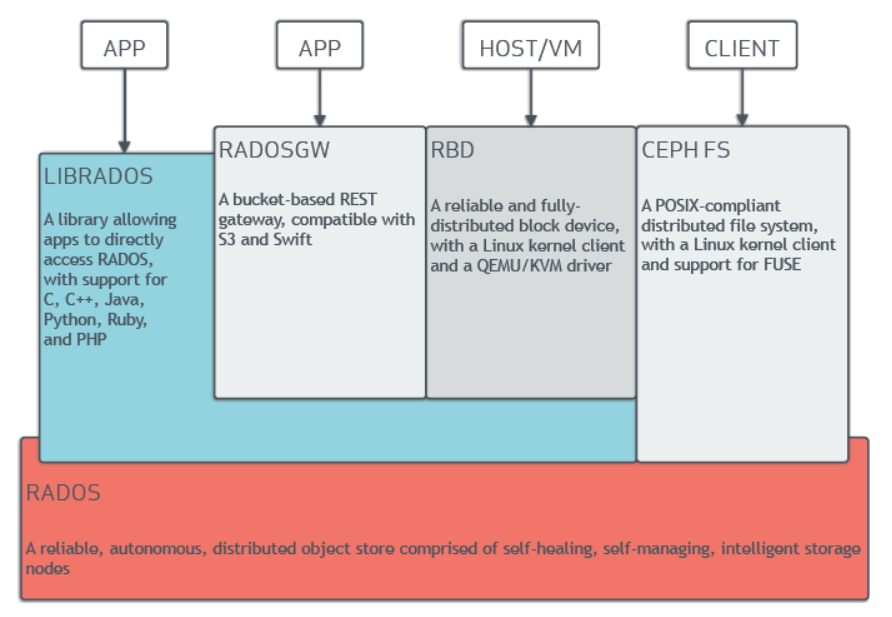
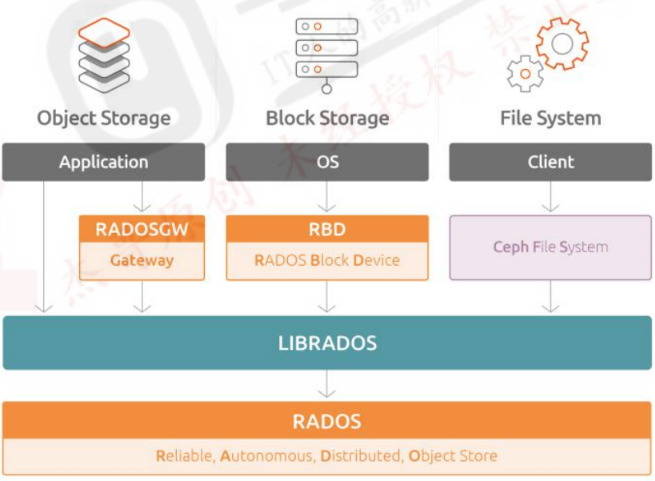
#RBD(RADOS Block Devices)即为块存储设备,RBD 可以为 KVM、vmware 等虚拟化技术和云服务(如 OpenStack、kubernetes)提供高性能和无限可扩展性的存储后端
#客户端基于 librbd 库即可将 RADOS 存储集群用作块设备
#不过,用于 rbd 的存储池需要事先启用rbd 功能并进行初始化。例如,下面的命令创建一个名为 myrbd1 的存储池,并在启用 rbd功能后对其进行初始化:

##【1.创建RBD】
root@ceph-monmgr1:~# ceph osd pool --help | grep create
osd pool create <pool> [<pg_num:int>] [<pgp_num:int>] [<pool_type:replicated|erasure>] [<erasure_code_profile>] [<rule>] [<expected_num_objects:int>] [<size:int>] [<pg_num_   create pool
osd pool get noautoscale                                                                                                                                                       Get the noautoscale flag to see if all pools are setting the autoscaler on or off as well as newly created pools in the future.
osd pool set noautoscale                                                                                                                                                       set the noautoscale for all pools (including newly created pools in the future) and complete all on-going progress events regarding PG-autoscaling.
osd pool unset noautoscale                                                                                                                                                     Unset the noautoscale flag so all pools will go back to its previous mode. Newly created pools in the future will autoscaler on by default.

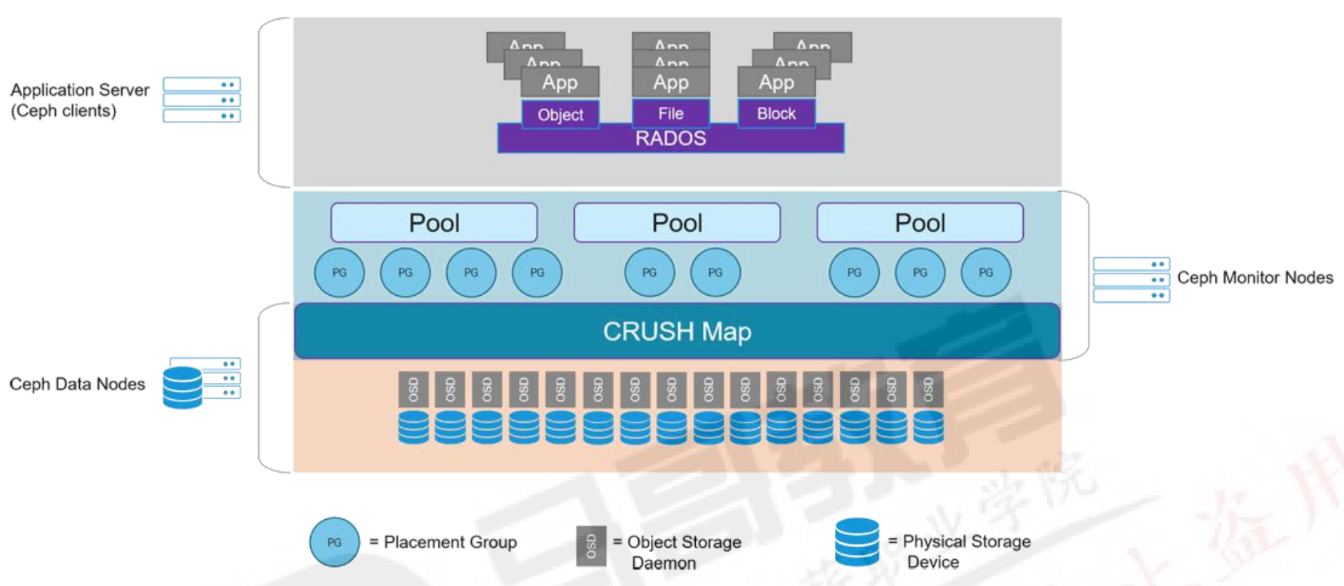
#创建存储池,指定 pg 和 pgp 的数量,Pgp 是对存在pg的数据进行组合存储,pgp通常等于pg的值
root@ceph-monmgr1:~# ceph osd pool create myrbd1 64 64
pool 'myrbd1' created
root@ceph-monmgr1:~# ceph osd pool ls
.mgr
myrbd1
root@ceph-monmgr1:~# rados lspools
.mgr
myrdb1
myrbd1
#对存储池启用RBD功能
root@ceph-monmgr1:~# ceph osd pool application enable myrbd1 rbd
enabled application 'rbd' on pool 'myrbd1'
#通过RBD命令对存储池初始化
root@ceph-monmgr1:~# rbd pool init -p myrbd1

##【2:创建并验证img】
#不过,rbd 存储池并不能直接用于块设备,而是需要事先在其中按需创建映像(image)并把映像文件作为块设备使用,rbd命令可用于创建、查看及删除块设备相在的映像(image),以及克隆映像、创建快照、将映像回滚到快照和査看快照等管理操作
#例如,下面的命令能够创建一个名为 myimg1 的映像:
root@ceph-monmgr1:~# rbd create myimg1 --size 1G --pool myrbd1
#rbd有特性 可以指定特性 有些可以特性可以不需要 根据需要
root@ceph-monmgr1:~# rbd create --help | grep feature
    feature disable                   Disable the specified image feature.
    feature enable                    Enable the specified image feature.
#myimg1:features: layering, exclusive-lock, object-map, fast-diff, deep-flatten 默认特性
root@ceph-monmgr1:~# rbd --image myimg1 --pool myrbd1 info
rbd image 'myimg1':
        size 1 GiB in 256 objects
        order 22 (4 MiB objects)
        snapshot_count: 0
        id: acfb81edf9bc
        block_name_prefix: rbd_data.acfb81edf9bc
        format: 2
        features: layering, exclusive-lock, object-map, fast-diff, deep-flatten
        op_features:
        flags:
        create_timestamp: Thu Mar  7 06:51:33 2024
        access_timestamp: Thu Mar  7 06:51:33 2024
        modify_timestamp: Thu Mar  7 06:51:33 2024
#       myimg2: 只有layering特性
root@ceph-monmgr1:~# rbd create myimg2 --size 2G --pool myrbd1 --image-format 2 --image-feature layering
root@ceph-monmgr1:~# rbd --image myimg2 --pool myrbd1 info
rbd image 'myimg2':
        size 2 GiB in 512 objects
        order 22 (4 MiB objects)
        snapshot_count: 0
        id: ad0737ed8203
        block_name_prefix: rbd_data.ad0737ed8203
        format: 2
        features: layering
        op_features:
        flags:
        create_timestamp: Thu Mar  7 06:53:11 2024
        access_timestamp: Thu Mar  7 06:53:11 2024
        modify_timestamp: Thu Mar  7 06:53:11 2024

##【客户端使用块存储】
root@ceph-monmgr1:~# ceph df
--- RAW STORAGE ---
CLASS     SIZE    AVAIL     USED  RAW USED  %RAW USED
hdd    270 GiB  267 GiB  2.6 GiB   2.6 GiB       0.95
TOTAL  270 GiB  267 GiB  2.6 GiB   2.6 GiB       0.95

--- POOLS ---
POOL    ID  PGS   STORED  OBJECTS     USED  %USED  MAX AVAIL
.mgr     1    1  449 KiB        2  1.3 MiB      0     85 GiB
myrbd1   3   64    149 B        7   48 KiB      0     85 GiB

#使用Centos7客户端上安装ceph-common
[root@k8s-haproxy02 ~]# cat /etc/redhat-release
CentOS Linux release 7.9.2009 (Core)

[root@k8s-haproxy02 ~]# yum install epel-release
[root@k8s-haproxy02 ~]# yum install -y https://mirrors.aliyun.com/ceph/rpm-octopus/el7/noarch/ceph-release-1-1.el7.noarch.rpm
[root@k8s-haproxy02 ~]# yum install -y ceph-common
#从部署服务器同步认证文件
root@ceph-monmgr1:~# scp /etc/ceph/ceph.client.admin.keyring /etc/ceph/ceph.conf root@192.168.40.110:/etc/ceph
#客户端映射img
#因为myimg2 只有layering特性可以挂载
[root@k8s-haproxy02 ~]# rbd -p myrbd1 map myimg2
/dev/rbd0
#myimg1 5个特性 centos7不支持报错 Ubuntu 22.04版本可以支持这个特性
[root@k8s-haproxy02 ~]# rbd -p myrbd1 map myimg1
rbd: sysfs write failed
RBD image feature set mismatch. You can disable features unsupported by the kernel with "rbd feature disable myrbd1/myimg1 object-map fast-diff deep-flatten".
In some cases useful info is found in syslog - try "dmesg | tail".
rbd: map failed: (6) No such device or address
#客户端验证RBD
[root@k8s-haproxy02 ~]# lsblk
NAME            MAJ:MIN RM  SIZE RO TYPE MOUNTPOINT
sda               8:0    0   20G  0 disk
├─sda1            8:1    0    1G  0 part /boot
└─sda2            8:2    0   19G  0 part
  ├─centos-root 253:0    0   17G  0 lvm  /
  └─centos-swap 253:1    0    2G  0 lvm  [SWAP]
sr0              11:0    1 1024M  0 rom
rbd0            252:0    0    2G  0 disk
[root@k8s-haproxy02 ~]# fdisk -l /dev/rbd0

Disk /dev/rbd0: 2147 MB, 2147483648 bytes, 4194304 sectors
Units = sectors of 1 * 512 = 512 bytes
Sector size (logical/physical): 512 bytes / 512 bytes
I/O size (minimum/optimal): 4194304 bytes / 4194304 bytes
[root@k8s-haproxy02 ~]# mkfs.xfs /dev/rbd0
Discarding blocks...Done.
meta-data=/dev/rbd0              isize=512    agcount=8, agsize=65536 blks
         =                       sectsz=512   attr=2, projid32bit=1
         =                       crc=1        finobt=0, sparse=0
data     =                       bsize=4096   blocks=524288, imaxpct=25
         =                       sunit=1024   swidth=1024 blks
naming   =version 2              bsize=4096   ascii-ci=0 ftype=1
log      =internal log           bsize=4096   blocks=2560, version=2
         =                       sectsz=512   sunit=8 blks, lazy-count=1
realtime =none                   extsz=4096   blocks=0, rtextents=0
[root@k8s-haproxy02 ~]# mkdir /data/
[root@k8s-haproxy02 ~]# mount /dev/rbd0 /data/
[root@k8s-haproxy02 ~]# df -h
Filesystem               Size  Used Avail Use% Mounted on
devtmpfs                 979M     0  979M   0% /dev
tmpfs                    991M     0  991M   0% /dev/shm
tmpfs                    991M  9.6M  981M   1% /run
tmpfs                    991M     0  991M   0% /sys/fs/cgroup
/dev/mapper/centos-root   17G  2.2G   15G  13% /
/dev/sda1               1014M  138M  877M  14% /boot
tmpfs                    199M     0  199M   0% /run/user/0
/dev/rbd0                2.0G   33M  2.0G   2% /data
[root@k8s-haproxy02 ~]# cp /etc/passwd /data
[root@k8s-haproxy02 data]# cat /data/passwd
#添加一个100M的文件
[root@k8s-haproxy02 data]# dd if=/dev/zero of=/data/ceph-file bs=1M count=100
[root@k8s-haproxy02 data]# ll -h /data/ceph-file
-rw-r--r-- 1 root root 100M Mar  7 15:33 /data/ceph-file
#110 MiB ceph验证数据
root@ceph-monmgr1:~# ceph df
--- RAW STORAGE ---
CLASS     SIZE    AVAIL     USED  RAW USED  %RAW USED
hdd    270 GiB  267 GiB  2.9 GiB   2.9 GiB       1.07
TOTAL  270 GiB  267 GiB  2.9 GiB   2.9 GiB       1.07

--- POOLS ---
POOL    ID  PGS   STORED  OBJECTS     USED  %USED  MAX AVAIL
.mgr     1    1  449 KiB        2  1.3 MiB      0     84 GiB
myrbd1   3   64  110 MiB       44  331 MiB   0.13     84 GiB
#数据被分布到不同的PG中
root@ceph-monmgr1:~# ceph pg ls-by-pool myrbd1 | awk '{print $1,$2,$15}'
PG OBJECTS UP
3.0 2 [8,4,1]p8
3.1 0 [0,4,6]p0
3.2 1 [1,6,5]p1
3.3 0 [4,0,6]p4
3.4 1 [1,7,3]p1
3.5 1 [5,2,6]p5
3.6 0 [0,4,8]p0
3.7 1 [2,6,4]p2
3.8 0 [6,1,4]p6
3.9 1 [8,5,1]p8
3.a 1 [3,1,8]p3
3.b 0 [1,4,8]p1
3.c 0 [5,0,7]p5
3.d 1 [3,7,2]p3
3.e 1 [7,4,0]p7
3.f 0 [5,8,0]p5
3.10 0 [5,7,1]p5
3.11 1 [7,4,0]p7
3.12 0 [0,3,7]p0
3.13 0 [3,2,8]p3
3.14 0 [3,8,2]p3
3.15 1 [8,3,0]p8
3.16 1 [5,1,7]p5
3.17 1 [0,5,8]p0
3.18 2 [2,6,3]p2
3.19 0 [1,4,6]p1
3.1a 0 [8,1,4]p8
3.1b 0 [6,4,1]p6
3.1c 2 [5,1,6]p5
3.1d 0 [7,4,1]p7
3.1e 1 [2,6,3]p2
3.1f 0 [0,3,7]p0
3.20 2 [6,5,2]p6
3.21 1 [7,5,1]p7
3.22 2 [7,2,3]p7
3.23 1 [0,4,7]p0
3.24 0 [0,4,7]p0
3.25 0 [6,0,5]p6
3.26 0 [6,4,1]p6
3.27 2 [2,4,7]p2
3.28 2 [6,0,5]p6
3.29 1 [0,8,3]p0
3.2a 1 [5,0,6]p5
3.2b 1 [0,3,6]p0
3.2c 2 [6,4,1]p6
3.2d 0 [7,2,4]p7
3.2e 0 [2,4,8]p2
3.2f 2 [7,5,0]p7
3.30 0 [3,0,7]p3
3.31 0 [1,4,7]p1
3.32 1 [0,7,5]p0
3.33 0 [0,5,6]p0
3.34 2 [4,6,0]p4
3.35 1 [5,8,2]p5
3.36 0 [3,7,1]p3
3.37 1 [3,6,2]p3
3.38 0 [2,6,5]p2
3.39 1 [3,0,7]p3
3.3a 2 [5,2,8]p5
3.3b 0 [8,2,5]p8
3.3c 0 [5,8,2]p5
3.3d 0 [0,8,4]p0
3.3e 0 [1,6,4]p1
3.3f 0 [7,3,0]p7
#删除数据
rm ceph-file
#删除完成的数据只是标记为已经被删除,但是不会从块存储立即清空,因此在删除完成后使用 ceph df 查看并没有回收空间:
root@ceph-monmgr1:~# ceph df
--- RAW STORAGE ---
CLASS     SIZE    AVAIL     USED  RAW USED  %RAW USED
hdd    270 GiB  267 GiB  2.9 GiB   2.9 GiB       1.07
TOTAL  270 GiB  267 GiB  2.9 GiB   2.9 GiB       1.07

--- POOLS ---
POOL    ID  PGS   STORED  OBJECTS     USED  %USED  MAX AVAIL
.mgr     1    1  449 KiB        2  1.3 MiB      0     84 GiB
myrdb1   2   64      0 B        0      0 B      0     84 GiB
myrbd1   3   64  110 MiB       44  331 MiB   0.13     84 GiB
#但是后期可以使用此空间,如果需要立即在系统层回收空间,需要执行以下命令:
#~]# fstrim -v /data #/data为挂载点,fstrim 命令来自于英文词组“filesystem trim”的缩写,其功能是回收文件系统中未使用的块资源。
[root@k8s-haproxy02 data]# fstrim -v /data
/data: 2 GiB (2132541440 bytes) trimmed
root@ceph-monmgr1:~# ceph df
--- RAW STORAGE ---
CLASS     SIZE    AVAIL     USED  RAW USED  %RAW USED
hdd    270 GiB  267 GiB  2.6 GiB   2.6 GiB       0.96
TOTAL  270 GiB  267 GiB  2.6 GiB   2.6 GiB       0.96

--- POOLS ---
POOL    ID  PGS   STORED  OBJECTS     USED  %USED  MAX AVAIL
.mgr     1    1  449 KiB        2  1.3 MiB      0     85 GiB
myrdb1   2   64      0 B        0      0 B      0     85 GiB
myrbd1   3   64   10 MiB       18   31 MiB   0.01     85 GiB
#取消映射
rbd -p myrbd1 unmap myimg1


 浙公网安备 33010602011771号