Glance
![]()
![]()
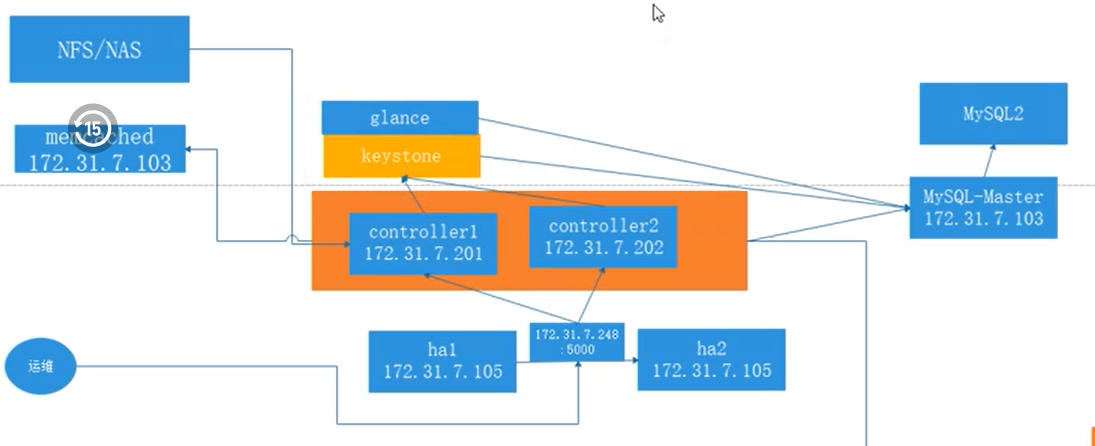
配置Glance服务
#Image service – glance installation for Train
#https://docs.openstack.org/glance/train/install/
#https://docs.openstack.org/glance/train/install/install-rdo.html

#Haproxy1上进行操作
#安装NFS
[root@openstack-haproxy1 ~]# yum install nfs-utils
[root@openstack-haproxy1 ~]# cat /etc/exports
/data/glance *(rw,no_root_squash)
[root@openstack-haproxy1 ~]# systemctl restart nfs
[root@openstack-haproxy1 ~]# systemctl enable nfs

#openstack-controller1上操作验证是否可以挂载
[root@openstack-controller1 ~]# yum install -y nfs-utils
[root@openstack-controller1 ~]# showmount -e 192.168.40.105
Export list for 192.168.40.105:
/data/glance *

#创建数据库-openstack-mysql上操作
mysql -u root -p
MariaDB [(none)]> CREATE DATABASE glance;
MariaDB [(none)]> GRANT ALL PRIVILEGES ON glance.* TO 'glance'@'localhost' \
  IDENTIFIED BY 'glance123';
MariaDB [(none)]> GRANT ALL PRIVILEGES ON glance.* TO 'glance'@'%' \
  IDENTIFIED BY 'glance123';

#执行脚本 配置环境变量
source admin-openrc.sh
 #Create the glance user
[root@openstack-controller1 ~]# openstack user create --domain default --password-prompt glance
User Password:glance
Repeat User Password:glance
+---------------------+----------------------------------+
| Field               | Value                            |
+---------------------+----------------------------------+
| domain_id           | default                          |
| enabled             | True                             |
| id                  | d9b690221ba940ad8df9c8f9778107eb |
| name                | glance                           |
| options             | {}                               |
| password_expires_at | None                             |
+---------------------+----------------------------------+
#Add the admin role to the glance user and service project
openstack role add --project service --user glance admin
#List endpoint
[root@openstack-controller1 ~]# openstack endpoint list
+----------------------------------+-----------+--------------+--------------+---------+-----------+-----------------------------------------+
| ID                               | Region    | Service Name | Service Type | Enabled | Interface | URL                                     |
+----------------------------------+-----------+--------------+--------------+---------+-----------+-----------------------------------------+
| 1b27558f07784548a469ddda0c58131c | RegionOne | keystone     | identity     | True    | internal  | http://openstack-vip.xks.local:5000/v3/ |
| 87bc41b7caf146409e6ec0d87744fd13 | RegionOne | keystone     | identity     | True    | public    | http://openstack-vip.xks.local:5000/v3/ |
| a878161f65d449f6863f59cd6a1bc2a6 | RegionOne | keystone     | identity     | True    | admin     | http://openstack-vip.xks.local:5000/v3/ |
+----------------------------------+-----------+--------------+--------------+---------+-----------+-----------------------------------------+
#Create the glance service entity:用于注册后端服务器,相当于k8s的service name
openstack service create --name glance \
  --description "OpenStack Image" image
+-------------+----------------------------------+
| Field       | Value                            |
+-------------+----------------------------------+
| description | OpenStack Image                  |
| enabled     | True                             |
| id          | ccb31e2f5d4d432692f0b3d6b8722a71 |
| name        | glance                           |
| type        | image                            |
+-------------+----------------------------------+

[root@openstack-controller1 ~]# openstack service list
+----------------------------------+----------+----------+
| ID                               | Name     | Type     |
+----------------------------------+----------+----------+
| 79dccac8ea6b4d5f8e63515a8331ee82 | glance   | imag     |
| c615e0c6903344e69fb49a85859cdf64 | keystone | identity |
+----------------------------------+----------+----------+

#Create the Image service API endpoint:相当于k8s中的pod
[root@openstack-controller1 ~]# openstack endpoint create --region RegionOne image public http://openstack-vip.xks.local:9292
+--------------+-------------------------------------+
| Field        | Value                               |
+--------------+-------------------------------------+
| enabled      | True                                |
| id           | 9a1203aadc7a41839fc7a7a52045e5fd    |
| interface    | public                              |
| region       | RegionOne                           |
| region_id    | RegionOne                           |
| service_id   | ccb31e2f5d4d432692f0b3d6b8722a71    |
| service_name | glance                              |
| service_type | image                               |
| url          | http://openstack-vip.xks.local:9292 |
+--------------+-------------------------------------+
[root@openstack-controller1 ~]# openstack endpoint create --region RegionOne image internal http://openstack-vip.xks.local:9292
+--------------+-------------------------------------+
| Field        | Value                               |
+--------------+-------------------------------------+
| enabled      | True                                |
| id           | f0c0ba4d8fa74b9897b194de714de1b9    |
| interface    | internal                            |
| region       | RegionOne                           |
| region_id    | RegionOne                           |
| service_id   | ccb31e2f5d4d432692f0b3d6b8722a71    |
| service_name | glance                              |
| service_type | image                               |
| url          | http://openstack-vip.xks.local:9292 |
+--------------+-------------------------------------+
[root@openstack-controller1 ~]# openstack endpoint create --region RegionOne image admin http://openstack-vip.xks.local:9292
+--------------+-------------------------------------+
| Field        | Value                               |
+--------------+-------------------------------------+
| enabled      | True                                |
| id           | 42cbf7b421684f318513d762e79010fb    |
| interface    | admin                               |
| region       | RegionOne                           |
| region_id    | RegionOne                           |
| service_id   | ccb31e2f5d4d432692f0b3d6b8722a71    |
| service_name | glance                              |
| service_type | image                               |
| url          | http://openstack-vip.xks.local:9292 |
+--------------+-------------------------------------+

[root@openstack-controller1 ~]# openstack endpoint list
+----------------------------------+-----------+--------------+--------------+---------+-----------+-----------------------------------------+
| ID                               | Region    | Service Name | Service Type | Enabled | Interface | URL                                     |
+----------------------------------+-----------+--------------+--------------+---------+-----------+-----------------------------------------+
| 1b27558f07784548a469ddda0c58131c | RegionOne | keystone     | identity     | True    | internal  | http://openstack-vip.xks.local:5000/v3/ |
| 42cbf7b421684f318513d762e79010fb | RegionOne | glance       | image        | True    | admin     | http://openstack-vip.xks.local:9292     |
| 87bc41b7caf146409e6ec0d87744fd13 | RegionOne | keystone     | identity     | True    | public    | http://openstack-vip.xks.local:5000/v3/ |
| 9a1203aadc7a41839fc7a7a52045e5fd | RegionOne | glance       | image        | True    | public    | http://openstack-vip.xks.local:9292     |
| a878161f65d449f6863f59cd6a1bc2a6 | RegionOne | keystone     | identity     | True    | admin     | http://openstack-vip.xks.local:5000/v3/ |
| f0c0ba4d8fa74b9897b194de714de1b9 | RegionOne | glance       | image        | True    | internal  | http://openstack-vip.xks.local:9292     |
+----------------------------------+-----------+--------------+--------------+---------+-----------+-----------------------------------------+

#配置添加haproxy、haproxy服务器上添加
[root@openstack-haproxy1 ~]# vim /etc/haproxy/haproxy.cfg
listen openstack-glance-9292
  bind 192.168.40.248:9292
  mode tcp
  server 192.168.40.101 192.168.40.101:9292 check inter 3s fall 3 rise 5

[root@openstack-haproxy1 ~]# systemctl restart haproxy
[root@openstack-haproxy1 ~]# netstat -ntlp | grep 9292
tcp        0      0 192.168.40.248:9292     0.0.0.0:*               LISTEN      23765/haproxy

#Install and configure components
yum install -y openstack-glance

mkdir -p /var/lib/glance/images/

vim /etc/glance/glance-api.conf
[database]
# ...
connection = mysql+pymysql://glance:glance123@openstack-vip.xks.local/glance

[keystone_authtoken]
# ...
www_authenticate_uri  = http://openstack-vip.xks.local:5000
auth_url = http://openstack-vip.xks.local:5000
memcached_servers = openstack-vip.xks.local:11211
auth_type = password
project_domain_name = Default
user_domain_name = Default
project_name = service
username = glance
password = glance

[paste_deploy]
# ...
flavor = keystone

[glance_store]
# ...
stores = file,http
default_store = file
filesystem_store_datadir = /var/lib/glance/images/

#初始化数据库
su -s /bin/sh -c "glance-manage db_sync" glance
#验证数据库
mysql
use glance;
MariaDB [glance]> show tables;
+----------------------------------+
| Tables_in_glance                 |
+----------------------------------+
| alembic_version                  |
| image_locations                  |
| image_members                    |
| image_properties                 |
| image_tags                       |
| images                           |
| metadef_namespace_resource_types |
| metadef_namespaces               |
| metadef_objects                  |
| metadef_properties               |
| metadef_resource_types           |
| metadef_tags                     |
| migrate_version                  |
| task_info                        |
| tasks                            |
+----------------------------------+
15 rows in set (0.000 sec)

systemctl enable openstack-glance-api.service
systemctl start openstack-glance-api.service

[root@openstack-controller1 ~]# mount -t nfs 192.168.40.105:/data/glance /var/lib/glance/images
[root@openstack-controller1 ~]# df -h
Filesystem                   Size  Used Avail Use% Mounted on
devtmpfs                     2.5G     0  2.5G   0% /dev
tmpfs                        2.5G     0  2.5G   0% /dev/shm
tmpfs                        2.5G   12M  2.5G   1% /run
tmpfs                        2.5G     0  2.5G   0% /sys/fs/cgroup
/dev/mapper/centos-root       50G  2.9G   48G   6% /
/dev/sda1                   1014M  138M  877M  14% /boot
/dev/mapper/centos-home       95G   33M   95G   1% /home
tmpfs                        494M     0  494M   0% /run/user/0
192.168.40.105:/data/glance   17G  2.4G   15G  14% /var/lib/glance/images
#配置自动挂载
vim /etc/fstab
    192.168.40.105:/data/glance /var/lib/glance/images nfs defaults,_netdev 0 0
mount -a
#修改属组/var/lib/glance/images/
#默认是属于root 但是要变成glance才能写入镜像
[root@openstack-controller1 ~]# ll /var/lib/glance/images/ -d
drwxr-xr-x 2 root root 6 Jul 22 22:12 /var/lib/glance/images/
[root@openstack-controller1 ~]# id glance
uid=161(glance) gid=161(glance) groups=161(glance)
[root@openstack-controller1 ~]# chown -R 161.161 /var/lib/glance/images/
[root@openstack-controller1 ~]# ll /var/lib/glance/images/ -d
drwxr-xr-x 2 glance glance 6 Jul 22 22:12 /var/lib/glance/images/
#确认nfs存储上id
[root@openstack-haproxy1 glance]# ll /data/glance/ -d
drwxr-xr-x 2 161 161 6 Jul 22 22:12 /data/glance/

#重新开启服务
systemctl restart openstack-glance-api.service

#验证是否可以传入镜像
source admin-openrc.sh

wget http://download.cirros-cloud.net/0.4.0/cirros-0.4.0-x86_64-disk.img

glance image-create --name "cirros" \
  --file cirros-0.4.0-x86_64-disk.img \
  --disk-format qcow2 --container-format bare \
  --visibility public
+------------------+----------------------------------------------------------------------------------+
| Property         | Value                                                                            |
+------------------+----------------------------------------------------------------------------------+
| checksum         | 443b7623e27ecf03dc9e01ee93f67afe                                                 |
| container_format | bare                                                                             |
| created_at       | 2023-07-22T15:22:31Z                                                             |
| disk_format      | qcow2                                                                            |
| id               | 53a32b05-8c30-4e55-921e-11acb50d9640                                             |
| min_disk         | 0                                                                                |
| min_ram          | 0                                                                                |
| name             | cirros                                                                           |
| os_hash_algo     | sha512                                                                           |
| os_hash_value    | 6513f21e44aa3da349f248188a44bc304a3653a04122d8fb4535423c8e1d14cd6a153f735bb0982e |
|                  | 2161b5b5186106570c17a9e58b64dd39390617cd5a350f78                                 |
| os_hidden        | False                                                                            |
| owner            | 9f43f66e7d0b411a8219c163858c6f2a                                                 |
| protected        | False                                                                            |
| size             | 12716032                                                                         |
| status           | active                                                                           |
| tags             | []                                                                               |
| updated_at       | 2023-07-22T15:22:32Z                                                             |
| virtual_size     | Not available                                                                    |
| visibility       | public                                                                           |
+------------------+----------------------------------------------------------------------------------+

#两个命令都可以列出来
[root@openstack-controller1 ~]# glance image-list
+--------------------------------------+--------+
| ID                                   | Name   |
+--------------------------------------+--------+
| 53a32b05-8c30-4e55-921e-11acb50d9640 | cirros |
+--------------------------------------+--------+
[root@openstack-controller1 ~]# openstack image list
+--------------------------------------+--------+--------+
| ID                                   | Name   | Status |
+--------------------------------------+--------+--------+
| 53a32b05-8c30-4e55-921e-11acb50d9640 | cirros | active |
+--------------------------------------+--------+--------+
#查看存储上
[root@openstack-haproxy1 glance]# ll /data/glance/
total 12420
-rw-r----- 1 161 161 12716032 Jul 22 23:22 53a32b05-8c30-4e55-921e-11acb50d9640
[root@openstack-haproxy1 glance]# file /data/glance/53a32b05-8c30-4e55-921e-11acb50d9640
/data/glance/53a32b05-8c30-4e55-921e-11acb50d9640: QEMU QCOW Image (v3), 46137344 bytes

#删除镜像
[root@openstack-controller1 ~]# glance image-delete 53a32b05-8c30-4e55-921e-11acb50d9640



 浙公网安备 33010602011771号