
ArgoCD 部署【一】
构架图

1. Install Argo CD
https://argo-cd.readthedocs.io/en/stable/getting_started/
https://github.com/argoproj/argo-cd/releases/tag/v2.5.1

【2.5.0-rc1】
Non-HA:-实验选用
kubectl create namespace argocd
kubectl apply -n argocd -f https://raw.githubusercontent.com/argoproj/argo-cd/v2.5.1/manifests/install.yaml
HA:
kubectl create namespace argocd
kubectl apply -n argocd -f https://raw.githubusercontent.com/argoproj/argo-cd/v2.5.1/manifests/ha/install.yaml

crictl pull quay.io/argoproj/argocd:v2.5.1 && \
crictl pull redis:7.0.5-alpine && \
crictl pull ghcr.io/dexidp/dex:v2.35.3-distroless && \
crictl pull haproxy:2.6.2-alpine


[root@xianchaomaster1 KnativeSrc]# kubectl apply -n argocd -f install.yaml

[root@xianchaomaster1 KnativeSrc]# kubectl get pods -n argocd
NAME                                                READY   STATUS    RESTARTS   AGE
argocd-application-controller-0                     1/1     Running   0          48s
argocd-applicationset-controller-64c6c7fc9d-gdts6   1/1     Running   0          48s
argocd-dex-server-dcfd7c444-n6stt                   1/1     Running   0          48s
argocd-notifications-controller-6c79697d45-28sxs    1/1     Running   0          48s
argocd-redis-79c755c747-c7dnt                       1/1     Running   0          48s
argocd-repo-server-84c9fcd68f-ts2wz                 1/1     Running   0          48s
argocd-server-578c66b478-k6vlb                      1/1     Running   0          48s

# argocd-server-578c66b478-k6vlb
ArgoCD Server API接囗,为Web UI、CLI,以及相关的CI/CD系统提供服务,相关功能包括
管理应用程序并报告其状态
调用并发起应用程序的特定操作,例如sync、rollback以及用户定义的其它行为管理Repository和Cluster相关的凭据
将身份认证与授权功能委派给外部IdP(identityproviders)服务
强制实施RBAC
监听及转发Git Webhook相关的事件等
# argocd-application-controller-0
负责为管理的目标应用程序提供遵循Kubernetes控制器模式的调谐循环
它持续监视正在运行的应用程序,并将其当前的活动状态与定义在GitRepo中的期望状态进行比较
确保活动状态不断逼近或等同于期望状态
# argocd-applicationset-controller-64c6c7fc9d-gdts6
以模板化形式自动生成由ArgoCD管理的应用程序
支持从多个不同的角度构建模板,例如不同的GitRepo,或者不同的Kubernetes Cluster等ApplicationSet受控于专用的
ApplicationSet Controller
# argocd-dex-server-dcfd7c444-n6stt
dex-Server则主要用于提供in-memory Database
# argocd-redis-79c755c747-c7dnt
Redis负责提供缓存服务
# argocd-repo-server-84c9fcd68f-ts2wz
内部服务,用于为相关的Git仓库维护一个本地缓存
负责根据以下输入生成和返回Kubernetes资源配置
repository URL、revision (commit, tag, branch)及application path等
template specific settings: parameters, ksonnet environments, helm values.yaml
# argocd-notifications-controller-6c79697d45-28sxs
持续监控ArgoCD管理的Applicaton,并支持通过多种不同的方式将其状态变化通知给用户
支持Trigger和Template

[root@xianchaomaster1 argocd]# kubectl explain Application
KIND:     Application
VERSION:  argoproj.io/v1alpha1

DESCRIPTION:
     Application is a definition of Application resource.

FIELDS:
   apiVersion   <string>
     APIVersion defines the versioned schema of this representation of an
     object. Servers should convert recognized schemas to the latest internal
     value, and may reject unrecognized values. More info:
     https://git.k8s.io/community/contributors/devel/sig-architecture/api-conventions.md#resources

   kind <string>
     Kind is a string value representing the REST resource this object
     represents. Servers may infer this from the endpoint the client submits
     requests to. Cannot be updated. In CamelCase. More info:
     https://git.k8s.io/community/contributors/devel/sig-architecture/api-conventions.md#types-kinds

   metadata     <Object> -required-
     Standard object's metadata. More info:
     https://git.k8s.io/community/contributors/devel/sig-architecture/api-conventions.md#metadata

   operation    <Object>
     Operation contains information about a requested or running operation

   spec <Object> -required-
     ApplicationSpec represents desired application state. Contains link to
     repository with application definition and additional parameters link
     definition revision.

   status       <Object>
     ApplicationStatus contains status information for the application


[root@xianchaomaster1 argocd]# kubectl api-resources --api-group=argoproj.io
NAME              SHORTNAMES         APIVERSION             NAMESPACED   KIND
applications      app,apps           argoproj.io/v1alpha1   true         Application
applicationsets   appset,appsets     argoproj.io/v1alpha1   true         ApplicationSet
appprojects       appproj,appprojs   argoproj.io/v1alpha1   true         AppProject
2. Download Argo CD CLI
https://github.com/argoproj/argo-cd/releases/download/v2.5.1/argocd-linux-amd64

[root@xianchaomaster1 KnativeSrc]# cp argocd-linux-amd64 /usr/bin/argocd
[root@xianchaomaster1 KnativeSrc]# chmod +x /usr/bin/argocd
[root@xianchaomaster1 KnativeSrc]# argocd version
argocd: v2.5.1+504da42
  BuildDate: 2022-11-01T21:36:58Z
  GitCommit: 504da424c2c9bb91d7fb2ebf3ae72162e7a5a5be
  GitTreeState: clean
  GoVersion: go1.18.7
  Compiler: gc
  Platform: linux/amd64
FATA[0000] Argo CD server address unspecified
3. Access The Argo CD API Server
3.1 开放NodePort模式
[root@xianchaomaster1 argocd]# kubectl edit svc argocd-server -n argocd
改为:NodePort
service/argocd-server edited

[root@xianchaomaster1 KnativeSrc]# kubectl get svc argocd-server -n argocd
NAME            TYPE       CLUSTER-IP      EXTERNAL-IP   PORT(S)                      AGE
argocd-server   NodePort   10.96.233.247   <none>        80:32338/TCP,443:31251/TCP   2m31s

[root@xianchaomaster1 argocd]# kubectl get svc -n istio-system
NAME                    TYPE           CLUSTER-IP      EXTERNAL-IP      PORT(S)                                      AGE
istio-ingressgateway    LoadBalancer   10.110.125.34   192.168.40.190   15021:32757/TCP,80:32235/TCP,443:31264/TCP   2d18h
istiod                  ClusterIP      10.104.93.25    <none>           15010/TCP,15012/TCP,443/TCP,15014/TCP        2d18h
knative-local-gateway   ClusterIP      10.106.94.20    <none>           80/TCP                                       2d16h


#访问
192.168.40.180:32338
3.2 开放Istio-Ingressgateway模式
[root@ca-k8s-master01 argocd]# vim 02-argocd-dashboard-virtualservice.yaml
apiVersion: networking.istio.io/v1beta1
kind: Gateway
metadata:
  name: argocd-dashboard-gateway
  namespace: istio-system
spec:
  selector:
    app: istio-ingressgateway
  servers:
    - hosts:
        - "argocd.magedu.com"
      port:
        number: 80
        name: http
        protocol: HTTP
      tls:
        httpsRedirect: true
    - hosts:
        - "argocd.magedu.com"
      port:
        number: 443
        name: https
        protocol: HTTPS
      tls:
        mode: PASSTHROUGH
---
apiVersion: networking.istio.io/v1beta1
kind: VirtualService
metadata:
  name: argocd-dashboard-virtualservice
  namespace: argocd
spec:
  hosts:
  - "argocd.magedu.com"
  gateways:
  - istio-system/argocd-dashboard-gateway
  tls:
  - match:
    - port: 443
      sniHosts:
      - argocd.magedu.com
    route:
    - destination:
        host: argocd-server
        port:
          number: 443

kubectl apply -f 02-argocd-dashboard-virtualservice.yaml

[root@ca-k8s-master01 argocd]# kubectl get pods -n istio-system
NAME                                    READY   STATUS    RESTARTS        AGE
istio-ingressgateway-6849fc894d-2hk68   1/1     Running   1 (6d12h ago)   9d
istio-ingressgateway-6849fc894d-4kkpv   1/1     Running   1 (6d12h ago)   9d
istio-ingressgateway-6849fc894d-lnzh9   1/1     Running   1 (6d12h ago)   9d
istiod-9c5b49645-bjz6w                  1/1     Running   2 (6d12h ago)   9d
istiod-9c5b49645-t96lw                  1/1     Running   1               9d
istiod-9c5b49645-z8clq                  1/1     Running   1 (6d12h ago)   9d

[root@ca-k8s-master01 argocd]# kubectl get gw -n istio-system
NAME                       AGE
argocd-dashboard-gateway   101s
gitlab-gateway             8d
tekton-dashboard-gateway   7d17h
[root@ca-k8s-master01 argocd]# kubectl get vs -n argocd
NAME                              GATEWAYS                                    HOSTS                   AGE
argocd-dashboard-virtualservice   ["istio-system/argocd-dashboard-gateway"]   ["argocd.magedu.com"]   105s

[root@ca-k8s-master01 argocd]# kubectl get svc -n istio-system
NAME                    TYPE           CLUSTER-IP       EXTERNAL-IP      PORT(S)                                      AGE
istio-ingressgateway    LoadBalancer   10.97.24.103     192.168.40.190   15021:30488/TCP,80:32514/TCP,443:31148/TCP   9d
istiod                  ClusterIP      10.110.253.151   <none>           15010/TCP,15012/TCP,443/TCP,15014/TCP        9d
knative-local-gateway   ClusterIP      10.103.156.206   <none>           80/TCP                                       9d

#windows机器配置 hosts
192.168.40.190 argocd.magedu.com
4. Login Using The CLI
#获取当前密码
[root@xianchaomaster1 argocd]# kubectl -n argocd get secret argocd-initial-admin-secret -o jsonpath="{.data.password}" | base64 -d;echo
lNUDKTp2feI91bmK


#登录账户admin/SuahNQRwpr-wnLPn DPOzT8UBpG8d6O5Z
[root@xianchaomaster1 argocd]# argocd login 192.168.40.180:32338 #Nodeport模式
[root@ca-k8s-master01 argocd]# argocd login argocd.magedu.com #Istio-system模式
WARNING: server certificate had error: x509: cannot validate certificate for 192.168.40.180 because it doesn't contain any IP SANs. Proceed insecurely (y/n)? y
Username: admin
Password:
admin:login' logged in successfully
Context '192.168.40.180:31240' updated

#修改账户admin/xksdu.com
[root@xianchaomaster1 argocd]# argocd account update-password
*** Enter password of currently logged in user (admin):
*** Enter new password for user admin:
*** Confirm new password for user admin:
Password updated
Context '192.168.40.180:31240' updated

#登录账户UI
6.Create An Application From A Git Repository
Creating Apps Via CLI
kubectl config set-context --current --namespace=argocd

argocd app create guestbook --repo https://github.com/argoproj/argocd-example-apps.git --path guestbook --dest-server https://kubernetes.default.svc --dest-namespace default
Creating Apps Via UI

5. Register A Cluster To Deploy Apps To (Optional)
已有集群6. Create An Application From A Git Repository
https://github.com/argoproj/argocd-example-apps

#下载代码 到 本地Gitlab中
仓库地址:https://gitee.com/mageedu/argocd-example-apps.git

#将Gitlab仓库地址复制到 ArgoCD配置中
http://gitlab.gitlab.svc.cluster.local/root/argocd-example-apps.git 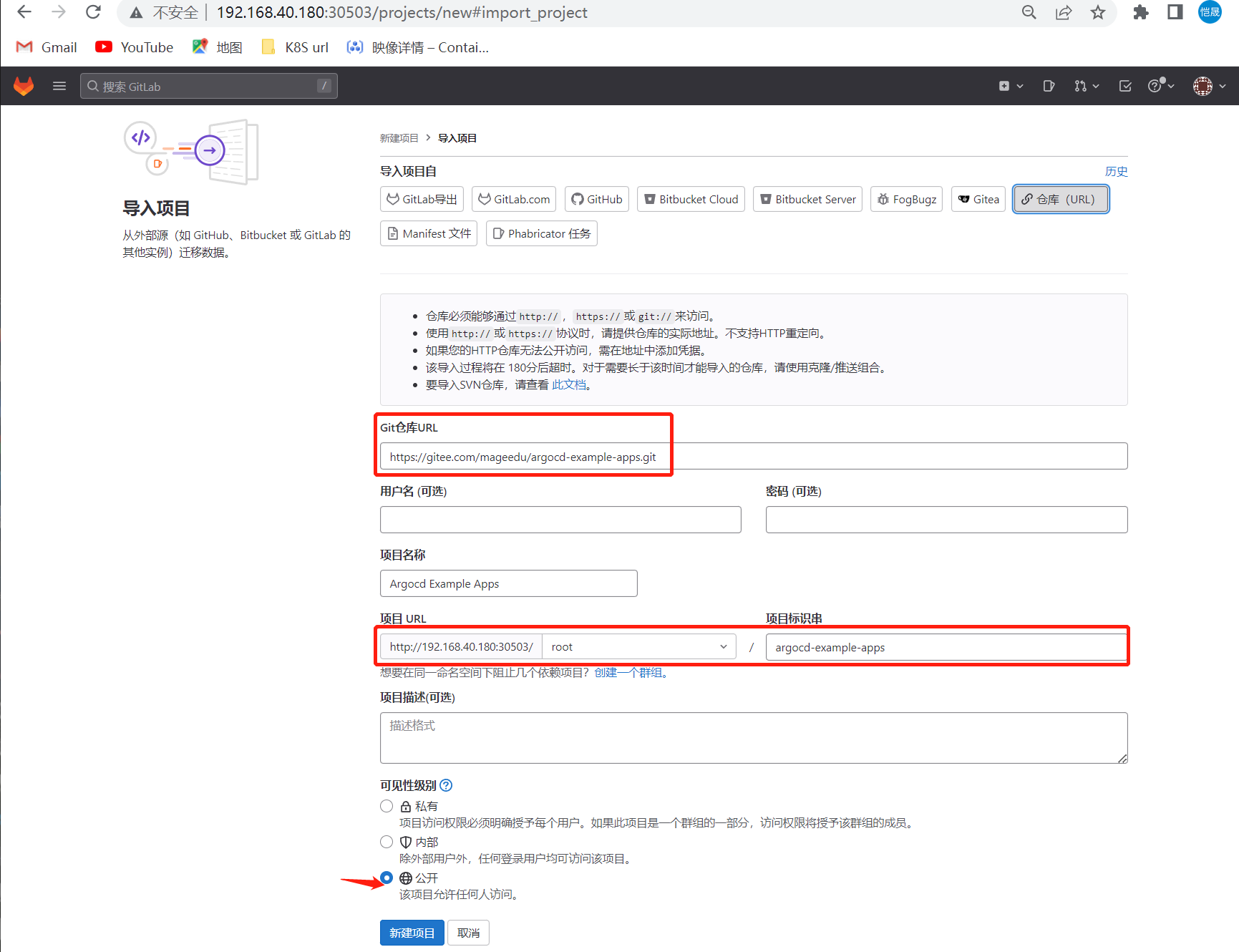
gcr.io/heptio-images/ks-guestbook-demo:0.2
改为
gcr.lank8s.cn/heptio-images/ks-guestbook-demo:0.2

#下载镜像
crictl pull registry.cn-hangzhou.aliyuncs.com/birkhoff/ks-guestbook-demo:0.2

#
guestbook/guestbook-ui-deployment.yaml
- image: registry.cn-hangzhou.aliyuncs.com/birkhoff/ks-guestbook-demo:0.2 


查看状态
[root@xianchaomaster1 KnativeSrc]# kubectl get secrets argocd-initial-admin-secret -n argocd --template={{.data.password}} | base64 -d

[root@xianchaomaster1 KnativeSrc]# argocd login 192.168.40.180:30354
WARNING: server certificate had error: x509: cannot validate certificate for 192.168.40.180 because it doesn't contain any IP SANs. Proceed insecurely (y/n)? y
Username: admin
Password:
'admin:login' logged in successfully
Context '192.168.40.180:30354' updated
[root@xianchaomaster1 KnativeSrc]# argocd app get guestbook
Name:               argocd/guestbook
Project:            default
Server:             https://kubernetes.default.svc
Namespace:          default
URL:                https://192.168.40.180:30354/applications/guestbook
Repo:               http://gitlab.gitlab.svc.cluster.local/root/argocd-example-apps.git
Target:             HEAD
Path:               guestbook
SyncWindow:         Sync Allowed
Sync Policy:        <none>
Sync Status:        Synced to HEAD (f139003)
Health Status:      Healthy

GROUP  KIND        NAMESPACE  NAME          STATUS  HEALTH   HOOK  MESSAGE
       Service     default    guestbook-ui  Synced  Healthy        service/guestbook-ui created
apps   Deployment  default    guestbook-ui  Synced  Healthy        deployment.apps/guestbook-ui created
[root@xianchaomaster1 KnativeSrc]# argocd app list
NAME CLUSTER NAMESPACE PROJECT STATUS HEALTH SYNCPOLICY CONDITIONS REPO PATH TARGET
argocd/guestbook https://kubernetes.default.svc default default Synced Healthy <none> <none> http://gitlab.gitlab.svc.cluster.local/root/argocd-example-apps.git guestbook HEAD
argocd/guestbooking https://kubernetes.default.svc guestbooking default Synced Healthy <none> <none> http://gitlab.gitlab.svc.cluster.local/root/argocd-example-apps.git guestbook HEAD
#
[root@xianchaomaster1 KnativeSrc]# argocd app get guestbook
Name: argocd/guestbook
Project: default
Server: https://kubernetes.default.svc
Namespace: default
URL: https://192.168.40.180:30354/applications/guestbook
Repo: http://gitlab.gitlab.svc.cluster.local/root/argocd-example-apps.git
Target: HEAD
Path: guestbook
SyncWindow: Sync Allowed
Sync Policy: <none>
Sync Status: Synced to HEAD (f139003)
Health Status: Healthy
GROUP KIND NAMESPACE NAME STATUS HEALTH HOOK MESSAGE
Service default guestbook-ui Synced Healthy service/guestbook-ui created
apps Deployment default guestbook-ui Synced Healthy deployment.apps/guestbook-ui created
#
[root@xianchaomaster1 KnativeSrc]# argocd app manifests guestbook
---
apiVersion: v1
kind: Service
metadata:
labels:
app.kubernetes.io/instance: guestbook
name: guestbook-ui
namespace: default
spec:
ports:
- port: 80
targetPort: 80
selector:
app: guestbook-ui
---
apiVersion: apps/v1
kind: Deployment
metadata:
labels:
app.kubernetes.io/instance: guestbook
name: guestbook-ui
namespace: default
spec:
replicas: 1
revisionHistoryLimit: 3
selector:
matchLabels:
app: guestbook-ui
template:
metadata:
labels:
app: guestbook-ui
spec:
containers:
- image: registry.cn-hangzhou.aliyuncs.com/birkhoff/ks-guestbook-demo:0.2
name: guestbook-ui
ports:
- containerPort: 80
#导出yaml格式
[root@xianchaomaster1 KnativeSrc]# kubectl get application guestbook -o yaml -n argocd
apiVersion: argoproj.io/v1alpha1
kind: Application
metadata:
creationTimestamp: "2023-07-17T02:56:42Z"
generation: 82
name: guestbook
namespace: argocd
resourceVersion: "633760"
uid: 2413e14d-5b72-4d52-8d0d-e4ad5daaaa06
spec:
destination:
namespace: default
server: https://kubernetes.default.svc
project: default
source:
path: guestbook
repoURL: http://gitlab.gitlab.svc.cluster.local/root/argocd-example-apps.git
targetRevision: HEAD
syncPolicy:
automated:
prune: true
selfHeal: true
syncOptions:
- CreateNamespace=true
- PruneLast=true
- RespectIgnoreDifferences=true
- ApplyOutOfSyncOnly=true
#删除argocd application
[root@xianchaomaster1 KnativeSrc]# argocd app delete guestbooking
Are you sure you want to delete 'guestbooking' and all its resources? [y/n] y
application 'guestbooking' deleted
[root@xianchaomaster1 KnativeSrc]# argocd app delete guestbook
Are you sure you want to delete 'guestbook' and all its resources? [y/n] y
application 'guestbook' deleted
#命令行创建Application
#创建一个guestbook、需要手动配置 Auto-Create Namespace
argocd app create guestbookcli \
--repo http://gitlab.gitlab.svc.cluster.local/root/argocd-example-apps.git \
--path guestbook \
--dest-server https://kubernetes.default.svc \
--dest-namespace guestbookcli \命令行创建Application
argocd app create guestbook --repo http://gitlab.gitlab.svc.cluster.local/root/argocd-example-apps.git --path guestbook --dest-server https://kubernetes.default.svc --dest-namespace guestbook --sync-option createnamespace=true --sync-policy automaticMore:Argo CD 参数

Argo CD 参数
Application Name: 服务名称
Project Name: 服务所属项目,没有创建项目,默认为空
SYNC POLICY: 同步策略
Manual: 手动同步
Automatic: 自动同步
RRUNE RESOURCES:自动修剪。集群上某个资源在 GitRepo 中找不到对应的配置时,自动删除集群上的该资源
SELF HEAL:自愈。因各种原因(如手动修改)集群上资源的实时状态而导致与 GitRepo 不匹配时,自动将实际状态与 GitRepo 的期望状态同步。
例如,GitRepo 中定义 pod 的数量为2,你在集群上改为了 3 个 pod,如果你不勾选 self heal。
则 ArgoCD 则不会在同步(对一次提交只同步一次),这时 pod 的数量就一直为 3。
但你如果勾选了 self heal,ArgoCD 就会轮询去同步,将你的 pod 改为你 GitRepo 里的数量
#
SYNC OPTIONS(同步选项)
SKIP SCHEMA VALIDATION:是否执行资源规范格式的校验,相当于 ”kubectl apply --validate={true|false}“,默认为 true
AUTO-CREATE NAMESPACE:自动创建命名空间。如果部署的应用没有命名空间,则自动创建
PRUNE LAST:同步后进行修剪,即其他资源已经部署且转为健康状态后在进行 prune
APPLY OUT OF SYNC ONLY:仅对那些处于 OutOfSync 状态的资源执行同步操作。避免大量对象时资源APl消耗
RESPECT IGNORE DIFFERENCES:支持忽略差异配置
SERVER-SIDE APPLY:部署操作在服务端运行(避免文件过大)
PRUNE PROPAGATION POLICY:资源修剪传播策略,默认值使用 foreground 策略,还有 background 和 orphan
REPLACE:将使用 kubectl replace 命令同步资源,而非默认的 apply
syncPolicy:
automated:
prune: true
selfHeal: true
syncOptions:
- Validate=false #禁用Kubectl验证
- CreateNamespace=true # 自动创建命名空间
- PruneLast=true # 同步后进行修剪
- ApplyOutOfSyncOnly=true # 仅对那些处于 OutOfSync 状态的资源执行同步操作
- RespectIgnoreDifferences=true #支持忽路差异配置 (ianoreDifferences)
- PrunePropagationPolicy=background # 级联删除策略 (backoround. foreground and orphan.)
- Replace=true # kubectl replace替换
#
SOURCE
Repository URL:定义k8s资源清单的 git 仓库地址
Revision:要使用的 Revision,通常是指源码库上的 branch、tag、commit 或 helm chart 版本
Path:git 仓库中含有配置文件的子目录路径
DESTINATION
CLuster URL:部署的目标集群
Namespace:部署集群的 namespace
sync process 同步流程
获取所有设置为 auto-sync 的 Apps
从每个 App 的 Git 存储库中获取最新状态
将 Git 状态与集群应用状态对比
如果相同,不执行任何操作并标记为 synced
如果不同,标记为 out-of-sync 
 浙公网安备 33010602011771号