Knative自动缩放机制
#“请求驱动计算”是Serverless的核心特性
    ◼ 缩容至0:即没有请求时,系统不会分配资源给KService
    ◼ 从0开始扩容:由Activator缓存请求,并报告指标数据给AutoScaler
    ◼ 按需扩容:AutoScaler根据Revision中各实例的QP报告的指标数据不断调整Revision中的实例数量
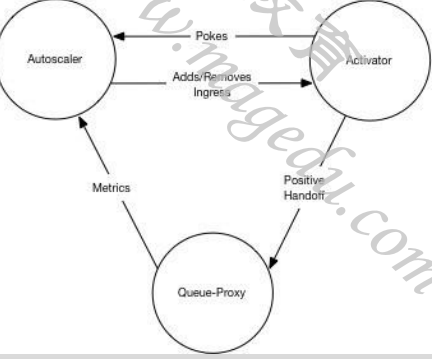
#Knative系统中,AutoScaler、Activator和Queue-Proxy三者协同管理应用规模与流量规模的匹配
    ◼ Knative附带了开箱即用的AutoScaler,简称为KPA
    ◼ 同时,Knative还支持使用Kubernetes HPA进行Deployment缩放
![]()
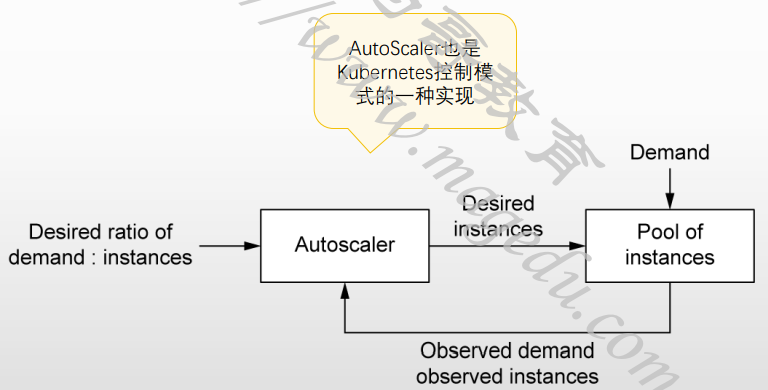
#AutoScaler在扩缩容功能实现上的基本假设
    ◼ 用户不能仅因为服务实例收缩为0而收到错误响应
    ◼ 请求不能导致应用过载
    ◼ 系统不能造成无谓的资源浪费
![]()
非零实例时
![]()
缩放窗口和Panic
#负载变动频繁时,Knative可能会因为响应负载变动而导致频繁创建或销毁Pod实例
#为避免服务规模“抖动”,AutoScaler支持两种扩缩容模式
    ◼ Stable:根据稳定窗口期(stable window,默认为60秒)的请求平均数(平均并发数)及每个Pod的目标并发数计算Pod数
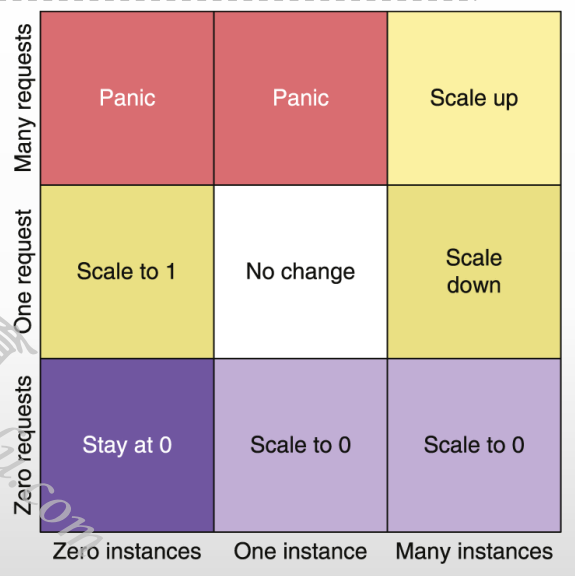
    ◼ Panic:短期内收到大量请求时,将启用Panic模式
        ◆十分之一窗口期(6秒)的平均并发数 ≥ 2*单实例目标并发数
        ◆进入Panic模式60秒后,系统会重新返回Stable模式
#以右图矩阵为例(假设现有实例数和平均并发数均为0)
    ◼ 横轴(现有实例数量):0个、1个和M个
    ◼ 纵轴(到达的请求数): 0个、1个和N个
![]()
Autoscaler执行扩缩容的基本流程
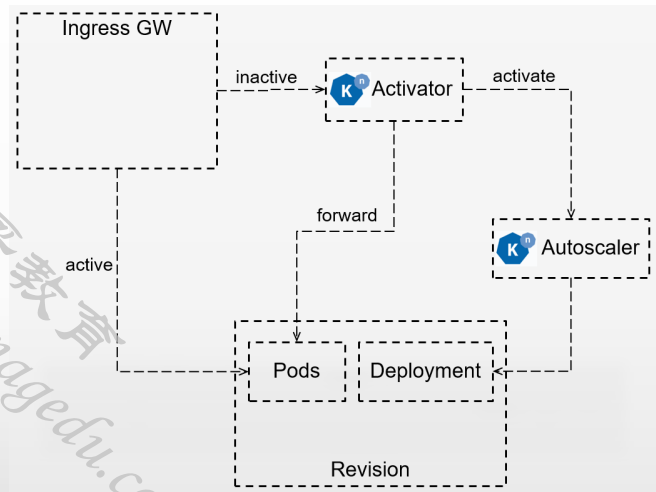
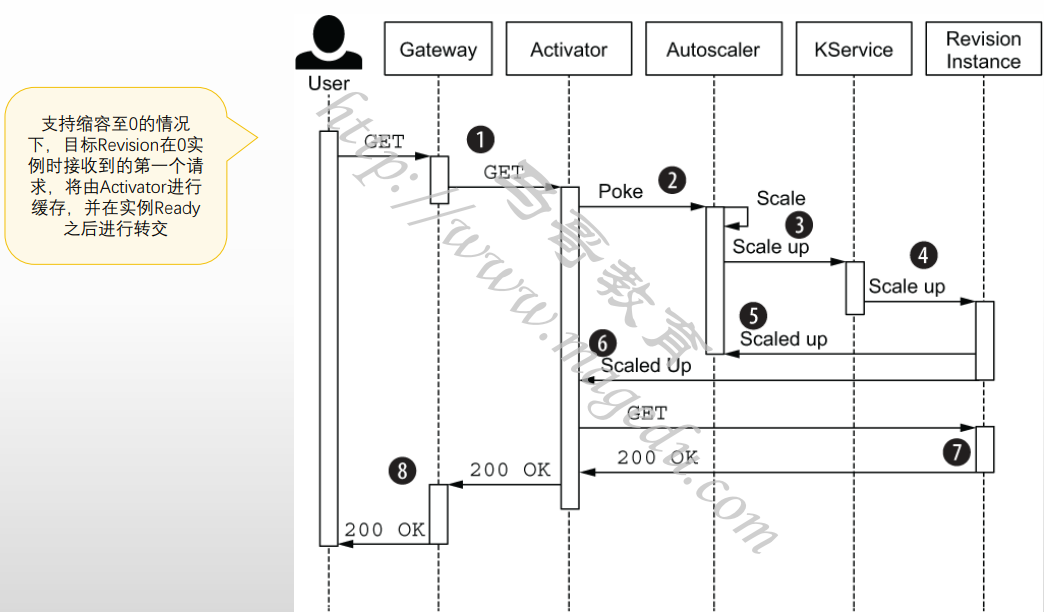
#目标Revision零实例
    ◼ 初次请求由Ingress GW转发给Activator进行缓存,同时报告数据给Autoscaler,进而控制相应的Deployment来完成Pod实例扩展;
    ◼ Pod副本的状态Ready之后,Activator将缓存的请求转发至相应的Pod对象;
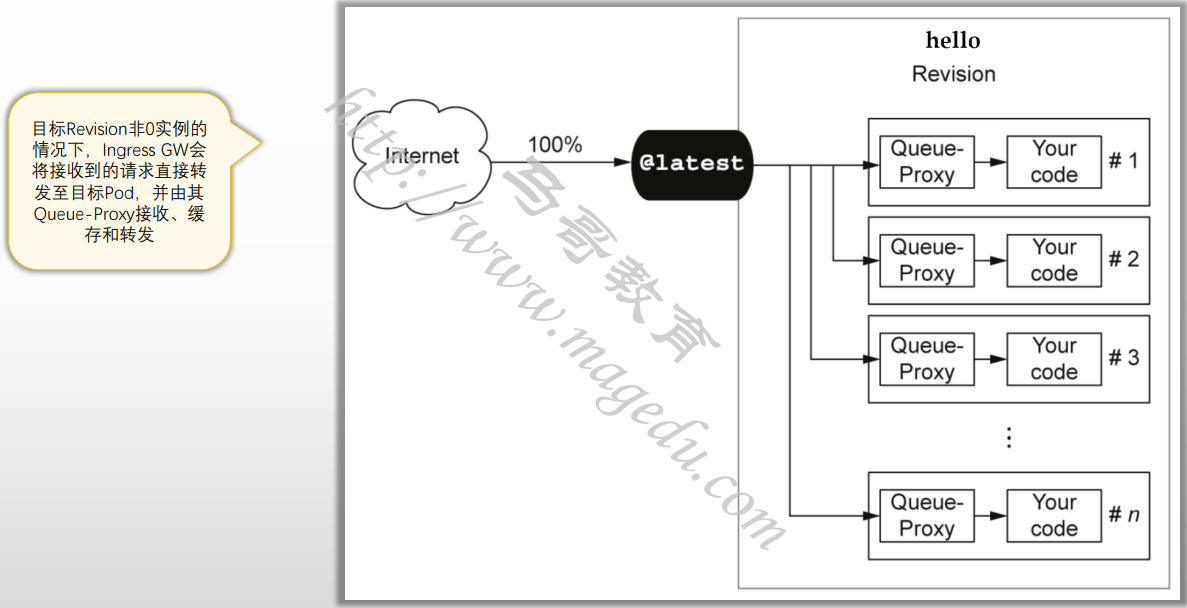
    ◼ 随后,存在Ready状态的Pod期间,Ingress GW会将后续的请求直接转给Pod,而不再转给Activator
#目标Revision存在至少一个Ready状态的Pod
    ◼ Autoscaler根据Revision中各Pod的Queue-Proxy容器持续报告指标数据持续计算Pod副本数
    ◼ Deployment根据Autoscaler的计算结果进行实例数量调整
#Revision实例数不为0,但请求数持续为0
    ◼ Autoscaler在Queue-Proxy持续一段时间报告指标为0之后,即为将其Pod数缩减为0
    ◼ 随后,Ingress GW会将收到的请求再次转发为Activator
![]()
零实例时收到请求的工作流程
![]()
Autoscaler的全局配置
[root@xianchaomaster1 autoscaling]# kubectl get cm config-autoscaler -o yaml -n knative-serving

#全局配置参数定义在knative-serving名称空间中的configmap/auto-scaler之中
#
◼ container-concurrency-target-default:实例的目标并发数,即最大并发数,默认值为100;
◼ container-concurrency-target-percentage:实例的目标利用率,默认为“0.7”;
◼ enable-scale-to-zero:是否支持缩容至0,默认为true;仅KPA支持;
◼ max-scale-up-rate:最大扩容速率,默认为1000;
◆当前可最大扩容数 = 最大扩容速率 * Ready状态的Pod数量
◼ max-scale-down-rate:最大缩容速率,默认为2;
    ◆当前可最大缩容数 = Ready状态的Pod数量 / 最大缩容速率
◼ panic-window-percentage:Panic窗口期时长相当于Stable窗口期时长的百分比,默认为10,即百分之十;
◼ panic-threshold-percentage:因Pod数量偏差而触发Panic阈值百分比,默认为200,即2倍;
◼ scale-to-zero-grace-period:缩容至0的宽限期,即等待最后一个Pod删除的最大时长,默认为30s;
◼ scale-to-zero-pod-retention-period:决定缩容至0后,允许最后一个Pod处于活动状态的最小时长,默认为0s;
◼ stable-window:稳定窗口期的时长,默认为60s;
◼ target-burst-capacity:突发请求容量,默认为200;
◼ requests-per-second-target-default:每秒并发(RPS)的默认值,默认为200;使用rps指标时生效;
配置支持缩容至0实例
#配置支持Revision自动缩放至0实例的参数
◼ enable-scale-to-zero
    ◆不支持Revision级别的配置
◼ scale-to-zero-grace-period
    ◆不支持Revision级别的配置
◼ scale-to-zero-pod-retention-period
    ◆Revision级别配置时,使用注解键“autoscaling.knative.dev/scale-to-zero-pod-retention-period”
#允许最后一个Pod处于活动状态的最小时长1m5s
[root@xianchaomaster1 autoscaling]# cat autoscaling-scale-to-zero.yaml
apiVersion: serving.knative.dev/v1
kind: Service
metadata:
  name: hello
  namespace: default
spec:
  template:
    metadata:
      annotations:
        autoscaling.knative.dev/scale-to-zero-pod-retention-period: "1m5s"
    spec:
      containers:
        - image: ikubernetes/helloworld-go
          ports:
            - containerPort: 8080
          env:
            - name: TARGET
              value: "Knative Autoscaling Scale-to-Zero"
配置实例并发数
#单实例并发数相关的设定参数
◼ 软限制:流量突发尖峰期允许超出
    ◆全局默认配置参数:container-concurrency-target-default
    ◆Revision级的注解:autoscaling.knative.dev/target
◼ 硬限制:不允许超出,达到上限的请求需进行缓冲
    ◆全局默认配置参数:container-concurrency
        ⚫ 位于config-defaults中
    ◆Revision级的注解:containerConcurrency
◼ Target目标利用率
    ◆全局配置参数:container-concurrency-target-percentage
    ◆Revision级的注解:autoscaling.knative.dev/target-utilization-percentage
[root@xianchaomaster1 autoscaling]# cat autoscaling-concurrency.yaml
apiVersion: serving.knative.dev/v1
kind: Service
metadata:
  name: hello
  namespace: default
spec:
  template:
    metadata:
      annotations:
        autoscaling.knative.dev/target-utilization-percentage: "60"
        autoscaling.knative.dev/target: "10"
    spec:
      containers:
        - image: ikubernetes/helloworld-go
          ports:
            - containerPort: 8080
          env:
            - name: TARGET
              value: "Knative Autoscaling Concurrency"

[root@xianchaomaster1 autoscaling]# kubectl apply -f autoscaling-concurrency.yaml
service.serving.knative.dev/hello configured

[root@xianchaomaster1 autoscaling]# kn service list
NAME      URL                              LATEST          AGE   CONDITIONS   READY   REASON
demoapp   http://demoapp.default.xks.com   demoapp-00001   21h   3 OK / 3     True
hello     http://hello.default.xks.com     hello-00004     19h   3 OK / 3     True
[root@xianchaomaster1 autoscaling]# kn revision list
NAME              SERVICE   TRAFFIC   TAGS   GENERATION   AGE   CONDITIONS   READY   REASON
demoapp-00001     demoapp   100%             1            21h   3 OK / 4     True
hello-00004       hello                      4            33s   4 OK / 4     True
hello-knative     hello     50%              3            19h   4 OK / 4     True
hello-world-002   hello     30%              2            19h   3 OK / 4     True
hello-world       hello     20%              1            19h   3 OK / 4     True

[root@xianchaomaster1 autoscaling]# kn service update hello --traffic '@latest'=100
Updating Service 'hello' in namespace 'default':

  0.018s The Route is still working to reflect the latest desired specification.
  0.051s Ingress has not yet been reconciled.
  0.084s Waiting for load balancer to be ready
  0.274s Ready to serve.

Service 'hello' with latest revision 'hello-00004' (unchanged) is available at URL:
http://hello.default.xks.com

[root@xianchaomaster1 autoscaling]# kn revision list
NAME              SERVICE   TRAFFIC   TAGS   GENERATION   AGE    CONDITIONS   READY   REASON
demoapp-00001     demoapp   100%             1            21h    3 OK / 4     True
hello-00004       hello     100%             4            103s   4 OK / 4     True
hello-knative     hello                      3            19h    3 OK / 4     True
hello-world-002   hello                      2            19h    3 OK / 4     True
hello-world       hello                      1            20h    3 OK / 4     True

[root@xianchaomaster1 autoscaling]# curl -H "Host: hello.default.xks.com" 192.168.40.190
Hello Knative Autoscaling Concurrency!

#安装压测工具
wget https://hey-release.s3.us-east-2.amazonaws.com/hey_linux_amd64
chmod +x hey_linux_amd64
mv hey_linux_amd64 /usr/sbin/hey

# 使用如下测试命令,模拟在60秒内,以20的并发向hello KService发起请求
另外一个终端:hey -z 60s -c 20 -host "hello.default.xks.com" http://192.168.40.190?sleep=100&prime=10000&bloat=5


[root@xianchaomaster1 autoscaling]# kubectl get pods --show-labels
NAME                                     READY   STATUS    RESTARTS   AGE    LABELS
hello-00004-deployment-74d749c6d-k86xw   2/2     Running   0          102s   app=hello-00004,pod-template-hash=74d749c6d,service.isti                                                                                        o.io/canonical-name=hello,service.istio.io/canonical-revision=hello-00004,serving.knative.dev/configuration=hello,serving.knative.dev                                                                                        /configurationGeneration=4,serving.knative.dev/configurationUID=730b659f-54c8-428b-abfb-6033970860b9,serving.knative.dev/revision=hel                                                                                        lo-00004,serving.knative.dev/revisionUID=e7618b89-daf2-43ce-a90a-52c84f41a104,serving.knative.dev/service=hello,serving.knative.dev/s                                                                                        erviceUID=05303f44-5c0a-46ea-a403-c3538f99d614

#检测是否扩展
root@xianchaomaster1 autoscaling]# kubectl get pods -l serving.knative.dev/service=hello -w
NAME                                     READY   STATUS    RESTARTS   AGE
hello-00004-deployment-74d749c6d-k86xw   2/2     Running   0          2m21s
 curl -H "Host: hello.default.xks.com" 192.168.40.190hello-00004-deployment-74d749c6d-xpbjd   0/2     Pending   0          0s
hello-00004-deployment-74d749c6d-xpbjd   0/2     Pending   0          0s
hello-00004-deployment-74d749c6d-xpbjd   0/2     ContainerCreating   0          0s
hello-00004-deployment-74d749c6d-xpbjd   0/2     ContainerCreating   0          0s
hello-00004-deployment-74d749c6d-xpbjd   1/2     Running             0          2s
hello-00004-deployment-74d749c6d-xpbjd   2/2     Running             0          2s
配置Revision的扩缩容边界
1.扩缩容边界
#相关的配置参数
◼ 最小实例数
    ◆Revision级别的Annotation: autoscaling.knative.dev/min-scale
        ⚫ 说明:KPA且支持缩容至0时,该参数的默认值为0;其它情况下,默认值为1;
◼ 最大实例数
    ◆全局参数:max-scale
    ◆Revision级别的Annotation: autoscaling.knative.dev/max-scale
        ⚫ 整数型取值,0表示无限制
◼ 初始规模:创建Revision,需要立即初始创建的实例数,满足该条件后Revision才能Ready,默认值为1;
    ◆全局参数:initial-scale和allow-zero-initial-scale
    ◆Revision级别的Annotation:autoscaling.knative.dev/initial-scale
        ⚫ 说明:其实际规模依然可以根据流量进行自动调整
◼ 缩容延迟:时间窗口,在应用缩容决策前,该时间窗口内并发请求必须处于递减状态,取值范围[0s, 1h]
    ◆全局参数:scale-down-delay
    ◆Revision级别的Annotation:autoscaling.knative.dev/scale-down-delay
◼ Stable窗口期:取值范围[6s, 1h]
    ◆全局参数:stable-window
    ◆Revision级别的Annotation: autoscaling.knative.dev/window
[root@xianchaomaster1 autoscaling]# cat autoscaling-scale-bounds.yaml
apiVersion: serving.knative.dev/v1
kind: Service
metadata:
  name: hello
  namespace: default
spec:
  template:
    metadata:
      annotations:
        autoscaling.knative.dev/target-utilization-percentage: "60"
        autoscaling.knative.dev/target: "10"
        autoscaling.knative.dev/max-scale: "3"
        autoscaling.knative.dev/initial-scale: "1"
        autoscaling.knative.dev/scale-down-delay: "1m"
        autoscaling.knative.dev/stable-window: "60s"
    spec:
      containers:
        - image: ikubernetes/helloworld-go
          ports:
            - containerPort: 8080
          env:
            - name: TARGET
              value: "Knative Autoscaling Scale Bounds"

[root@xianchaomaster1 ~]# hey -z 60s -c 20 -host "hello.default.xks.com" 'http://192.168.40.190?sleep=100&prime=10000&bloat=5'


[root@xianchaomaster1 autoscaling]# kubectl apply -f autoscaling-scale-bounds.yaml
service.serving.knative.dev/hello configured
[root@xianchaomaster1 autoscaling]# kn revision list
NAME              SERVICE   TRAFFIC   TAGS   GENERATION   AGE   CONDITIONS   READY   REASON
demoapp-00001     demoapp   100%             1            21h   3 OK / 4     True
hello-00005       hello     100%             5            8s    4 OK / 4     True
hello-00004       hello                      4            13m   3 OK / 4     True
hello-knative     hello                      3            19h   3 OK / 4     True
hello-world-002   hello                      2            20h   3 OK / 4     True
hello-world       hello                      1            20h   3 OK / 4     True

#最多3个pod
[root@xianchaomaster1 autoscaling]# kubectl get pods -l serving.knative.dev/service=hello -w
NAME                                      READY   STATUS    RESTARTS   AGE
hello-00005-deployment-84485764d9-hxtxd   2/2     Running   0          68s
hello-00005-deployment-84485764d9-zkdcq   2/2     Running   0          14s
2.扩缩容边界
#metric: "rps" target: "100" initial-scale: "1"
[root@xianchaomaster1 autoscaling]# cat autoscaling-metrics-and-targets.yaml
apiVersion: serving.knative.dev/v1
kind: Service
metadata:
  name: hello
  namespace: default
spec:
  template:
    metadata:
      annotations:
        autoscaling.knative.dev/target-utilization-percentage: "60"
        autoscaling.knative.dev/metric: "rps"
        autoscaling.knative.dev/target: "100"
        autoscaling.knative.dev/max-scale: "10"
        autoscaling.knative.dev/initial-scale: "1"
        autoscaling.knative.dev/stable-window: "2m"
    spec:
      containers:
        - image: ikubernetes/helloworld-go
          ports:
            - containerPort: 8080
          env:
            - name: TARGET
              value: "Knative Autoscaling Metrics and Targets"

#并发请求
[root@xianchaomaster1 ~]# hey -z 60s -c 20 -host "hello.default.xks.com" 'http://192.168.40.190?sleep=100&prime=10000&bloat=5'

#马上扩容到了10个pod
[root@xianchaomaster1 autoscaling]# kubectl get pods -l serving.knative.dev/service=hello
NAME                                     READY   STATUS    RESTARTS   AGE
hello-00006-deployment-c47c45779-9klc8   2/2     Running   0          34s
hello-00006-deployment-c47c45779-g45pp   2/2     Running   0          34s
hello-00006-deployment-c47c45779-ljffv   2/2     Running   0          34s
hello-00006-deployment-c47c45779-lmgmx   2/2     Running   0          34s
hello-00006-deployment-c47c45779-n4pj7   2/2     Running   0          34s
hello-00006-deployment-c47c45779-swkkn   2/2     Running   0          34s
hello-00006-deployment-c47c45779-wcfnw   2/2     Running   0          34s
hello-00006-deployment-c47c45779-x9996   2/2     Running   0          34s
hello-00006-deployment-c47c45779-xsdmb   2/2     Running   0          34s
hello-00006-deployment-c47c45779-zcdrw   2/2     Running   0          98s


 浙公网安备 33010602011771号