
Istio - 网格和SSO【十二】
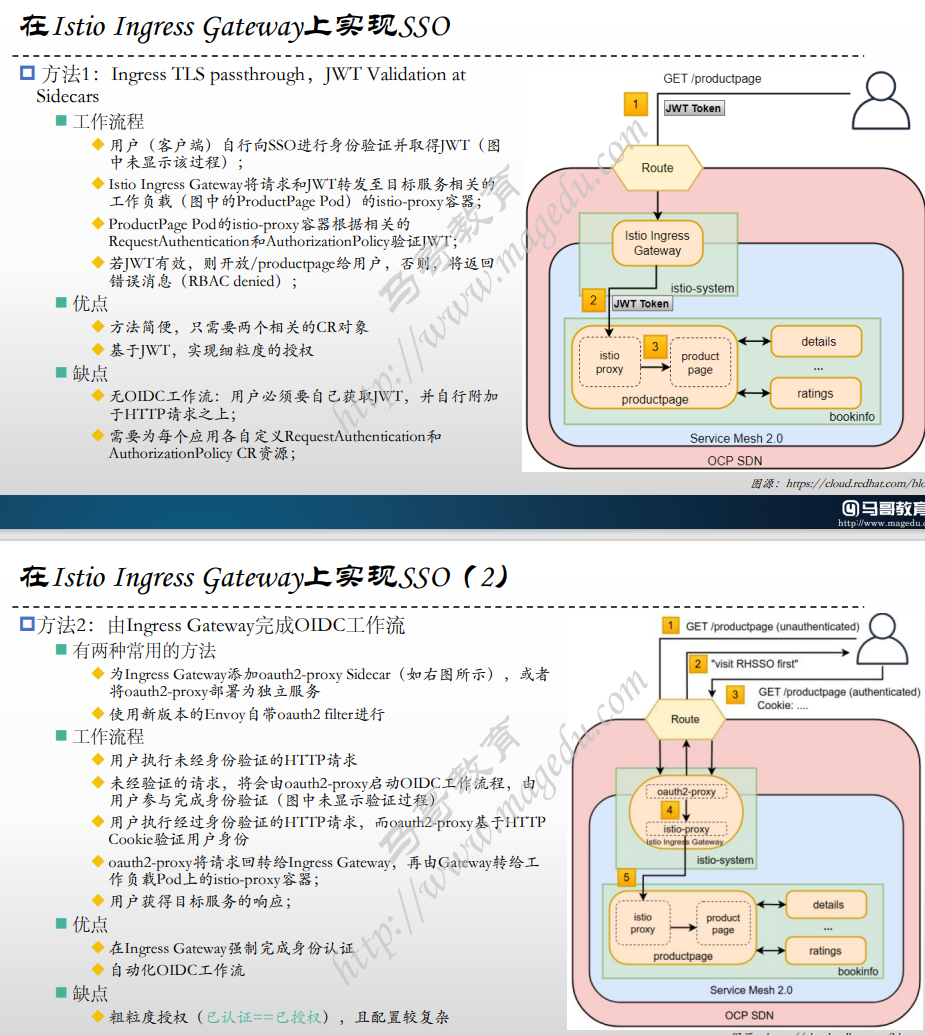
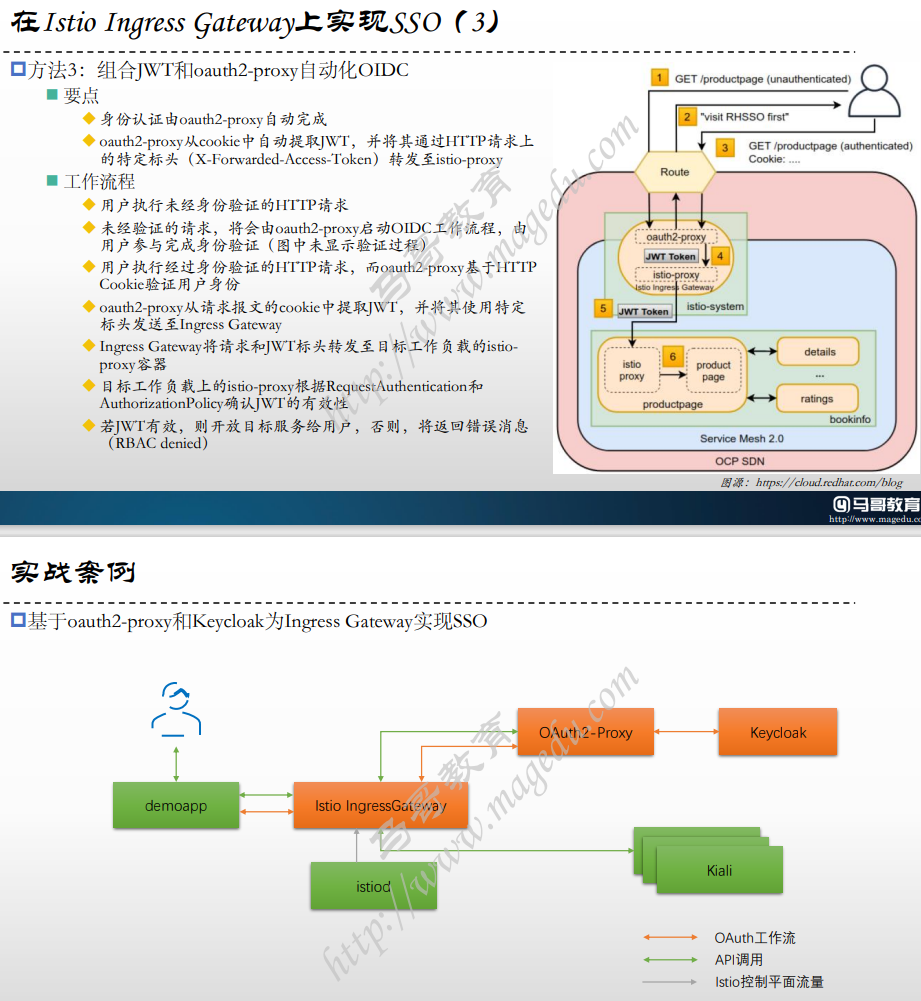
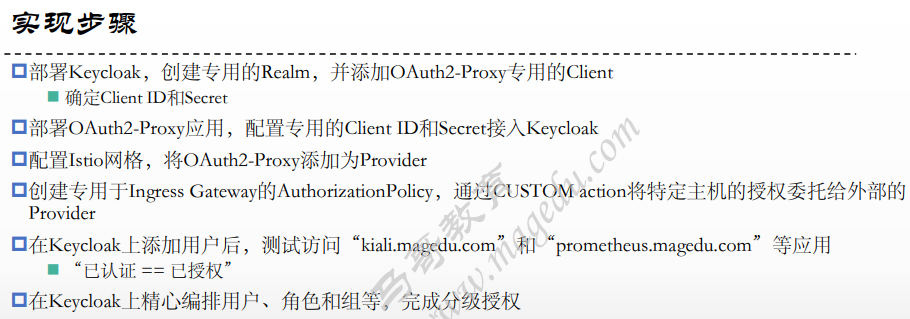
部署实验
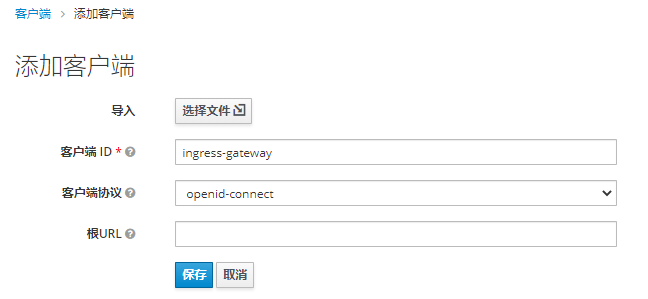
1.添加客户端
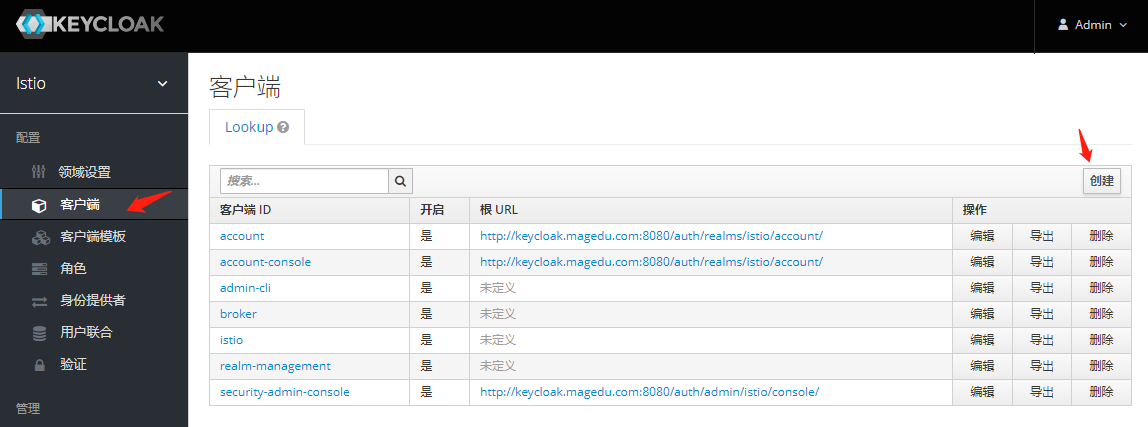
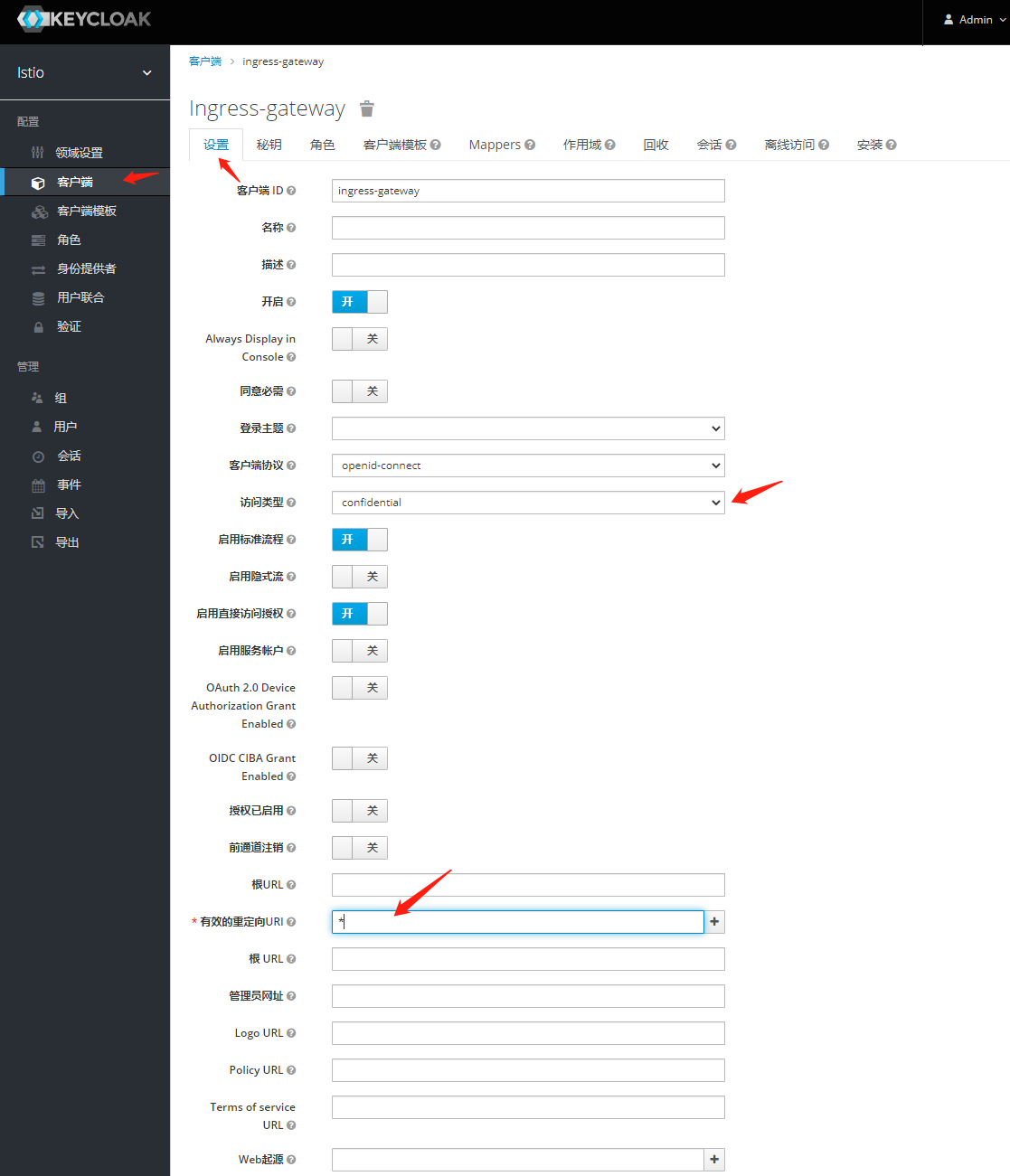
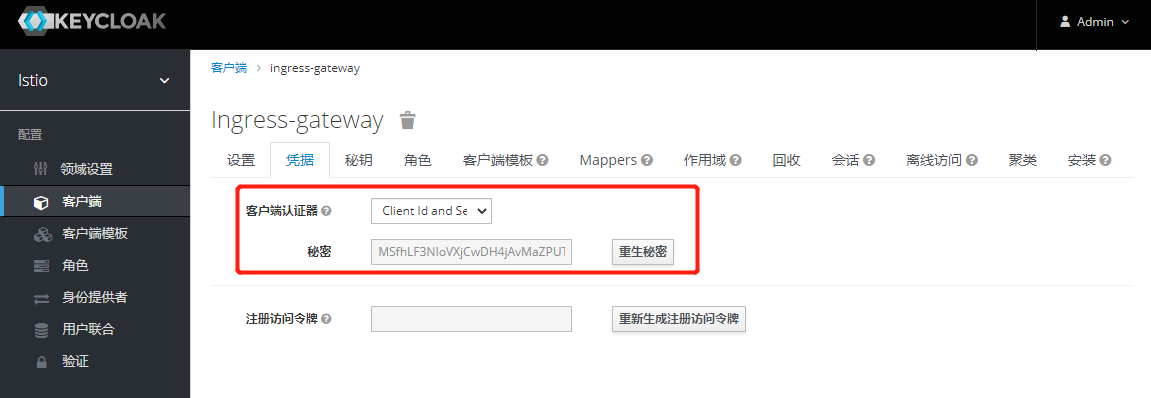
#密钥:
MSfhLF3NIoVXjCwDH4jAvMaZPUT7AajO
2. 创建Mappers
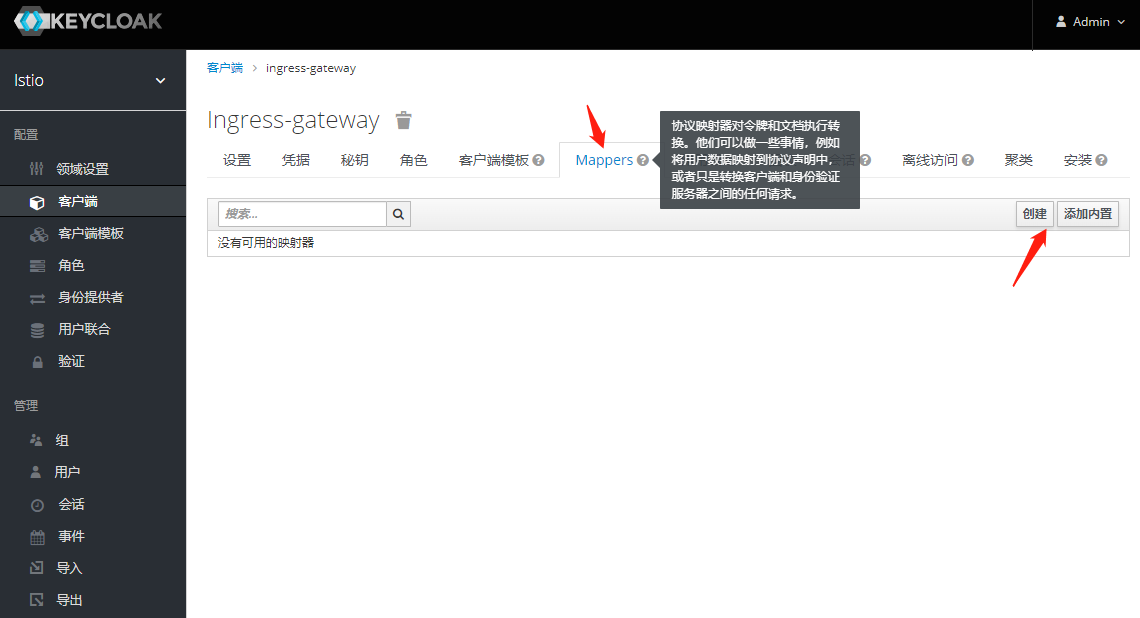
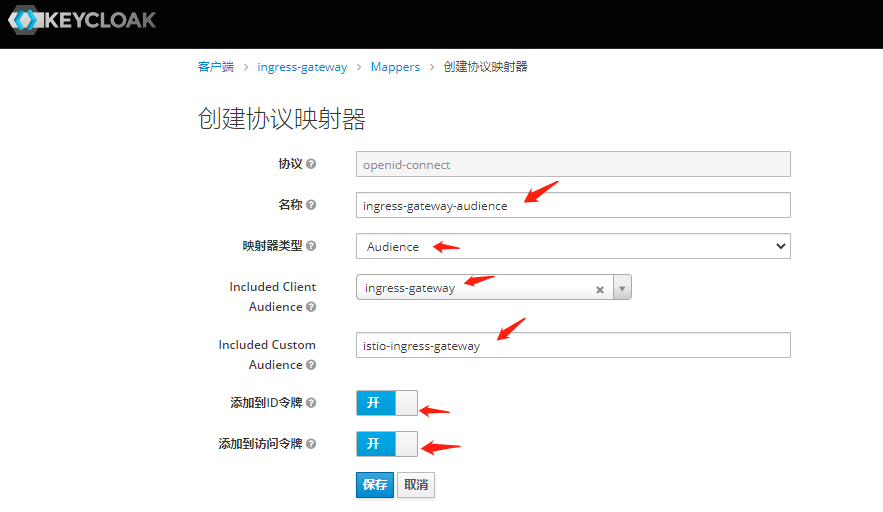
3.部署OAuth2-Proxy
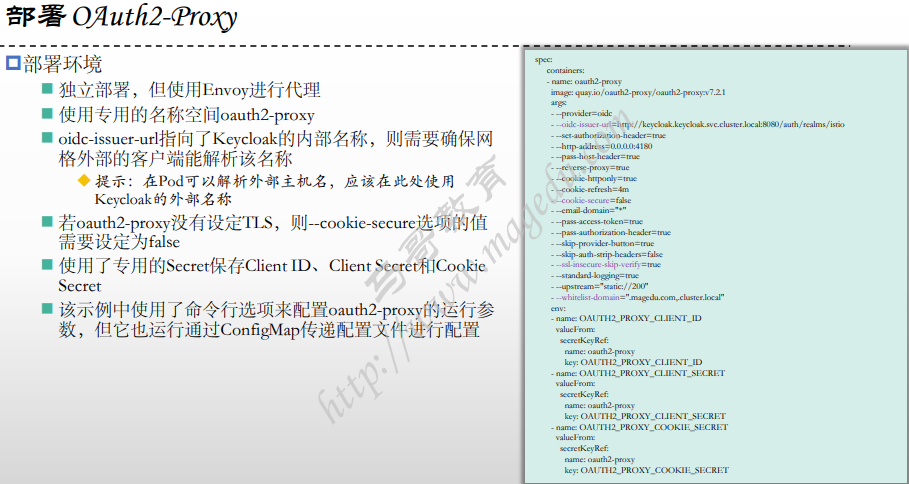
#  change this to your Keycloak Realm Client Id 改为自己创建的 客户端名称 ingress-gateway
#  OAUTH2_PROXY_CLIENT_ID: ingress-gateway
# change this to your Keycloak Client Secret
# OAUTH2_PROXY_CLIENT_SECRET: MSfhLF3NIoVXjCwDH4jAvMaZPUT7AajO  #需要修改 OAUTH2_PROXY_COOKIE_SECRET 为上面的密钥
# Generate by command: openssl rand -base64 32 | tr -- '+/' '-_'
# OAUTH2_PROXY_COOKIE_SECRET: 81PP9ejj3Qc7l40epv8a9bjaiRpKBs99lFYjsDOqYmo

[root@xksmaster1 05-JWT-and-Keycloak]# cat 01-deploy-oauth2.yaml
apiVersion: v1
kind: Namespace
metadata:
  name: oauth2-proxy
  labels:
    istio-injection: enabled
---
apiVersion: v1
kind: Secret
metadata:
  name: oauth2-proxy
  namespace: oauth2-proxy
stringData:
  # change this to your Keycloak Realm Client Id
  OAUTH2_PROXY_CLIENT_ID: ingress-gateway
  # change this to your Keycloak Client Secret
  OAUTH2_PROXY_CLIENT_SECRET: MSfhLF3NIoVXjCwDH4jAvMaZPUT7AajO
  # Generate by command: openssl rand -base64 32 | tr -- '+/' '-_'
  OAUTH2_PROXY_COOKIE_SECRET: 81PP9ejj3Qc7l40epv8a9bjaiRpKBs99lFYjsDOqYmo
---
apiVersion: v1
kind: Service
metadata:
  name: oauth2-proxy
  namespace: oauth2-proxy
spec:
  selector:
    app: oauth2-proxy
  ports:
  - name: http
    port: 4180
---
apiVersion: apps/v1
kind: Deployment
metadata:
  name: oauth2-proxy
  namespace: oauth2-proxy
spec:
  selector:
    matchLabels:
      app: oauth2-proxy
  template:
    metadata:
      labels:
        app: oauth2-proxy
    spec:
      containers:
      - name: oauth2-proxy
        image: quay.io/oauth2-proxy/oauth2-proxy:v7.2.1
        args:
        - --provider=oidc
        - --oidc-issuer-url=http://keycloak.keycloak.svc.cluster.local:8080/auth/realms/istio
        - --profile-url=http://keycloak.keycloak.svc.cluster.local:8080/auth/realms/istio/protocol/openid-connect/userinfo
        - --validate-url=http://keycloak.keycloak.svc.cluster.local:8080/auth/realms/istio/protocol/openid-connect/userinfo
        - --set-authorization-header=true
        - --http-address=0.0.0.0:4180
        - --pass-host-header=true
        - --reverse-proxy=true
        - --auth-logging=true
        - --cookie-httponly=true
        - --cookie-refresh=4m
        - --cookie-secure=false
        - --email-domain="*"
        - --pass-access-token=true
        - --pass-authorization-header=true
        - --request-logging=true
        - --set-xauthrequest=true
        - --silence-ping-logging=true
        - --skip-provider-button=true
        - --skip-auth-strip-headers=false
        - --ssl-insecure-skip-verify=true
        - --standard-logging=true
        - --upstream="static://200"
        - --whitelist-domain=".magedu.com,.cluster.local"
        env:
        - name: OAUTH2_PROXY_CLIENT_ID
          valueFrom:
            secretKeyRef:
              name: oauth2-proxy
              key: OAUTH2_PROXY_CLIENT_ID
        - name: OAUTH2_PROXY_CLIENT_SECRET
          valueFrom:
            secretKeyRef:
              name: oauth2-proxy
              key: OAUTH2_PROXY_CLIENT_SECRET
        - name: OAUTH2_PROXY_COOKIE_SECRET
          valueFrom:
            secretKeyRef:
              name: oauth2-proxy
              key: OAUTH2_PROXY_COOKIE_SECRET
        resources:
          requests:
            cpu: 10m
            memory: 100Mi
        ports:
        - containerPort: 4180
          protocol: TCP
        readinessProbe:
          periodSeconds: 3
          httpGet:
            path: /ping
            port: 4180

[root@xksmaster1 05-JWT-and-Keycloak]# kubectl apply -f 01-deploy-oauth2.yaml
namespace/oauth2-proxy created
secret/oauth2-proxy created
service/oauth2-proxy created
deployment.apps/oauth2-proxy created

[root@xksmaster1 05-JWT-and-Keycloak]# kubectl get ns
NAME                   STATUS   AGE
oauth2-proxy           Active   36s

[root@xksmaster1 05-JWT-and-Keycloak]#  kubectl get pods -n oauth2-proxy
NAME                           READY   STATUS    RESTARTS      AGE
oauth2-proxy-f44694745-nc6dd   2/2     Running   2 (23s ago)   89s

[root@xksmaster1 05-JWT-and-Keycloak]# kubectl logs oauth2-proxy-f44694745-nc6dd -n oauth2-proxy
[2023/06/12 07:02:35] [proxy.go:77] mapping path "/" => static response 200
[2023/06/12 07:02:35] [oauthproxy.go:148] OAuthProxy configured for OpenID Connect Client ID: ingress-gateway
[2023/06/12 07:02:35] [oauthproxy.go:154] Cookie settings: name:_oauth2_proxy secure(https):false httponly:true expiry:168h0m0s domains: path:/ samesite: refresh:after 4m0s
4.配置网格
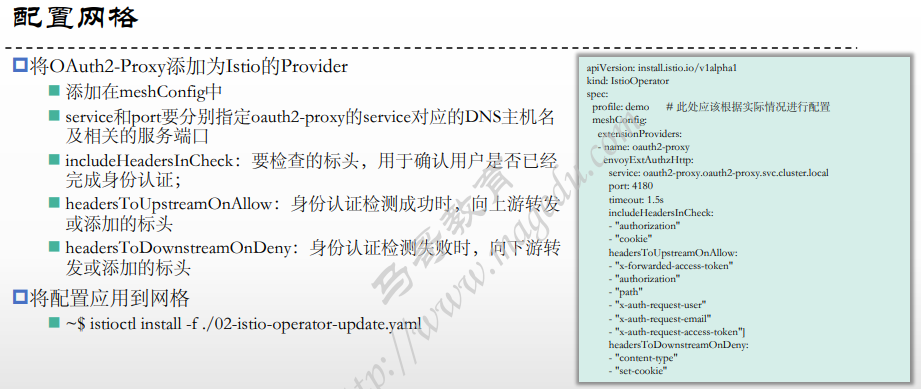
[root@xksmaster1 05-JWT-and-Keycloak]# cat 02-istio-operator-update.yaml
apiVersion: install.istio.io/v1alpha1
kind: IstioOperator
spec:
  profile: demo
  meshConfig:
    extensionProviders:
    - name: oauth2-proxy
      envoyExtAuthzHttp:
        service: oauth2-proxy.oauth2-proxy.svc.cluster.local
        port: 4180
        timeout: 1.5s
        includeHeadersInCheck: ["authorization", "cookie"]
        headersToUpstreamOnAllow: ["x-forwarded-access-token", "authorization", "path", "x-auth-request-user", "x-auth-request-email", "x-auth-request-access-token"]
        headersToDownstreamOnDeny: ["content-type", "set-cookie"]

[root@xksmaster1 05-JWT-and-Keycloak]# istioctl apply -f 02-istio-operator-update.yaml
This will install the Istio 1.17.1 demo profile with ["Istio core" "Istiod" "Ingress gateways" "Egress gateways"] components into the cluster. Proceed? (y/N) y
✔ Istio core installed
✔ Istiod installed
✔ Ingress gateways installed
✔ Egress gateways installed
✔ Installation complete                                                                                                                                                  Making this installation the default for injection and validation.

Thank you for installing Istio 1.17.  Please take a few minutes to tell us about your install/upgrade experience!  https://forms.gle/hMHGiwZHPU7UQRWe9
5.配置Ingress Gateway上的授权策略
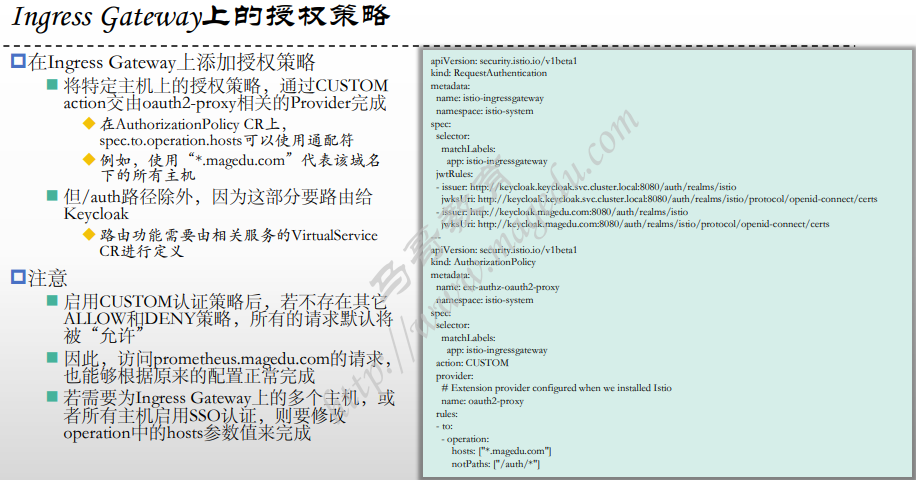
[root@xksmaster1 05-JWT-and-Keycloak]# cat 03-ext-auth-ingress-gateway.yaml
apiVersion: security.istio.io/v1beta1
kind: RequestAuthentication
metadata:
  name: istio-ingressgateway
  namespace: istio-system
spec:
  selector:
    matchLabels:
      app: istio-ingressgateway
  jwtRules:
  - issuer: http://keycloak.keycloak.svc.cluster.local:8080/auth/realms/istio
    jwksUri: http://keycloak.keycloak.svc.cluster.local:8080/auth/realms/istio/protocol/openid-connect/certs
    #audiences: ["ingress-gateway","istio-ingress-gateway"]
    # Forward JWT to Envoy Sidecar
    forwardOriginalToken: true
  - issuer: http://keycloak.magedu.com:8080/auth/realms/istio
    jwksUri: http://keycloak.magedu.com:8080/auth/realms/istio/protocol/openid-connect/certs
---
apiVersion: security.istio.io/v1beta1
kind: AuthorizationPolicy
metadata:
  name: ext-authz-oauth2-proxy
  namespace: istio-system
spec:
  selector:
    matchLabels:
      app: istio-ingressgateway
  action: CUSTOM
  provider:
    # Extension provider configured when we installed Istio
    name: oauth2-proxy
  rules:
  - to:
    - operation:
        hosts:
        - "kiali.magedu.com"
        - "prometheus.magedu.com"
        - "bookinfo.magedu.com"
        notPaths: ["/auth/*"]
  #- to:
  #  - operation:
  #      hosts: ["*.magedu.com"]
  #      notPaths: ["/auth/*"]


[root@xksmaster1 05-JWT-and-Keycloak]# kubectl apply -f 03-ext-auth-ingress-gateway.yaml
requestauthentication.security.istio.io/istio-ingressgateway unchanged
authorizationpolicy.security.istio.io/ext-authz-oauth2-proxy unchanged

[root@xksmaster1 05-JWT-and-Keycloak]# kubectl get ra -n istio-system
NAME                   AGE
istio-ingressgateway   57s
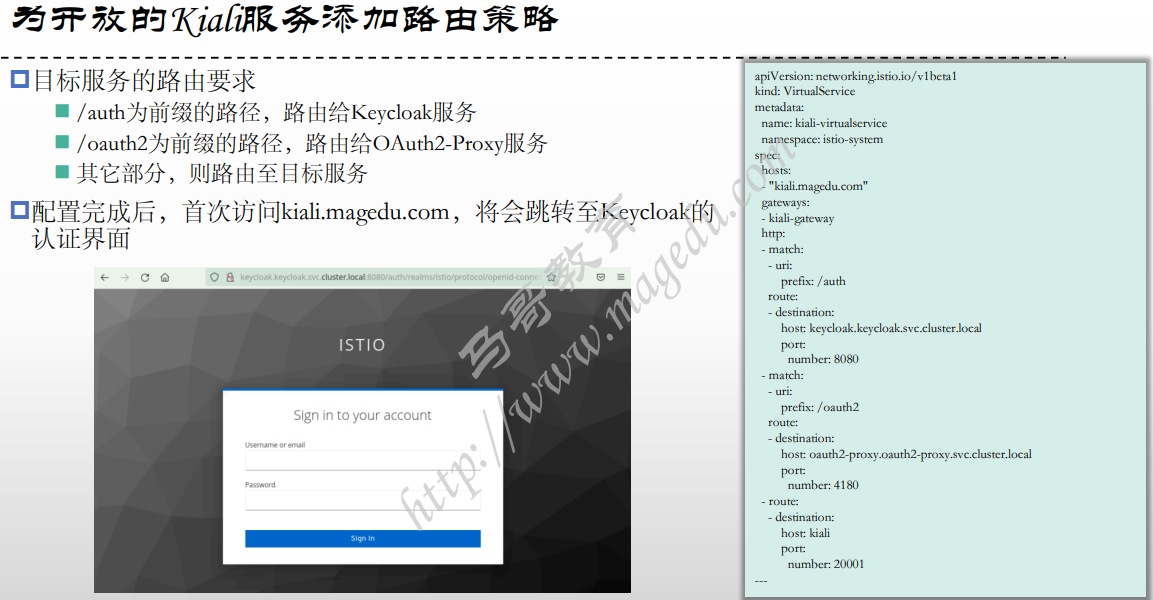
6.为开放的Kiali服务添加路由策略
#首先开放kiali到网格外
[root@xksmaster1 kiali-port-80]# ll
total 12
-rw-r--r-- 1 root root 182 Aug 20  2022 kiali-destinationrule.yaml
-rw-r--r-- 1 root root 282 Aug 20  2022 kiali-gateway.yaml
-rw-r--r-- 1 root root 334 Aug 20  2022 kiali-virtualservice.yaml
[root@xksmaster1 kiali-port-80]# cat kiali-gateway.yaml
apiVersion: networking.istio.io/v1beta1
kind: Gateway
metadata:
  name: kiali-gateway
  namespace: istio-system
spec:
  selector:
    app: istio-ingressgateway
  servers:
  - port:
      number: 80
      name: http-kiali
      protocol: HTTP
    hosts:
    - "kiali.magedu.com"
---
[root@xksmaster1 kiali-port-80]# cat kiali-destinationrule.yaml
apiVersion: networking.istio.io/v1beta1
kind: DestinationRule
metadata:
  name: kiali
  namespace: istio-system
spec:
  host: kiali
  trafficPolicy:
    tls:
      mode: DISABLE
---
[root@xksmaster1 kiali-port-80]# cat kiali-virtualservice.yaml
apiVersion: networking.istio.io/v1beta1
kind: VirtualService
metadata:
  name: kiali-virtualservice
  namespace: istio-system
spec:
  hosts:
  - "kiali.magedu.com"
  gateways:
  - kiali-gateway
  http:
  - match:
    - uri:
        prefix: /
    route:
    - destination:
        host: kiali
        port:
          number: 20001
---
[root@xksmaster1 kiali-port-80]# kubectl apply -f ./
destinationrule.networking.istio.io/kiali created
gateway.networking.istio.io/kiali-gateway created
virtualservice.networking.istio.io/kiali-virtualservice created

#添加外部IP
[root@xksmaster1 kiali-port-80]# kubectl get svc -n istio-system
NAME                   TYPE           CLUSTER-IP       EXTERNAL-IP      PORT(S)                                                                      AGE
istio-egressgateway    ClusterIP      10.106.118.36    <none>           80/TCP,443/TCP                                                               82d
istio-ingressgateway   LoadBalancer   10.108.113.206   192.168.19.190   15021:31695/TCP,80:31246/TCP,443:30196/TCP,31400:30817/TCP,15443:31775/TCP   82d
istiod                 ClusterIP      10.110.214.145   <none>           15010/TCP,15012/TCP,443/TCP,15014/TCP                                        82d
kiali                  LoadBalancer   10.102.111.29    192.168.19.190   20001:32748/TCP,9090:32308/TCP                                               12d


#配置windows hosts文件
192.168.19.190 kiali.magedu.com

#访问kiali正常 浏览器 kiali.magedu.com

#添加外部认证
[root@xksmaster1 kiali]# pwd
/root/istio/istio-in-practise-main/Security/05-JWT-and-Keycloak/04-routeconfig-for-services/kiali
[root@xksmaster1 kiali]# cat kiali-virtualservice.yaml
apiVersion: networking.istio.io/v1beta1
kind: VirtualService
metadata:
  name: kiali-virtualservice
  namespace: istio-system
spec:
  hosts:
  - "kiali.magedu.com"
  gateways:
  - kiali-gateway
  http:
  - match:
    - uri:
        prefix: /auth
    route:
    - destination:
        host: keycloak.keycloak.svc.cluster.local
        port:
          number: 8080
  - match:
    - uri:
        prefix: /oauth2
    route:
    - destination:
        host: oauth2-proxy.oauth2-proxy.svc.cluster.local
        port:
          number: 4180
  - route:
    - destination:
        host: kiali
        port:
          number: 20001
---
[root@xksmaster1 kiali]# cat kiali-gateway.yaml
---
apiVersion: networking.istio.io/v1beta1
kind: Gateway
metadata:
  name: kiali-gateway
  namespace: istio-system
spec:
  selector:
    app: istio-ingressgateway
  servers:
  - port:
      number: 80
      name: http
      protocol: HTTP
    hosts:
    - "kiali.magedu.com"
    tls:
      httpsRedirect: true
  - port:
      number: 443
      name: https
      protocol: HTTPS
    tls:
      mode: SIMPLE
      credentialName: kiali-credential
    hosts:
    - "kiali.magedu.com"
---
跳转到
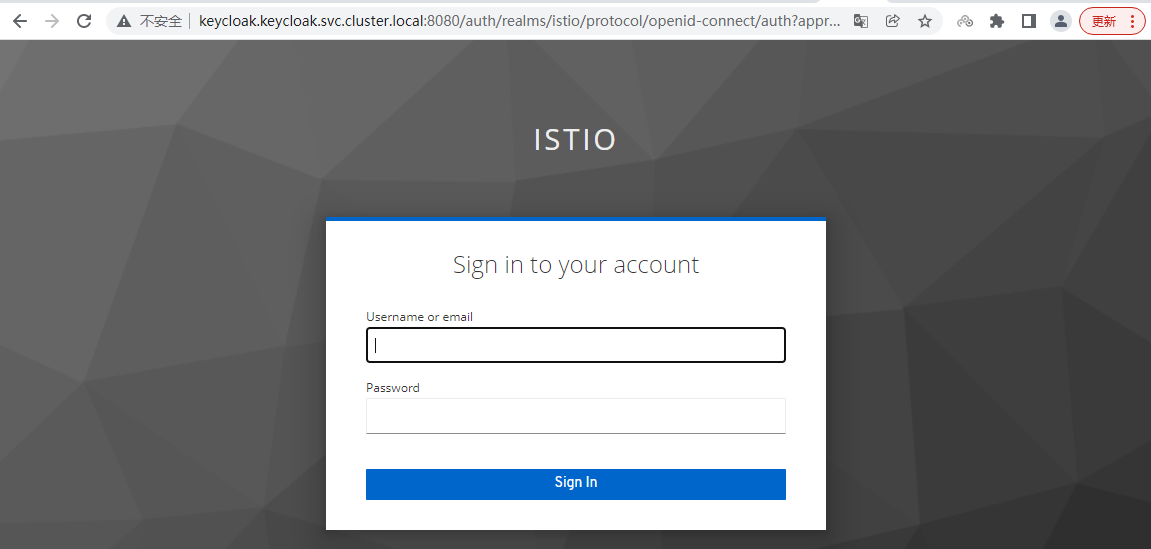
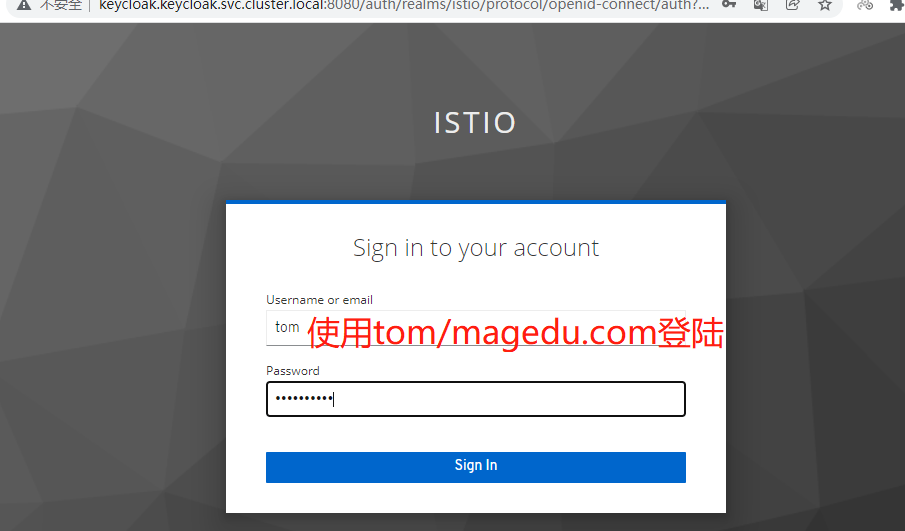
被拒绝了-因为tom 用户没有打开 电子邮件验证功能

7.重新添加用户 kiali
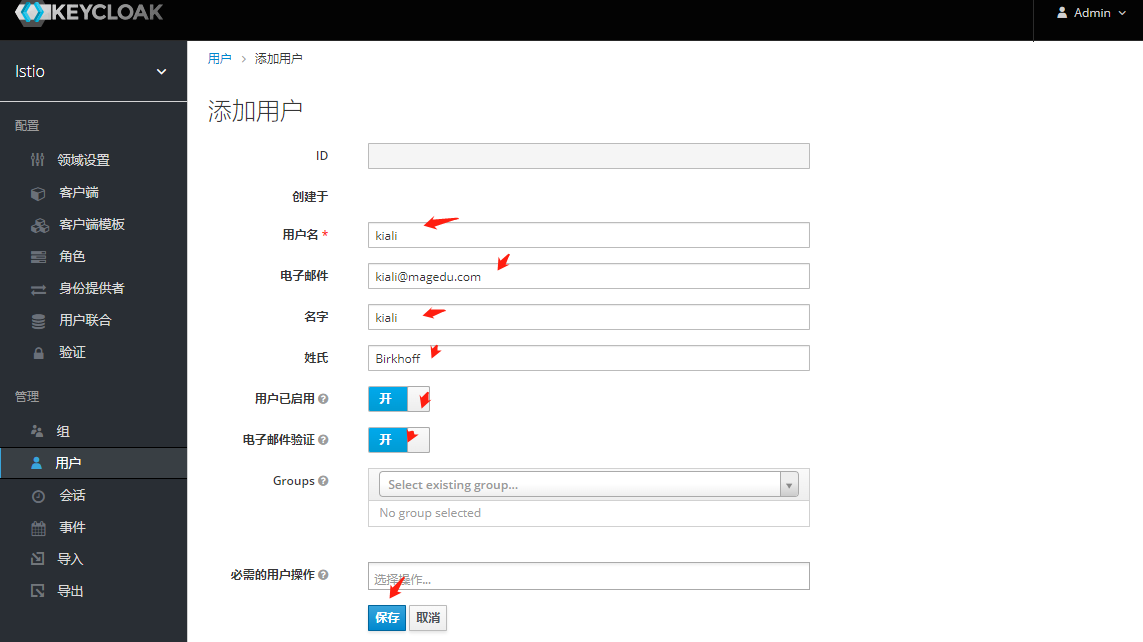
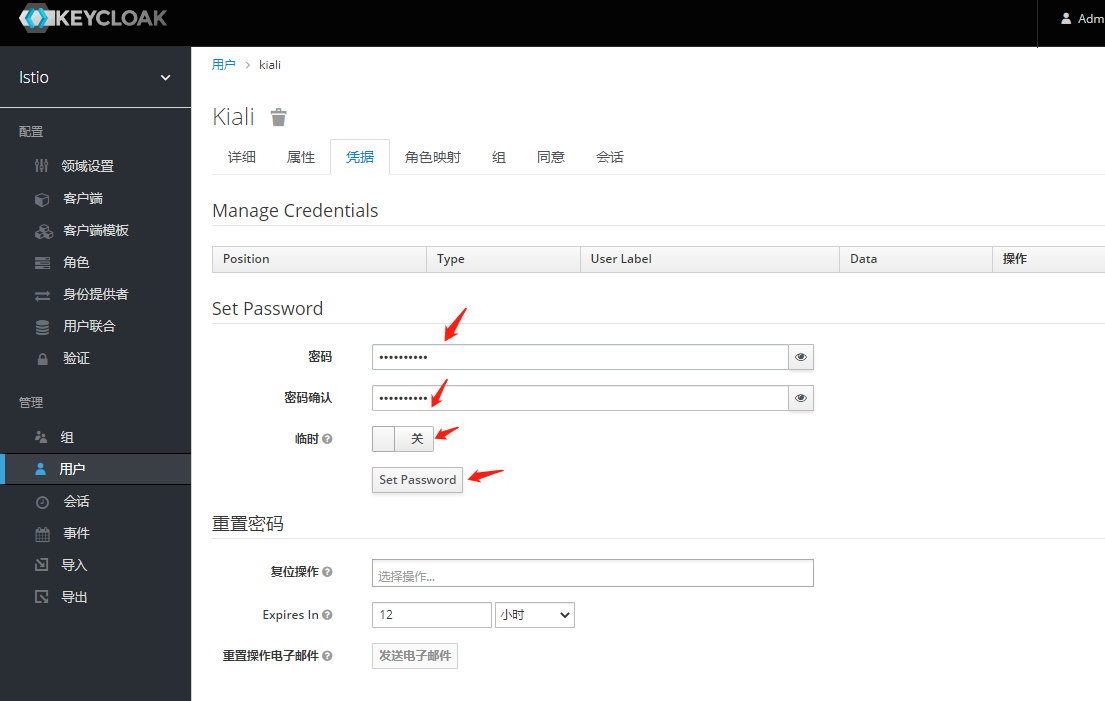
#访问测试
==========
curl -d "username=kiali&\
password=magedu.com&\
grant_type=password&\
client_id=ingress-gateway&\
client_secret=MSfhLF3NIoVXjCwDH4jAvMaZPUT7AajO" \
http://keycloak.keycloak.svc.cluster.local:8080/auth/realms/istio/protocol/openid-connect/token
==========

[root@demoappv11-6b479f5664-fblqm /]# curl -d "username=kiali&\
> password=magedu.com&\
> grant_type=password&\
> client_id=ingress-gateway&\
> client_secret=MSfhLF3NIoVXjCwDH4jAvMaZPUT7AajO" \
> http://keycloak.keycloak.svc.cluster.local:8080/auth/realms/istio/protocol/openid-connect/token
{"access_token":"eyJhbGciOiJSUzI1NiIsInR5cCIgOiAiSldUIiwia2lkIiA6ICJYbkpnV2Z1SFpzSUl1TEdiVEFoaDFaSWhBc1JXMGhDTlRpbUtMSnVIVDFzIn0.eyJleHAiOjE2ODY1NTcwNTksImlhdCI6MTY4NjU1Njc1OSwianRpIjoiZTBlNTk1MjAtYWNlYi00OTYxLWJjZTQtNWQ3MGJjODkyZjkzIiwiaXNzIjoiaHR0cDovL2tleWNsb2FrLmtleWNsb2FrLnN2Yy5jbHVzdGVyLmxvY2FsOjgwODAvYXV0aC9yZWFsbXMvaXN0aW8iLCJhdWQiOlsiaW5ncmVzcy1nYXRld2F5IiwiYWNjb3VudCJdLCJzdWIiOiJiMGIyMGQ3ZS00ZGYzLTQ4NjgtOTYwZS1iNGUxYzc1MmM1ZTUiLCJ0eXAiOiJCZWFyZXIiLCJhenAiOiJpbmdyZXNzLWdhdGV3YXkiLCJzZXNzaW9uX3N0YXRlIjoiMzk5NjUwZGUtOWQ2OC00MDU4LTg0MDgtMjg1ZTg5M2M2ODBiIiwiYWNyIjoiMSIsInJlYWxtX2FjY2VzcyI6eyJyb2xlcyI6WyJvZmZsaW5lX2FjY2VzcyIsInVtYV9hdXRob3JpemF0aW9uIiwiZGVmYXVsdC1yb2xlcy1pc3RpbyJdfSwicmVzb3VyY2VfYWNjZXNzIjp7ImFjY291bnQiOnsicm9sZXMiOlsibWFuYWdlLWFjY291bnQiLCJtYW5hZ2UtYWNjb3VudC1saW5rcyIsInZpZXctcHJvZmlsZSJdfX0sInNjb3BlIjoicHJvZmlsZSBlbWFpbCIsInNpZCI6IjM5OTY1MGRlLTlkNjgtNDA1OC04NDA4LTI4NWU4OTNjNjgwYiIsImVtYWlsX3ZlcmlmaWVkIjp0cnVlLCJuYW1lIjoia2lhbGkgQmlya2hvZmYiLCJwcmVmZXJyZWRfdXNlcm5hbWUiOiJraWFsaSIsImdpdmVuX25hbWUiOiJraWFsaSIsImZhbWlseV9uYW1lIjoiQmlya2hvZmYiLCJlbWFpbCI6ImtpYWxpQG1hZ2VkdS5jb20ifQ.H-T2NFRMCr6S6gQfvL8A_L6AP9nf4a6uDEYPqiAitpYJFufrfp-CnThdTYhiR4pOy0rajDvB2D-oYTJ_jQlIYzqnviej0N8HpSmITh4g2njq3fO8kRcdCY0MZkDtQPUkZXmWj-uMJLmz0Sxe1zYH52khDKQ29IsZunIbDHI1WuUK1EloW81bX3_17DunWJbvkVyV3NHRStADtaXyk9TUYWV46RqQlOAVPNRyNcZGyc3C_nnUCejVWJuLHAOfoGxAYHkvSs54-GOW3LFgowTbyK3qhB9Xd1H19x5hpy9r1Z3w0jkhVU4l3QywueVvZhRdscKwyiPMR1802kupeP9xXQ","expires_in":300,"refresh_expires_in":1800,"refresh_token":"eyJhbGciOiJIUzI1NiIsInR5cCIgOiAiSldUIiwia2lkIiA6ICJlMmIyMTQ3Ni1jNTViLTQ2YzItOGVkMy00NmJjY2Q2MjU5MTUifQ.eyJleHAiOjE2ODY1NTg1NTksImlhdCI6MTY4NjU1Njc1OSwianRpIjoiYWQ4ZTMyNGQtMTE0Yi00NTY0LWI3OGMtZWNiYmQyOWYzNjM1IiwiaXNzIjoiaHR0cDovL2tleWNsb2FrLmtleWNsb2FrLnN2Yy5jbHVzdGVyLmxvY2FsOjgwODAvYXV0aC9yZWFsbXMvaXN0aW8iLCJhdWQiOiJodHRwOi8va2V5Y2xvYWsua2V5Y2xvYWsuc3ZjLmNsdXN0ZXIubG9jYWw6ODA4MC9hdXRoL3JlYWxtcy9pc3RpbyIsInN1YiI6ImIwYjIwZDdlLTRkZjMtNDg2OC05NjBlLWI0ZTFjNzUyYzVlNSIsInR5cCI6IlJlZnJlc2giLCJhenAiOiJpbmdyZXNzLWdhdGV3YXkiLCJzZXNzaW9uX3N0YXRlIjoiMzk5NjUwZGUtOWQ2OC00MDU4LTg0MDgtMjg1ZTg5M2M2ODBiIiwic2NvcGUiOiJwcm9maWxlIGVtYWlsIiwic2lkIjoiMzk5NjUwZGUtOWQ2OC00MDU4LTg0MDgtMjg1ZTg5M2M2ODBiIn0.WR1HXr1Q6G3I9T1YpntbSNGlEXQkbXR_h8CVu6g0k3c","token_type":"Bearer","not-before-policy":0,"session_state":"399650de-9d68-4058-8408-285e893c680b","scope":"profile email"}[root@demoappv11-6b479f5664-fblqm /]#

#解析
  "iat": 1686556759,
  "jti": "e0e59520-aceb-4961-bce4-5d70bc892f93",
  "iss": "http://keycloak.keycloak.svc.cluster.local:8080/auth/realms/istio",
  "aud": [
    "ingress-gateway",
    "account"
  ],
  "sub": "b0b20d7e-4df3-4868-960e-b4e1c752c5e5",
  "typ": "Bearer",
  "azp": "ingress-gateway",
  "session_state": "399650de-9d68-4058-8408-285e893c680b",
  "acr": "1",
  "realm_access": {
    "roles": [
      "offline_access",
      "uma_authorization",
      "default-roles-istio"
    ]
  },
  "resource_access": {
    "account": {
      "roles": [
        "manage-account",
        "manage-account-links",
        "view-profile"
      ]
    }
  },
  "scope": "profile email",
  "sid": "399650de-9d68-4058-8408-285e893c680b",
  "email_verified": true,
  "name": "kiali Birkhoff",
  "preferred_username": "kiali",
  "given_name": "kiali",
  "family_name": "Birkhoff",
  "email": "kiali@magedu.com"
}
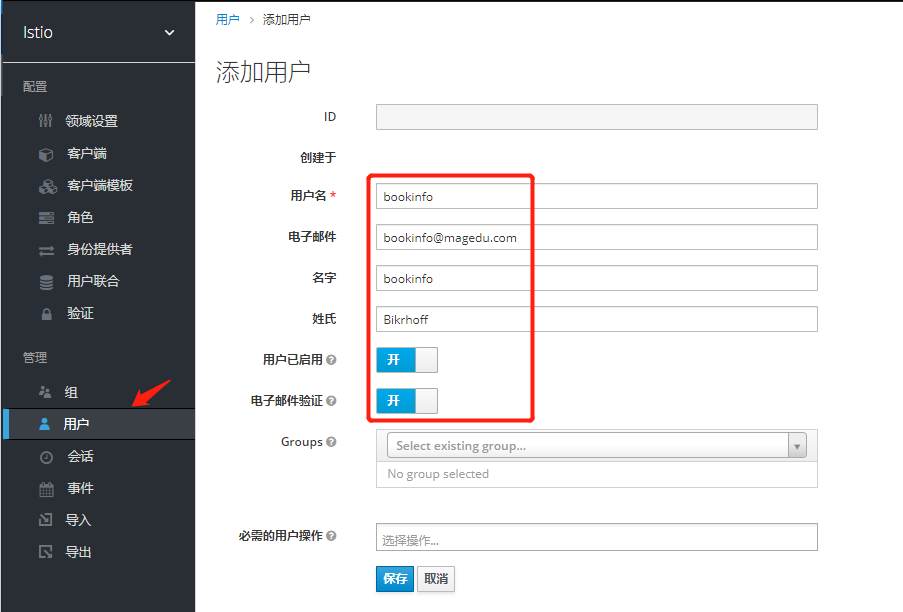
Bookinfo 案例
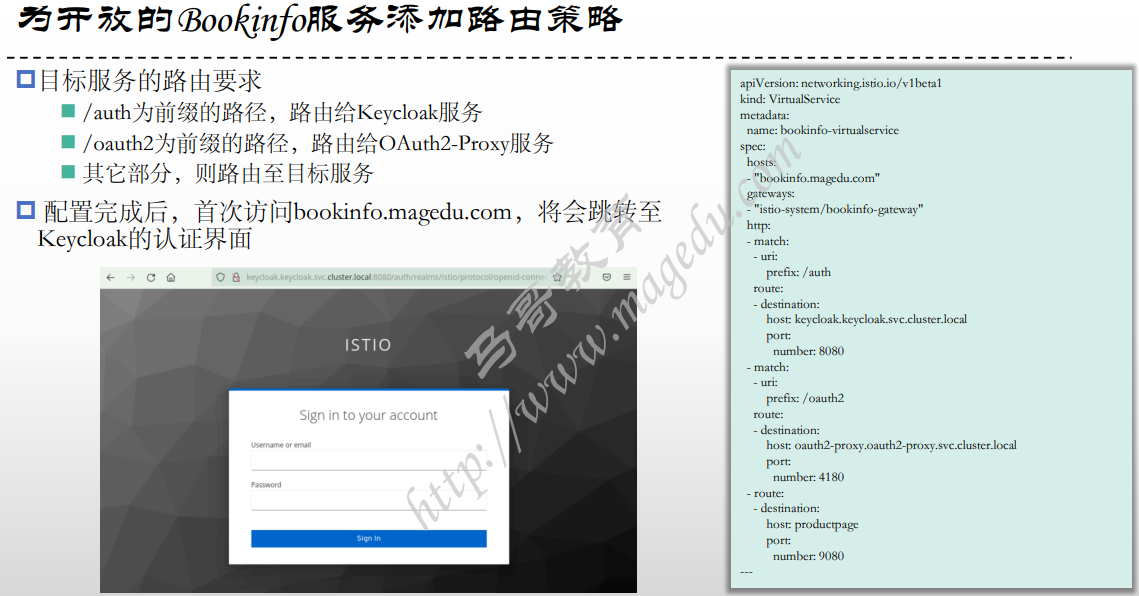
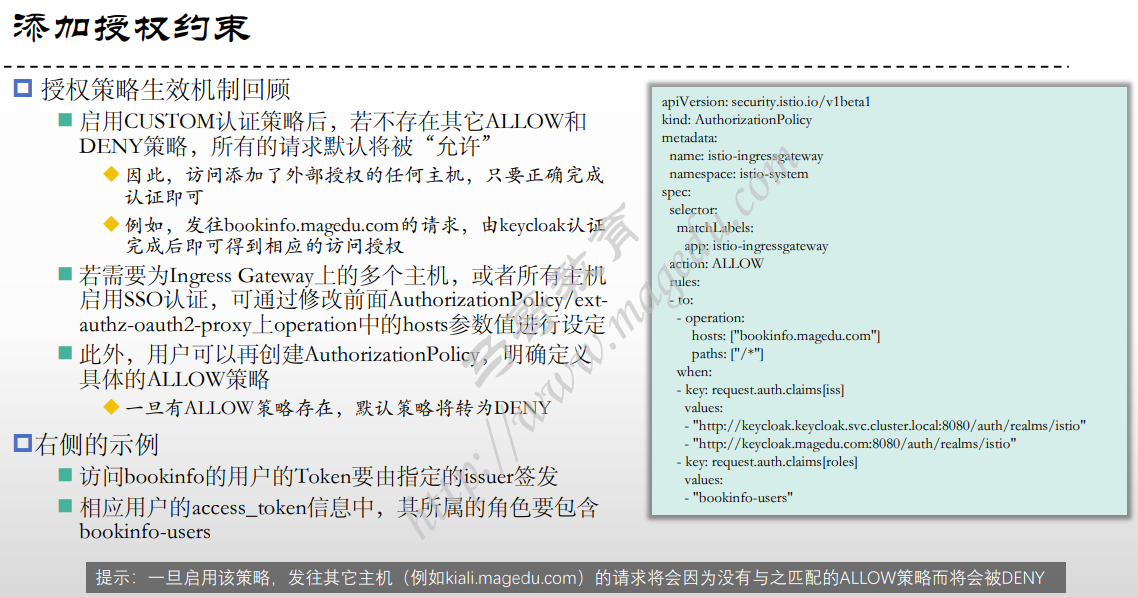
为用户创建角色和组
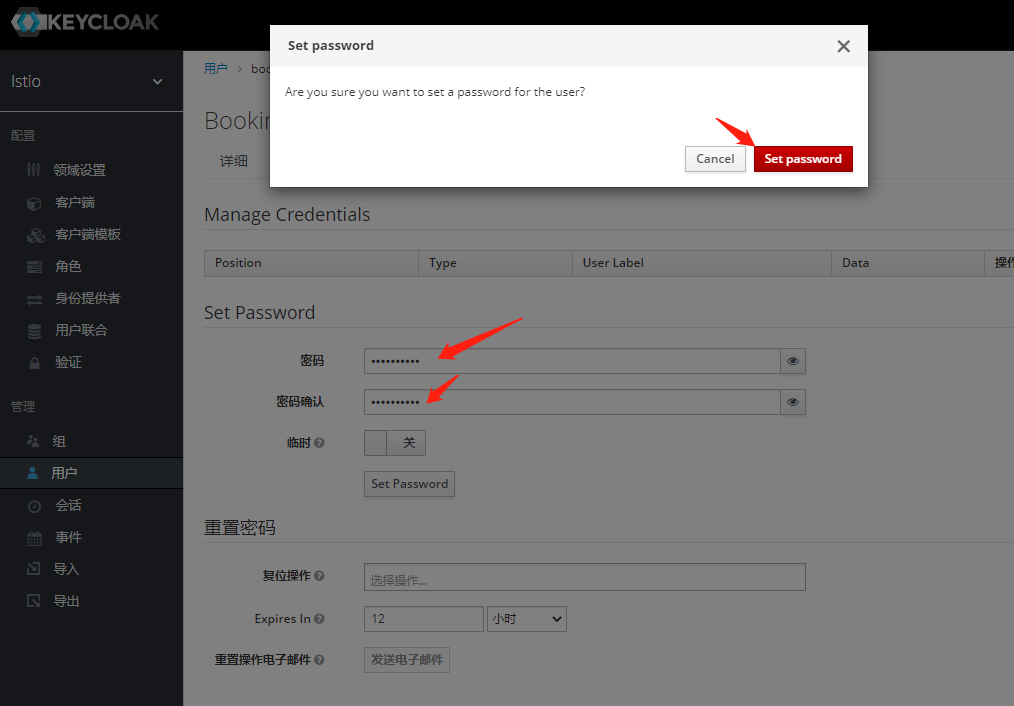
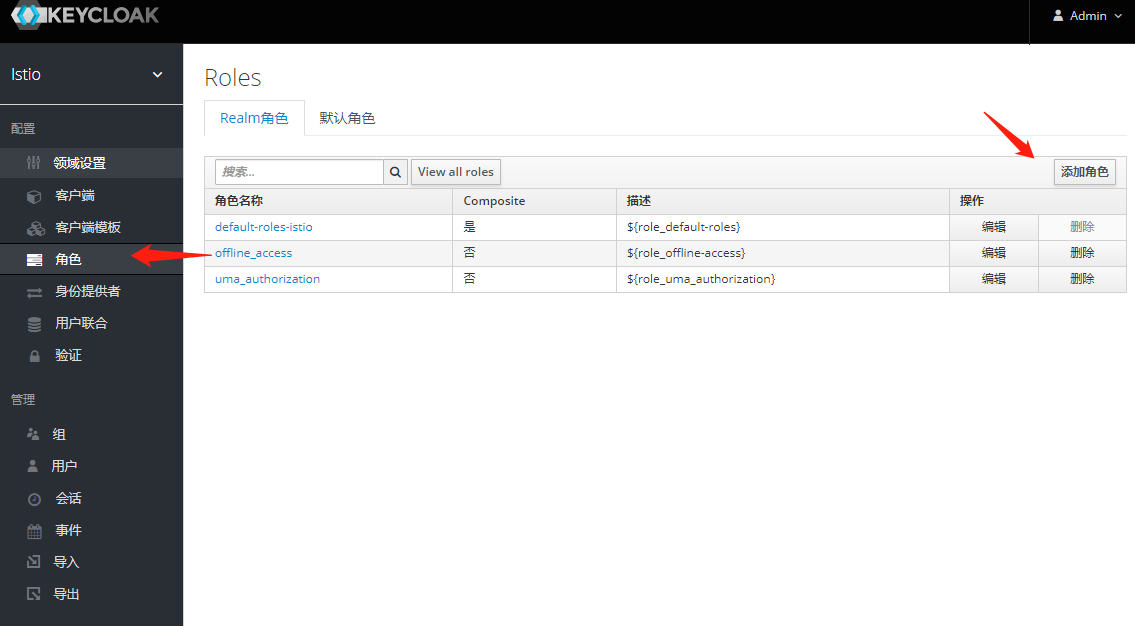
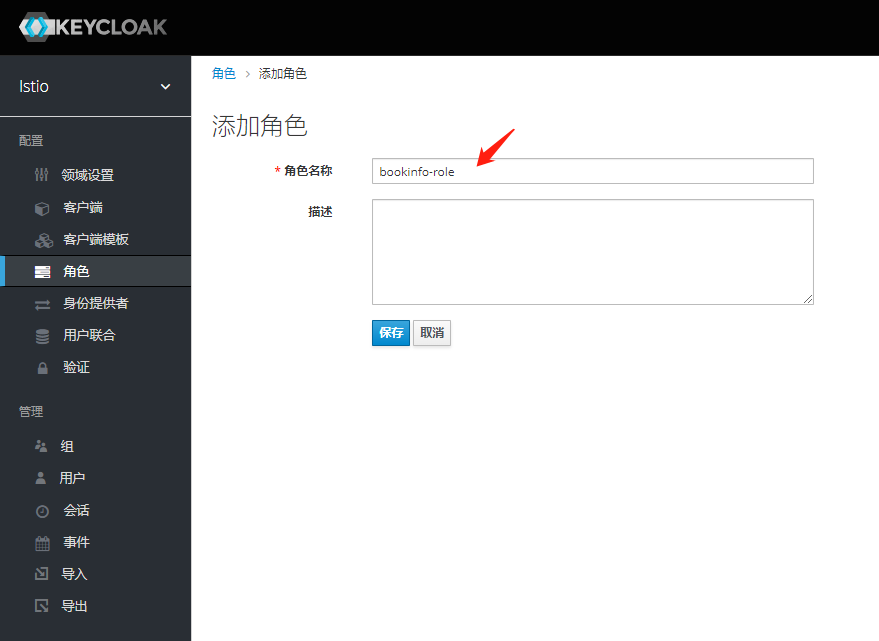
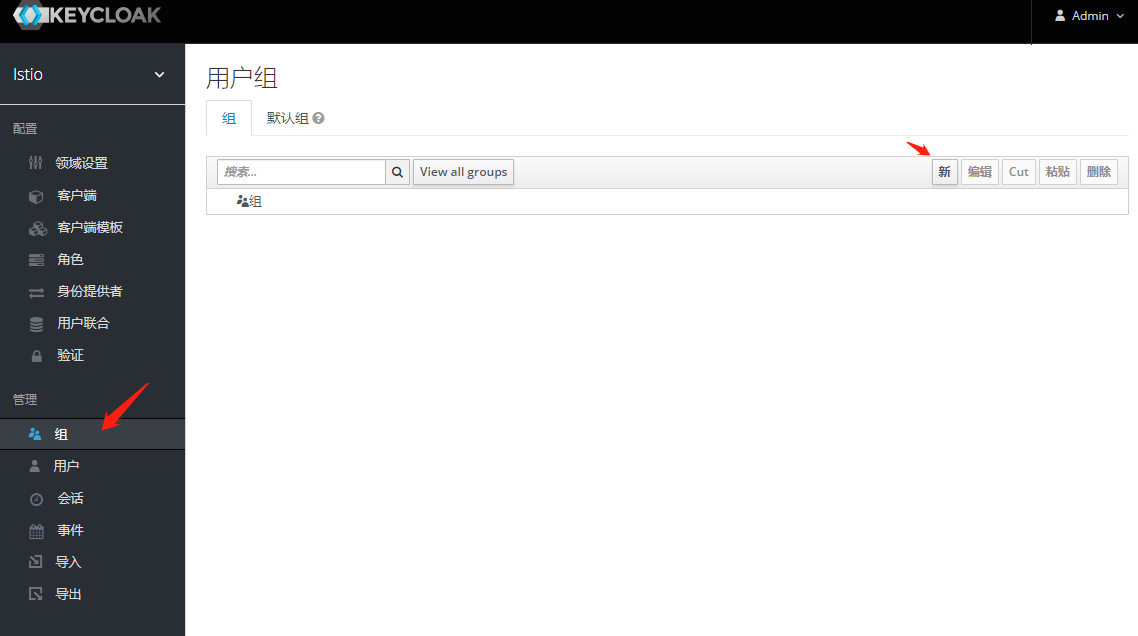
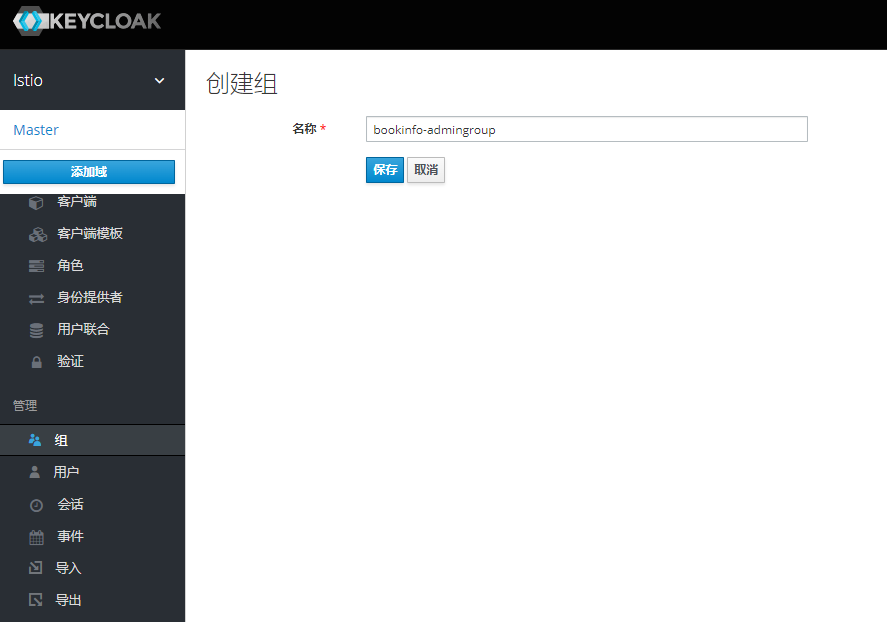
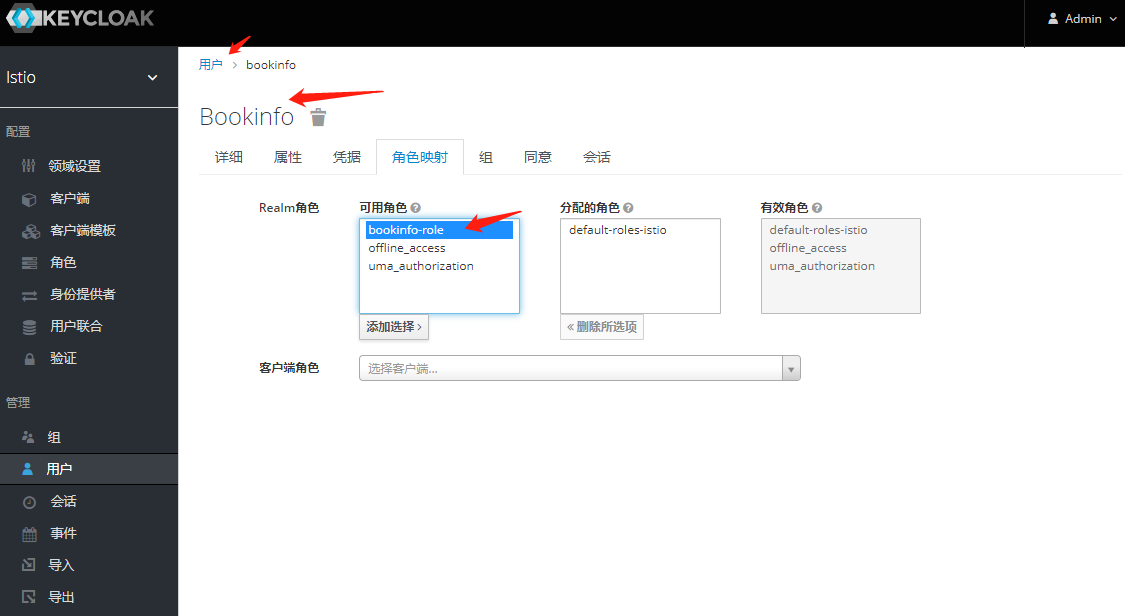
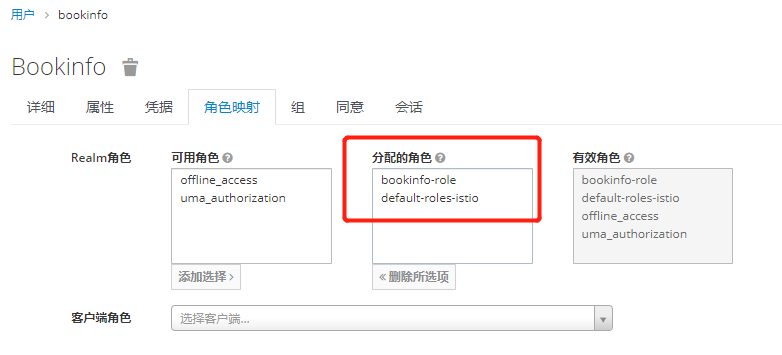
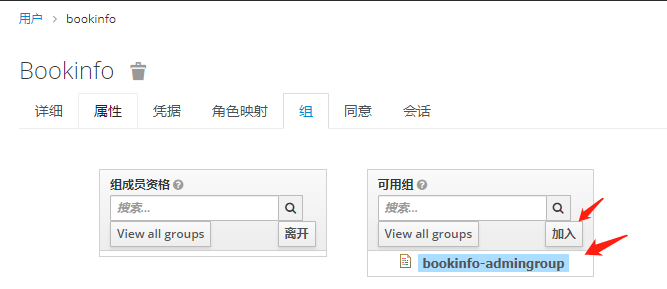
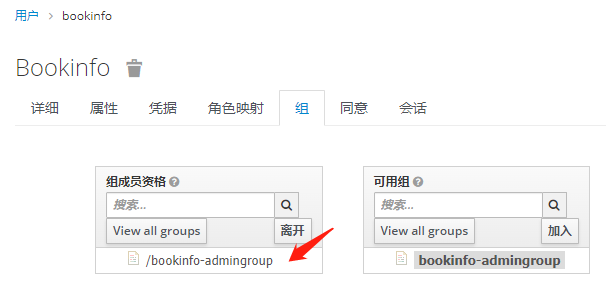
将组角色 使用Mappers 映射出去 -之后token信息中心携带此信息
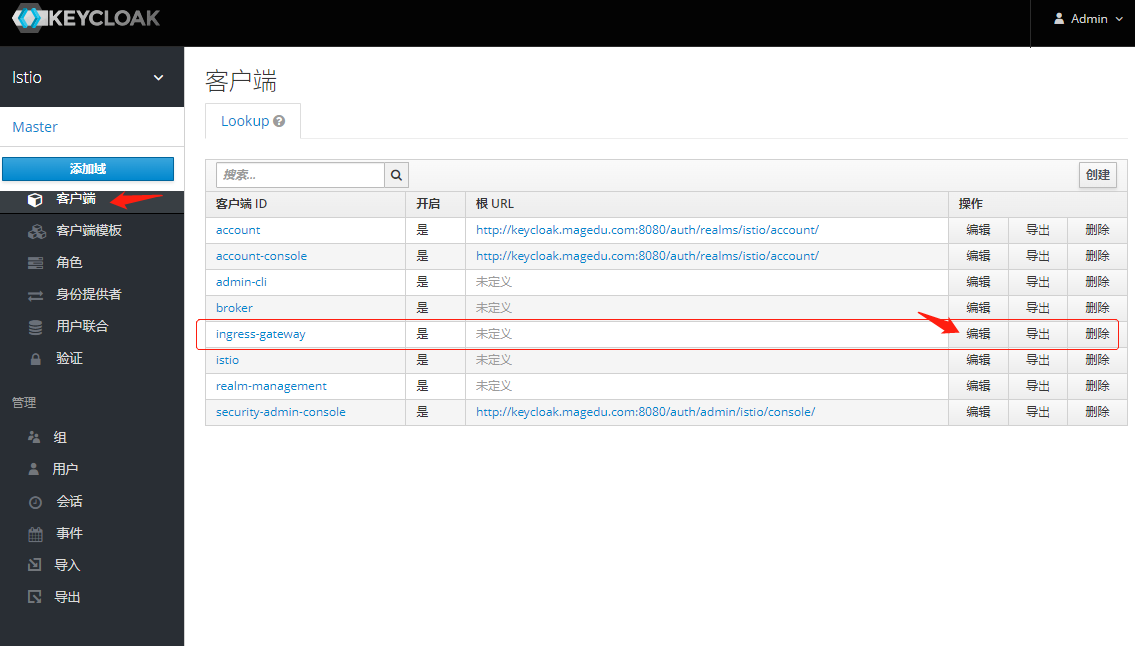
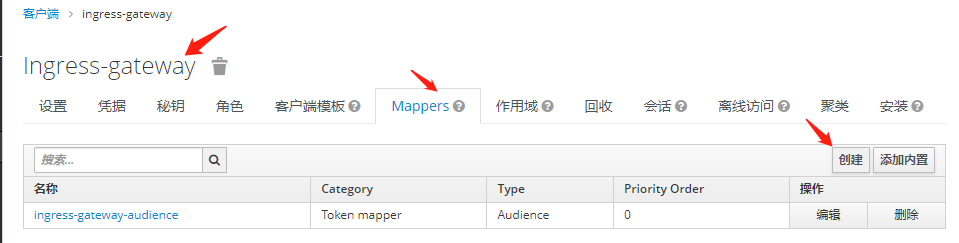
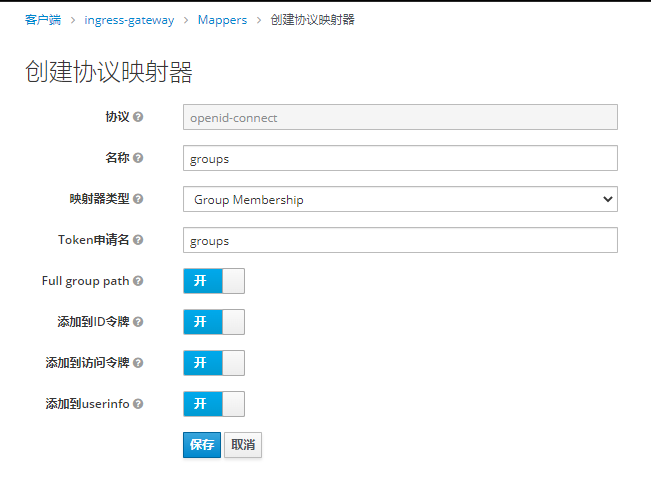
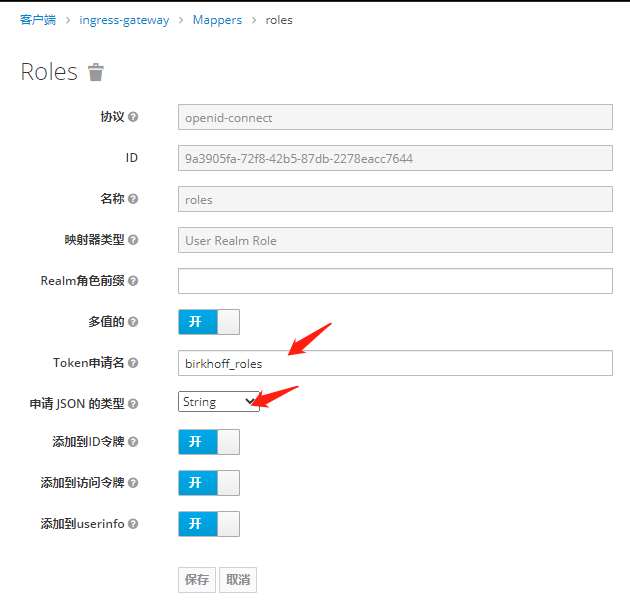
测试是否携带 角色和组信息
[root@xksmaster1 kube]# kubectl exec -it demoappv11-6b479f5664-fblqm /bin/sh

curl -d "username=bookinfo&\
password=magedu.com&\
grant_type=password&\
client_id=ingress-gateway&\
client_secret=MSfhLF3NIoVXjCwDH4jAvMaZPUT7AajO" \
http://keycloak.keycloak.svc.cluster.local:8080/auth/realms/istio/protocol/openid-connect/token

{"access_token":"eyJhbGciOiJSUzI1NiIsInR5cCIgOiAiSldUIiwia2lkIiA6ICJYbkpnV2Z1SFpzSUl1TEdiVEFoaDFaSWhBc1JXMGhDTlRpbUtMSnVIVDFzIn0.eyJleHAiOjE2ODY1NTg5NzIsImlhdCI6MTY4NjU1ODY3MiwianRpIjoiNTkyNThlOTgtNmRiMi00MzM4LTgyZGItYzM0OTIzNzYwNDYzIiwiaXNzIjoiaHR0cDovL2tleWNsb2FrLmtleWNsb2FrLnN2Yy5jbHVzdGVyLmxvY2FsOjgwODAvYXV0aC9yZWFsbXMvaXN0aW8iLCJhdWQiOlsiaW5ncmVzcy1nYXRld2F5IiwiYWNjb3VudCJdLCJzdWIiOiIxZGVlMjcxYS0wZjg1LTQ3YWQtODBkNS05OGE1ZTQ1YmIzZDIiLCJ0eXAiOiJCZWFyZXIiLCJhenAiOiJpbmdyZXNzLWdhdGV3YXkiLCJzZXNzaW9uX3N0YXRlIjoiZDI3ZTU0NjYtMGRhMC00NmZjLWIxYjctMDA1ZjVlNDZhY2UzIiwiYWNyIjoiMSIsInJlYWxtX2FjY2VzcyI6eyJyb2xlcyI6WyJvZmZsaW5lX2FjY2VzcyIsInVtYV9hdXRob3JpemF0aW9uIiwiYm9va2luZm8tcm9sZSIsImRlZmF1bHQtcm9sZXMtaXN0aW8iXX0sInJlc291cmNlX2FjY2VzcyI6eyJhY2NvdW50Ijp7InJvbGVzIjpbIm1hbmFnZS1hY2NvdW50IiwibWFuYWdlLWFjY291bnQtbGlua3MiLCJ2aWV3LXByb2ZpbGUiXX19LCJzY29wZSI6InByb2ZpbGUgZW1haWwiLCJzaWQiOiJkMjdlNTQ2Ni0wZGEwLTQ2ZmMtYjFiNy0wMDVmNWU0NmFjZTMiLCJlbWFpbF92ZXJpZmllZCI6dHJ1ZSwiYmlya2hvZmZfcm9sZXMiOlsib2ZmbGluZV9hY2Nlc3MiLCJ1bWFfYXV0aG9yaXphdGlvbiIsImJvb2tpbmZvLXJvbGUiLCJkZWZhdWx0LXJvbGVzLWlzdGlvIl0sIm5hbWUiOiJib29raW5mbyBCaWtyaG9mZiIsImdyb3VwcyI6WyIvYm9va2luZm8tYWRtaW5ncm91cCJdLCJwcmVmZXJyZWRfdXNlcm5hbWUiOiJib29raW5mbyIsImdpdmVuX25hbWUiOiJib29raW5mbyIsImZhbWlseV9uYW1lIjoiQmlrcmhvZmYiLCJlbWFpbCI6ImJvb2tpbmZvQG1hZ2VkdS5jb20ifQ.Cpy69MJk3kqjRaC074XpS3AEhymSoDlZQ6K991smA391qc_IN8sXNz9OFK5EOgVBlrMsk8VBaCu_aCdK-vN9w06rrrQD8BbtG4qDJvbbImgOlGruaC4oBBdc1wMG-kdc5W4kY3TpzipQ46xVhyI0jZvuBrpFEpA3OmljPLSg7HBYdYT8YU9I5bsSCEVMEAOg01VYwZci-sbb2xSq2YrivgpCryl2ue9ZTNP2LBWK6pUKhI5II2fYzcm5M8REUxgCywKaqcepUk4RCrxqyD0NuYTINkZvCaBiY3bzGKJTKMJaC8hrcCRuMrH5YXqLmE1iSpO4O5v1FxgcLVooNbZGUQ","expires_in":300,"refresh_expires_in":1800,"refresh_token":"eyJhbGciOiJIUzI1NiIsInR5cCIgOiAiSldUIiwia2lkIiA6ICJlMmIyMTQ3Ni1jNTViLTQ2YzItOGVkMy00NmJjY2Q2MjU5MTUifQ.eyJleHAiOjE2ODY1NjA0NzIsImlhdCI6MTY4NjU1ODY3MiwianRpIjoiOTU1YjgyMjMtOWNmNC00MmNlLWJhMmQtNTcxOWEyY2Y4ODI0IiwiaXNzIjoiaHR0cDovL2tleWNsb2FrLmtleWNsb2FrLnN2Yy5jbHVzdGVyLmxvY2FsOjgwODAvYXV0aC9yZWFsbXMvaXN0aW8iLCJhdWQiOiJodHRwOi8va2V5Y2xvYWsua2V5Y2xvYWsuc3ZjLmNsdXN0ZXIubG9jYWw6ODA4MC9hdXRoL3JlYWxtcy9pc3RpbyIsInN1YiI6IjFkZWUyNzFhLTBmODUtNDdhZC04MGQ1LTk4YTVlNDViYjNkMiIsInR5cCI6IlJlZnJlc2giLCJhenAiOiJpbmdyZXNzLWdhdGV3YXkiLCJzZXNzaW9uX3N0YXRlIjoiZDI3ZTU0NjYtMGRhMC00NmZjLWIxYjctMDA1ZjVlNDZhY2UzIiwic2NvcGUiOiJwcm9maWxlIGVtYWlsIiwic2lkIjoiZDI3ZTU0NjYtMGRhMC00NmZjLWIxYjctMDA1ZjVlNDZhY2UzIn0.xq2GjIe2WSUB_NRvkS5S_uREaEolzTaE-VaxBsNS_e8","token_type":"Bearer","not-before-policy":0,"session_state":"d27e5466-0da0-46fc-b1b7-005f5e46ace3","scope":"profile email"}

#解码 获得暴露出来的 角色和组     "/bookinfo-admingroup"         "bookinfo-role",

{
  "exp": 1686558972,
  "iat": 1686558672,
  "jti": "59258e98-6db2-4338-82db-c34923760463",
  "iss": "http://keycloak.keycloak.svc.cluster.local:8080/auth/realms/istio",
  "aud": [
    "ingress-gateway",
    "account"
  ],
  "sub": "1dee271a-0f85-47ad-80d5-98a5e45bb3d2",
  "typ": "Bearer",
  "azp": "ingress-gateway",
  "session_state": "d27e5466-0da0-46fc-b1b7-005f5e46ace3",
  "acr": "1",
  "realm_access": {
    "roles": [
      "offline_access",
      "uma_authorization",
      "bookinfo-role",
      "default-roles-istio"
    ]
  },
  "resource_access": {
    "account": {
      "roles": [
        "manage-account",
        "manage-account-links",
        "view-profile"
      ]
    }
  },
  "scope": "profile email",
  "sid": "d27e5466-0da0-46fc-b1b7-005f5e46ace3",
  "email_verified": true,
  "birkhoff_roles": [
    "offline_access",
    "uma_authorization",
    "bookinfo-role",
    "default-roles-istio"
  ],
  "name": "bookinfo Bikrhoff",
  "groups": [
    "/bookinfo-admingroup"
  ],
  "preferred_username": "bookinfo",
  "given_name": "bookinfo",
  "family_name": "Bikrhoff",
  "email": "bookinfo@magedu.com"
}
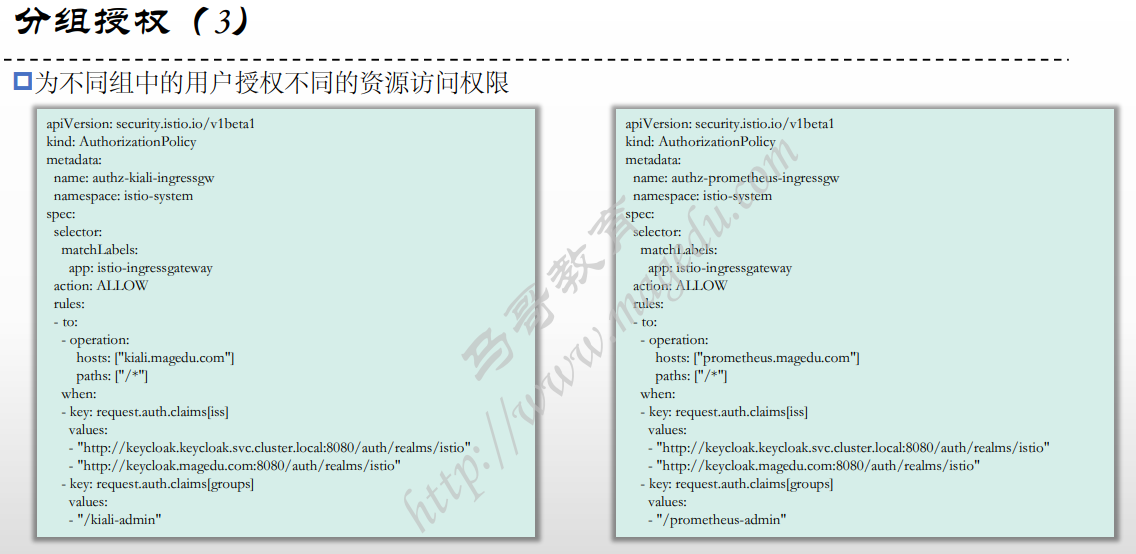
分组授权
[root@xksmaster1 bookinfo]# cat bookinfo-gateway.yaml
---
apiVersion: networking.istio.io/v1beta1
kind: Gateway
metadata:
  name: bookinfo-gateway
  namespace: istio-system
spec:
  selector:
    app: istio-ingressgateway
  servers:
  - port:
      number: 80
      name: http
      protocol: HTTP
    hosts:
    - "bookinfo.magedu.com"
    tls:
      httpsRedirect: true
  - port:
      number: 443
      name: https
      protocol: HTTPS
    tls:
      mode: SIMPLE
      credentialName: bookinfo-credential
    hosts:
    - "bookinfo.magedu.com"
---
You have new mail in /var/spool/mail/root
[root@xksmaster1 bookinfo]# cat bookinfo-virtualservice.yaml
apiVersion: networking.istio.io/v1beta1
kind: VirtualService
metadata:
  name: bookinfo-virtualservice
spec:
  hosts:
  - "bookinfo.magedu.com"
  gateways:
  - "istio-system/bookinfo-gateway"
  http:
  - match:
    - uri:
        prefix: /auth
    route:
    - destination:
        host: keycloak.keycloak.svc.cluster.local
        port:
          number: 8080
  - match:
    - uri:
        prefix: /oauth2
    route:
    - destination:
        host: oauth2-proxy.oauth2-proxy.svc.cluster.local
        port:
          number: 4180
  - match:
    - uri:
        exact: /productpage
    - uri:
        prefix: /static
    - uri:
        exact: /login
    - uri:
        exact: /logout
    - uri:
        prefix: /api/v1/products
    route:
    - destination:
        host: productpage
        port:
          number: 9080
---

[root@xksmaster1 bookinfo]# kubectl apply -f ./
gateway.networking.istio.io/bookinfo-gateway created
virtualservice.networking.istio.io/bookinfo-virtualservice created

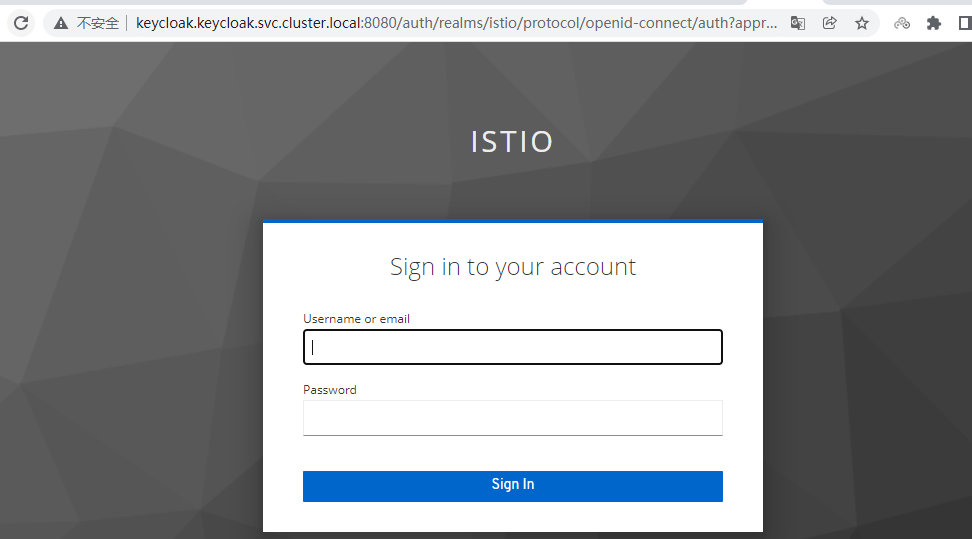
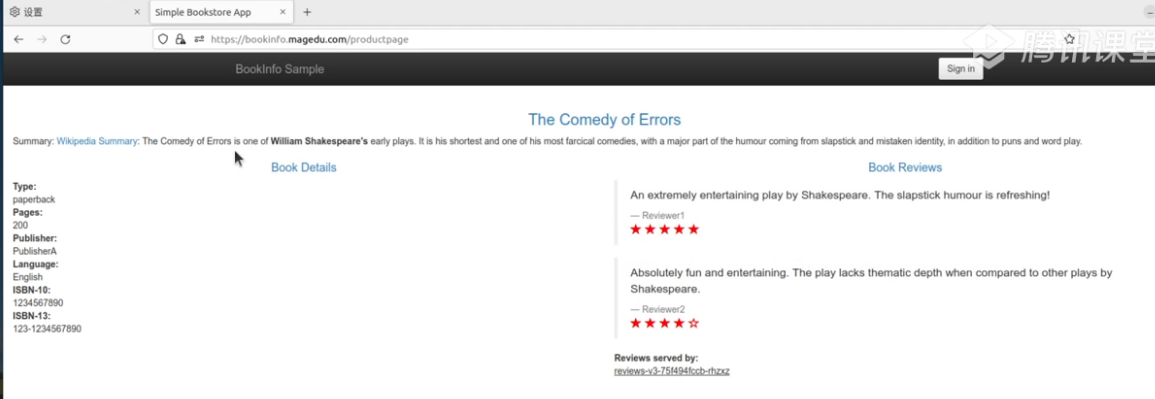
#此时访问 bookinfo.magedu.com 会跳转到keycloak上进行认证
http://bookinfo.magedu.com/productpage
http://bookinfo.magedu.com/productpage 访问跳转到 keycloak 输入账户密码进行登陆
====
  "birkhoff_roles": [
    "offline_access",
    "uma_authorization",
    "bookinfo-role",
    "default-roles-istio"
  ],
====

[root@xksmaster1 05-JWT-and-Keycloak]# cat 05-ingress-gateway-authz.yaml
apiVersion: security.istio.io/v1beta1
kind: AuthorizationPolicy
metadata:
  name: istio-ingressgateway
  namespace: istio-system
spec:
  selector:
    matchLabels:
      app: istio-ingressgateway
  action: ALLOW
  rules:
  - to:
    - operation:
        hosts: ["bookinfo.magedu.com"]
        paths: ["/*"]
    when:
    - key: request.auth.claims[iss]
      values:
      - "http://keycloak.keycloak.svc.cluster.local:8080/auth/realms/istio"
      - "http://keycloak.magedu.com:8080/auth/realms/istio"
    - key: request.auth.claims[birkhoff_roles]
      values:
      - "bookinfo-role"
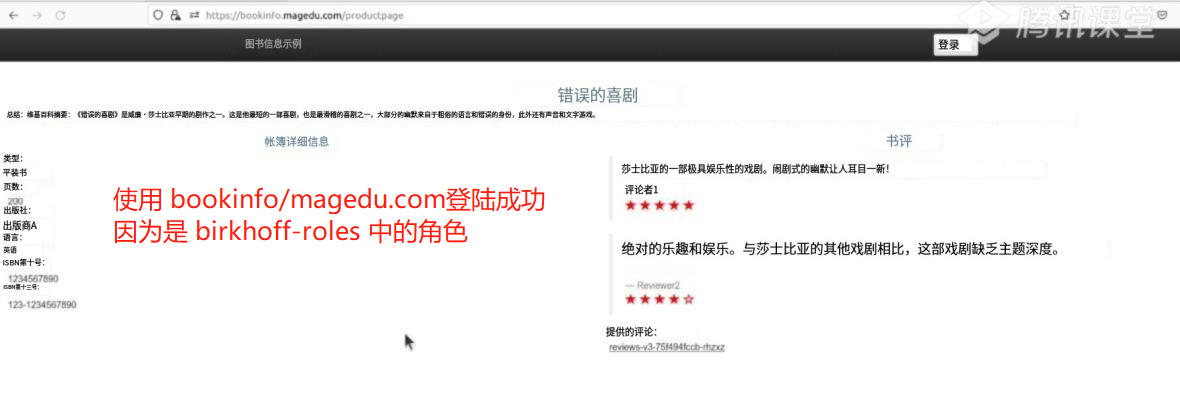
#此时 使用kiali登陆 无法登陆 因为不是bookinfo-role 这个角色

##此时 使用bookinfo登陆 登陆成功 因为是bookinfo-role 这个角色

 浙公网安备 33010602011771号