//-----------------------------------------------------------------------------
// Copyright (c) 2006 dhpoware. All Rights Reserved.
//
// Permission is hereby granted, free of charge, to any person obtaining a
// copy of this software and associated documentation files (the "Software"),
// to deal in the Software without restriction, including without limitation
// the rights to use, copy, modify, merge, publish, distribute, sublicense,
// and/or sell copies of the Software, and to permit persons to whom the
// Software is furnished to do so, subject to the following conditions:
//
// The above copyright notice and this permission notice shall be included in
// all copies or substantial portions of the Software.
//
// THE SOFTWARE IS PROVIDED "AS IS", WITHOUT WARRANTY OF ANY KIND, EXPRESS
// OR IMPLIED, INCLUDING BUT NOT LIMITED TO THE WARRANTIES OF MERCHANTABILITY,
// FITNESS FOR A PARTICULAR PURPOSE AND NONINFRINGEMENT. IN NO EVENT SHALL THE
// AUTHORS OR COPYRIGHT HOLDERS BE LIABLE FOR ANY CLAIM, DAMAGES OR OTHER
// LIABILITY, WHETHER IN AN ACTION OF CONTRACT, TORT OR OTHERWISE, ARISING
// FROM, OUT OF OR IN CONNECTION WITH THE SOFTWARE OR THE USE OR OTHER DEALINGS
// IN THE SOFTWARE.
//-----------------------------------------------------------------------------
//
// This demo builds on the previous layered window demo.
// (http://www.dhpoware.com/downloads/LayeredWindow.zip).
//
// In the previous demo, we used a TGA image with an embedded alpha mask as the
// source of our layered window.
//
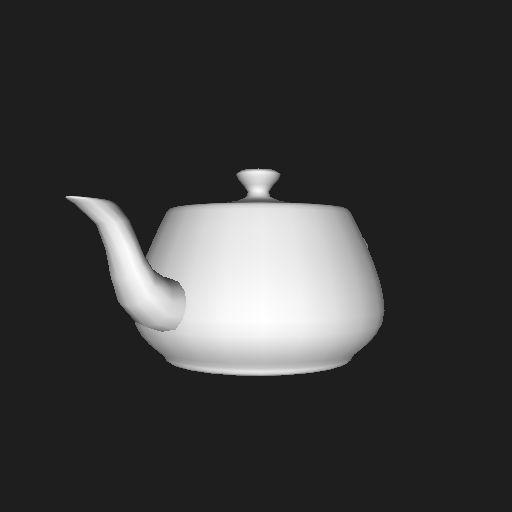
// In this demo we use Direct3D to draw a rotating teapot to an off-screen
// texture. We then use this off-screen texture as our non-rectangular, per
// pixel alpha blended layered window.
//
// You can move the teapot around the screen by holding down the left mouse
// button and dragging. To exit the demo press the ESC key.
//
// This demo requires Windows 2000, XP, or higher to run. The minimum supported
// operating system for the layered windows API is Windows 2000.
//
//-----------------------------------------------------------------------------
//include dir $(DXSDK_DIR)Include;
//lib dir $(DXSDK_DIR)Lib\x86
//libs dxguid.lib d3d9.lib d3dx9.lib winmm.lib
// Force the layered windows APIs to be visible.
#define _WIN32_WINNT 0x0500
// Disable warning C4244: conversion from 'float' to 'BYTE', possible loss of
// data. Used in the ImagePreMultAlpha() function.
#pragma warning (disable : 4244)
#if defined _DEBUG
#define D3D_DEBUG_INFO
#endif
#include <windows.h>
#include <tchar.h>
#include <mmsystem.h>
#include <cstdio>
#include <d3dx9.h>
#include <crtdbg.h>
#define IMAGE_WIDTH 512
#define IMAGE_HEIGHT 512
// Generic wrapper around a DIB with a 32-bit color depth.
struct Image
{
int width;
int height;
int pitch;
HDC hdc;
HBITMAP hBitmap;
BITMAPINFO info;
BYTE *pPixels;
};
HWND g_hWnd;
Image g_image;
IDirect3D9 *g_pDirect3D;
IDirect3DDevice9 *g_pDevice;
IDirect3DTexture9 *g_pTexture;
IDirect3DSurface9 *g_pSurface;
IDirect3DSurface9 *g_pRenderTargetSurface;
IDirect3DSurface9 *g_pDepthStencilSurface;
ID3DXMesh *g_pMesh;
D3DXMATRIX g_worldMtx;
int g_frames;
void ImageDestroy(Image *pImage)
{
if (!pImage)
return;
pImage->width = 0;
pImage->height = 0;
pImage->pitch = 0;
if (pImage->hBitmap)
{
DeleteObject(pImage->hBitmap);
pImage->hBitmap = 0;
}
if (pImage->hdc)
{
DeleteDC(pImage->hdc);
pImage->hdc = 0;
}
memset(&pImage->info, 0, sizeof(pImage->info));
pImage->pPixels = 0;
}
bool ImageCreate(Image *pImage, int width, int height)
{
if (!pImage)
return false;
// All Windows DIBs are aligned to 4-byte (DWORD) memory boundaries. This
// means that each scan line is padded with extra bytes to ensure that the
// next scan line starts on a 4-byte memory boundary. The 'pitch' member
// of the Image structure contains width of each scan line (in bytes).
pImage->width = width;
pImage->height = height;
pImage->pitch = ((width * 32 + 31) & ~31) >> 3;
pImage->pPixels = NULL;
pImage->hdc = CreateCompatibleDC(NULL);
if (!pImage->hdc)
return false;
memset(&pImage->info, 0, sizeof(pImage->info));
pImage->info.bmiHeader.biSize = sizeof(pImage->info.bmiHeader);
pImage->info.bmiHeader.biBitCount = 32;
pImage->info.bmiHeader.biWidth = width;
pImage->info.bmiHeader.biHeight = -height;
pImage->info.bmiHeader.biCompression = BI_RGB;
pImage->info.bmiHeader.biPlanes = 1;
pImage->hBitmap = CreateDIBSection(pImage->hdc, &pImage->info,
DIB_RGB_COLORS, (void**)&pImage->pPixels, NULL, 0);
if (!pImage->hBitmap)
{
ImageDestroy(pImage);
return false;
}
GdiFlush();
return true;
}
void ImagePreMultAlpha(Image *pImage)
{
// The per pixel alpha blending API for layered windows deals with
// pre-multiplied alpha values in the RGB channels. For further details see
// the MSDN documentation for the BLENDFUNCTION structure. It basically
// means we have to multiply each red, green, and blue channel in our image
// with the alpha value divided by 255.
//
// Notes:
// 1. ImagePreMultAlpha() needs to be called before every call to
// UpdateLayeredWindow() (in the RedrawLayeredWindow() function).
//
// 2. Must divide by 255.0 instead of 255 to prevent alpha values in range
// [1, 254] from causing the pixel to become black. This will cause a
// conversion from 'float' to 'BYTE' possible loss of data warning which
// can be safely ignored.
if (!pImage)
return;
BYTE *pPixel = NULL;
if (pImage->width * 4 == pImage->pitch)
{
// This is a special case. When the image width is already a multiple
// of 4 the image does not require any padding bytes at the end of each
// scan line. Consequently we do not need to address each scan line
// separately. This is much faster than the below case where the image
// width is not a multiple of 4.
int totalBytes = pImage->width * pImage->height * 4;
for (int i = 0; i < totalBytes; i += 4)
{
pPixel = &pImage->pPixels[i];
pPixel[0] *= (BYTE)((float)pPixel[3] / 255.0f);
pPixel[1] *= (BYTE)((float)pPixel[3] / 255.0f);
pPixel[2] *= (BYTE)((float)pPixel[3] / 255.0f);
}
}
else
{
// Width of the image is not a multiple of 4. So padding bytes have
// been included in the DIB's pixel data. Need to address each scan
// line separately. This is much slower than the above case where the
// width of the image is already a multiple of 4.
for (int y = 0; y < pImage->height; ++y)
{
for (int x = 0; x < pImage->width; ++x)
{
pPixel = &pImage->pPixels[(y * pImage->pitch) + (x * 4)];
pPixel[0] *= (BYTE)((float)pPixel[3] / 255.0f);
pPixel[1] *= (BYTE)((float)pPixel[3] / 255.0f);
pPixel[2] *= (BYTE)((float)pPixel[3] / 255.0f);
}
}
}
}
void RedrawLayeredWindow()
{
// The call to UpdateLayeredWindow() is what makes a non-rectangular
// window possible. To enable per pixel alpha blending we pass in the
// argument ULW_ALPHA, and provide a BLENDFUNCTION structure filled in
// to do per pixel alpha blending.
HDC hdc = GetDC(g_hWnd);
if (hdc)
{
HGDIOBJ hPrevObj = 0;
POINT ptDest = {0, 0};
POINT ptSrc = {0, 0};
SIZE client = {g_image.width, g_image.height};
BLENDFUNCTION blendFunc = {AC_SRC_OVER, 0, 255, AC_SRC_ALPHA};
hPrevObj = SelectObject(g_image.hdc, g_image.hBitmap);
ClientToScreen(g_hWnd, &ptDest);
UpdateLayeredWindow(g_hWnd, hdc, &ptDest, &client,
g_image.hdc, &ptSrc, 0, &blendFunc, ULW_ALPHA);
SelectObject(g_image.hdc, hPrevObj);
ReleaseDC(g_hWnd, hdc);
}
}
void Cleanup()
{
if (g_pMesh)
{
g_pMesh->Release();
g_pMesh = 0;
}
if (g_pSurface)
{
g_pSurface->Release();
g_pSurface = 0;
}
if (g_pDepthStencilSurface)
{
g_pDepthStencilSurface->Release();
g_pDepthStencilSurface = 0;
}
if (g_pRenderTargetSurface)
{
g_pRenderTargetSurface->Release();
g_pRenderTargetSurface = 0;
}
if (g_pTexture)
{
g_pTexture->Release();
g_pTexture = 0;
}
if (g_pDevice)
{
g_pDevice->Release();
g_pDevice = 0;
}
if (g_pDirect3D)
{
g_pDirect3D->Release();
g_pDirect3D = 0;
}
ImageDestroy(&g_image);
}
BOOL InitRenderToTexture(D3DFORMAT format, D3DFORMAT depthStencil)
{
HRESULT hr = 0;
int width = g_image.width;
int height = g_image.height;
// Create the dynamic render target texture. Since we want use this texture
// with the Win32 layered windows API to create a per pixel alpha blended
// non-rectangular window we *must* use a D3DFORMAT that contains an ALPHA
// channel.
hr = D3DXCreateTexture(g_pDevice, width, height, 0, D3DUSAGE_RENDERTARGET,
format, D3DPOOL_DEFAULT, &g_pTexture);
if (FAILED(hr))
return FALSE;
// Cache the top level surface of the render target texture. This will make
// it easier to bind the dynamic render target texture to the device.
hr = g_pTexture->GetSurfaceLevel(0, &g_pRenderTargetSurface);
if (FAILED(hr))
return FALSE;
// Create a depth-stencil surface so the scene rendered to the dynamic
// texture will be correctly depth sorted.
hr = g_pDevice->CreateDepthStencilSurface(width, height, depthStencil,
D3DMULTISAMPLE_NONE, 0, TRUE, &g_pDepthStencilSurface, 0);
if (FAILED(hr))
return FALSE;
// Create an off-screen plain system memory surface. This system memory
// surface will be used to fetch a copy of the pixel data rendered into the
// render target texture. We can't directly read the render target texture
// because textures created with D3DPOOL_DEFAULT can't be locked.
hr = g_pDevice->CreateOffscreenPlainSurface(width, height,
format, D3DPOOL_SYSTEMMEM, &g_pSurface, 0);
return TRUE;
}
BOOL InitD3D()
{
HRESULT hr = 0;
D3DPRESENT_PARAMETERS params = {0};
D3DDISPLAYMODE desktop = {0};
g_pDirect3D = Direct3DCreate9(D3D_SDK_VERSION);
if (!g_pDirect3D)
return FALSE;
// Just use the current desktop display mode.
hr = g_pDirect3D->GetAdapterDisplayMode(D3DADAPTER_DEFAULT, &desktop);
if (FAILED(hr))
return FALSE;
// Setup Direct3D for windowed rendering.
params.BackBufferWidth = 0;
params.BackBufferHeight = 0;
params.BackBufferFormat = desktop.Format;
params.BackBufferCount = 1;
params.MultiSampleType = D3DMULTISAMPLE_NONE;
params.MultiSampleQuality = 0;
params.SwapEffect = D3DSWAPEFFECT_DISCARD;
params.hDeviceWindow = g_hWnd;
params.Windowed = TRUE;
params.EnableAutoDepthStencil = TRUE;
params.AutoDepthStencilFormat = D3DFMT_D24S8;
params.Flags = D3DPRESENTFLAG_DISCARD_DEPTHSTENCIL;
params.FullScreen_RefreshRateInHz = 0;
params.PresentationInterval = D3DPRESENT_INTERVAL_DEFAULT;
// Most modern video cards should have no problems creating pure devices.
hr = g_pDirect3D->CreateDevice(D3DADAPTER_DEFAULT, D3DDEVTYPE_HAL, g_hWnd,
D3DCREATE_HARDWARE_VERTEXPROCESSING | D3DCREATE_PUREDEVICE,
¶ms, &g_pDevice);
if (FAILED(hr))
{
// Fall back to software vertex processing for less capable hardware.
hr = g_pDirect3D->CreateDevice(D3DADAPTER_DEFAULT, D3DDEVTYPE_HAL,
g_hWnd, D3DCREATE_SOFTWARE_VERTEXPROCESSING, ¶ms, &g_pDevice);
}
if (FAILED(hr))
return FALSE;
// Create the textures and surfaces required for off-screen rendering.
// Since we intend to use the rendered pixel data with the Win32 layered
// windows API (to draw an alpha blended window) we *must* ensure the
// created off-screen texture uses a format that supports an alpha channel.
if (!InitRenderToTexture(D3DFMT_A8R8G8B8, D3DFMT_D24S8))
return FALSE;
if (FAILED(D3DXCreateTeapot(g_pDevice, &g_pMesh, 0)))
return FALSE;
D3DLIGHT9 defaultLight =
{
D3DLIGHT_DIRECTIONAL, // type
1.0f, 1.0f, 1.0f, 0.0f, // diffuse
1.0f, 1.0f, 1.0f, 0.0f, // specular
1.0f, 1.0f, 1.0f, 0.0f, // ambient
0.0f, 0.0f, 0.0f, // position
0.0f, 0.0f, 1.0f, // direction
1000.0f, // range
1.0f, // falloff
0.0f, // attenuation0 (constant)
1.0f, // attenuation1 (linear)
0.0f, // attenuation2 (quadratic)
0.0f, // theta
0.0f // phi
};
D3DMATERIAL9 defaultMaterial =
{
0.8f, 0.8f, 0.8f, 1.0f, // diffuse
0.2f, 0.2f, 0.2f, 1.0f, // ambient
0.0f, 0.0f, 0.0f, 1.0f, // specular
0.0f, 0.0f, 0.0f, 1.0f, // emissive
0.0f // power
};
D3DXMATRIX projMtx;
D3DXMATRIX viewMtx;
D3DXMatrixPerspectiveFovLH(&projMtx, D3DX_PI / 4.0f,
(float)g_image.width / (float)g_image.height, 1.0f, 100.0f);
D3DXMatrixLookAtLH(&viewMtx, &D3DXVECTOR3(0.0f, 0.0f, -5.0f),
&D3DXVECTOR3(0.0f, 0.0f, 0.0f), &D3DXVECTOR3(0.0f, 1.0f, 0.0f));
g_pDevice->SetRenderState(D3DRS_ZENABLE, TRUE);
g_pDevice->SetRenderState(D3DRS_LIGHTING, TRUE);
g_pDevice->SetRenderState(D3DRS_ALPHABLENDENABLE, TRUE);
g_pDevice->SetRenderState(D3DRS_SRCBLEND, D3DBLEND_SRCALPHA);
g_pDevice->SetRenderState(D3DRS_DESTBLEND, D3DBLEND_INVSRCALPHA);
g_pDevice->SetLight(0, &defaultLight);
g_pDevice->LightEnable(0, TRUE);
g_pDevice->SetMaterial(&defaultMaterial);
g_pDevice->SetTransform(D3DTS_PROJECTION, &projMtx);
g_pDevice->SetTransform(D3DTS_VIEW, &viewMtx);
return TRUE;
}
BOOL Init()
{
if (!ImageCreate(&g_image, IMAGE_WIDTH, IMAGE_HEIGHT))
return FALSE;
if (!InitD3D())
{
Cleanup();
return FALSE;
}
return TRUE;
}
void CopyRenderTextureToImage()
{
// Dynamic render target textures are created with D3DPOOL_DEFAULT and so
// cannot be locked. To access the dynamic texture's pixel data we need to
// get Direct3D to make a system memory copy of the texture. The system
// memory copy can then be accessed and copies across to our Image
// structure. This copying from video memory to system memory is slow.
// So try not to make your dynamic textures too big if you intend to access
// their pixel data.
HRESULT hr = 0;
D3DLOCKED_RECT rcLock = {0};
hr = g_pDevice->GetRenderTargetData(g_pRenderTargetSurface, g_pSurface);
if (SUCCEEDED(hr))
{
hr = g_pSurface->LockRect(&rcLock, 0, 0);
if (SUCCEEDED(hr))
{
const BYTE *pSrc = (const BYTE *)rcLock.pBits;
BYTE *pDest = g_image.pPixels;
int srcPitch = rcLock.Pitch;
int destPitch = g_image.pitch;
if (srcPitch == destPitch)
{
memcpy(pDest, pSrc, destPitch * g_image.height);
}
else
{
for (int i = 0; i < g_image.height; ++i)
memcpy(&pDest[destPitch * i], &pSrc[srcPitch * i], destPitch);
}
g_pSurface->UnlockRect();
}
}
}
void DrawFrame()
{
// Tell Direct3D that we want to off-screen rendering to our dynamic render
// texture. This is done by binding our depth-stencil, and render target
// texture surfaces.
g_pDevice->SetDepthStencilSurface(g_pDepthStencilSurface);
g_pDevice->SetRenderTarget(0, g_pRenderTargetSurface);
// Clear the off-screen texture. We don't want the background to be visible
// in our final layered window image so we set the clear color to be fully
// transparent (by specifying a zero alpha component).
g_pDevice->Clear(0, 0,
D3DCLEAR_TARGET | D3DCLEAR_ZBUFFER | D3DCLEAR_ZBUFFER,
D3DCOLOR_COLORVALUE(0.0f, 0.0f, 0.0f, 0.0f), 1.0f, 0);
if (SUCCEEDED(g_pDevice->BeginScene()))
{
// Draw a rotating teapot.
D3DXMatrixRotationY(&g_worldMtx, timeGetTime() / 150.0f);
g_pDevice->SetTransform(D3DTS_WORLD, &g_worldMtx);
g_pMesh->DrawSubset(0);
// Since we're doing off-screen rendering we don't call Present().
// However we still must call EndScene() to finish rendering the scene.
g_pDevice->EndScene();
// At this stage the off-screen texture will contain our teapot scene.
// Now we make a system memory copy of the off-screen texture (located
// in video memory).
CopyRenderTextureToImage();
// Then we pre-multiply each pixel with its alpha component. This is how
// the layered windows API expects images containing alpha information.
ImagePreMultAlpha(&g_image);
// Finally we update our layered window with our teapot scene.
RedrawLayeredWindow();
++g_frames;
}
}
LRESULT CALLBACK WindowProc(HWND hWnd, UINT msg, WPARAM wParam, LPARAM lParam)
{
static TCHAR szBuffer[32] = {0};
switch (msg)
{
case WM_CREATE:
timeBeginPeriod(1);
SetTimer(hWnd, 1, 1000, 0);
return 0;
case WM_DESTROY:
KillTimer(hWnd, 1);
timeEndPeriod(1);
PostQuitMessage(0);
return 0;
case WM_KEYDOWN:
if (wParam == VK_ESCAPE)
{
SendMessage(hWnd, WM_CLOSE, 0, 0);
return 0;
}
break;
case WM_NCHITTEST:
return HTCAPTION; // allows dragging of the window
case WM_TIMER:
_stprintf(szBuffer, _TEXT("%d FPS"), g_frames);
SetWindowText(hWnd, szBuffer);
g_frames = 0;
return 0;
default:
break;
}
return DefWindowProc(hWnd, msg, wParam, lParam);
}
void DetectMemoryLeaks()
{
// Enable the memory leak tracking tools built into the CRT runtime.
#if defined _DEBUG
_CrtSetDbgFlag(_CRTDBG_LEAK_CHECK_DF | _CRTDBG_ALLOC_MEM_DF);
_CrtSetReportMode(_CRT_ASSERT, _CRTDBG_MODE_FILE);
_CrtSetReportFile(_CRT_ASSERT, _CRTDBG_FILE_STDERR);
#endif
}
int WINAPI WinMain(HINSTANCE hInstance, HINSTANCE hPrevInstance,
LPSTR lpCmdLine, int nShowCmd)
{
DetectMemoryLeaks();
MSG msg = {0};
WNDCLASSEX wcl = {0};
wcl.cbSize = sizeof(wcl);
wcl.style = CS_HREDRAW | CS_VREDRAW;
wcl.lpfnWndProc = WindowProc;
wcl.cbClsExtra = 0;
wcl.cbWndExtra = 0;
wcl.hInstance = hInstance;
wcl.hIcon = LoadIcon(0, IDI_APPLICATION);
wcl.hCursor = LoadCursor(0, IDC_ARROW);
wcl.hbrBackground = 0;
wcl.lpszMenuName = 0;
wcl.lpszClassName = TEXT("D3DLayeredWindowClass");
wcl.hIconSm = 0;
if (!RegisterClassEx(&wcl))
return 0;
g_hWnd = CreateWindowEx(WS_EX_LAYERED | WS_EX_TOPMOST, wcl.lpszClassName,
TEXT("D3D Layered Window Demo"), WS_POPUP, 0, 0,
IMAGE_WIDTH, IMAGE_HEIGHT, 0, 0,
wcl.hInstance, 0);
if (g_hWnd)
{
if (Init())
{
ShowWindow(g_hWnd, nShowCmd);
UpdateWindow(g_hWnd);
while (TRUE)
{
if (PeekMessage(&msg, 0, 0, 0, PM_REMOVE))
{
if (msg.message == WM_QUIT)
break;
TranslateMessage(&msg);
DispatchMessage(&msg);
}
else
{
DrawFrame();
}
}
}
Cleanup();
UnregisterClass(wcl.lpszClassName, hInstance);
}
return (int)(msg.wParam);
}


 浙公网安备 33010602011771号