
ORACLE SQLplus 登录
【故障处理】ORA-12162: TNS:net service name is incorrectly specified
本文将给大家阐述一个因未设置系统环境变量ORACLE_SID导致ORA-12162错误的案例。希望大家有所思考。
1.获得有关ORA-12162报错信息的通用表述信息
[oracle@asdlabdb01 ~]$ oerr ora 12162
12162, 00000, "TNS:net service name is incorrectly specified"
// *Cause: The connect descriptor corresponding to the net service name in
// TNSNAMES.ORA or in the directory server (Oracle Internet Directory) is
// incorrectly specified.
// *Action: If using local naming make sure there are no syntax errors in
// the corresponding connect descriptor in the TNSNAMES.ORA file. If using
// directory naming check the information provided through the administration
// used for directory naming.
2.故障现象
本文所要描述的故障与这个通用的问题描述不同,在数据库服务器端使用TNSNAMES.ORA中记录的连接串连接没有问题,但如若未指定连接串,将会报出ORA-12162错误。
1)使用system用户尝试登录系统,此时便会收到报错如下信息
[oracle@asdlabdb01 ~]$ sqlplus system/sys
SQL*Plus: Release 10.2.0.3.0 - Production on Sat Aug 27 22:54:02 2010
Copyright (c) 1982, 2006, Oracle. All Rights Reserved.
ERROR:
ORA-12162: TNS:net service name is incorrectly specified
Enter user-name:
2)使用sysdba身份登陆会得到同样的错误信息
[oracle@asdlabdb01 ~]$ sqlplus / as sysdba
SQL*Plus: Release 10.2.0.3.0 - Production on Sat Aug 27 22:54:48 2010
Copyright (c) 1982, 2006, Oracle. All Rights Reserved.
ERROR:
ORA-12162: TNS:net service name is incorrectly specified
Enter user-name:
3)但此时,如果使用服务名方式连接数据库,是可以成功的,这也是该问题现象的诡异之处。
[oracle@asdlabdb01 ~]$ sqlplus system/sys@ora10g
SQL*Plus: Release 10.2.0.3.0 - Production on Sat Aug 27 22:53:41 2010
Copyright (c) 1982, 2006, Oracle. All Rights Reserved.
Connected to:
Oracle Database 10g Enterprise Edition Release 10.2.0.3.0 - 64bit Production
With the Partitioning, Oracle Label Security, OLAP and Data Mining Scoring Engine options
system@ora10g>
想象一下,你的目标是快速的进入到数据库中进行维护操作,但此时登录都遭遇障碍,会感到非常的别扭。更让人抓狂的是,如果此时使用连接串登录到数据库进行停起操作,结果将会处于更加惨烈境况:数据库将因为无法正常登录导致无法启动数据库。
3.故障原因
诡异的故障背后的原因竟然是那样的基础:ORACLE_SID没有指定!
确认系统当前的ORACLE_HOME和ORACLE_SID环境变量
[oracle@asdlabdb01 ~]$ echo $ORACLE_HOME
/oracle/app/oracle/product/10.2.0/db_1
[oracle@asdlabdb01 ~]$ echo $ORACLE_SID
[oracle@asdlabdb01 ~]$
可见,此时只设置了ORACLE_HOME环境变量,但ORACLE_SID此时为空,这就是该问题的真实原因。
4.故障处理
给出ORACLE_SID,重新尝试登录。
[oracle@asdlabdb01 ~]$ export ORACLE_SID=ora10g
[oracle@asdlabdb01 ~]$ echo $ORACLE_SID
ora10g
[oracle@asdlabdb01 ~]$ sqlplus / as sysdba
SQL*Plus: Release 10.2.0.3.0 - Production on Sat Aug 27 23:27:34 2010
Copyright (c) 1982, 2006, Oracle. All Rights Reserved.
Connected to:
Oracle Database 10g Enterprise Edition Release 10.2.0.3.0 - 64bit Production
With the Partitioning, Oracle Label Security, OLAP and Data Mining Scoring Engine options
sys@ora10g>
OK,此时问题处理完毕。
SQLplus
+++++++++++++++++++++++++++++++++++++++++++++++++++++++++++++++++++++++
Start SQL*Plus.
Submit the SQL*Plus CONNECT Command
This example connects locally with theSYSDBAprivilege with operating system authentication
connect / as sysdba
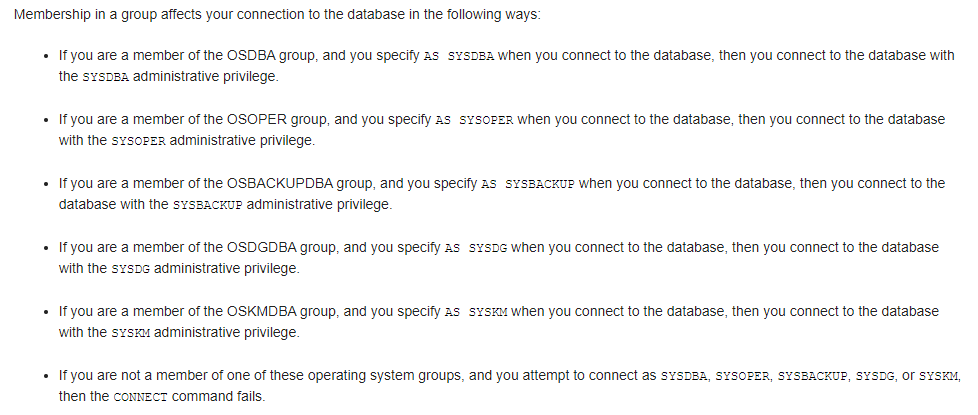
以sysdba的管理权限登录。操作系统授权登录。在数据库安装的时候会设置操作系统组,只有在特定的操作系统组的登录用户才能以这样的方式赋予相应的管理员权限访问数据库。

+++++++++++++++++++++++++++++++++++++++++++++++++++++++++++++++++++++++
5.小结
这个案例给我们的启迪是什么?
1)系统默认的错误提示信息有时不具有参考价值。而且,某些情况下这些错误提示还可能给我们带来误导。原因很简单,系统默认的错误提示信息不可能囊括所有故障现象;
2)任何系统级别的设置问题都有可能导致数据库系统出现异常;
3)在遇到故障的时候,我们需要沉着冷静。有些时候可能需要我们Check最原始的信息,切莫想当然。
建议:为了避免出现文章中提到的问题,第一,可以将ORACLE_SID等环境变量写入到系统profile中,但需要确保系统profile文件内容的有效性;第二,不在profile中进行填写,每次登录数据库服务器时手工完成数据库环境变量的指定,这种方法虽然增加了键盘的敲击,但它更直观、更有保障。

 浙公网安备 33010602011771号