
在Vue项目中添加单元测试
搭建基于jest的vue的单元测试环境
jest中文文档 jest 包含了 karma + mocha + chai + sinon 的所有常用功能,零配置开箱即用
安装依赖
npm install jest vue-jest babel-jest @vue/test-utils -D
jest配置文件
// ./test/unit/jest.conf.js
const path = require('path');

module.exports = {
  rootDir: path.resolve(__dirname, '../../'),
  moduleFileExtensions: [
    'js',
    'json',
    'vue', // 告诉 Jest 处理 `*.vue` 文件
  ],
  moduleNameMapper: {
    // 把@设置为/src的别名
    '^@/(.*)$': '<rootDir>/src/$1',
  },
  transform: {
    // 用 `babel-jest` 处理 `*.js` 文件
    '^.+\\.js$': '<rootDir>/node_modules/babel-jest',
    // 用 `vue-jest` 处理 `*.vue` 文件
    '.*\\.(vue)$': '<rootDir>/node_modules/vue-jest',
  },
  setupFiles: ['<rootDir>/test/unit/setup'],
  coverageDirectory: '<rootDir>/test/unit/coverage',
  collectCoverageFrom: [
    'src/**/*.{js,vue}',
    '!src/main.js',
    '!src/router/index.js',
    '!**/node_modules/**',
  ],
};
启动文件setup.js
// ./test/unit/setup.js
import Vue from 'vue';

Vue.config.productionTip = false;
添加jest启动脚本
"scripts": {
  "unit": "jest --config test/unit/jest.conf.js --coverage",
},
编写测试文件
// ./src/components/hello-world/HelloWorld.vue

<template>
  <div>
    <h1 id="title">{{ msg }}</h1>
  </div>
</template>

<script>
export default {
  name: 'HelloWorld',
  data() {
    return {
      msg: 'Hello Jest',
    };
  },
};
</script>
// ./src/components/hello-world/HelloWorld.spec.js

import { shallowMount } from '@vue/test-utils';
import HelloWorld from './HelloWorld';

describe('<hello-world/>', () => {
  it('should render correct contents', () => {
    const wrapper = shallowMount(HelloWorld);
    expect(wrapper.find('#title').text())
      .toEqual('Vue.js App');
  });
});
默认情况下,Jest 测试文件扩展名为 .spec.js 或 .test.js
启动测试
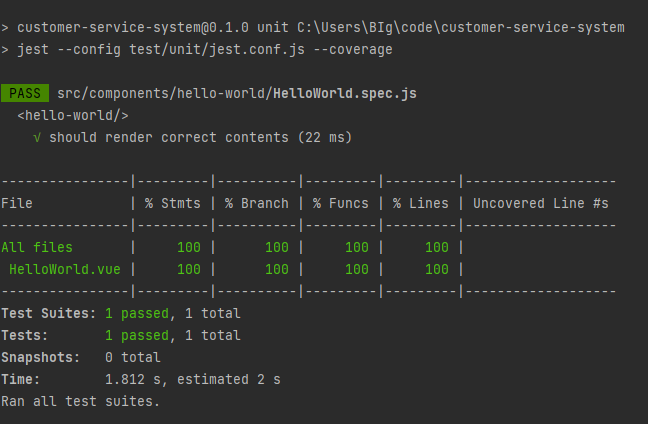
npm run unit
jest 会自动扫描项目目录下所有文件名以 .spec.js或.test.js 结尾的测试文件,并执行测试用例。

 浙公网安备 33010602011771号