
springboot文件上传下载
概述
今天本来是想写一个干净的springboot架子,因为安卓学到异步任务,需要进行的资料的下载,所以就想快速搭建一个服务器端程序,并且将文件放在服务器上,这样的话就可以通过安卓应用程序访问并下载资源,其实在之前,我直接将资源放在了webapp下面,没有做任何处理也能下,但是那样时浏览器在帮你工作,是一种变相的实现,但是可使用性特别差,言归正转,今天我们来讲一讲springboot文件的上传和下载,同时说明这种东西版本不同,各有千秋。
搭建环境
配置spring boot项目配置文件
<java.version>1.8</java.version>
以上是最基础的pom.xml文件,可以保持项目正常启动,具体配置看解析。
前台页面
主要演示单文件上传、多文件上传、单文件下载
单文件上传
文件下载
下载文件
多文件上传
注意:最早的HTTP POST是不支持文件上传的,给编程开发带来很多问题。但是在1995年,ietf出台了rfc1867,也就是《RFC 1867 -Form-based File Upload in HTML》,用以支持文件上传。所以Content-Type的类型扩充了multipart/form-data用以支持向服务器发送二进制数据。因此发送post请求时候,表单属性enctype共有二个值可选,这个属性管理的是表单的MIME编码:①application/x-www-form-urlencoded(默认值);②multipart/form-data。其实form表单在你不写enctype属性时,也默认为其添加了enctype属性值,默认值是enctype=“application/x- www-form-urlencoded”.
后台代码
单文件上传
//单文件上传
@RequestMapping(value = "/upload")
public String upload(@RequestParam("file") MultipartFile file, HttpServletRequest request) {
try {
//返回给前台的提示
if (file.isEmpty()) {
return "文件为空";
}
// 获取文件名
String fileName = file.getOriginalFilename();
// 获取文件的后缀名(可选操作)
String suffixName = fileName.substring(fileName.lastIndexOf("."));
// 设置文件存储路径,为了不写死,我专门上网找了相关资料研究了怎么样获取项目相对物理路径
//获取当前项目路径
//项目的物理路径到classes
File pathxx = new File(ResourceUtils.getURL("classpath:").getPath());
//项目的物理路径下指定的文件夹
File upload = new File(pathxx.getAbsolutePath(), "static/upload/");
//如果没有则创建它
if (!upload.exists()) upload.mkdirs();
//这里虽然我们加的是“\”,但是转义之后便是“/”
String uploadPath = upload + "\";
//文件的完整路径
String path = uploadPath + fileName;
File dest = new File(path);
// 检测是否存在目录
if (!dest.getParentFile().exists()) {
dest.getParentFile().mkdirs();// 新建文件夹
}
//transferto()方法,是springmvc封装的方法,用于图片上传时,把内存中图片写入磁盘,简化了传统io的操作流程
file.transferTo(dest);// 文件写入
return "上传成功";
} catch (IllegalStateException e) {
e.printStackTrace();
} catch (IOException e) {
e.printStackTrace();
}
return "上传失败";
}
多文件上传
//多文件上传
@PostMapping("/uploads")
public String handleFileUpload(HttpServletRequest request) throws FileNotFoundException {
List
MultipartFile file = null;
BufferedOutputStream stream = null;
for (int i = 0; i < files.size(); ++i) {
file = files.get(i);
File pathxx = new File(ResourceUtils.getURL("classpath:").getPath());
File upload = new File(pathxx.getAbsolutePath(), "static/upload/");
if (!upload.exists()) upload.mkdirs();
String filePath = upload + "\";
if (!file.isEmpty()) {
try {
//i/o流的写入写出,在此之前都是由模板代码的
//获取文件字节数组,MultipartFile下的接口
byte[] bytes = file.getBytes();
stream = new BufferedOutputStream(new FileOutputStream(
new File(filePath + file.getOriginalFilename())));//设置文件路径及名字
//可以看看源码,会发线,与i/o模板相似
stream.write(bytes);// 写入
stream.close();
} catch (Exception e) {
stream = null;
return "第 " + i + " 个文件上传失败 ==> "
+ e.getMessage();
}
} else {
return "第 " + i
+ " 个文件上传失败因为文件为空";
}
}
return "上传成功";
}
单文件下载
@GetMapping("/download")
public String downloadFile(HttpServletRequest request, HttpServletResponse response) throws FileNotFoundException {
//这个名字在实际项目中也需要动态获取,这里只做个演示
String fileName = "app-release.apk";// 文件名
if (fileName != null) {
//设置文件路径
File pathxx = new File(ResourceUtils.getURL("classpath:").getPath());
File upload = new File(pathxx.getAbsolutePath(), "static/upload/");
if (!upload.exists()) upload.mkdirs();
String filePath = upload + "\";
//动态拼接项目路径
File file = new File(filePath+fileName);
if (file.exists()) {
response.setContentType("application/force-download");// 设置强制下载不打开
response.addHeader("Content-Disposition", "attachment;fileName=" + fileName);// 设置文件名
//以下便是i/o模板代码
byte[] buffer = new byte[1024];
FileInputStream fis = null;
BufferedInputStream bis = null;
try {
fis = new FileInputStream(file);
bis = new BufferedInputStream(fis);
OutputStream os = response.getOutputStream();
int i = bis.read(buffer);
while (i != -1) {
os.write(buffer, 0, i);
i = bis.read(buffer);
}
return "下载成功";
} catch (Exception e) {
e.printStackTrace();
} finally {
if (bis != null) {
try {
bis.close();
} catch (IOException e) {
e.printStackTrace();
}
}
if (fis != null) {
try {
fis.close();
} catch (IOException e) {
e.printStackTrace();
}
}
}
}
}
return "下载失败";
}
配置文件
设置端口
server.port=80
#设置上传下载参数(springboot版本不同,设置的方式也不一样)
spring.servlet.multipart.max-file-size=30MB
spring.servlet.multipart.maxRequestSize=30MB
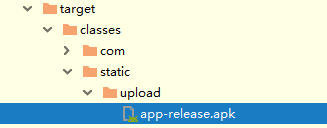
最后上传的位置会在
欢迎各位批评指正
本文参考https://www.jianshu.com/p/85017f5ecba1

 浙公网安备 33010602011771号