
creating server tcp listening socket 127.0.0.1:6379: bind No error
参考链接:https://blog.csdn.net/n_fly/article/details/52692480
1、window10环境下面安装的redis,之前安装好弄了一下,过了好几天,再次使用redis-server.exe命令启动,发现报了如下所示的错误:
 1 D:\biehl\redis>redis-server.exe
 2 [16916] 28 Nov 19:43:49.684 # Warning: no config file specified, using the default config. In order to specify a config file use redis-server.exe /path/to/redis.conf
 3 [16916] 28 Nov 19:43:49.689 # Creating Server TCP listening socket *:6379: bind: No such file or directory
 4
 5 D:\biehl\redis>redis-cli.exe
 6 127.0.0.1:6379> shutdown
 7 (error) NOAUTH Authentication required.
 8 127.0.0.1:6379> AUTH 123456
 9 OK
10 127.0.0.1:6379> shutdown
11 not connected> exit
12
13 D:\biehl\redis>redis-server.exe
14 [12420] 28 Nov 19:46:00.458 # Warning: no config file specified, using the default config. In order to specify a config file use redis-server.exe /path/to/redis.conf
15                 _._
16            _.-``__ ''-._
17       _.-``    `.  `_.  ''-._           Redis 3.2.100 (00000000/0) 64 bit
18   .-`` .-```.  ```\/    _.,_ ''-._
19  (    '      ,       .-`  | `,    )     Running in standalone mode
20  |`-._`-...-` __...-.``-._|'` _.-'|     Port: 6379
21  |    `-._   `._    /     _.-'    |     PID: 12420
22   `-._    `-._  `-./  _.-'    _.-'
23  |`-._`-._    `-.__.-'    _.-'_.-'|
24  |    `-._`-._        _.-'_.-'    |           http://redis.io
25   `-._    `-._`-.__.-'_.-'    _.-'
26  |`-._`-._    `-.__.-'    _.-'_.-'|
27  |    `-._`-._        _.-'_.-'    |
28   `-._    `-._`-.__.-'_.-'    _.-'
29       `-._    `-.__.-'    _.-'
30           `-._        _.-'
31               `-.__.-'
32
33 [12420] 28 Nov 19:46:00.467 # Server started, Redis version 3.2.100
34 [12420] 28 Nov 19:46:00.468 * DB loaded from disk: 0.000 seconds
35 [12420] 28 Nov 19:46:00.468 * The server is now ready to accept connections on port 6379
截图如下所示:

所以呢,自己学习完,也可以将redis进行shutdown,这样养成好的习惯。
redis-cli shutdown,这样可以避免redis正在将内存中的数据同步到硬盘中,因为强行终止redis进行可能会导致数据丢失。
执行此命令后,redis会先断开所有客户端连接,然后根据配置执行持久化,最后完成退出。
Redis可以妥善处理Sigterm信号,所以使用kill redis进行的pid也可以正常结束redis,效果与发送shutdown命令一样。
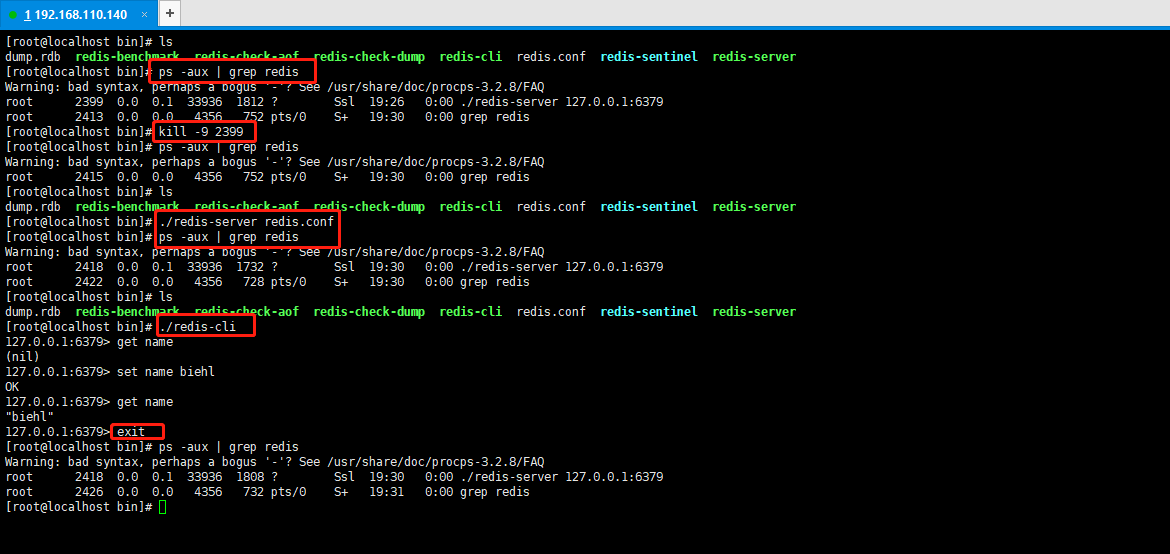
2、linux操作系统安装的redis如何进行正常启动服务器端,客户端,关闭客户端,关闭服务器端。操作如下所示:
 1 [root@localhost bin]# ls
 2 dump.rdb  redis-benchmark  redis-check-aof  redis-check-dump  redis-cli  redis.conf  redis-sentinel  redis-server
 3 [root@localhost bin]# ps -aux | grep redis
 4 Warning: bad syntax, perhaps a bogus '-'? See /usr/share/doc/procps-3.2.8/FAQ
 5 root      2399  0.0  0.1  33936  1812 ?        Ssl  19:26   0:00 ./redis-server 127.0.0.1:6379
 6 root      2413  0.0  0.0   4356   752 pts/0    S+   19:30   0:00 grep redis
 7 [root@localhost bin]# kill -9 2399
 8 [root@localhost bin]# ps -aux | grep redis
 9 Warning: bad syntax, perhaps a bogus '-'? See /usr/share/doc/procps-3.2.8/FAQ
10 root      2415  0.0  0.0   4356   752 pts/0    S+   19:30   0:00 grep redis
11 [root@localhost bin]# ls
12 dump.rdb  redis-benchmark  redis-check-aof  redis-check-dump  redis-cli  redis.conf  redis-sentinel  redis-server
13 [root@localhost bin]# ./redis-server redis.conf
14 [root@localhost bin]# ps -aux | grep redis
15 Warning: bad syntax, perhaps a bogus '-'? See /usr/share/doc/procps-3.2.8/FAQ
16 root      2418  0.0  0.1  33936  1732 ?        Ssl  19:30   0:00 ./redis-server 127.0.0.1:6379
17 root      2422  0.0  0.0   4356   728 pts/0    S+   19:30   0:00 grep redis
18 [root@localhost bin]# ls
19 dump.rdb  redis-benchmark  redis-check-aof  redis-check-dump  redis-cli  redis.conf  redis-sentinel  redis-server
20 [root@localhost bin]# ./redis-cli
21 127.0.0.1:6379> get name
22 (nil)
23 127.0.0.1:6379> set name biehl
24 OK
25 127.0.0.1:6379> get name
26 "biehl"
27 127.0.0.1:6379> exit
28 [root@localhost bin]# ps -aux | grep redis
29 Warning: bad syntax, perhaps a bogus '-'? See /usr/share/doc/procps-3.2.8/FAQ
30 root      2418  0.0  0.1  33936  1808 ?        Ssl  19:30   0:00 ./redis-server 127.0.0.1:6379
31 root      2426  0.0  0.0   4356   732 pts/0    S+   19:31   0:00 grep redis
32 [root@localhost bin]#
操作如下所示:

 浙公网安备 33010602011771号