
仿天猫官网主页侧边栏导航效果(jQuery实现楼层滚动效果)
使用jQuery,可以实现楼层滚动效果,以及滚动时导航栏背景色改变
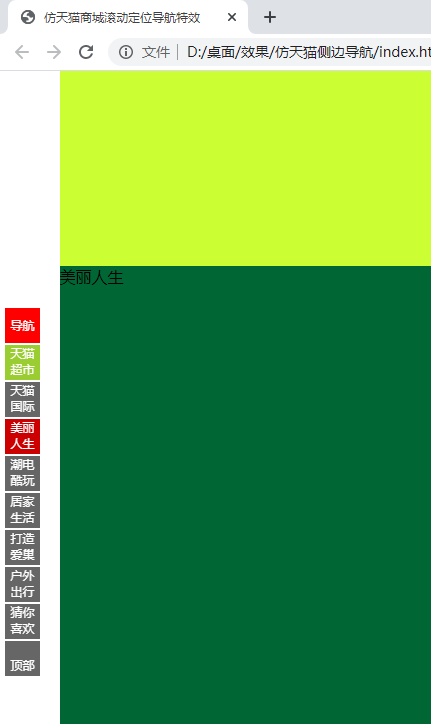
效果图:
html代码:
<div id="loutinav">
    <ul>
        <li style="background: red;line-height: 35px;"><span>导航</span> </li>
        <li  class="active"><span class="listhover1">天猫超市</span> </li>
        <li><span class="listhover2">天猫国际</span> </li>
        <li><span class="listhover3">美丽人生</span> </li>
        <li><span class="listhover4">潮电酷玩</span> </li>
        <li><span class="listhover5">居家生活</span> </li>
        <li><span class="listhover6">打造爱巢</span> </li>
        <li><span class="listhover7">户外出行</span> </li>
        <li><span class="listhover8">猜你喜欢</span> </li>
        <li class="last"><i class="iconfont icon-up"></i><br>顶部</li>
    </ul>
</div>
<!--楼层内容开始-->
<!-- <div id="header">
    向下滚动鼠标查看效果
</div> -->
<div id="main">
    <div id="daohang" class="louti" style="background: #cc0033;">
        导航
    </div>
    <div id="tmcs" class="louti" style="background: #999933;">
        天猫超市
    </div>
    <div id="tmgj" class="louti" style="background: #ccff33;">
        天猫国际
    </div>
    <div id="tmgj" class="louti" style="background: #006633;">
        美丽人生
    </div>
    <div id="tmgj" class="louti" style="background: #6666cc;">
        潮电酷玩
    </div>
    <div id="tmgj" class="louti" style="background: #ff6600;">
        居家生活
    </div>
    <div id="tmgj" class="louti" style="background: #ffff00;">
        打造爱巢
    </div>
    <div id="tmgj" class="louti" style="background: #3333ff;">
        户外出行
    </div>
    <div id="tmgj" class="louti" style="background: #ff00cc;">
        猜你喜欢
    </div>
</div>
<div id="footer">
    网站底部
</div>
css样式:
* {
    margin: 0;
    padding: 0;
    font-family: 'microsoft yahei';
}

#loutinav {
    width: 40px;
    height: 370px;
    position: fixed;
    top: 235px;
    left: 5px;
    display: none;

}

#loutinav ul li {
    width: 35px;
    height: 35px;
    list-style: none;
    font-size: 12px;
    text-align: center;
    position: relative;
    cursor: pointer;
    margin-top: 2px;
    background: rgba(0,0,0,0.6);
    color: #fff;
}

#loutinav ul li span {
    width: 35px;
    height: 35px;
    position: absolute;
    top: 0;
    left: 0;
}

#loutinav ul li.last {
    background: rgba(0,0,0,0.6);
    color: #fff;
}

#loutinav ul li.active span {
    color: #fff;
    display: block;
    background: #c00;
}
.listhover1:hover{
    background: yellowgreen;
}
.listhover2:hover{
    background: black;
}
.listhover3:hover{
    background: hotpink;
}
.listhover4:hover{
    background: skyblue;
}
.listhover5:hover{
    background: yellowgreen;
}
.listhover6:hover{
    background: deeppink;
}
.listhover7:hover{
    background: skyblue;
}
.listhover8:hover{
    background: black;
}
#header {
    width: 1230px;
    height: 1230px;
    background: #cc6633;
    margin: 0 auto;
     font-size: 50px;line-height: 1000px;text-align: center;
     color: #000;
}

#main {
    width: 1230px;
    background: #66ff66;
    margin: 0 auto;
}

#daohang{
    height: 665px;
    width: 1230px;
    background: hotpink;
}
#tmcs{
    height: 665px;
    width: 1230px;
    background: gold;
}
#tmgj{
    height: 665px;
    width: 1230px;
    background: purple;
}
#footer {
    width: 1230px;
    height: 400px;
    background: red;
    margin: 0 auto;
    font-size: 50px;line-height: 400px;text-align: center;
     color: #000;
}
js代码:
    $(function(){
        //1.楼梯什么时候显示,800px scroll--->scrollTop
        $(window).on('scroll',function(){
            var $scroll=$(this).scrollTop();
            if($scroll>=800){
                $('#loutinav').show();
            }else{
                $('#loutinav').hide();
            }

            //4.拖动滚轮,对应的楼梯样式进行匹配
            $('.louti').each(function(){
                var $loutitop=$('.louti').eq($(this).index()).offset().top+400;
                //console.log($loutitop);
                if($loutitop>$scroll){//楼层的top大于滚动条的距离
                    $('#loutinav li').removeClass('active');
                    $('#loutinav li').eq($(this).index()).addClass('active');
                    return false;//中断循环
                }
            });
        });
        //2.获取每个楼梯的offset().top,点击楼梯让对应的内容模块移动到对应的位置  offset().left

        var $loutili=$('#loutinav li').not('.last');
        $loutili.on('click',function(){
            $(this).addClass('active').siblings('li').removeClass('active');
            var $loutitop=$('.louti').eq($(this).index()).offset().top;
            //获取每个楼梯的offsetTop值
            $('html,body').animate({//$('html,body')兼容问题body属于chrome
                scrollTop:$loutitop
            })
        });
        //3.回到顶部
        $('.last').on('click',function(){
            $('html,body').animate({//$('html,body')兼容问题body属于chrome
                scrollTop:0
            })
        });


    })
引入jQuery插件库:
<script src="./js/jquery-3.4.1.js"></script>

 浙公网安备 33010602011771号