
轮播图带广告词条随图片滚动
css样式:
<style>
    * {
        padding: 0;
        margin: 0;
        font-family: "微软雅黑";
        font-size: 14px;}
    ul,li {
        list-style: none;
        }
    a {
        text-decoration: none;
        color: black;
        }
    .box{
        width: 240px;
        height: 350px;
        margin: 20px auto;
        overflow: hidden;
        position: relative;
        }
    .box-1 ul{
        width: 2500px;
        height: 350px;
    }
    .box-1 ul li{
        width: 240px;
        height: 350;
        position: relative;
        overflow: hidden;
        }
    .box-1 ul li img{
        display:block;
        width: 240px;
         height: 350px;
         }
    .box-1 ul li h2{
        position: absolute;
        left: 0;bottom: 0;
        height: 30px;
        width:240px;
        background: rgba(255,255,255,.6);
        text-align: center;
        font-size: 12px;
        line-height: 30px;
        text-overflow: ellipsis;
        overflow: hidden;
        white-space: nowrap;
        font-weight: normal;
        color: black;
        }
    .box-2{
        position: absolute;
        left: 70px;
        bottom: 40px;
        }
    .box-2 ul li{
        float:left;
        width: 5px;
        height: 5px;
        overflow: hidden;
        margin: 0 5px;
        background: white;
        text-indent: 100px;
        cursor: pointer;
        }
    .box-2 ul .on{
        background: orangered;
        }
    .box-3 span{
        position: absolute;
        color: black;
        width: 20px;
        height: 30px;
        bottom: 0px;
        line-height:30px;
        font-size:20px;
        text-align: center;
        cursor: pointer;
        }
    .box-3 .prev{left: 10px;}
    .box-3 .next{right: 10px;}
    .box-3 span::selection{background: transparent;}
    </style>
html内容:
<body>
    <div class="box">
        <div class="box-1">
            <ul>
                <li>
                    <img src="images/1.jpg" alt="这里是第一场图片"></img>
                    <h2>好浪漫!狮子猎豹蹲坐"彩虹尽头"</h2>
                </li>
                <li>
                    <img src="images/2.jpg" alt="这里是第二张图片"></img>
                    <h2>刘炜宣布退役 回顾传奇"8号"</h2>
                </li>
                <li>
                    <img src="images/3.jpg" alt="这里是第三张图片"></img>
                    <h2>疑似吴亦凡女友生活照模样清纯</h2>
                </li>
                <li>
                    <img src="images/4.jpg" alt="这里是第一场图片"></img>
                    <h2>不做韭菜,叶女侠带你修炼</h2>
                </li>
                <li>
                    <img src="images/5.jpg" alt="这里是第一场图片"></img>
                    <h2>007新武器阿斯顿·马丁Valhalla</h2>
                </li>
                <li>
                    <img src="images/6.jpg" alt="这里是第一场图片"></img>
                    <h2>靠网红发卡凹出少女感</h2>
                </li>
                <li>
                    <img src="images/7.jpg" alt="这里是第一场图片"></img>
                    <h2>河北饶阳:"民族乐器进校园"</h2>
                </li>
            </ul>
        </div>
        <div class="box-2">
            <ul>

            </ul>
        </div>
        <div class="box-3">
            <span class="prev"> < </span>
            <span class="next"> > </span>
        </div>
    </div>

    </body>
js内容:
<script type="text/javascript">
        window.onload = function(){
            function $(param){
                if(arguments[1] == true){
                    return document.querySelectorAll(param);
                }else{
                    return document.querySelector(param);
                }
            }
            var $box = $(".box");
            var $box1 = $(".box-1 ul li",true);
            var $box2 = $(".box-2 ul");
            var $box3 = $(".box-3");
            var $length = $box1.length;

            var str = "";
            for(var i =0;i<$length;i++){
                if(i==0){
                    str +="<li class='on'>"+(i+1)+"</li>";
                }else{
                    str += "<li>"+(i+1)+"</li>";
                }
            }
            $box2.innerHTML = str;

            var current = 0;

            var timer;
            timer = setInterval(go,1000);
            function go(){
                for(var j =0;j<$length;j++){
                    $box1[j].style.display = "none";
                    $box2.children[j].className = "";
                }
                if($length == current){
                    current = 0;
                }
                $box1[current].style.display = "block";
                $box2.children[current].className = "on";
                current++;
            }

            for(var k=0;k<$length;k++){
                $box1[k].onmouseover = function(){
                    clearInterval(timer);
                }
                $box1[k].onmouseout = function(){
                    timer = setInterval(go,1000);
                }
            }
            for(var p=0;p<$box3.children.length;p++){
                $box3.children[p].onmouseover = function(){
                    clearInterval(timer);
                };
                $box3.children[p].onmouseout = function(){
                    timer = setInterval(go,1000);
                }
            }

            for(var u =0;u<$length;u++){
                $box2.children[u].index  = u;
                $box2.children[u].onmouseover = function(){
                    clearInterval(timer);
                    for(var j=0;j<$length;j++){
                        $box1[j].style.display = "none";
                        $box2.children[j].className = "";
                    }
                    this.className = "on";
                    $box1[this.index].style.display = "block";
                    current = this.index +1;
                }
                $box2.children[u].onmouseout = function(){
                    timer = setInterval(go,1000);
                }
            }

            $box3.children[0].onclick = function(){
                back();
            }
            $box3.children[1].onclick = function(){
                go();
            }
            function back(){
                for(var j =0;j<$length;j++){
                    $box1[j].style.display = "none";
                    $box2.children[j].className = "";
                }
                if(current == 0){
                    current = $length;
                }
                $box1[current-1].style.display = "block";
                $box2.children[current-1].className = "on";
                current--;
            }
        }
        </script>
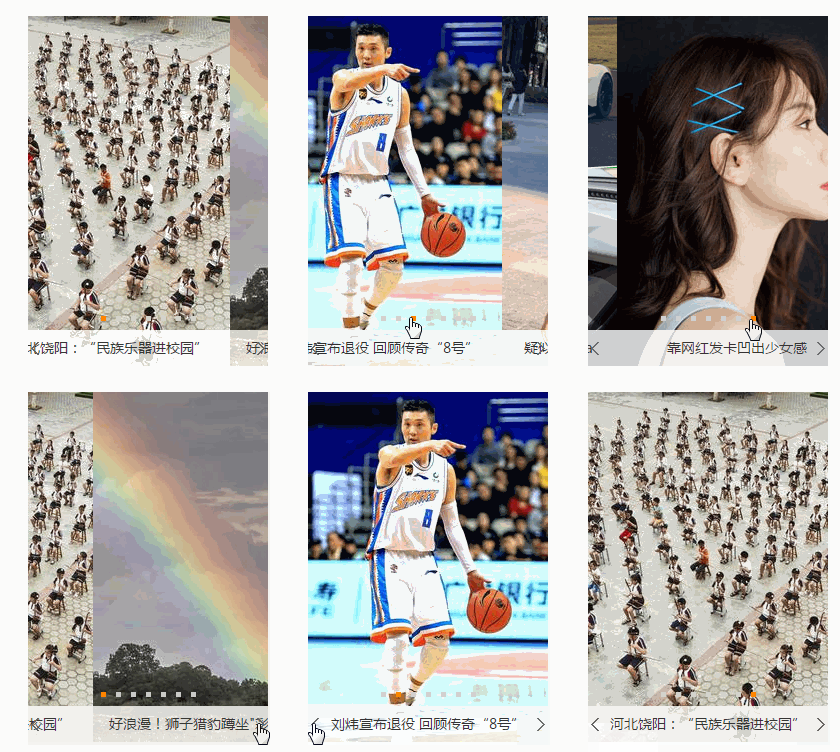
轮播图效果:

 浙公网安备 33010602011771号