


接着第一部分,这篇文章就 Angular cli进行介绍总结:
1. ng g:列出当前命令
ng g
需在angular工程文件夹下执行:
C:\Users\zb\angulardemo\heroes>ng g
Generates and/or modifies files based on a schematic.
usage: ng generate <schematic> [options]

arguments:
  schematic
    The schematic or collection:schematic to generate.

options:
  --defaults
    When true, disables interactive input prompts for options with a default.
  --dry-run (-d)
    When true, runs through and reports activity without writing out results.
  --force (-f)
    When true, forces overwriting of existing files.
  --help
    Shows a help message for this command in the console.
  --interactive
    When false, disables interactive input prompts.

Available Schematics:
  Collection "@schematics/angular" (default):
    appShell
    application
    class
    component
    directive
    enum
    guard
    interface
    library
    module
    pipe
    service
    serviceWorker
    universal
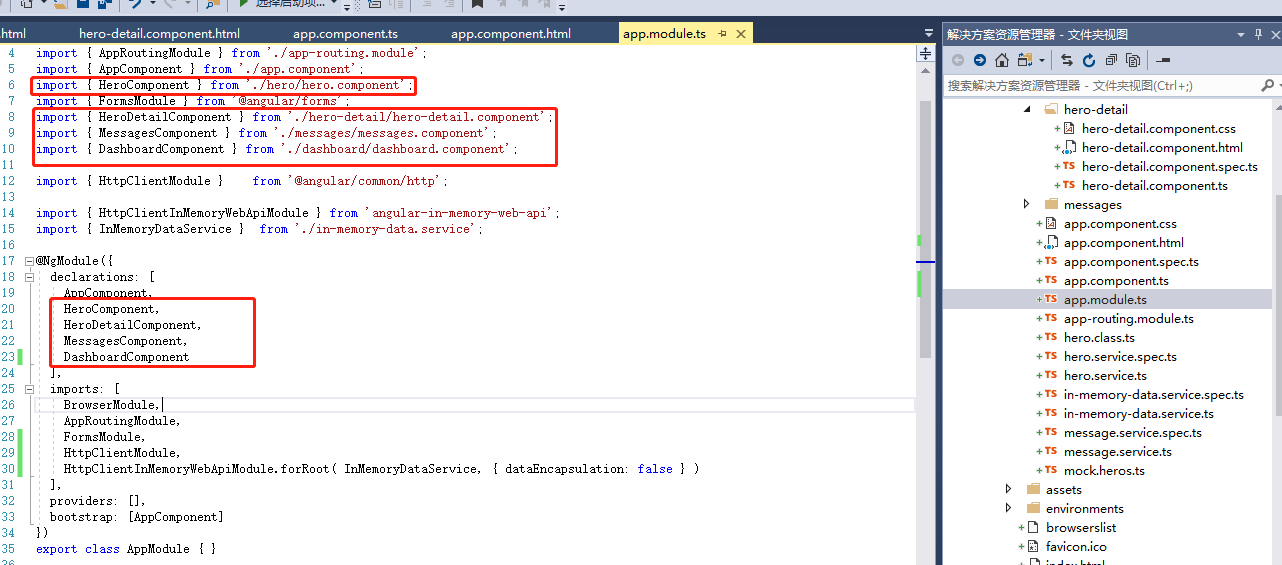
2. ng generate component component-name:该命令会把生成的组件,
添加到 src/app/app.module.ts 文件中 @NgModule 的 declarations 列表中声明:
3. ng generate service: 创建服务文件
ng generate service hero
该命令会在 src/app/hero.service.ts 中生成 HeroService 类的骨架。 HeroService类的代码如下:
import { Injectable } from '@angular/core';

@Injectable({
  providedIn: 'root',
})
export class HeroService {

  constructor() { }

}
4. ng generate module app-routing --flat --module=app:添加 AppRoutingModule
ng generate module app-routing --flat --module=app
--flat把这个文件放进了src/app中,而不是单独的目录中。--module=app告诉CLI把它注册到AppModule的imports数组中。
生成的代码如下:
import { NgModule } from '@angular/core';
import { CommonModule } from '@angular/common';

@NgModule({
  imports: [
    CommonModule
  ],
  declarations: []
})
export class AppRoutingModule { }

 浙公网安备 33010602011771号