
eNSP华为模拟器介绍
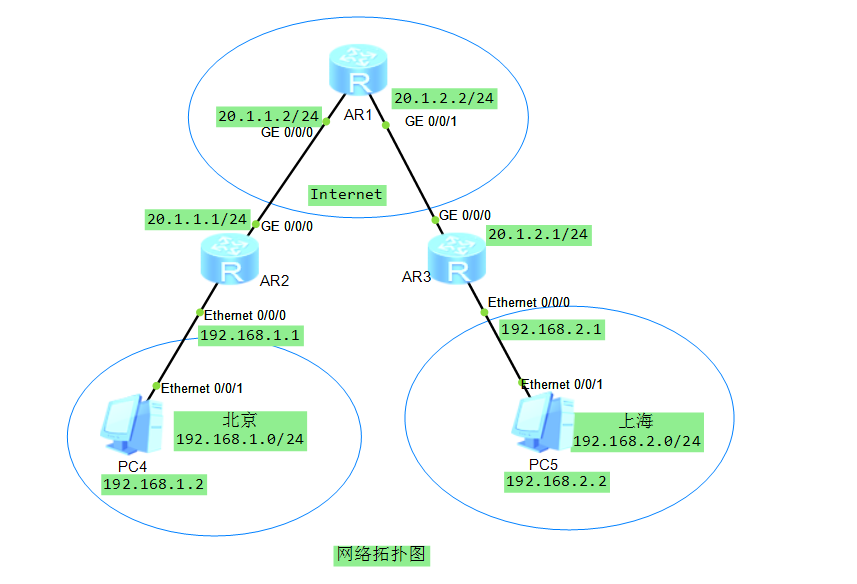

一、华为路由器
- 路由器与电脑之间IP配置(Enthernet接口)
<Huawei>sy
Enter system view, return user view with Ctrl+Z.
[Huawei]sysname R3
[R3]interface Vlanif  1
May 10 2020 17:13:44-08:00 R3 %%01IFNET/4/IF_STATE(l)[0]:Interface Vlanif1 has t
urned into UP state.
[R3-Vlanif1]ip a
[R3-Vlanif1]ip ad
[R3-Vlanif1]ip address 192.168.2.1 24
[R3-Vlanif1]
May 10 2020 17:14:10-08:00 R3 %%01IFNET/4/LINK_STATE(l)[1]:The line protocol IP
on the interface Vlanif1 has entered the UP state.
[R3-Vlanif1]display  this
[V200R003C00]
#
interface Vlanif1
 ip address 192.168.2.1 255.255.255.0
#
return
- 路由器与Internet路由之间的配置(GE接口)
<R2>sy
Enter system view, return user view with Ctrl+Z.
[R2]interfa
[R2]interface
[R2]interface G
[R2]interface GigabitEthernet  0
[R2]interface GigabitEthernet  0/
[R2]interface GigabitEthernet  0/0/0
[R2-GigabitEthernet0/0/0]ip add
[R2-GigabitEthernet0/0/0]ip address  20.1.1.1 24
[R2-GigabitEthernet0/0/0]
May 10 2020 17:30:16-08:00 R2 %%01IFNET/4/LINK_STATE(l)[0]:The line protocol IP
on the interface GigabitEthernet0/0/0 has entered the UP state.
[R2-GigabitEthernet0/0/0]disp
[R2-GigabitEthernet0/0/0]display  this
[V200R003C00]
#
interface GigabitEthernet0/0/0
 ip address 20.1.1.1 255.255.255.0
#
return
[R2-GigabitEthernet0/0/0]
- 保存设置
<R1>display current-configuration  #查看所有配置信息
[V200R003C00]
#
 sysname R1
#
 snmp-agent local-engineid 800007DB03000000000000
 snmp-agent
#
 clock timezone China-Standard-Time minus 08:00:00
#
portal local-server load portalpage.zip
#
 drop illegal-mac alarm
#
 set cpu-usage threshold 80 restore 75
#
aaa
 authentication-scheme default
 authorization-scheme default
 accounting-scheme default
 domain default
 domain default_admin
 local-user admin password cipher %$%$K8m.Nt84DZ}e#<0`8bmE3Uw}%$%$
 local-user admin service-type http
#
firewall zone Local
 priority 15
#
interface Ethernet0/0/0
#
interface Ethernet0/0/1
#
interface Ethernet0/0/2
#
interface Ethernet0/0/3
#
interface Ethernet0/0/4
#
interface Ethernet0/0/5
#
interface Ethernet0/0/6
#
interface Ethernet0/0/7
#
interface GigabitEthernet0/0/0
 ip address 20.1.1.2 255.255.255.0
#
interface GigabitEthernet0/0/1
 ip address 20.1.2.2 255.255.255.0
#
interface NULL0
#
user-interface con 0
 authentication-mode password
user-interface vty 0 4
user-interface vty 16 20
#
wlan ac
#
return
<R1>save  #保存设置
  The current configuration will be written to the device.
  Are you sure to continue? (y/n)[n]:y
  It will take several minutes to save configuration file, please wait..........
..
  Configuration file had been saved successfully
  Note: The configuration file will take effect after being activated
<R1>dir
Directory of flash:/

  Idx  Attr     Size(Byte)  Date        Time(LMT)  FileName
    0  drw-              -  May 10 2020 09:02:18   dhcp
    1  -rw-        121,802  May 26 2014 09:20:58   portalpage.zip
    2  -rw-          2,263  May 10 2020 09:04:20   statemach.efs
    3  -rw-        828,482  May 26 2014 09:20:58   sslvpn.zip
    4  -rw-            352  May 10 2020 09:50:53   private-data.txt
    5  -rw-            583  May 10 2020 09:50:53   vrpcfg.zip

1,090,732 KB total (784,452 KB free)
- 配置静态路由保证网络畅通,以AR1为例
[R1]ip route-static  20.1.1.0 24 20.1.1.2
[R1]ip route-static 192.168.1.0 24 20.1.1.1
[R1]display ip routing-table
Route Flags: R - relay, D - download to fib
------------------------------------------------------------------------------
Routing Tables: Public
         Destinations : 12       Routes : 12

Destination/Mask    Proto   Pre  Cost      Flags NextHop         Interface

       20.1.1.0/24  Direct  0    0           D   20.1.1.2        GigabitEthernet
0/0/0
       20.1.1.2/32  Direct  0    0           D   127.0.0.1       GigabitEthernet
0/0/0
     20.1.1.255/32  Direct  0    0           D   127.0.0.1       GigabitEthernet
0/0/0
       20.1.2.0/24  Direct  0    0           D   20.1.2.2        GigabitEthernet
0/0/1
       20.1.2.2/32  Direct  0    0           D   127.0.0.1       GigabitEthernet
0/0/1
     20.1.2.255/32  Direct  0    0           D   127.0.0.1       GigabitEthernet
0/0/1
      127.0.0.0/8   Direct  0    0           D   127.0.0.1       InLoopBack0
      127.0.0.1/32  Direct  0    0           D   127.0.0.1       InLoopBack0
127.255.255.255/32  Direct  0    0           D   127.0.0.1       InLoopBack0
    192.168.1.0/24  Static  60   0          RD   20.1.1.1        GigabitEthernet
0/0/0
    192.168.2.0/24  Static  60   0          RD   20.1.2.1        GigabitEthernet
0/0/1
255.255.255.255/32  Direct  0    0           D   127.0.0.1       InLoopBack0
同理AR2、AR3配置如下
AR2配置如下:

display ip routing-table
Route Flags: R - relay, D - download to fib
------------------------------------------------------------------------------
Routing Tables: Public
         Destinations : 12       Routes : 12

Destination/Mask    Proto   Pre  Cost      Flags NextHop         Interface

       20.1.1.0/24  Direct  0    0           D   20.1.1.1        GigabitEthernet
0/0/0
       20.1.1.1/32  Direct  0    0           D   127.0.0.1       GigabitEthernet
0/0/0
     20.1.1.255/32  Direct  0    0           D   127.0.0.1       GigabitEthernet
0/0/0
       20.1.2.0/24  Static  60   0          RD   20.1.1.2        GigabitEthernet
0/0/0
      127.0.0.0/8   Direct  0    0           D   127.0.0.1       InLoopBack0
      127.0.0.1/32  Direct  0    0           D   127.0.0.1       InLoopBack0
127.255.255.255/32  Direct  0    0           D   127.0.0.1       InLoopBack0
    192.168.1.0/24  Direct  0    0           D   192.168.1.1     Vlanif1
    192.168.1.1/32  Direct  0    0           D   127.0.0.1       Vlanif1
  192.168.1.255/32  Direct  0    0           D   127.0.0.1       Vlanif1
    192.168.2.0/24  Static  60   0          RD   20.1.1.2        GigabitEthernet
0/0/0
255.255.255.255/32  Direct  0    0           D   127.0.0.1       InLoopBack0
AR3配置如下:

display ip routing-table
Route Flags: R - relay, D - download to fib
------------------------------------------------------------------------------
Routing Tables: Public
         Destinations : 12       Routes : 12

Destination/Mask    Proto   Pre  Cost      Flags NextHop         Interface

       20.1.1.0/24  Static  60   0          RD   20.1.2.2        GigabitEthernet
0/0/0
       20.1.2.0/24  Direct  0    0           D   20.1.2.1        GigabitEthernet
0/0/0
       20.1.2.1/32  Direct  0    0           D   127.0.0.1       GigabitEthernet
0/0/0
     20.1.2.255/32  Direct  0    0           D   127.0.0.1       GigabitEthernet
0/0/0
      127.0.0.0/8   Direct  0    0           D   127.0.0.1       InLoopBack0
      127.0.0.1/32  Direct  0    0           D   127.0.0.1       InLoopBack0
127.255.255.255/32  Direct  0    0           D   127.0.0.1       InLoopBack0
    192.168.1.0/24  Static  60   0          RD   20.1.2.2        GigabitEthernet
0/0/0
    192.168.2.0/24  Direct  0    0           D   192.168.2.1     Vlanif1
    192.168.2.1/32  Direct  0    0           D   127.0.0.1       Vlanif1
  192.168.2.255/32  Direct  0    0           D   127.0.0.1       Vlanif1
255.255.255.255/32  Direct  0    0           D   127.0.0.1       InLoopBack0
- 测试客户端网络连通性
客户端PC4测试PC5

PC>ping 192.168.2.2

Ping 192.168.2.2: 32 data bytes, Press Ctrl_C to break
Request timeout!
From 192.168.2.2: bytes=32 seq=2 ttl=125 time=32 ms
From 192.168.2.2: bytes=32 seq=3 ttl=125 time=15 ms
From 192.168.2.2: bytes=32 seq=4 ttl=125 time=16 ms
From 192.168.2.2: bytes=32 seq=5 ttl=125 time=31 ms

--- 192.168.2.2 ping statistics ---
  5 packet(s) transmitted
  4 packet(s) received
  20.00% packet loss
  round-trip min/avg/max = 0/23/32 ms
注:如果网络不通,可以通过wireshark抓包工具排查原因
二、web服务器与FTP服务器应用
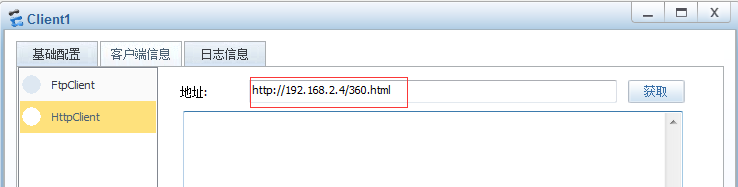
1.设置client1客户端

2.设置server端
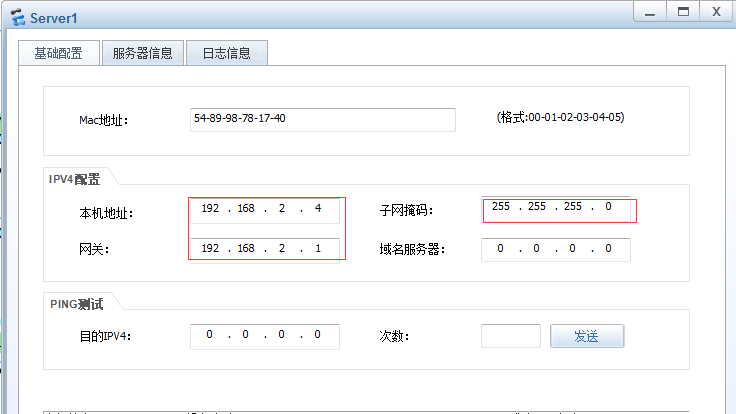
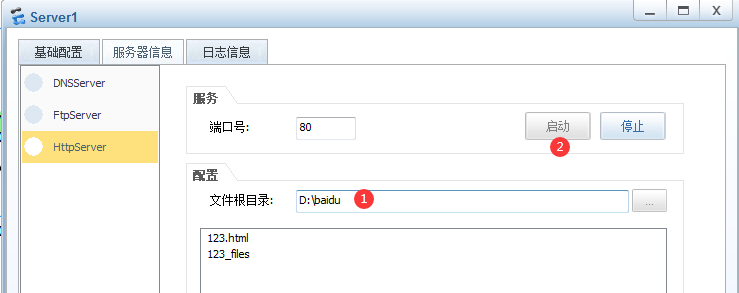
注:网页360.html需要首先保存一个网页到指定目录下(本次我保存在桌面的“测试网络”文件夹)
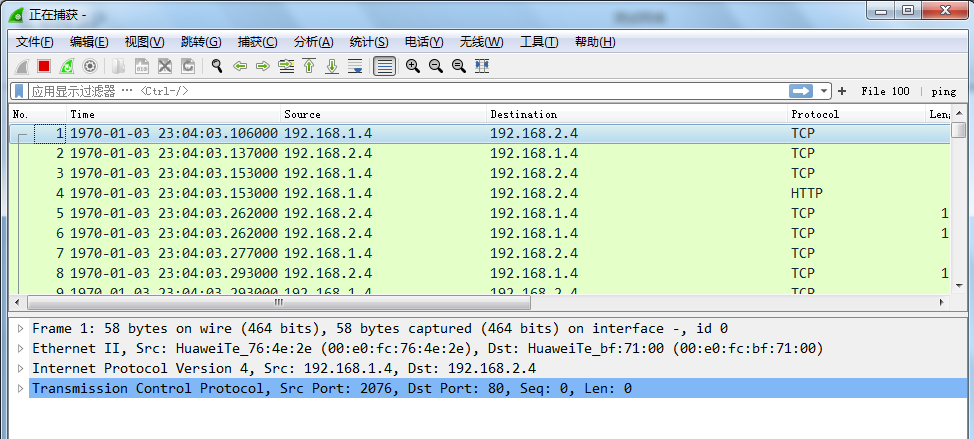
3.抓包测试
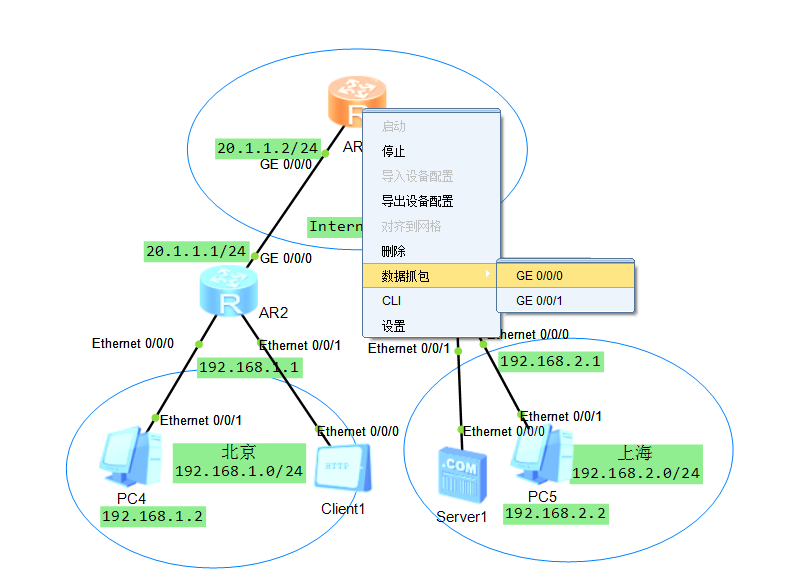

如图所示
二、物理机连接eNSP配置
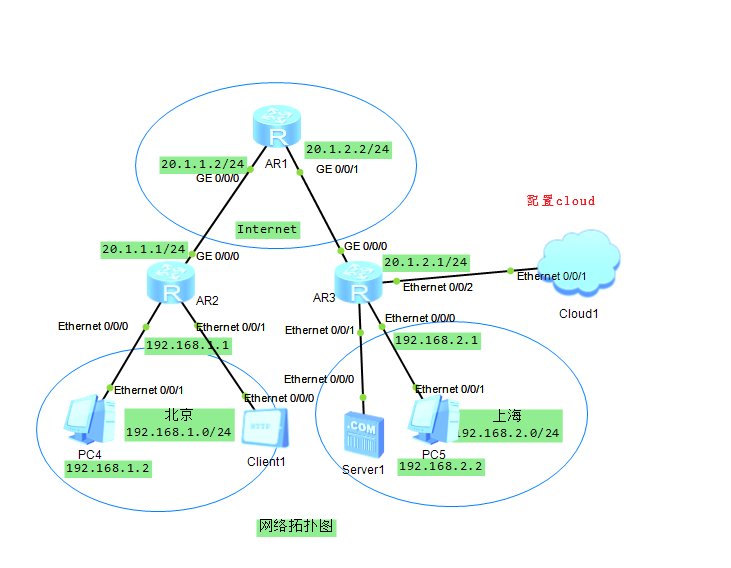
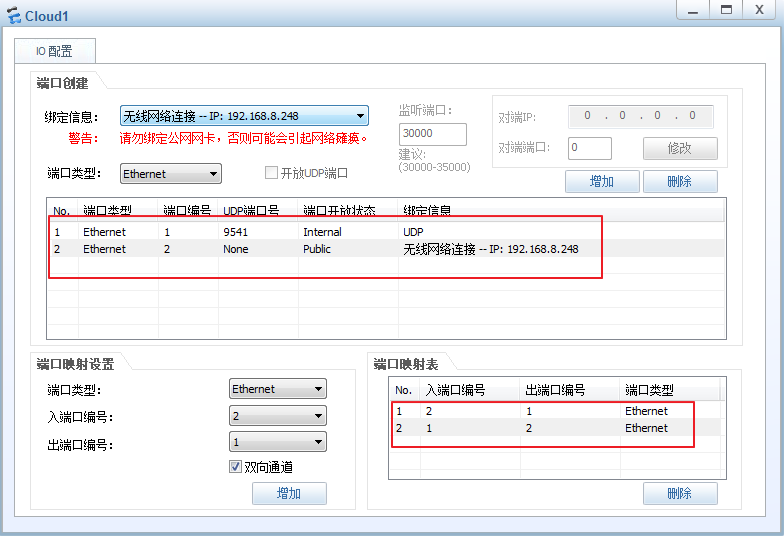
注:并配置物理机与路由器在同一个网段上。
三、搭建帧中继网络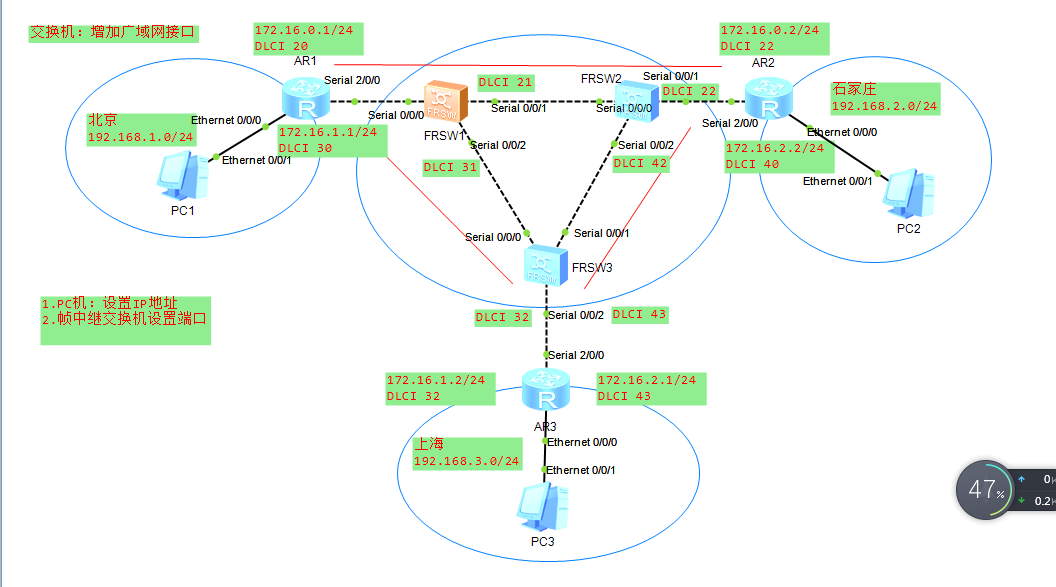
- 帧中继设置
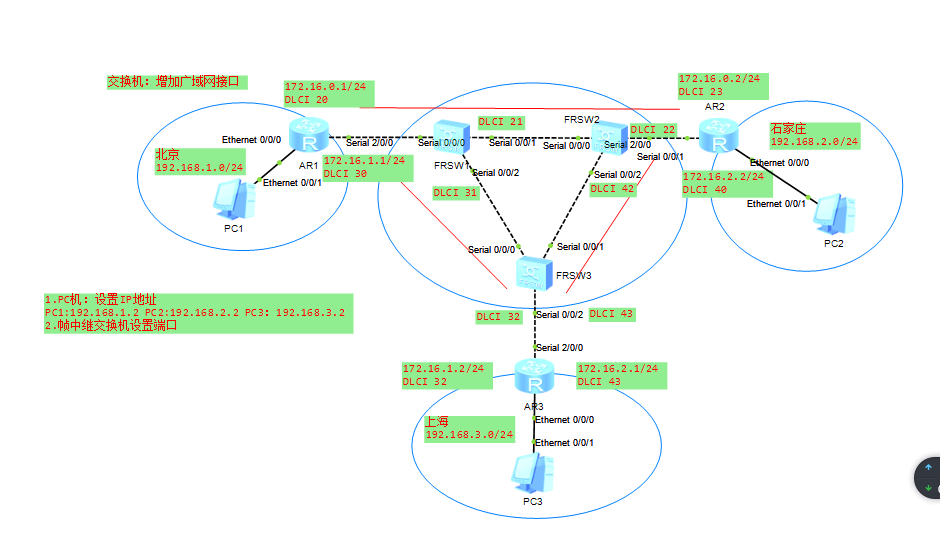

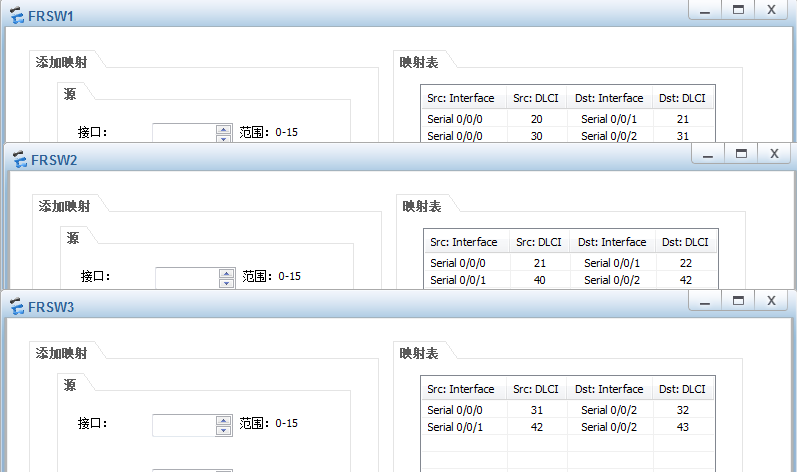
- 配置路由器(以AR1为例)
<Huawei>
<Huawei>sys
Enter system view, return user view with Ctrl+Z.
[Huawei]sysname R1
[R1]interf
[R1]interface addre
[R1]interface Vl
[R1]interface Vlanif 1
May 12 2020 10:41:33-08:00 R1 %%01IFNET/4/IF_STATE(l)[5]:Interface Vlanif1 has t
urned into UP state.
[R1-Vlanif1]ip addr
[R1-Vlanif1]ip address  192.168.1.1 24
[R1-Vlanif1]
May 12 2020 10:43:07-08:00 R1 %%01IFNET/4/LINK_STATE(l)[6]:The line protocol IP
on the interface Vlanif1 has entered the UP state.
[R1-Vlanif1] quit
[R1]interface S
[R1]interface Serial 2/0/0
[R1-Serial2/0/0]link-p
[R1-Serial2/0/0]link-protocol fr
Warning: The encapsulation protocol of the link will be changed. Continue? [Y/N]
:y
May 12 2020 10:44:37-08:00 R1 %%01IFNET/4/CHANGE_ENCAP(l)[7]:The user performed
the configuration that will change the encapsulation protocol of the link and th
en selected Y.
[R1-Serial2/0/0]
May 12 2020 10:44:37-08:00 R1 %%01IFPDT/4/IF_STATE(l)[8]:Interface Serial2/0/0 h
as turned into DOWN state.
[R1-Serial2/0/0]
May 12 2020 10:44:38-08:00 R1 FR/4/TRAP:OID 16777216.50331648.100663296.16777216
.33554432.16777216.167772160.536870912.0.16777216 Interface 218103808 DLCI 33554
4320 turns into 33554432 state (invalid(1), active(2), inactive(3)).
[R1-Serial2/0/0]
May 12 2020 10:44:38-08:00 R1 FR/4/TRAP:OID 16777216.50331648.100663296.16777216
.33554432.16777216.167772160.536870912.0.16777216 Interface 218103808 DLCI 50331
6480 turns into 33554432 state (invalid(1), active(2), inactive(3)).
[R1-Serial2/0/0]
May 12 2020 10:44:38-08:00 R1 %%01IFPDT/4/IF_STATE(l)[9]:Interface Serial2/0/0 h
as turned into UP state.
[R1-Serial2/0/0]
May 12 2020 10:44:38-08:00 R1 %%01IFNET/4/LINK_STATE(l)[10]:The line protocol IP
 on the interface Serial2/0/0 has entered the UP state.
[R1-Serial2/0/0]quit
[R1]interface Serial 2/0/0
[R1-Serial2/0/0]fr  inte
[R1-Serial2/0/0]fr  interface-type  dte
[R1-Serial2/0/0]quit
[R1]interface  s
[R1]interface  Serial 2/0/0.1 p
[R1]interface  Serial 2/0/0.1 p2p
May 12 2020 10:46:40-08:00 R1 %%01IFNET/4/LINK_STATE(l)[11]:The line protocol IP
 on the interface Serial2/0/0.1 has entered the UP state.
[R1-Serial2/0/0.1]fr dl
[R1-Serial2/0/0.1]fr dlci 20
May 12 2020 10:47:22-08:00 R1 FR/4/TRAP:OID 16777216.50331648.100663296.16777216
.33554432.16777216.167772160.536870912.0.16777216 Interface 268435456 DLCI 33554
4320 turns into 33554432 state (invalid(1), active(2), inactive(3)).
[R1-fr-dlci-Serial2/0/0.1-20]quit
[R1-Serial2/0/0.1]ip add
[R1-Serial2/0/0.1]ip address  172.16.0.1 24
[R1-Serial2/0/0.1]quit
[R1]interface Serial 2/0/0.2 p2p
[R1-Serial2/0/0.2]
May 12 2020 10:48:15-08:00 R1 %%01IFNET/4/LINK_STATE(l)[12]:The line protocol IP
 on the interface Serial2/0/0.2 has entered the UP state.
[R1-Serial2/0/0.2]ip address 172.16.1.1 24
[R1-Serial2/0/0.2]fr dlci 30
May 12 2020 10:49:09-08:00 R1 FR/4/TRAP:OID 16777216.50331648.100663296.16777216
.33554432.16777216.167772160.536870912.0.16777216 Interface 285212672 DLCI 50331
6480 turns into 33554432 state (invalid(1), active(2), inactive(3)).
[R1-fr-dlci-Serial2/0/0.2-30]quit
[R1-Serial2/0/0.2]
AR2 配置

[Huawei]sysname R2
[R2]ip addr
[R2]interface Vl
[R2]interface Vlanif 1
May 12 2020 10:44:42-08:00 R2 %%01IFNET/4/IF_STATE(l)[0]:Interface Vlanif1 has t
urned into UP state.
[R2-Vlanif1]ip addr
[R2-Vlanif1]ip address 172.16.0.2 24
[R2-Vlanif1]
May 12 2020 10:45:05-08:00 R2 %%01IFNET/4/LINK_STATE(l)[1]:The line protocol IP
on the interface Vlanif1 has entered the UP state.
[R2-Vlanif1]ip address 192.168.2.1 24
[R2-Vlanif1]displ
[R2-Vlanif1]display  this
[V200R003C00]
#
interface Vlanif1
 ip address 192.168.2.1 255.255.255.0
#
return
[R2-Vlanif1]quit
[R2]interface s
[R2]interface Serial  2/0/0
[R2-Serial2/0/0]inte
[R2-Serial2/0/0]intefa
[R2-Serial2/0/0]lng
[R2-Serial2/0/0]llin
[R2-Serial2/0/0]lik
[R2-Serial2/0/0]lin
[R2-Serial2/0/0]link-protocol  fr
Warning: The encapsulation protocol of the link will be changed. Continue? [Y/N]
:y
May 12 2020 10:47:28-08:00 R2 %%01IFNET/4/CHANGE_ENCAP(l)[2]:The user performed
the configuration that will change the encapsulation protocol of the link and th
en selected Y.
[R2-Serial2/0/0]
May 12 2020 10:47:28-08:00 R2 %%01IFPDT/4/IF_STATE(l)[3]:Interface Serial2/0/0 h
as turned into DOWN state.
[R2-Serial2/0/0]
May 12 2020 10:47:28-08:00 R2 FR/4/TRAP:OID 16777216.50331648.100663296.16777216
.33554432.16777216.167772160.536870912.0.16777216 Interface 218103808 DLCI 36909
8752 turns into 33554432 state (invalid(1), active(2), inactive(3)).
[R2-Serial2/0/0]
May 12 2020 10:47:28-08:00 R2 FR/4/TRAP:OID 16777216.50331648.100663296.16777216
.33554432.16777216.167772160.536870912.0.16777216 Interface 218103808 DLCI 67108
8640 turns into 33554432 state (invalid(1), active(2), inactive(3)).
[R2-Serial2/0/0]
May 12 2020 10:47:28-08:00 R2 %%01IFPDT/4/IF_STATE(l)[4]:Interface Serial2/0/0 h
as turned into UP state.
[R2-Serial2/0/0]
May 12 2020 10:47:28-08:00 R2 %%01IFNET/4/LINK_STATE(l)[5]:The line protocol IP
on the interface Serial2/0/0 has entered the UP state.
[R2-Serial2/0/0]fr inter
[R2-Serial2/0/0]fr interface-type dte
[R2-Serial2/0/0]qut
                ^
Error: Unrecognized command found at '^' position.
[R2-Serial2/0/0]quit
[R2]interface s
[R2]interface Serial  2/0/0.1
May 12 2020 10:48:27-08:00 R2 %%01IFNET/4/LINK_STATE(l)[6]:The line protocol IP
on the interface Serial2/0/0.1 has entered the UP state.
[R2-Serial2/0/0.1]ip add
[R2-Serial2/0/0.1]ip address 172.16.0.2 24
[R2-Serial2/0/0.1]fr dl
[R2-Serial2/0/0.1]fr dlci 22
May 12 2020 10:48:54-08:00 R2 FR/4/TRAP:OID 16777216.50331648.100663296.16777216
.33554432.16777216.167772160.536870912.0.16777216 Interface 268435456 DLCI 36909
8752 turns into 33554432 state (invalid(1), active(2), inactive(3)).
[R2-fr-dlci-Serial2/0/0.1-22]quit
[R2-Serial2/0/0.1]inter
[R2-Serial2/0/0.1]interf
[R2-Serial2/0/0.1]interface Serial 2/0/0.2
May 12 2020 10:49:41-08:00 R2 %%01IFNET/4/LINK_STATE(l)[7]:The line protocol IP
on the interface Serial2/0/0.2 has entered the UP state.
[R2-Serial2/0/0.2]ip add
[R2-Serial2/0/0.2]ip address 172.16.2.2 24
[R2-Serial2/0/0.2]fr do
[R2-Serial2/0/0.2]fr di
[R2-Serial2/0/0.2]fr dl
[R2-Serial2/0/0.2]fr dlci 40
May 12 2020 10:50:51-08:00 R2 FR/4/TRAP:OID 16777216.50331648.100663296.16777216
.33554432.16777216.167772160.536870912.0.16777216 Interface 285212672 DLCI 67108
8640 turns into 33554432 state (invalid(1), active(2), inactive(3)).
[R2-fr-dlci-Serial2/0/0.2-40]quit
[R2-Serial2/0/0.2]

  Please check whether system data has been changed, and save data in time

  Configuration console time out, please press any key to log on

<R2>
<R2>ping 172.16.0.1
  PING 172.16.0.1: 56  data bytes, press CTRL_C to break
    Reply from 172.16.0.1: bytes=56 Sequence=1 ttl=255 time=50 ms
    Reply from 172.16.0.1: bytes=56 Sequence=2 ttl=255 time=30 ms
    Reply from 172.16.0.1: bytes=56 Sequence=3 ttl=255 time=10 ms
    Reply from 172.16.0.1: bytes=56 Sequence=4 ttl=255 time=30 ms
    Reply from 172.16.0.1: bytes=56 Sequence=5 ttl=255 time=30 ms

  --- 172.16.0.1 ping statistics ---
    5 packet(s) transmitted
    5 packet(s) received
    0.00% packet loss
    round-trip min/avg/max = 10/30/50 ms
AR3 设置

<Huawei>sys
Enter system view, return user view with Ctrl+Z.
[Huawei]sysna
[Huawei]sysname  R3
[R3]interface v
[R3]interface Vl
[R3]interface Vlanif  1
[R3-Vlanif1]
May 12 2020 10:51:57-08:00 R3 %%01IFNET/4/IF_STATE(l)[0]:Interface Vlanif1 has t
urned into UP state.
[R3-Vlanif1]ip addr
[R3-Vlanif1]ip address 192.168.3.1 24
[R3-Vlanif1]
May 12 2020 10:52:17-08:00 R3 %%01IFNET/4/LINK_STATE(l)[1]:The line protocol IP
on the interface Vlanif1 has entered the UP state.
[R3-Vlanif1]quit
[R3]interface s
[R3]interface Serial  2/0/0
[R3-Serial2/0/0]link
[R3-Serial2/0/0]link-protocol  fr
Warning: The encapsulation protocol of the link will be changed. Continue? [Y/N]
:y
May 12 2020 10:53:27-08:00 R3 %%01IFNET/4/CHANGE_ENCAP(l)[2]:The user performed
the configuration that will change the encapsulation protocol of the link and th
en selected Y.
[R3-Serial2/0/0]
May 12 2020 10:53:27-08:00 R3 %%01IFPDT/4/IF_STATE(l)[3]:Interface Serial2/0/0 h
as turned into DOWN state.
[R3-Serial2/0/0]
[R3-Serial2/0/0]
May 12 2020 10:53:28-08:00 R3 %%01IFPDT/4/IF_STATE(l)[4]:Interface Serial2/0/0 h
as turned into UP state.
[R3-Serial2/0/0]
May 12 2020 10:53:28-08:00 R3 %%01IFNET/4/LINK_STATE(l)[5]:The line protocol IP
on the interface Serial2/0/0 has entered the UP state.
[R3-Serial2/0/0]
May 12 2020 10:53:28-08:00 R3 FR/4/TRAP:OID 16777216.50331648.100663296.16777216
.33554432.16777216.167772160.536870912.0.16777216 Interface 218103808 DLCI 53687
0912 turns into 33554432 state (invalid(1), active(2), inactive(3)).
[R3-Serial2/0/0]
May 12 2020 10:53:28-08:00 R3 FR/4/TRAP:OID 16777216.50331648.100663296.16777216
.33554432.16777216.167772160.536870912.0.16777216 Interface 218103808 DLCI 72142
0288 turns into 33554432 state (invalid(1), active(2), inactive(3)).
[R3-Serial2/0/0]fr interface
[R3-Serial2/0/0]fr interface-type dte
[R3-Serial2/0/0]quit
[R3]interface Serial 2/0/0.1
May 12 2020 10:54:13-08:00 R3 %%01IFNET/4/LINK_STATE(l)[6]:The line protocol IP
on the interface Serial2/0/0.1 has entered the UP state.
[R3-Serial2/0/0.1]ip add
[R3-Serial2/0/0.1]ip address  172.16.1.2 24
[R3-Serial2/0/0.1]fr dlc
[R3-Serial2/0/0.1]fr dlci 32
[R3-fr-dlci-Serial2/0/0.1-32]
May 12 2020 10:54:40-08:00 R3 FR/4/TRAP:OID 16777216.50331648.100663296.16777216
.33554432.16777216.167772160.536870912.0.16777216 Interface 268435456 DLCI 53687
0912 turns into 33554432 state (invalid(1), active(2), inactive(3)).
[R3-fr-dlci-Serial2/0/0.1-32]quit
[R3-Serial2/0/0.1]interface Serial 2/0/0.2
May 12 2020 10:54:51-08:00 R3 %%01IFNET/4/LINK_STATE(l)[7]:The line protocol IP
on the interface Serial2/0/0.2 has entered the UP state.
[R3-Serial2/0/0.2]ip ad
[R3-Serial2/0/0.2]ip address 172.16.2.1 24
[R3-Serial2/0/0.2]fr dlc
[R3-Serial2/0/0.2]fr dlci 43
May 12 2020 10:55:25-08:00 R3 FR/4/TRAP:OID 16777216.50331648.100663296.16777216
.33554432.16777216.167772160.536870912.0.16777216 Interface 285212672 DLCI 72142
0288 turns into 33554432 state (invalid(1), active(2), inactive(3)).
[R3-fr-dlci-Serial2/0/0.2-43]quit
[R3-Serial2/0/0.2]ping 172.16.1.1
  PING 172.16.1.1: 56  data bytes, press CTRL_C to break
    Reply from 172.16.1.1: bytes=56 Sequence=1 ttl=255 time=150 ms
    Reply from 172.16.1.1: bytes=56 Sequence=2 ttl=255 time=50 ms
    Reply from 172.16.1.1: bytes=56 Sequence=3 ttl=255 time=30 ms
    Reply from 172.16.1.1: bytes=56 Sequence=4 ttl=255 time=30 ms
    Reply from 172.16.1.1: bytes=56 Sequence=5 ttl=255 time=80 ms

  --- 172.16.1.1 ping statistics ---
    5 packet(s) transmitted
    5 packet(s) received
    0.00% packet loss
    round-trip min/avg/max = 30/68/150 ms

[R3-Serial2/0/0.2]ping 172.16.2.2
  PING 172.16.2.2: 56  data bytes, press CTRL_C to break
    Reply from 172.16.2.2: bytes=56 Sequence=1 ttl=255 time=80 ms
    Reply from 172.16.2.2: bytes=56 Sequence=2 ttl=255 time=20 ms
    Reply from 172.16.2.2: bytes=56 Sequence=3 ttl=255 time=30 ms
    Reply from 172.16.2.2: bytes=56 Sequence=4 ttl=255 time=30 ms
    Reply from 172.16.2.2: bytes=56 Sequence=5 ttl=255 time=40 ms

  --- 172.16.2.2 ping statistics ---
    5 packet(s) transmitted
    5 packet(s) received
    0.00% packet loss
    round-trip min/avg/max = 20/40/80 ms
- 配置静态路由保证电脑直接的网络连通
AR1 路由器设置:
[R1]ip route-static 192.168.2.0 24 172.16.0.2
[R1]ip route-static 192.168.3.0 24 172.16.1.2
[R1]display ip routing-table
Route Flags: R - relay, D - download to fib
------------------------------------------------------------------------------
Routing Tables: Public
         Destinations : 15       Routes : 15

Destination/Mask    Proto   Pre  Cost      Flags NextHop         Interface

      127.0.0.0/8   Direct  0    0           D   127.0.0.1       InLoopBack0
      127.0.0.1/32  Direct  0    0           D   127.0.0.1       InLoopBack0
127.255.255.255/32  Direct  0    0           D   127.0.0.1       InLoopBack0
     172.16.0.0/24  Direct  0    0           D   172.16.0.1      Serial2/0/0.1
     172.16.0.1/32  Direct  0    0           D   127.0.0.1       Serial2/0/0.1
   172.16.0.255/32  Direct  0    0           D   127.0.0.1       Serial2/0/0.1
     172.16.1.0/24  Direct  0    0           D   172.16.1.1      Serial2/0/0.2
     172.16.1.1/32  Direct  0    0           D   127.0.0.1       Serial2/0/0.2
   172.16.1.255/32  Direct  0    0           D   127.0.0.1       Serial2/0/0.2
    192.168.1.0/24  Direct  0    0           D   192.168.1.1     Vlanif1
    192.168.1.1/32  Direct  0    0           D   127.0.0.1       Vlanif1
  192.168.1.255/32  Direct  0    0           D   127.0.0.1       Vlanif1
    192.168.2.0/24  Static  60   0          RD   172.16.0.2      Serial2/0/0.1
    192.168.3.0/24  Static  60   0          RD   172.16.1.2      Serial2/0/0.2
255.255.255.255/32  Direct  0    0           D   127.0.0.1       InLoopBack0
AR2 设置
[R2]ip route-static 192.168.1.0 24 172.16.0.1
[R2]ip route-static 192.168.3.0 24 172.16.2.1
<R2>display  ip routing-table
Route Flags: R - relay, D - download to fib
------------------------------------------------------------------------------
Routing Tables: Public
         Destinations : 17       Routes : 17

Destination/Mask    Proto   Pre  Cost      Flags NextHop         Interface

      127.0.0.0/8   Direct  0    0           D   127.0.0.1       InLoopBack0
      127.0.0.1/32  Direct  0    0           D   127.0.0.1       InLoopBack0
127.255.255.255/32  Direct  0    0           D   127.0.0.1       InLoopBack0
     172.16.0.0/24  Direct  0    0           D   172.16.0.2      Serial2/0/0.1
     172.16.0.1/32  Direct  0    0           D   172.16.0.1      Serial2/0/0.1
     172.16.0.2/32  Direct  0    0           D   127.0.0.1       Serial2/0/0.1
   172.16.0.255/32  Direct  0    0           D   127.0.0.1       Serial2/0/0.1
     172.16.2.0/24  Direct  0    0           D   172.16.2.2      Serial2/0/0.2
     172.16.2.1/32  Direct  0    0           D   172.16.2.1      Serial2/0/0.2
     172.16.2.2/32  Direct  0    0           D   127.0.0.1       Serial2/0/0.2
   172.16.2.255/32  Direct  0    0           D   127.0.0.1       Serial2/0/0.2
    192.168.1.0/24  Static  60   0          RD   172.16.0.1      Serial2/0/0.1
    192.168.2.0/24  Direct  0    0           D   192.168.2.1     Vlanif1
    192.168.2.1/32  Direct  0    0           D   127.0.0.1       Vlanif1
  192.168.2.255/32  Direct  0    0           D   127.0.0.1       Vlanif1
    192.168.3.0/24  Static  60   0          RD   172.16.2.1      Serial2/0/0.2
255.255.255.255/32  Direct  0    0           D   127.0.0.1       InLoopBack0


AR3:设置
[R3]ip route-static 192.168.1.0 24 172.16.0.1
[R3]ip route-static 192.168.2.0 24 172.16.2.2
<R3>display ip routing-table
Route Flags: R - relay, D - download to fib
------------------------------------------------------------------------------
Routing Tables: Public
         Destinations : 17       Routes : 17

Destination/Mask    Proto   Pre  Cost      Flags NextHop         Interface

      127.0.0.0/8   Direct  0    0           D   127.0.0.1       InLoopBack0
      127.0.0.1/32  Direct  0    0           D   127.0.0.1       InLoopBack0
127.255.255.255/32  Direct  0    0           D   127.0.0.1       InLoopBack0
     172.16.1.0/24  Direct  0    0           D   172.16.1.2      Serial2/0/0.1
     172.16.1.1/32  Direct  0    0           D   172.16.1.1      Serial2/0/0.1
     172.16.1.2/32  Direct  0    0           D   127.0.0.1       Serial2/0/0.1
   172.16.1.255/32  Direct  0    0           D   127.0.0.1       Serial2/0/0.1
     172.16.2.0/24  Direct  0    0           D   172.16.2.1      Serial2/0/0.2
     172.16.2.1/32  Direct  0    0           D   127.0.0.1       Serial2/0/0.2
     172.16.2.2/32  Direct  0    0           D   172.16.2.2      Serial2/0/0.2
   172.16.2.255/32  Direct  0    0           D   127.0.0.1       Serial2/0/0.2
    192.168.1.0/24  Static  60   0          RD   172.16.1.1      Serial2/0/0.1
    192.168.2.0/24  Static  60   0          RD   172.16.2.2      Serial2/0/0.2
    192.168.3.0/24  Direct  0    0           D   192.168.3.1     Vlanif1
    192.168.3.1/32  Direct  0    0           D   127.0.0.1       Vlanif1
  192.168.3.255/32  Direct  0    0           D   127.0.0.1       Vlanif1
255.255.255.255/32  Direct  0    0           D   127.0.0.1       InLoopBack0


 浙公网安备 33010602011771号