
注意:具体的代码去我码云参考
需求分析
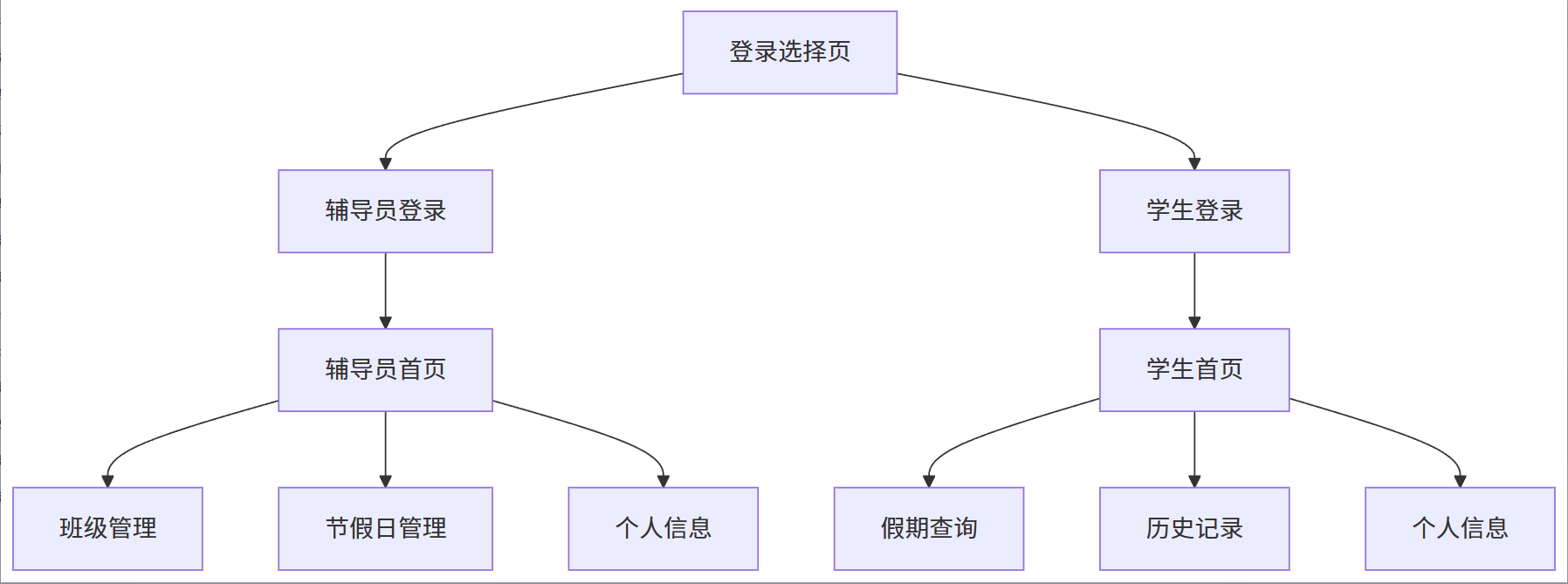
本系统有两个重要角色:管理员(辅导员)、学生
辅导员可以干什么?
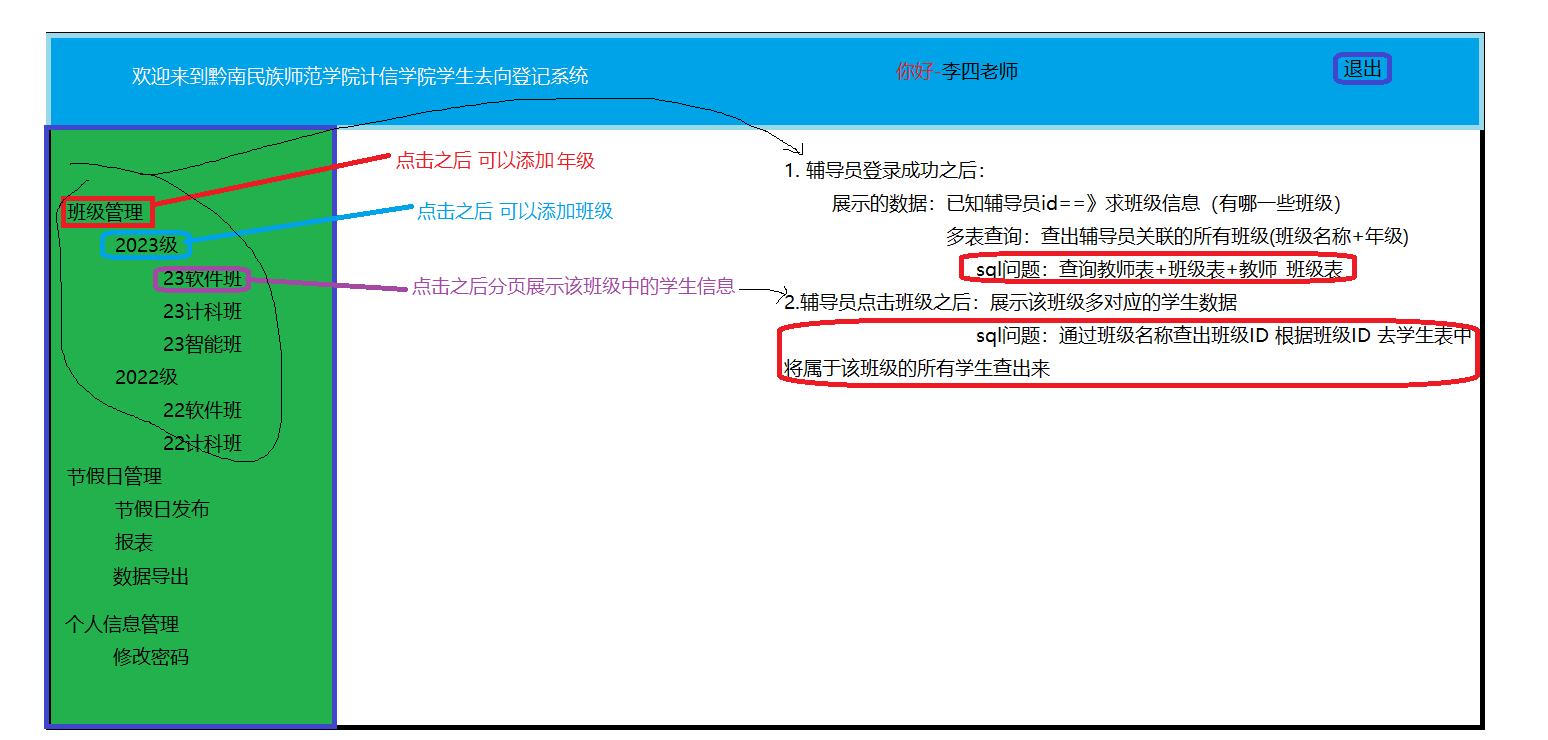
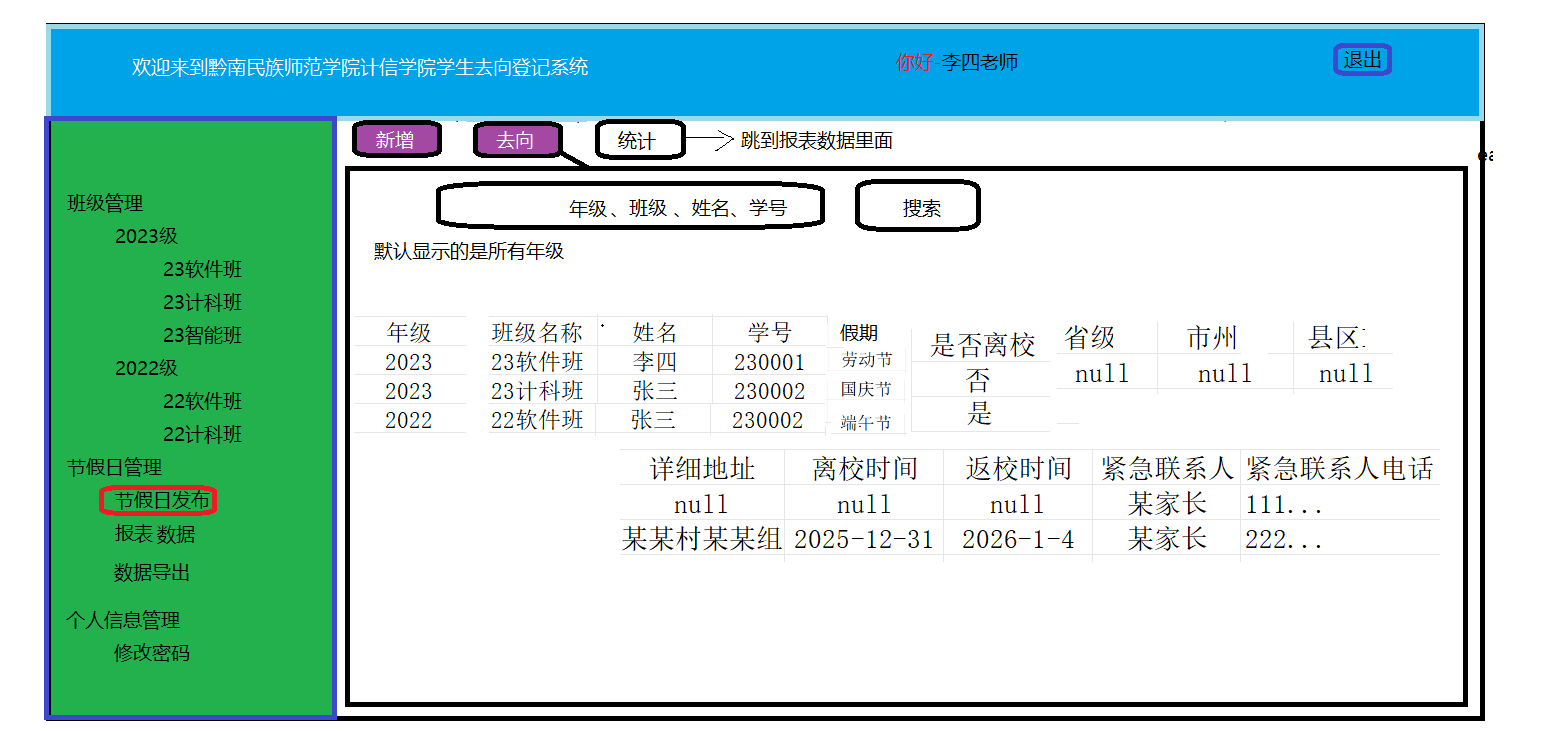
- 班级管理:辅导员可以查看、添加、修改和删除班级信息,班级信息包括:班级名称、年级。==》就是说:辅导员操作的是班级表 (年级管理功能)
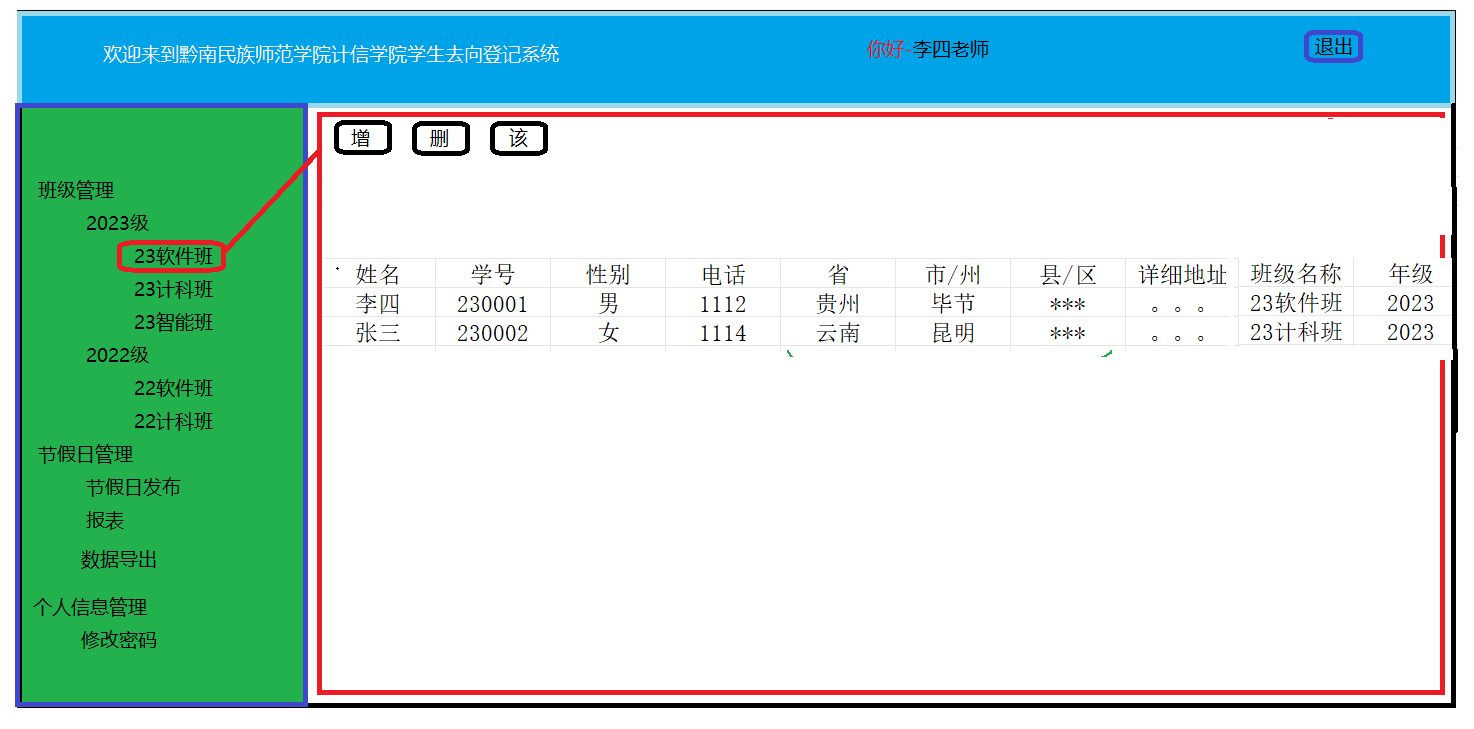
- 学生信息管理:辅导员可以查看、添加、修改和删除学生信息 ==》辅导员可以操作学生表 (班级管理功能)
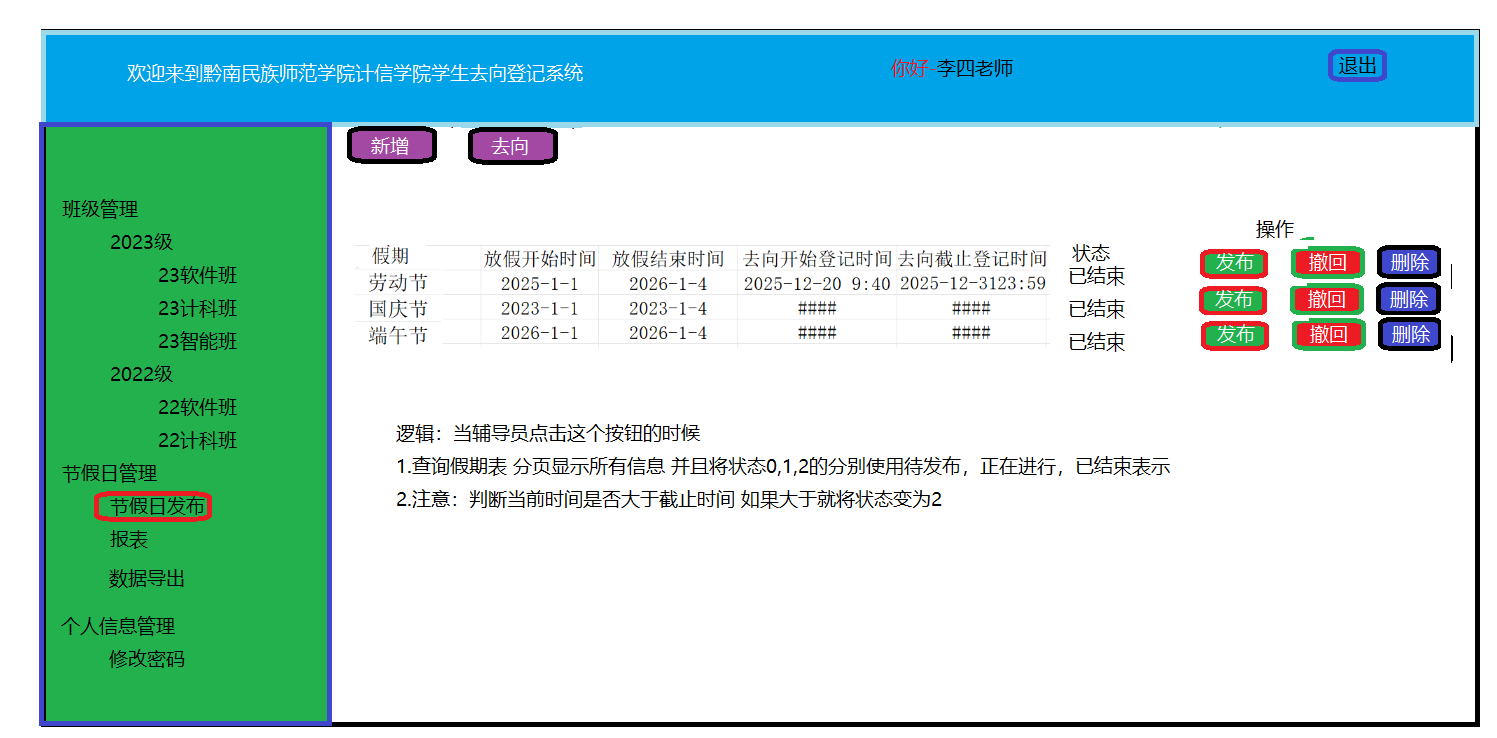
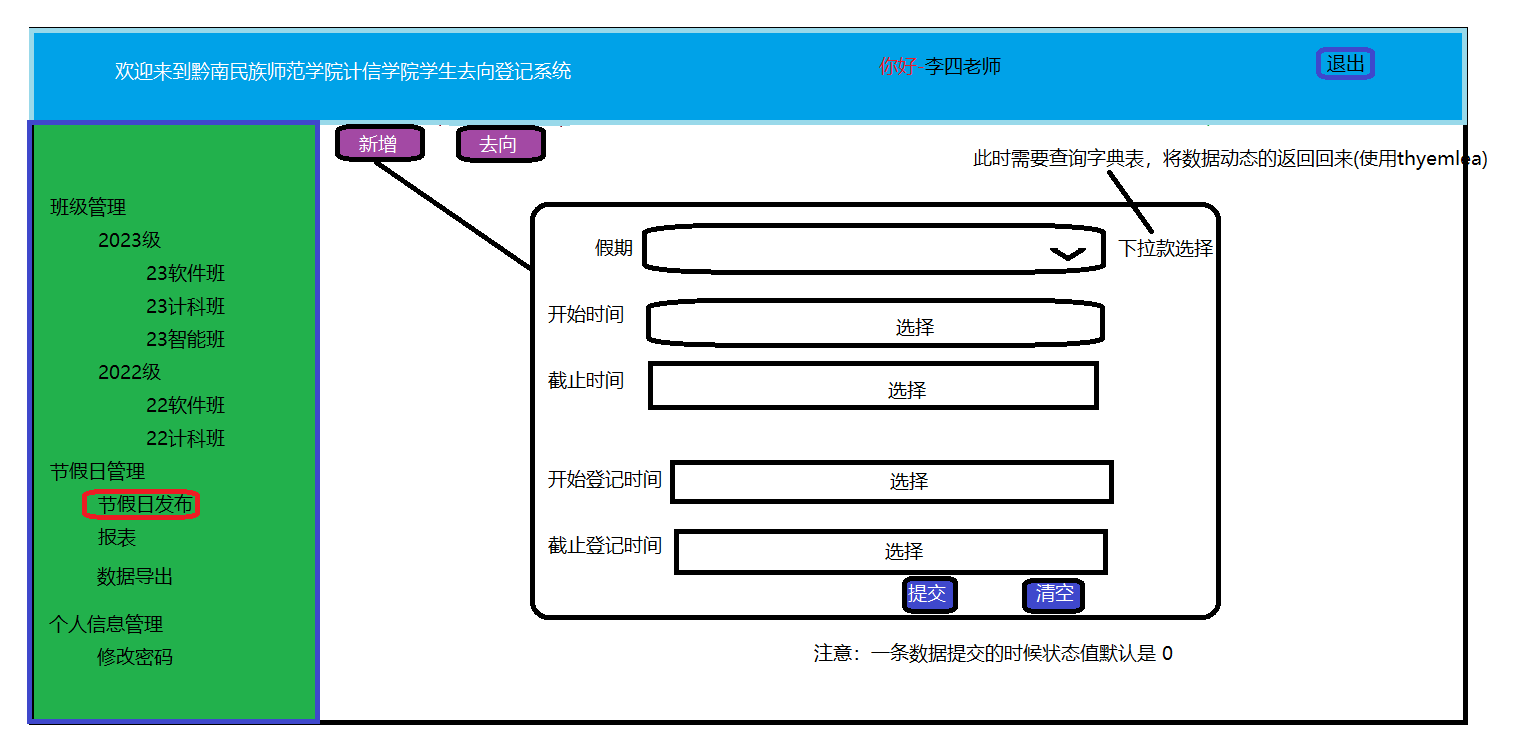
- 假期去向登记信息发布:辅导员根据学校假期安排发布假期去向登记信息。包括:假期(例如劳动节、端午节)、放假开始时间、放假截止时间、去向登记开始时间、去向登记截止时间。==》辅导员可以操作假期表 (节假日发布功能里面的 新增功能)
- 辅导员可以根据学号、姓名、班级等条件查询学生的假期去向情况==》辅导员根据去向表将学生去向信息得出(留校多少人,离校多少人,出省多少人,省内多少人等等) (节假日发布功能里面的 去向功能)
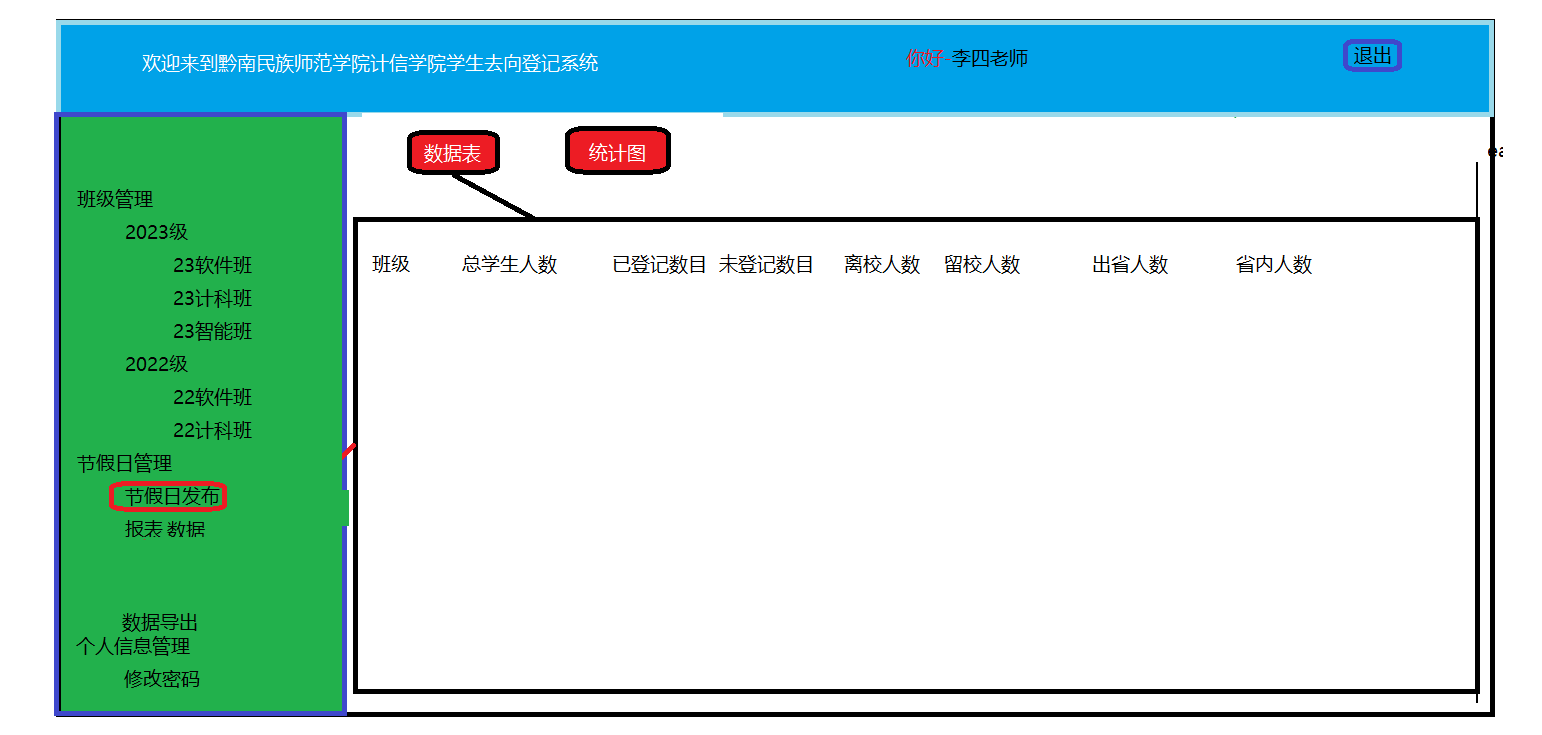
- 去向统计:辅导员可以统计每个班级、学生假期去向(例如:留校多少人,离校多少人,出省多少人,省内多少人),统计情况可以用柱状图、饼图等显示。==》根据需求4的结果 将此结果使用 图展示出来 (报表功能)
- 密码修改:用户可以通过系统修改自己的密码,确保账号安全。==》辅导员操作者辅导员表 (辅导员个人信息功能)
- 数据导出:管理员可以统计数据导出为Excel文件,方便数据的管理和分析。==》导出的是需求4和需求5中的信息(数据导出功能)
学生可以干什么?
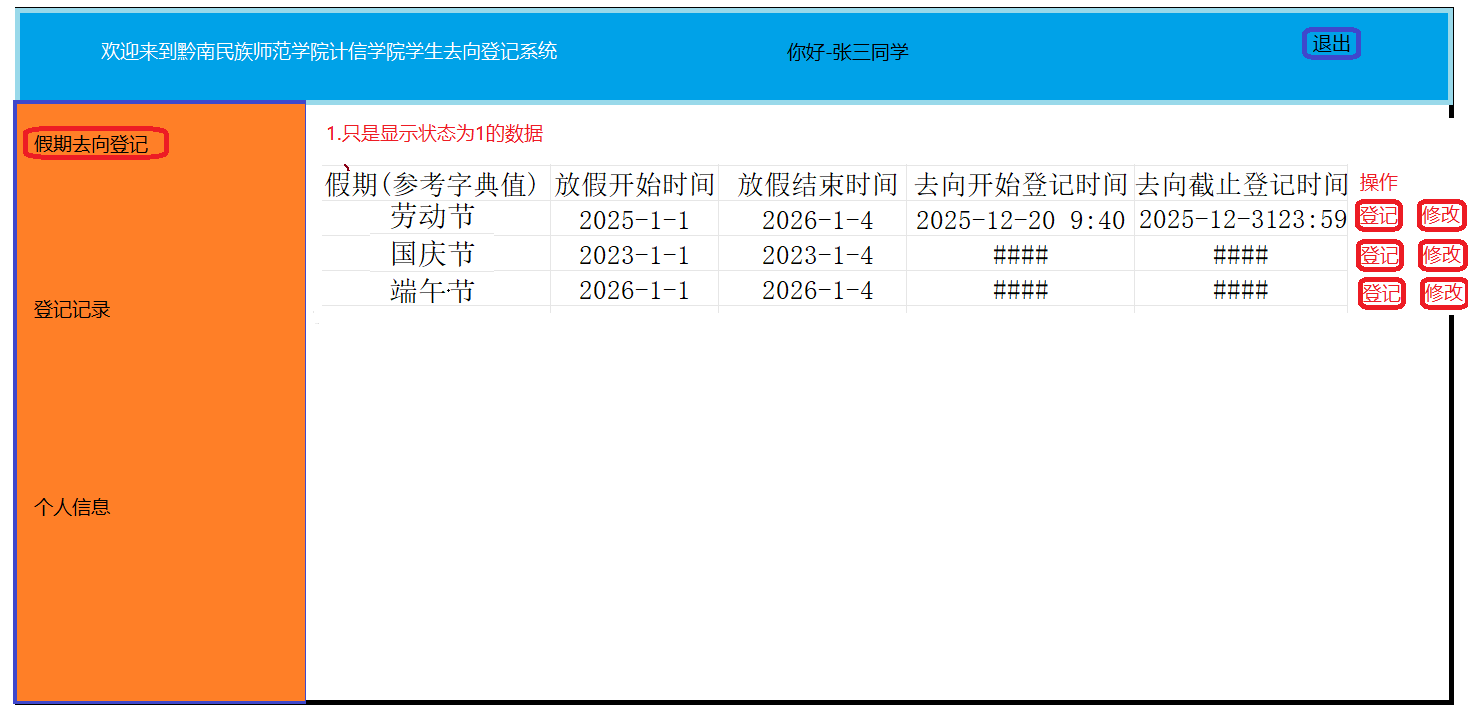
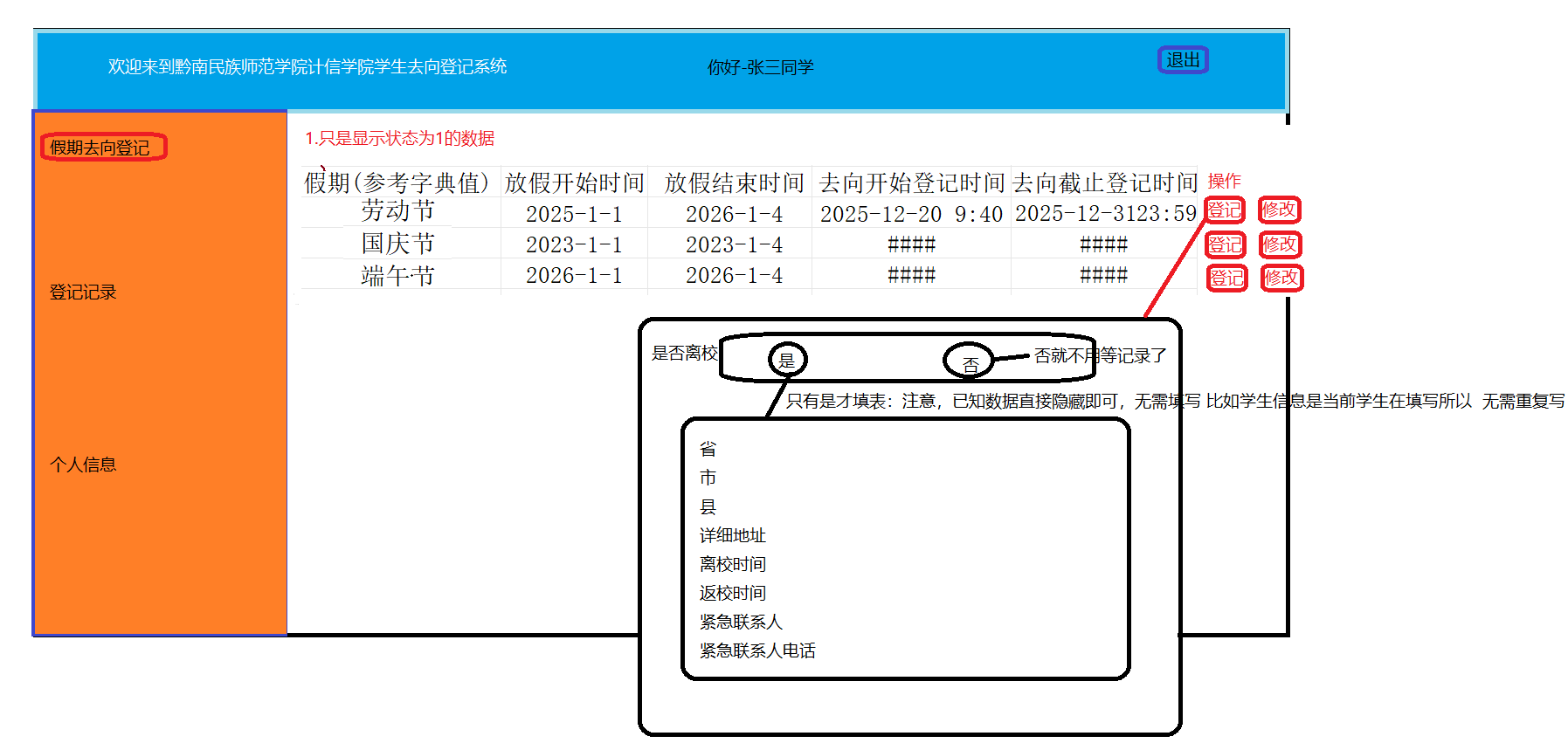
- 假期去向登记:学生可以在软件中根据辅导员发布的假期去向登记信息,登记自己的假期去向,包括去向类型(离校、留校),如果是离校则登记去向(省份、市州、县、详细地址)、离校时间、返校时间、紧急联系人、紧急联系人电话。在去向登记时间范围内可以修改去向记录。==》学生操作的是去向表 而且只能在状态为:正在进行 (去向登记功能)
- 学生只能查询本人的去向登记信息。==》学生操作学生表 只是操作自己的信息(个人信息) 学生查询假期表 将自己以前填写过的假期表给查出来(登记记录功能)
- 密码修改:用户可以通过系统修改自己的密码,确保账号安全。(属于需求2中,个人信息修改功能)
界面原型
知道这个系统我们到底在做什么
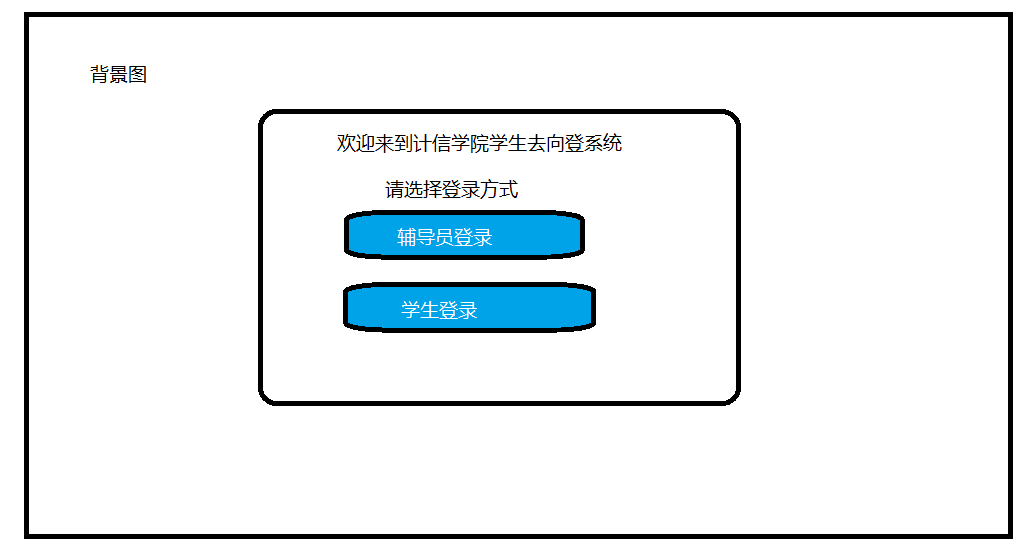
总的登录页面
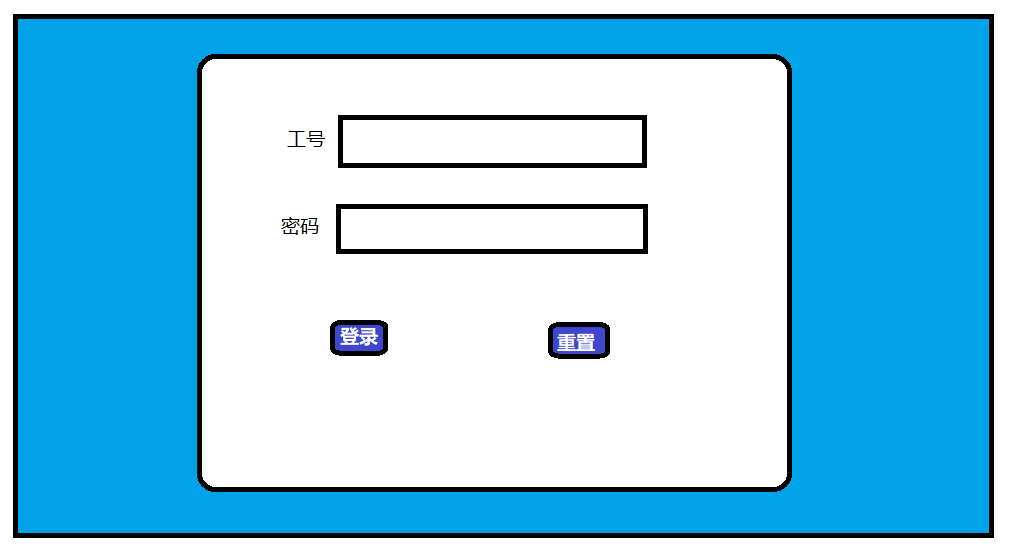
辅导员登录系统
此时需要查询辅导员表
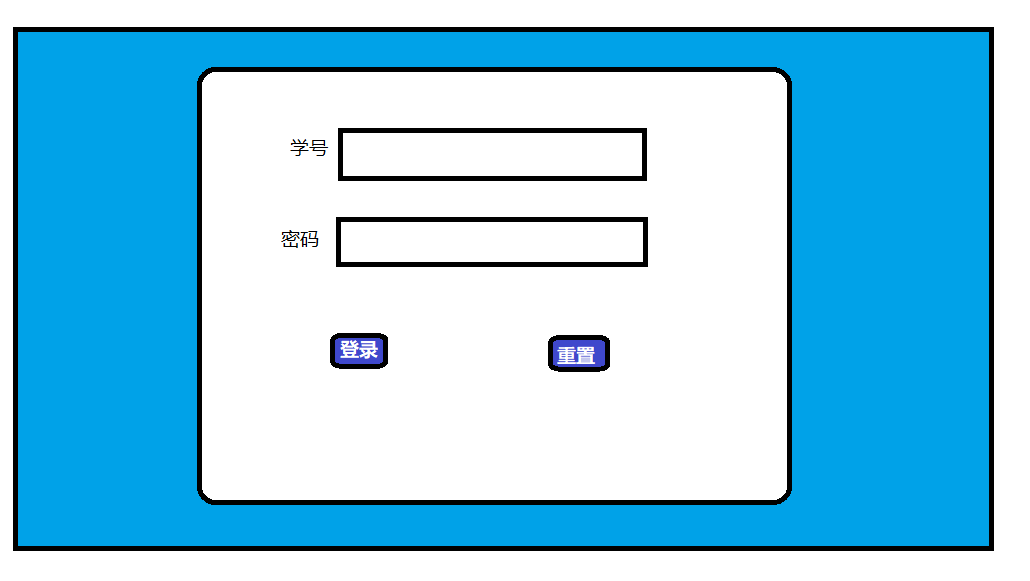
学生登录系统
此时需要查询学生表
辅导员界面
涉及到的表操作:1.班级和年级的数据展示:通过教师ID查询 班级信息
2.显示学生信息:同过班级名称查询班级id 通过班级id 查询对应的学生
根据班级id查询学生表(为什么根据班级ID 因为为了多表查询是后的关联条件)
学生界面
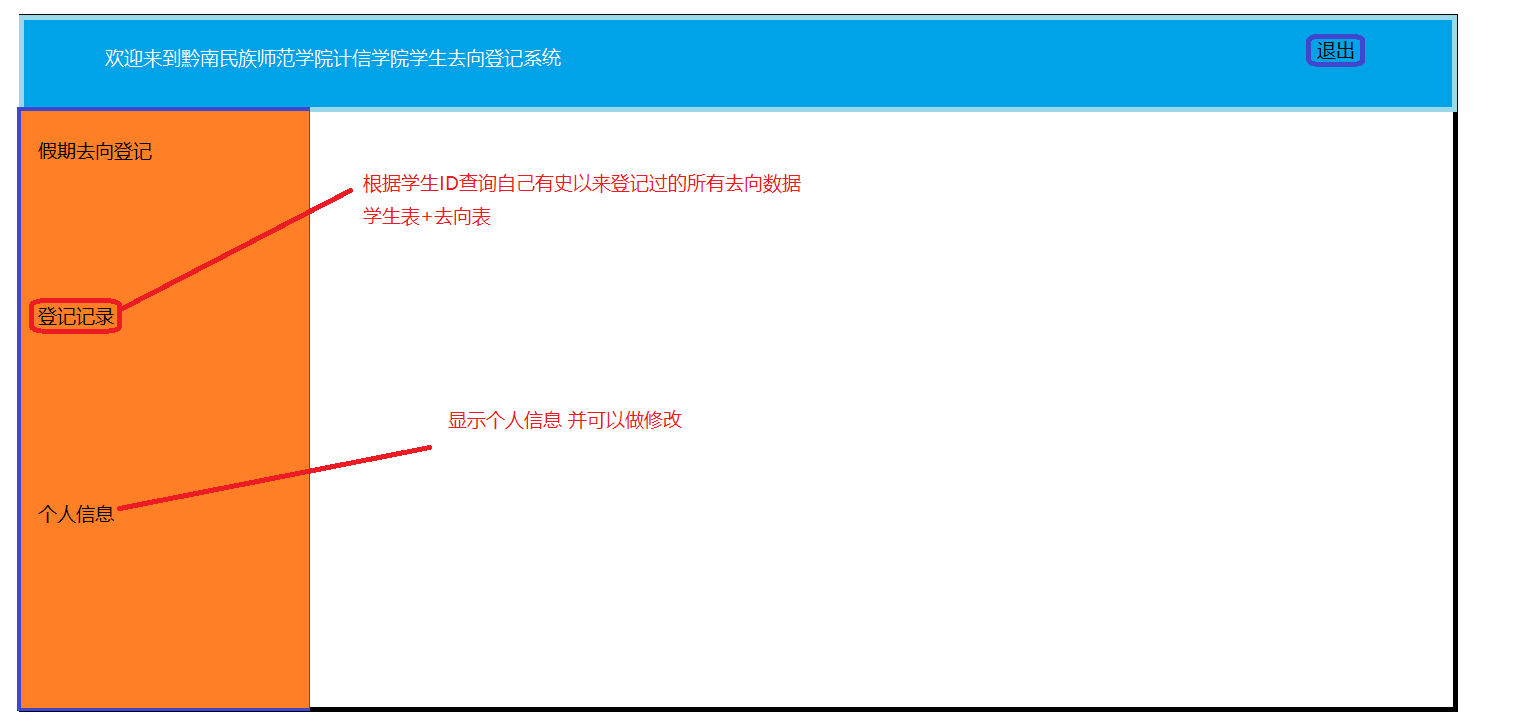
数据库设计
在idea中建立连接
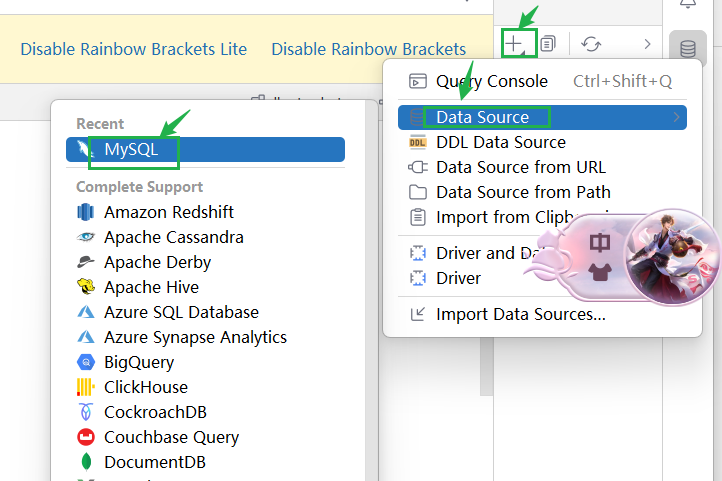
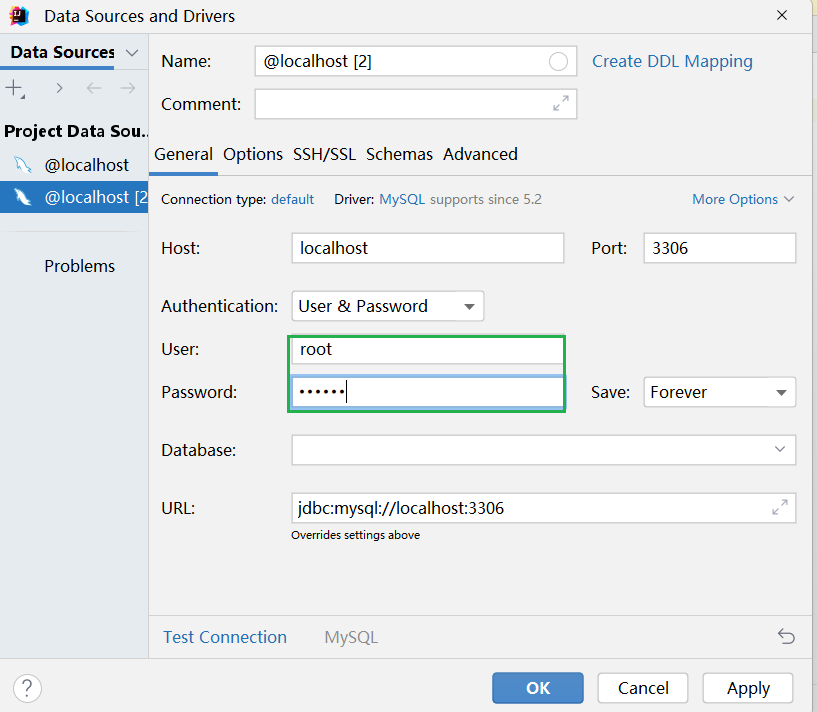
输入用户名和密码
将以下代码粘过去:
-- 首先我们现将数据库中所存在的相关库清理一下
/****************************************************
*
*
*
****************************************************/

-- 删除数据库
drop database if exists db_stu_dest;#如果存在学生去向 库 就将他删除

-- 创建数据库
create database if not exists db_stu_dest charset 'utf8mb4';

-- 使用数据库
use db_stu_dest;

/****************************************************
*表名:班级表
*作用:存储班级信息 主要用于辅导员端的管理
*关联:无
****************************************************/
create table if not exists t_class(
    id bigint primary key auto_increment,
    name varchar(50) not null unique comment '班级名称',
    grade varchar(20) not null comment '年级'
);

/****************************************************
*表名:辅导员表
*作用:存储辅导员信息
*关联: 无
****************************************************/
create table if not exists t_teacher(
    id bigint primary key auto_increment,
    job_number varchar(20) not null unique comment '教师工号',
    name varchar(150) not null comment '教师姓名',
    telephone varchar(18) not null unique comment '联系电话',
    password varchar(20) not null unique comment '密码'
);

/****************************************************
*表名:辅导员_班级表
*作用:关联教师_班级这样的 多对多关系
*关联: 辅导员、班级
****************************************************/
create table if not exists t_teacher_class(
    id bigint primary key auto_increment,
    begin date not null comment '辅导开始时间',
    end date not null comment '辅导结束时间',
    class_id bigint comment '班级ID 外键 参考t_class(id)',
    teacher_id bigint comment '教师ID 外键 参考t_teacher(id)',
    constraint fk_t_teacher_class_class_id foreign key (class_id) references t_class(id),
    constraint fk_t_teacher_class_teacher_id foreign key (teacher_id) references t_teacher(id)
);

/****************************************************
*表名:字典表
*作用:存储所有枚举信息(键值对)
*关联:无
****************************************************/
create table if not exists t_dict(
    id bigint primary key auto_increment,
    table_name varchar(20) comment '哪一张表',
    field_name varchar(20) comment '哪一个字段',
    value int not null comment '字典值',
    `describe` varchar(150) not null comment '描述'
);

/****************************************************
*表名:行政区域表(自关联)
*作用:用于存储行政地址,方便到时候对区县的参考
*关联:行政区域表(自己关联自己)
*constraint约束 外键名 外键指令(字段) 参考 表名(字段)
****************************************************/
create table if not exists t_region(
    id bigint primary key auto_increment,
    code varchar(18) not null comment '行政编码',
    name varchar(50) not null comment '名称',
    parent_id bigint comment '父级ID 外键 自关联 参考自己id',
    constraint fk_t_region_parent_id foreign key (parent_id) references t_region(id)
);

/****************************************************
*表名:学生表
*作用:存储学生信息 辅导员可以对其进行增删改查 学生自己可查自己信息
*关联:班级表、行政区域表、字典表中的字典值(性别来自于字典表)
****************************************************/
create table if not exists t_student(
    id bigint primary key auto_increment,
    name varchar(20) not null comment '学生姓名',
    student_number varchar(20) not null unique comment '学号',
    /*此处将enum('0','1') 使用check (gender in (0,1))
      因为字典表中value是Int类型 所以此处使用check确保 gender为整型 统一类型
      防止后面查询出错
      */
    gender int check (gender in (0,1)) comment '性别 参考于字典表 0-男 1-女',
    telephone varchar(18) not null unique comment '联系电话',
    province_id bigint comment '外键 参考于 行政区域表',
    city_id bigint comment '外键 参考于 行政区域表',
    county_id bigint comment '外键 参考于 行政区域表',
    detailed_address varchar(255) comment '详细地址',
    password varchar(20) not null unique comment '学生密码',
    class_id bigint comment '班级ID 外键 参考t_class(id)',
    constraint fk_t_student_class_id foreign key (class_id) references t_class(id),
    constraint fk_t_student_province_id foreign key (province_id) references t_region(id),
    constraint fk_t_student_city_id foreign key (city_id) references t_region(id),
    constraint fk_t_student_county_id foreign key (county_id) references t_region(id)
);

/****************************************************
*表名:假期表
*作用:存储假期信息,用于到时候辅导员发布(重点加入 状态)
*关联:字典表
****************************************************/
create table if not exists t_holiday(
    id bigint primary key auto_increment,
    holiday_value int not null comment '参考字典表中的字典值',
    holiday_begin datetime not null comment '假期开始时间',
    holiday_end datetime not null comment '假期结束时间',
    holiday_dest_register_begin datetime not null comment '假期去向登记开始时间',
    holiday_dest_register_end datetime not null comment '假期去向登记截止时间',
    state int check ( state in (0,1,2) ) comment '参照字典表 0->待发布 1->正在进行 2->已发布'
);

/****************************************************
*表名:去向表
*作用:存储学生去向信息
*关联:学生表、假期表、去向表、行政区域表、字典表
****************************************************/
create table if not exists t_dest(
    id bigint primary key auto_increment,
    student_id bigint comment '学生ID 外键 参考t_student(id)',
    holiday_id bigint comment '假期ID 外键 参考t_holiday(id)',
    isLeave int check ( isLeave in (0,1) ) comment '是否离校 参考字典表 0-否  1-是',
    province_id bigint comment '省份ID 外键 参考t_region(id)',
    city_id bigint comment '市州ID 外键 参考t_region(id)',
    county_id bigint comment '县区ID 外键 参考t_region(id)',
    detailed_address varchar(255) comment '详细地址',
    leave_date date not null comment '离校时间',
    return_date date not null comment '返校时间',
    emergency_contact varchar(20) not null comment '紧急联系人',
    emergency_contact_telephone varchar(18) not null comment '紧急联系人电话',
    constraint fk_t_dest_student_id foreign key (student_id) references t_student(id),
    constraint fk_t_dest_holiday_id foreign key (holiday_id) references t_holiday(id),
    constraint fk_t_dest_province_id foreign key (province_id) references t_region(id),
    constraint fk_t_dest_city_id foreign key (city_id) references t_region(id),
    constraint fk_t_dest_county_id foreign key (county_id) references t_region(id)
);
搭建环境
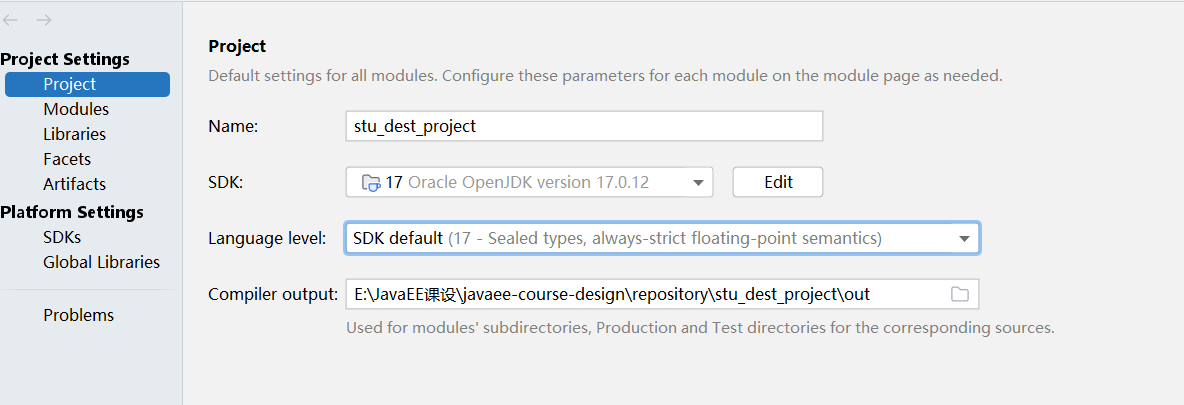
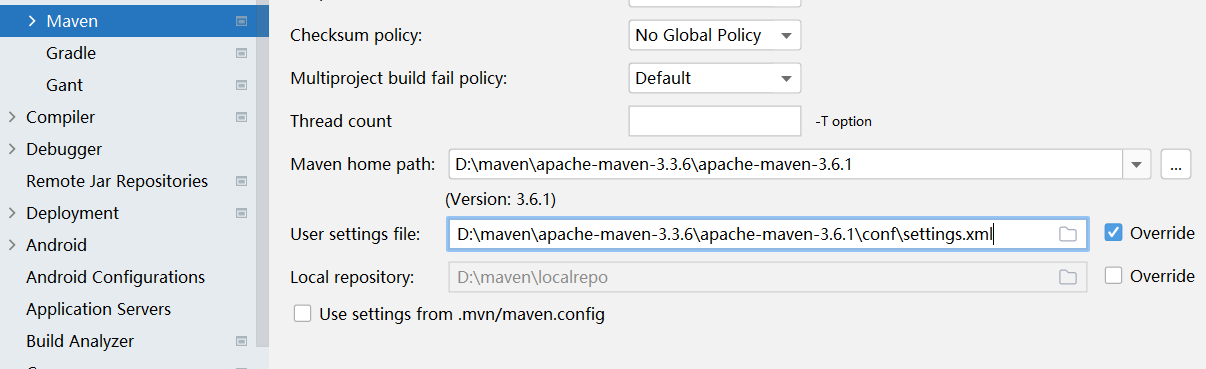
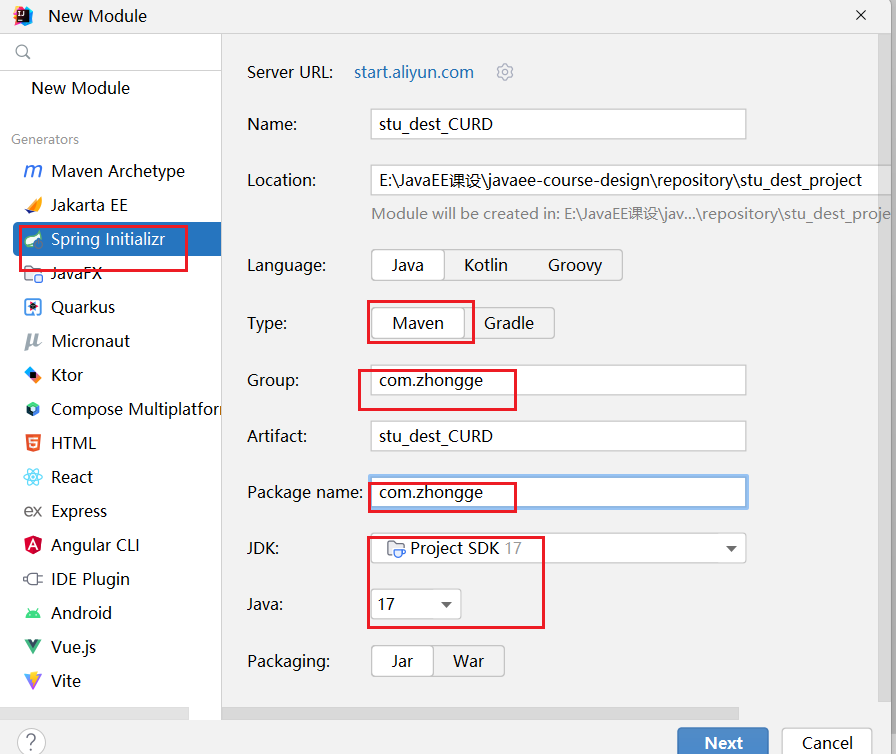
新建一个模块
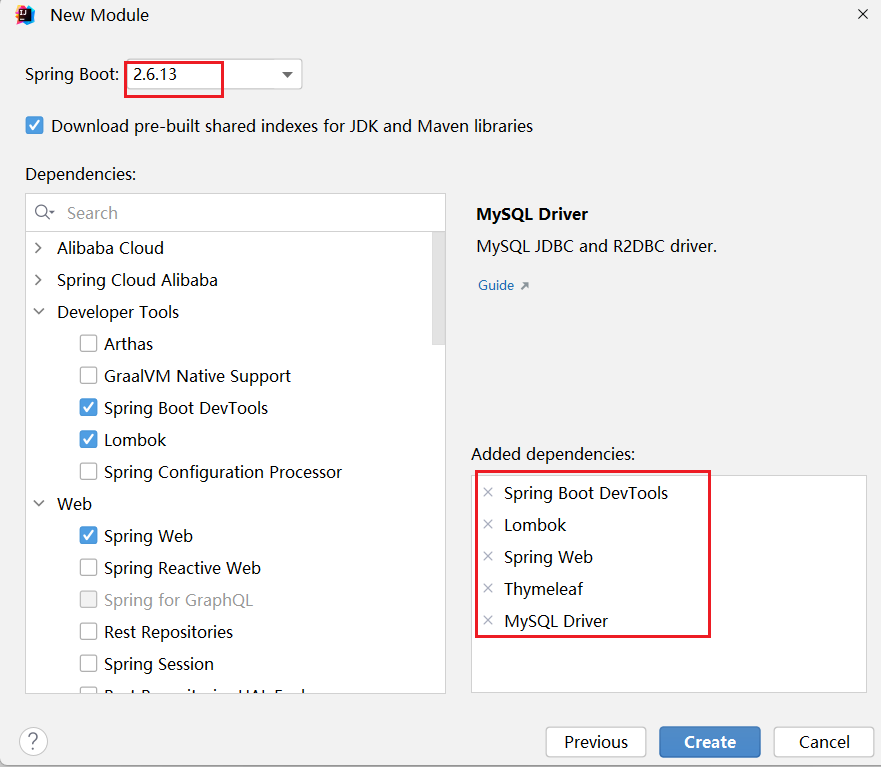
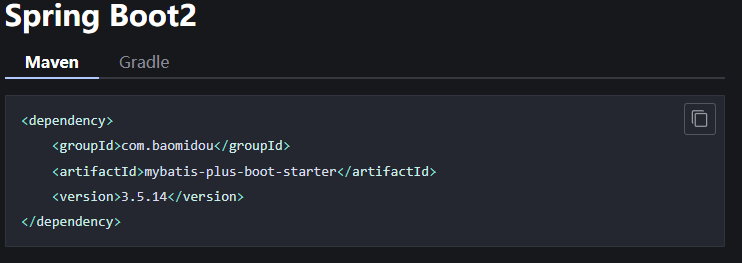
导入依赖 如果是springboot2就是下面这个

进行配置文件的配置

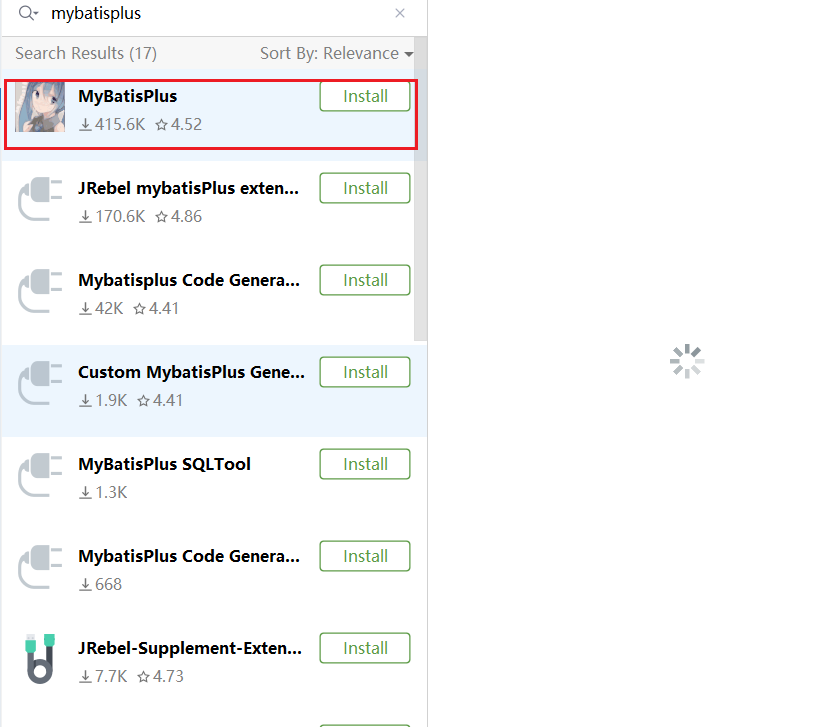
下载mybatis-plus代码生成器插件
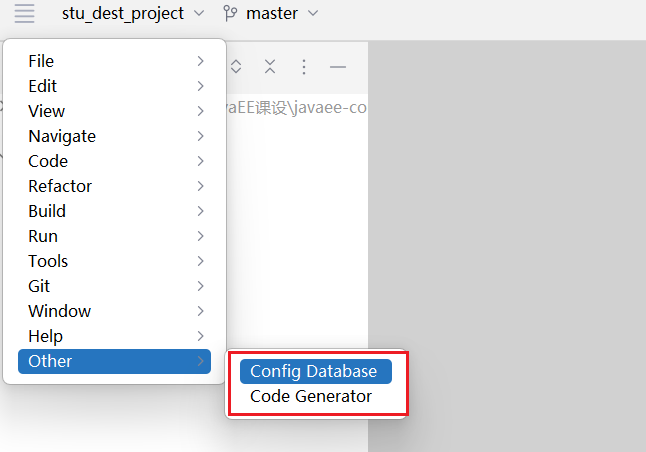
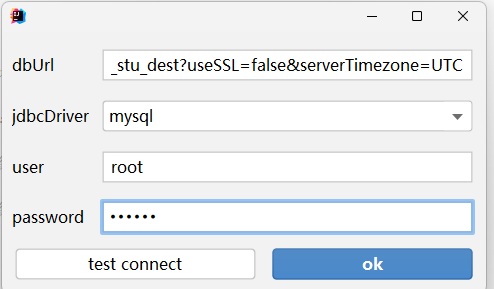
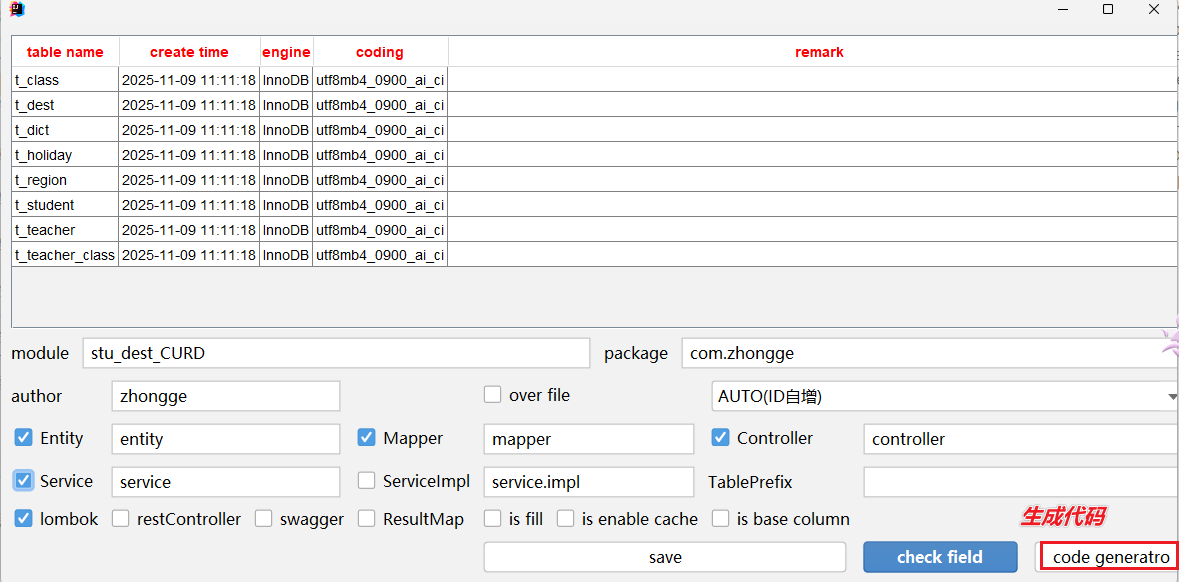
重启idea 做如下连接(如果没有在other里面 那么就是在 tools里面)

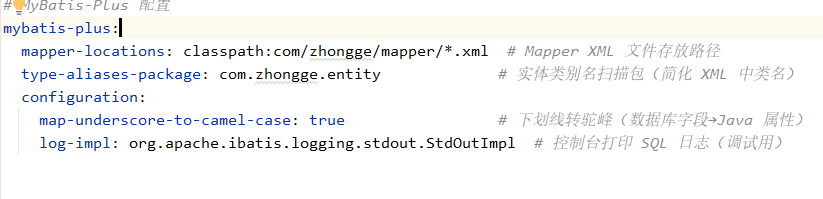
mybatis的配置
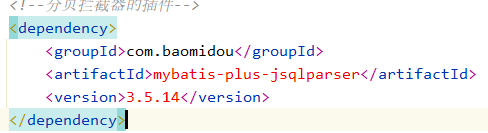
mybatis-plus分页查询的插件拦截器配置

前端实现
我将在所有前端页面中添加详细的注释,特别是针对后端接口调用、数据格式要求和交互逻辑的说明。以下是带有完整注释的改进版本:
1. 公共头部 (common-header.html) - 注释版
<!DOCTYPE html>
<html xmlns:th="http://www.thymeleaf.org">
<head>
    <meta charset="UTF-8">
    <title>学生假期去向登记系统</title>
    <!-- EasyUI 核心样式 -->
    <link rel="stylesheet" type="text/css" th:href="@{/easyui/themes/default/easyui.css}">
    <!-- EasyUI 图标样式 -->
    <link rel="stylesheet" type="text/css" th:href="@{/easyui/themes/icon.css}">
    <!-- EasyUI 示例样式(可选) -->
    <link rel="stylesheet" type="text/css" th:href="@{/easyui/demo/demo.css}">
    <!-- jQuery 核心库 -->
    <script type="text/javascript" th:src="@{/easyui/jquery.min.js}"></script>
    <!-- EasyUI 主要JS文件 -->
    <script type="text/javascript" th:src="@{/easyui/jquery.easyui.min.js}"></script>
    <!-- 中文语言包 -->
    <script type="text/javascript" th:src="@{/easyui/locale/easyui-lang-zh_CN.js}"></script>
    <style>
        /* 页面布局样式 */
        .north-panel {
            padding: 10px;
            background: #444;
            color: white;
            font-size: 18px;
            height: 60px;
        }
        .west-panel {
            padding: 10px;
            background: #f5f5f5;
        }
        .user-info {
            float: right;
            margin-top: 5px;
            font-size: 14px;
        }
        .logout-btn {
            float: right;
            margin-top: 15px;
            margin-right: 10px;
        }
    </style>
</head>
2. 登录模块
2.1 总登录页面 (login-select.html) - 注释版
<!DOCTYPE html>
<html xmlns:th="http://www.thymeleaf.org">
<head th:include="common-header :: head"></head>
<body>
    <div style="text-align: center; margin-top: 150px;">
        <h1>欢迎来到计信学院学生去向登录系统</h1>
        <br><br>
        <!-- 辅导员登录入口 -->
        <a href="counselor-login.html" class="easyui-linkbutton" iconCls="icon-man"
           style="width:200px;height:50px;font-size:18px;margin:10px;">辅导员登录</a>
        <!-- 学生登录入口 -->
        <a href="student-login.html" class="easyui-linkbutton" iconCls="icon-man"
           style="width:200px;height:50px;font-size:18px;margin:10px;">学生登录</a>
    </div>
</body>
</html>
<!--
    页面说明:
    1. 这是系统的入口页面
    2. 提供两个角色的登录选择
    3. 点击按钮跳转到对应的登录页面
    4. 无需与后端交互,纯静态页面
-->
2.2 辅导员登录 (counselor-login.html) - 注释版
<!DOCTYPE html>
<html xmlns:th="http://www.thymeleaf.org">
<head th:include="common-header :: head"></head>
<body>
    <div style="width:400px;margin:150px auto;">
        <div class="easyui-panel" title="辅导员登录" style="padding:30px;">
            <!-- 登录表单 -->
            <form id="counselorLoginForm">
                <div style="margin-bottom:20px">
                    <!-- 工号输入框 -->
                    <input class="easyui-textbox" name="workId" style="width:100%;height:40px"
                           data-options="prompt:'请输入工号',iconCls:'icon-man',iconWidth:38" required>
                </div>
                <div style="margin-bottom:20px">
                    <!-- 密码输入框 -->
                    <input class="easyui-passwordbox" name="password" style="width:100%;height:40px"
                           data-options="prompt:'请输入密码',iconCls:'icon-lock',iconWidth:38" required>
                </div>
                <div style="text-align:center;padding:5px 0">
                    <!-- 登录按钮 -->
                    <a href="javascript:void(0)" class="easyui-linkbutton" onclick="submitCounselorLogin()" style="width:100px">登录</a>
                    <!-- 重置按钮 -->
                    <a href="javascript:void(0)" class="easyui-linkbutton" onclick="resetForm()" style="width:100px">重置</a>
                    <!-- 返回按钮 -->
                    <a href="login-select.html" class="easyui-linkbutton" style="width:100px">返回</a>
                </div>
            </form>
        </div>
    </div>

    <script>
        // 提交辅导员登录表单
        function submitCounselorLogin() {
            $('#counselorLoginForm').form('submit', {
                url: '/counselor/login',  // 后端登录接口
                onSubmit: function() {
                    return $(this).form('validate');  // 表单验证
                },
                success: function(data) {
                    var result = JSON.parse(data);
                    if (result.success) {
                        // 登录成功跳转到首页
                        window.location.href = 'counselor-index.html';
                    } else {
                        // 显示错误信息
                        $.messager.alert('错误', result.message, 'error');
                    }
                }
            });
        }

        // 重置表单
        function resetForm() {
            $('#counselorLoginForm').form('clear');
        }
    </script>
</body>
</html>
<!--
    后端接口要求:
    1. 接口地址:POST /counselor/login
    2. 请求参数:{workId: "工号", password: "密码"}
    3. 返回JSON格式:
       {
         "success": true/false,
         "message": "提示信息"
       }
    4. 成功时设置session,失败时不跳转
-->
2.3 学生登录 (student-login.html) - 注释版
<!DOCTYPE html>
<html xmlns:th="http://www.thymeleaf.org">
<head th:include="common-header :: head"></head>
<body>
    <div style="width:400px;margin:150px auto;">
        <div class="easyui-panel" title="学生登录" style="padding:30px;">
            <form id="studentLoginForm">
                <div style="margin-bottom:20px">
                    <input class="easyui-textbox" name="studentId" style="width:100%;height:40px"
                           data-options="prompt:'请输入学号',iconCls:'icon-man',iconWidth:38" required>
                </div>
                <div style="margin-bottom:20px">
                    <input class="easyui-passwordbox" name="password" style="width:100%;height:40px"
                           data-options="prompt:'请输入密码',iconCls:'icon-lock',iconWidth:38" required>
                </div>
                <div style="text-align:center;padding:5px 0">
                    <a href="javascript:void(0)" class="easyui-linkbutton" onclick="submitStudentLogin()" style="width:100px">登录</a>
                    <a href="javascript:void(0)" class="easyui-linkbutton" onclick="resetForm()" style="width:100px">重置</a>
                    <a href="login-select.html" class="easyui-linkbutton" style="width:100px">返回</a>
                </div>
            </form>
        </div>
    </div>

    <script>
        function submitStudentLogin() {
            $('#studentLoginForm').form('submit', {
                url: '/student/login',  // 学生登录接口
                onSubmit: function() {
                    return $(this).form('validate');
                },
                success: function(data) {
                    var result = JSON.parse(data);
                    if (result.success) {
                        window.location.href = 'student-index.html';  // 跳转学生首页
                    } else {
                        $.messager.alert('错误', result.message, 'error');
                    }
                }
            });
        }

        function resetForm() {
            $('#studentLoginForm').form('clear');
        }
    </script>
</body>
</html>
<!--
    后端接口要求:
    1. 接口地址:POST /student/login
    2. 请求参数:{studentId: "学号", password: "密码"}
    3. 返回JSON格式同辅导员登录
    4. 需要在session中保存学生信息用于显示
-->
3. 辅导员模块
3.1 辅导员首页 (counselor-index.html) - 注释版
<!DOCTYPE html>
<html xmlns:th="http://www.thymeleaf.org">
<head th:include="common-header :: head"></head>
<body class="easyui-layout">
    <!-- 顶部区域 -->
    <div data-options="region:'north',split:false" class="north-panel">
        <span>欢迎来到黔南民族师范学院计信学院学生去向登记系统</span>
        <!-- 用户信息显示,后端需要提供用户名 -->
        <span class="user-info">李四-老师</span>
        <a href="javascript:void(0)" class="easyui-linkbutton logout-btn" data-options="iconCls:'icon-cancel'" onclick="logout()">退出</a>
    </div>

    <!-- 左侧菜单 -->
    <div data-options="region:'west',split:true" title="系统菜单" class="west-panel" style="width:200px;">
        <!-- 树形菜单 -->
        <ul id="menuTree" class="easyui-tree" data-options="
                animate:true,
                onClick: treeOnClick,
                onContextMenu: treeOnContextMenu
            "></ul>
    </div>

    <!-- 中央内容区 -->
    <div data-options="region:'center'">
        <!-- 主选项卡 -->
        <div id="mainTabs" class="easyui-tabs" fit="true" border="false">
            <div title="欢迎页" iconCls="icon-tip" style="padding:20px;">
                <h2>欢迎使用学生假期去向登记系统</h2>
                <p>系统功能说明:</p>
                <ul>
                    <li>班级管理:查看、添加、修改和删除班级信息</li>
                    <li>节假日管理:发布假期去向登记信息,查看统计报表</li>
                    <li>个人信息管理:修改个人信息</li>
                </ul>
            </div>
        </div>
    </div>

    <!-- 右键菜单 - 班级管理 -->
    <div id="classManageMenu" class="easyui-menu" style="width:120px;">
        <div data-options="iconCls:'icon-add'" onclick="addGrade()">添加年级</div>
    </div>

    <!-- 右键菜单 - 年级节点 -->
    <div id="gradeMenu" class="easyui-menu" style="width:120px;">
        <div data-options="iconCls:'icon-add'" onclick="addClass()">添加班级</div>
    </div>

    <!-- 添加年级/班级对话框 -->
    <div id="addDlg" class="easyui-dialog" style="width:400px;padding:20px;"
         data-options="closed:true,buttons:'#dlg-buttons'">
        <form id="addForm" method="post">
            <input type="hidden" id="nodeType" name="nodeType">
            <input type="hidden" id="parentId" name="parentId">
            <table cellpadding="5">
                <tr>
                    <td>名称:</td>
                    <td><input class="easyui-textbox" name="name" style="width:200px;" required></td>
                </tr>
            </table>
        </form>
    </div>
    <div id="dlg-buttons">
        <a href="javascript:void(0)" class="easyui-linkbutton" iconCls="icon-ok" onclick="saveItem()">保存</a>
        <a href="javascript:void(0)" class="easyui-linkbutton" iconCls="icon-cancel" onclick="javascript:$('#addDlg').dialog('close')">取消</a>
    </div>

    <script>
        $(function() {
            loadMenuTree();  // 页面加载时加载菜单树
        });

        // 加载班级树数据
        function loadMenuTree() {
            // 后端需要提供树形结构的班级数据
            // 数据格式示例:
            // [
            //   {
            //     "id": "classManagement",
            //     "text": "班级管理",
            //     "children": [
            //       {
            //         "id": "grade_2023",
            //         "text": "2023级",
            //         "attributes": {"type": "grade"},
            //         "children": [
            //           {"id": "class_2301", "text": "23软件班", "attributes": {"type": "class"}}
            //         ]
            //       }
            //     ]
            //   }
            // ]
            $.getJSON('/class/getTreeData', function(data) {
                $('#menuTree').tree('loadData', data);
            });
        }

        // 菜单点击事件
        function treeOnClick(node) {
            if (node.attributes && node.attributes.url) {
                addTab(node.text, node.attributes.url);  // 打开新标签页
            } else if (node.attributes && node.attributes.type === 'class') {
                // 点击班级节点时加载该班级的学生列表
                addStudentTab(node.text, node.id);
            }
        }

        // 右键菜单事件
        function treeOnContextMenu(e, node) {
            e.preventDefault();
            $(this).tree('select', node.target);

            if (node.id === 'classManagement') {
                // 在"班级管理"节点右键显示添加年级菜单
                $('#classManageMenu').menu('show', {
                    left: e.pageX,
                    top: e.pageY
                });
            } else if (node.attributes && node.attributes.type === 'grade') {
                // 在年级节点右键显示添加班级菜单
                $('#parentId').val(node.id);
                $('#gradeMenu').menu('show', {
                    left: e.pageX,
                    top: e.pageY
                });
            }
        }

        // 打开新标签页
        function addTab(title, url) {
            if ($('#mainTabs').tabs('exists', title)) {
                $('#mainTabs').tabs('select', title);
            } else {
                var content = '<iframe scrolling="auto" frameborder="0" src="'+url+'" style="width:100%;height:100%;"></iframe>';
                $('#mainTabs').tabs('add', {
                    title: title,
                    content: content,
                    closable: true,
                    iconCls: 'icon-page'
                });
            }
        }

        // 打开添加学生列表标签页
        function addStudentTab(title, classId) {
            var url = 'class-students.html?classId=' + classId;
            addTab(title, url);
        }

        // 添加年级
        function addGrade() {
            $('#addDlg').dialog('open').dialog('setTitle', '添加年级');
            $('#addForm').form('clear');
            $('#nodeType').val('grade');
            $('#parentId').val('');
        }

        // 添加班级
        function addClass() {
            $('#addDlg').dialog('open').dialog('setTitle', '添加班级');
            $('#addForm').form('clear');
            $('#nodeType').val('class');
        }

        // 保存新增项
        function saveItem() {
            var nodeType = $('#nodeType').val();
            $('#addForm').form('submit', {
                url: '/class/save' + (nodeType === 'grade' ? 'Grade' : 'Class'),
                onSubmit: function() {
                    return $(this).form('validate');
                },
                success: function(data) {
                    var result = JSON.parse(data);
                    if (result.success) {
                        $.messager.show({title:'成功', msg:result.message});
                        $('#addDlg').dialog('close');
                        loadMenuTree();  // 重新加载菜单树
                    } else {
                        $.messager.alert('错误', result.message, 'error');
                    }
                }
            });
        }

        // 退出登录
        function logout() {
            $.messager.confirm('确认', '确定要退出系统吗?', function(r) {
                if (r) {
                    window.location.href = 'login-select.html';
                }
            });
        }
    </script>
</body>
</html>
<!--
    后端接口要求:
    1. GET /class/getTreeData - 获取班级树形数据
    2. POST /class/saveGrade - 保存年级信息
    3. POST /class/saveClass - 保存班级信息
    4. 需要支持树形结构的数据格式
    5. 返回统一的JSON格式:{success: boolean, message: string}
-->
3.2 班级学生管理页面 (class-students.html) - 注释版
<!DOCTYPE html>
<html xmlns:th="http://www.thymeleaf.org">
<head th:include="common-header :: head"></head>
<body>
    <div class="easyui-layout" fit="true">
        <div region="center" border="false">
            <!-- 学生数据表格 -->
            <table id="studentDataGrid" class="easyui-datagrid" title="学生列表"
                   data-options="
                    fit:true,
                    border:false,
                    pagination:true,
                    pageSize:20,
                    pageList:[10,20,50],
                    toolbar:'#toolbar',
                    url:'/student/list?classId='+getParameter('classId'),  // 动态获取班级ID
                    rownumbers:true,
                    singleSelect:true,
                    idField:'id'
                ">
                <thead>
                    <tr>
                        <th data-options="field:'id',width:80">学号</th>
                        <th data-options="field:'name',width:100">姓名</th>
                        <th data-options="field:'gender',width:80,formatter:formatGender">性别</th>
                        <th data-options="field:'phone',width:120">联系方式</th>
                        <th data-options="field:'address',width:200">家庭地址</th>
                        <th data-options="field:'action',width:120,align:'center',formatter:formatAction">操作</th>
                    </tr>
                </thead>
            </table>

            <!-- 工具栏 -->
            <div id="toolbar">
                <a href="javascript:void(0)" class="easyui-linkbutton" iconCls="icon-add" plain="true" onclick="addStudent()">添加</a>
                <a href="javascript:void(0)" class="easyui-linkbutton" iconCls="icon-edit" plain="true" onclick="editStudent()">修改</a>
                <a href="javascript:void(0)" class="easyui-linkbutton" iconCls="icon-remove" plain="true" onclick="deleteStudent()">删除</a>
                <a href="javascript:void(0)" class="easyui-linkbutton" iconCls="icon-redo" plain="true" onclick="resetPassword()">重置密码</a>
            </div>

            <!-- 添加/编辑对话框 -->
            <div id="dlg" class="easyui-dialog" style="width:600px;padding:20px;"
                 data-options="closed:true,buttons:'#dlg-buttons'">
                <form id="fm" method="post">
                    <input type="hidden" name="id">
                    <table cellpadding="5">
                        <tr>
                            <td>学号:</td>
                            <td><input class="easyui-textbox" name="id" style="width:180px;" required></td>
                            <td>姓名:</td>
                            <td><input class="easyui-textbox" name="name" style="width:180px;" required></td>
                        </tr>
                        <tr>
                            <td>性别:</td>
                            <td>
                                <select class="easyui-combobox" name="gender" style="width:180px;">
                                    <option value="男">男</option>
                                    <option value="女">女</option>
                                </select>
                            </td>
                            <td>联系方式:</td>
                            <td><input class="easyui-textbox" name="phone" style="width:180px;"></td>
                        </tr>
                        <tr>
                            <td>省份:</td>
                            <td><input class="easyui-combobox" name="province" style="width:180px;" data-options="url:'/region/provinces',valueField:'id',textField:'name'"></td>
                            <td>市:</td>
                            <td><input class="easyui-combobox" name="city" style="width:180px;" data-options="disabled:true"></td>
                        </tr>
                        <tr>
                            <td>县:</td>
                            <td><input class="easyui-combobox" name="county" style="width:180px;" data-options="disabled:true"></td>
                            <td>详细地址:</td>
                            <td><input class="easyui-textbox" name="detailAddress" style="width:180px;"></td>
                        </tr>
                    </table>
                </form>
            </div>
            <div id="dlg-buttons">
                <a href="javascript:void(0)" class="easyui-linkbutton" iconCls="icon-ok" onclick="saveStudent()">保存</a>
                <a href="javascript:void(0)" class="easyui-linkbutton" iconCls="icon-cancel" onclick="javascript:$('#dlg').dialog('close')">取消</a>
            </div>
        </div>
    </div>

    <script>
        // 获取URL参数
        function getParameter(name) {
            var reg = new RegExp("(^|&)" + name + "=([^&]*)(&|$)");
            var r = window.location.search.substr(1).match(reg);
            if (r != null) return unescape(r[2]); return null;
        }

        // 性别格式化
        function formatGender(value) {
            return value === '1' ? '男' : '女';
        }

        // 操作列格式化
        function formatAction(value, row) {
            return '<a href="javascript:void(0)" class="easyui-linkbutton" iconCls="icon-edit" onclick="editStudent(' + row.id + ')">修改</a>';
        }

        // 添加学生
        function addStudent() {
            $('#dlg').dialog('open').dialog('setTitle', '添加学生');
            $('#fm').form('clear');
            $('#fm input[name="id"]').textbox('enable');  // 新增时允许修改学号
        }

        // 编辑学生
        function editStudent(id) {
            var row = $('#studentDataGrid').datagrid('getSelected');
            if (!row) {
                $.messager.alert('提示', '请选择要编辑的学生', 'info');
                return;
            }
            $('#dlg').dialog('open').dialog('setTitle', '修改学生信息');
            $('#fm').form('load', row);
            $('#fm input[name="id"]').textbox('disable');  // 修改时禁用学号
        }

        // 保存学生信息
        function saveStudent() {
            $('#fm').form('submit', {
                url: '/student/save',
                onSubmit: function() {
                    return $(this).form('validate');
                },
                success: function(data) {
                    var result = JSON.parse(data);
                    if (result.success) {
                        $.messager.show({title:'成功', msg:result.message});
                        $('#dlg').dialog('close');
                        $('#studentDataGrid').datagrid('reload');
                    } else {
                        $.messager.alert('错误', result.message, 'error');
                    }
                }
            });
        }

        // 删除学生
        function deleteStudent() {
            var row = $('#studentDataGrid').datagrid('getSelected');
            if (!row) {
                $.messager.alert('提示', '请选择要删除的学生', 'info');
                return;
            }
            $.messager.confirm('确认', '确定要删除该学生?', function(r) {
                if (r) {
                    $.post('/student/delete', {id: row.id}, function(data) {
                        if (data.success) {
                            $('#studentDataGrid').datagrid('reload');
                        } else {
                            $.messager.alert('错误', data.message, 'error');
                        }
                    });
                }
            });
        }

        // 重置密码
        function resetPassword() {
            var row = $('#studentDataGrid').datagrid('getSelected');
            if (!row) {
                $.messager.alert('提示', '请选择要重置密码的学生', 'info');
                return;
            }
            $.messager.confirm('确认', '确定要重置该学生的密码?', function(r) {
                if (r) {
                    $.post('/student/resetPassword', {id: row.id}, function(data) {
                        if (data.success) {
                            $.messager.show({title:'成功', msg:data.message});
                        } else {
                            $.messager.alert('错误', data.message, 'error');
                        }
                    });
                }
            });
        }

        // 省市区联动
        $(function() {
            $('input[name="province"]').combobox({
                onSelect: function(record) {
                    var cityCombo = $('input[name="city"]');
                    cityCombo.combobox('enable').combobox('reload', '/region/cities?provinceId=' + record.id);
                    $('input[name="county"]').combobox('disable');
                }
            });

            $('input[name="city"]').combobox({
                onSelect: function(record) {
                    $('input[name="county"]').combobox('enable').combobox('reload', '/region/counties?cityId=' + record.id);
                }
            });
        });
    </script>
</body>
</html>
<!--
    后端接口要求:
    1. GET /student/list?classId=xxx - 获取指定班级的学生列表
    2. POST /student/save - 保存学生信息(新增或修改)
    3. POST /student/delete - 删除学生
    4. POST /student/resetPassword - 重置学生密码
    5. GET /region/provinces - 获取所有省份
    6. GET /region/cities?provinceId=xxx - 根据省份获取城市
    7. GET /region/counties?cityId=xxx - 根据城市获取县区

    数据格式要求:
    - 学生列表返回格式:
      {
        "total": 100,
        "rows": [
          {
            "id": "2023001",
            "name": "张三",
            "gender": "男",
            "phone": "13800138000",
            "province": "贵州省",
            "city": "黔南州",
            "county": "都匀市",
            "detailAddress": "XX路XX号"
          }
        ]
      }
    - 单个学生信息格式同上
    - 省市区数据格式:
      [
        {"id": 1, "name": "北京市"},
        {"id": 2, "name": "上海市"}
      ]
-->
3.3 节假日发布页面 (holiday-publish.html) - 注释版
<!DOCTYPE html>
<html xmlns:th="http://www.thymeleaf.org">
<head th:include="common-header :: head"></head>
<body>
    <div class="easyui-layout" fit="true">
        <div region="center" border="false">
            <!-- 假期数据表格 -->
            <table id="holidayDataGrid" class="easyui-datagrid" title="节假日管理"
                   data-options="
                    fit:true,
                    border:false,
                    pagination:true,
                    pageSize:20,
                    pageList:[10,20,50],
                    toolbar:'#toolbar',
                    url:'/holiday/list',  // 加载假期列表数据
                    rownumbers:true,
                    singleSelect:true,
                    idField:'id'
                ">
                <thead>
                    <tr>
                        <th data-options="field:'name',width:120">假期名称</th>
                        <th data-options="field:'startDate',width:120,formatter:formatDate">放假开始</th>
                        <th data-options="field:'endDate',width:120,formatter:formatDate">放假结束</th>
                        <th data-options="field:'registerStart',width:120,formatter:formatDate">登记开始</th>
                        <th data-options="field:'registerEnd',width:120,formatter:formatDate">登记结束</th>
                        <th data-options="field:'status',width:100,formatter:formatStatus">状态</th>
                        <th data-options="field:'action',width:150,align:'center',formatter:formatAction">操作</th>
                    </tr>
                </thead>
            </table>

            <!-- 工具栏 -->
            <div id="toolbar">
                <a href="javascript:void(0)" class="easyui-linkbutton" iconCls="icon-add" plain="true" onclick="addHoliday()">新增假期</a>
                <a href="javascript:void(0)" class="easyui-linkbutton" iconCls="icon-sum" plain="true" onclick="viewRegistrations()">查看登记</a>
            </div>

            <!-- 添加/编辑对话框 -->
            <div id="dlg" class="easyui-dialog" style="width:600px;padding:20px;"
                 data-options="closed:true,buttons:'#dlg-buttons'">
                <form id="fm" method="post">
                    <input type="hidden" name="id">
                    <table cellpadding="5">
                        <tr>
                            <td>假期名称:</td>
                            <td>
                                <select class="easyui-combobox" name="holidayId" style="width:180px;" required>
                                    <option value="">请选择假期</option>
                                    <!-- 从字典表加载数据 -->
                                </select>
                            </td>
                        </tr>
                        <tr>
                            <td>放假开始时间:</td>
                            <td><input class="easyui-datetimebox" name="startDate" style="width:180px;" required></td>
                            <td>放假结束时间:</td>
                            <td><input class="easyui-datetimebox" name="endDate" style="width:180px;" required></td>
                        </tr>
                        <tr>
                            <td>登记开始时间:</td>
                            <td><input class="easyui-datetimebox" name="registerStart" style="width:180px;" required></td>
                            <td>登记结束时间:</td>
                            <td><input class="easyui-datetimebox" name="registerEnd" style="width:180px;" required></td>
                        </tr>
                    </table>
                </form>
            </div>
            <div id="dlg-buttons">
                <a href="javascript:void(0)" class="easyui-linkbutton" iconCls="icon-ok" onclick="saveHoliday()">保存</a>
                <a href="javascript:void(0)" class="easyui-linkbutton" iconCls="icon-cancel" onclick="javascript:$('#dlg').dialog('close')">取消</a>
            </div>

            <!-- 登记记录窗口 -->
            <div id="regDlg" class="easyui-dialog" style="width:900px;height:500px;padding:10px;"
                 data-options="closed:true,title:'登记记录',modal:true">
                <table id="registrationGrid" class="easyui-datagrid" fit="true" border="false">
                    <thead>
                        <tr>
                            <th data-options="field:'studentId',width:100">学号</th>
                            <th data-options="field:'name',width:100">姓名</th>
                            <th data-options="field:'className',width:120">班级</th>
                            <th data-options="field:'destinationType',width:80,formatter:formatDestType">去向类型</th>
                            <th data-options="field:'address',width:200">详细地址</th>
                            <th data-options="field:'leaveDate',width:120,formatter:formatDate">离校时间</th>
                            <th data-options="field:'returnDate',width:120,formatter:formatDate">返校时间</th>
                        </tr>
                    </thead>
                </table>
            </div>
        </div>
    </div>

    <script>
        // 日期格式化函数
        function formatDate(date) {
            if (!date) return '';
            var d = new Date(date);
            return d.getFullYear() + '-' + (d.getMonth()+1) + '-' + d.getDate() + ' ' +
                   d.getHours() + ':' + (d.getMinutes()<10?'0':'') + d.getMinutes();
        }

        // 状态格式化
        function formatStatus(value) {
            switch(value) {
                case 0: return '<span style="color:red">待发布</span>';
                case 1: return '<span style="color:blue">进行中</span>';
                case 2: return '<span style="color:green">已完成</span>';
                default: return value;
            }
        }

        // 去向类型格式化
        function formatDestType(value) {
            return value === 0 ? '留校' : '离校';
        }

        // 操作列格式化
        function formatAction(value, row) {
            var actions = [];
            if (row.status === 0) {
                actions.push('<a href="javascript:void(0)" class="easyui-linkbutton" iconCls="icon-ok" onclick="publishHoliday(' + row.id + ')">发布</a>');
            } else if (row.status === 1) {
                actions.push('<a href="javascript:void(0)" class="easyui-linkbutton" iconCls="icon-cancel" onclick="cancelHoliday(' + row.id + ')">撤回</a>');
            }
            actions.push('<a href="javascript:void(0)" class="easyui-linkbutton" iconCls="icon-edit" onclick="editHoliday(' + row.id + ')">修改</a>');
            return actions.join('');
        }

        // 新增假期
        function addHoliday() {
            $('#dlg').dialog('open').dialog('setTitle', '新增假期');
            $('#fm').form('clear');
            $('input[name="id"]').val('');
            // 加载假期字典数据
            $.getJSON('/dict/holidays', function(data) {
                var combo = $('select[name="holidayId"]');
                combo.empty().append('<option value="">请选择假期</option>');
                $.each(data, function(i, item) {
                    combo.append('<option value="' + item.id + '">' + item.name + '</option>');
                });
            });
        }

        // 编辑假期
        function editHoliday(id) {
            $.getJSON('/holiday/get/' + id, function(data) {
                if (data) {
                    $('#dlg').dialog('open').dialog('setTitle', '修改假期');
                    $('#fm').form('load', data);
                    // 加载假期字典数据并设置选中项
                    $.getJSON('/dict/holidays', function(dictData) {
                        var combo = $('select[name="holidayId"]');
                        combo.empty().append('<option value="">请选择假期</option>');
                        $.each(dictData, function(i, item) {
                            combo.append('<option value="' + item.id + '">' + item.name + '</option>');
                        });
                        combo.val(data.holidayId);
                    });
                }
            });
        }

        // 保存假期信息
        function saveHoliday() {
            $('#fm').form('submit', {
                url: '/holiday/save',
                onSubmit: function() {
                    return $(this).form('validate');
                },
                success: function(data) {
                    var result = JSON.parse(data);
                    if (result.success) {
                        $.messager.show({title:'成功', msg:result.message});
                        $('#dlg').dialog('close');
                        $('#holidayDataGrid').datagrid('reload');
                    } else {
                        $.messager.alert('错误', result.message, 'error');
                    }
                }
            });
        }

        // 发布假期
        function publishHoliday(id) {
            $.messager.confirm('确认', '确定要发布该假期登记?', function(r) {
                if (r) {
                    $.post('/holiday/publish', {id: id}, function(data) {
                        if (data.success) {
                            $.messager.show({title:'成功', msg:data.message});
                            $('#holidayDataGrid').datagrid('reload');
                        } else {
                            $.messager.alert('错误', data.message, 'error');
                        }
                    });
                }
            });
        }

        // 撤回假期
        function cancelHoliday(id) {
            $.messager.confirm('确认', '确定要撤回该假期登记?', function(r) {
                if (r) {
                    $.post('/holiday/cancel', {id: id}, function(data) {
                        if (data.success) {
                            $.messager.show({title:'成功', msg:data.message});
                            $('#holidayDataGrid').datagrid('reload');
                        } else {
                            $.messager.alert('错误', data.message, 'error');
                        }
                    });
                }
            });
        }

        // 查看登记记录
        function viewRegistrations() {
            var row = $('#holidayDataGrid').datagrid('getSelected');
            if (!row) {
                $.messager.alert('提示', '请选择要查看的假期', 'info');
                return;
            }

            $('#regDlg').dialog('open');
            $('#registrationGrid').datagrid({
                url: '/registration/list?holidayId=' + row.id,
                pagination: true,
                pageSize: 20
            });
        }
    </script>
</body>
</html>
<!--
    后端接口要求:
    1. GET /holiday/list - 获取所有假期列表
    2. GET /holiday/get/{id} - 获取单个假期详情
    3. POST /holiday/save - 保存假期信息(新增或修改)
    4. POST /holiday/publish - 发布假期
    5. POST /holiday/cancel - 撤回假期
    6. GET /dict/holidays - 获取假期字典列表
    7. GET /registration/list?holidayId=xxx - 获取指定假期的登记记录

    数据格式要求:
    - 假期列表返回格式:
      {
        "total": 5,
        "rows": [
          {
            "id": 1,
            "name": "五一劳动节",
            "startDate": "2024-05-01T00:00:00",
            "endDate": "2024-05-05T23:59:59",
            "registerStart": "2024-04-25T00:00:00",
            "registerEnd": "2024-04-30T23:59:59",
            "status": 1
          }
        ]
      }
    - 假期字典数据格式:
      [
        {"id": 1, "name": "五一劳动节"},
        {"id": 2, "name": "端午节"}
      ]
    - 登记记录返回格式:
      {
        "total": 200,
        "rows": [
          {
            "studentId": "2023001",
            "name": "张三",
            "className": "23软件班",
            "destinationType": 1,
            "address": "贵州省黔南州都匀市XX路XX号",
            "leaveDate": "2024-04-30T18:00:00",
            "returnDate": "2024-05-05T20:00:00"
          }
        ]
      }
-->
3.4 报表统计页面 (statistics-report.html) - 注释版
<!DOCTYPE html>
<html xmlns:th="http://www.thymeleaf.org">
<head th:include="common-header :: head"></head>
<body>
    <div class="easyui-layout" fit="true">
        <div region="north" border="false" style="height:40px;padding:5px;">
            <a href="javascript:void(0)" class="easyui-linkbutton" iconCls="icon-sum" onclick="loadRegistrationStats()">登记表统计</a>
            <a href="javascript:void(0)" class="easyui-linkbutton" iconCls="icon-sum" onclick="loadDestinationStats()">去向统计</a>
            <a href="javascript:void(0)" class="easyui-linkbutton" iconCls="icon-chart" onclick="showCharts()">统计图表</a>
        </div>
        <div region="center" border="false">
            <div id="statsContainer" class="easyui-panel" fit="true" border="false">
                <!-- 默认显示去向统计 -->
                <table id="statsGrid" class="easyui-datagrid" fit="true" border="false">
                    <thead>
                        <tr>
                            <th data-options="field:'className',width:150">班级名称</th>
                            <th data-options="field:'total',width:100">总人数</th>
                            <th data-options="field:'offCampus',width:100">离校人数</th>
                            <th data-options="field:'onCampus',width:100">留校人数</th>
                            <th data-options="field:'outProvince',width:100">出省人数</th>
                            <th data-options="field:'inProvince',width:100">省内人数</th>
                        </tr>
                    </thead>
                </table>
            </div>
        </div>
    </div>

    <!-- 图表对话框 -->
    <div id="chartDlg" class="easyui-dialog" style="width:800px;height:600px;padding:10px;"
         data-options="closed:true,title:'统计图表',modal:true">
        <div id="chartContainer" style="width:100%;height:100%;"></div>
    </div>

    <script src="https://cdn.jsdelivr.net/npm/echarts@5.4.0/dist/echarts.min.js"></script>
    <script>
        $(function() {
            loadDestinationStats();  // 页面加载时默认显示去向统计
        });

        // 加载登记表统计
        function loadRegistrationStats() {
            $('#statsGrid').datagrid({
                url: '/statistics/registration',
                columns: [[
                    {field:'className',title:'班级名称',width:150},
                    {field:'total',title:'总人数',width:100},
                    {field:'registered',title:'登记人数',width:100},
                    {field:'unregistered',title:'未登记人数',width:100}
                ]]
            });
        }

        // 加载去向统计
        function loadDestinationStats() {
            $('#statsGrid').datagrid({
                url: '/statistics/destination',
                columns: [[
                    {field:'className',title:'班级名称',width:150},
                    {field:'total',title:'总人数',width:100},
                    {field:'offCampus',title:'离校人数',width:100},
                    {field:'onCampus',title:'留校人数',width:100},
                    {field:'outProvince',title:'出省人数',width:100},
                    {field:'inProvince',title:'省内人数',width:100}
                ]]
            });
        }

        // 显示统计图表
        function showCharts() {
            $.getJSON('/statistics/chartData', function(data) {
                $('#chartDlg').dialog('open');
                renderCharts(data);
            });
        }

        // 渲染图表
        function renderCharts(data) {
            var chartDom = document.getElementById('chartContainer');
            var myChart = echarts.init(chartDom);

            var option = {
                title: {
                    text: '学生去向统计',
                    subtext: '按班级分类',
                    left: 'center'
                },
                tooltip: {
                    trigger: 'item',
                    formatter: '{a} <br/>{b}: {c} ({d}%)'
                },
                legend: {
                    orient: 'vertical',
                    left: 'left'
                },
                series: [
                    {
                        name: '去向类型',
                        type: 'pie',
                        radius: '50%',
                        data: [
                            {value: data.offCampus, name: '离校'},
                            {value: data.onCampus, name: '留校'},
                            {value: data.outProvince, name: '出省'},
                            {value: data.inProvince, name: '省内'}
                        ],
                        emphasis: {
                            itemStyle: {
                                shadowBlur: 10,
                                shadowOffsetX: 0,
                                shadowColor: 'rgba(0, 0, 0, 0.5)'
                            }
                        }
                    }
                ]
            };

            myChart.setOption(option);
        }
    </script>
</body>
</html>
<!--
    后端接口要求:
    1. GET /statistics/registration - 获取登记表统计数据
    2. GET /statistics/destination - 获取去向统计数据
    3. GET /statistics/chartData - 获取图表数据

    数据格式要求:
    - 登记表统计数据格式:
      {
        "total": 5,
        "rows": [
          {
            "className": "23软件班",
            "total": 50,
            "registered": 48,
            "unregistered": 2
          }
        ]
      }
    - 去向统计数据格式:
      {
        "total": 5,
        "rows": [
          {
            "className": "23软件班",
            "total": 50,
            "offCampus": 30,
            "onCampus": 20,
            "outProvince": 15,
            "inProvince": 15
          }
        ]
      }
    - 图表数据格式:
      {
        "offCampus": 120,
        "onCampus": 80,
        "outProvince": 60,
        "inProvince": 60
      }
-->
3.5 数据导出页面 (data-export.html) - 注释版
<!DOCTYPE html>
<html xmlns:th="http://www.thymeleaf.org">
<head th:include="common-header :: head"></head>
<body>
    <div class="easyui-layout" fit="true">
        <div region="north" border="false" style="height:80px;padding:10px;">
            <div class="easyui-panel" title="导出条件" style="padding:10px;">
                <form id="exportForm" method="post">
                    <table>
                        <tr>
                            <td>假期:</td>
                            <td>
                                <select class="easyui-combobox" name="holidayId" style="width:180px;">
                                    <option value="">所有假期</option>
                                    <!-- 从后端加载 -->
                                </select>
                            </td>
                            <td>班级:</td>
                            <td>
                                <select class="easyui-combobox" name="classId" style="width:180px;">
                                    <option value="">所有班级</option>
                                    <!-- 从后端加载 -->
                                </select>
                            </td>
                        </tr>
                        <tr>
                            <td>去向类型:</td>
                            <td>
                                <select class="easyui-combobox" name="destinationType" style="width:180px;">
                                    <option value="">全部</option>
                                    <option value="0">留校</option>
                                    <option value="1">离校</option>
                                </select>
                            </td>
                            <td>时间范围:</td>
                            <td>
                                <input class="easyui-datebox" name="startDate" style="width:150px;"> -
                                <input class="easyui-datebox" name="endDate" style="width:150px;">
                            </td>
                        </tr>
                    </table>
                </form>
            </div>
        </div>
        <div region="center" border="false" style="padding:10px;">
            <div class="easyui-panel" title="导出操作" style="padding:20px;text-align:center;">
                <a href="javascript:void(0)" class="easyui-linkbutton" iconCls="icon-large-smartart" style="width:200px;height:50px;font-size:16px;" onclick="exportData()">导出Excel</a>
                <br><br>
                <p>导出文件将包含以下信息:学号、姓名、班级、去向类型、详细地址、离校时间、返校时间、紧急联系人、紧急联系电话</p>
            </div>
        </div>
    </div>

    <script>
        $(function() {
            // 加载假期下拉框数据
            $.getJSON('/holiday/list', function(data) {
                var combo = $('select[name="holidayId"]');
                $.each(data.rows, function(i, item) {
                    combo.append('<option value="' + item.id + '">' + item.name + '</option>');
                });
            });

            // 加载班级下拉框数据
            $.getJSON('/class/getAll', function(data) {
                var combo = $('select[name="classId"]');
                $.each(data, function(i, item) {
                    combo.append('<option value="' + item.id + '">' + item.text + '</option>');
                });
            });
        });

        function exportData() {
            // 验证表单
            if (!$('#exportForm').form('validate')) {
                return;
            }

            // 创建临时表单提交
            var $form = $('<form>', {
                'action': '/export/data',
                'method': 'post',
                'target': '_blank'
            });

            // 添加表单数据
            $('#exportForm').serializeArray().forEach(function(item) {
                $('<input>').attr({
                    type: 'hidden',
                    name: item.name,
                    value: item.value
                }).appendTo($form);
            });

            // 提交表单
            $form.appendTo('body').submit().remove();
        }
    </script>
</body>
</html>
<!--
    后端接口要求:
    1. GET /holiday/list - 获取假期列表用于下拉框
    2. GET /class/getAll - 获取所有班级列表用于下拉框
    3. POST /export/data - 导出数据(返回Excel文件)

    请求参数:
    - holidayId: 假期ID
    - classId: 班级ID
    - destinationType: 去向类型(0:留校, 1:离校)
    - startDate: 开始日期
    - endDate: 结束日期

    返回:直接返回Excel文件流,Content-Type: application/vnd.openxmlformats-officedocument.spreadsheetml.sheet
-->
3.6 个人信息管理 (personal-info.html) - 注释版
<!DOCTYPE html>
<html xmlns:th="http://www.thymeleaf.org">
<head th:include="common-header :: head"></head>
<body>
    <div class="easyui-layout" fit="true">
        <div region="center" border="false" style="padding:20px;">
            <div class="easyui-panel" title="个人信息" style="width:800px;margin:0 auto;">
                <form id="infoForm" method="post">
                    <table cellpadding="10" style="margin:0 auto;">
                        <tr>
                            <td>工号:</td>
                            <td><input class="easyui-textbox" name="workId" style="width:200px;" readonly></td>
                            <td>姓名:</td>
                            <td><input class="easyui-textbox" name="name" style="width:200px;" required></td>
                        </tr>
                        <tr>
                            <td>性别:</td>
                            <td>
                                <select class="easyui-combobox" name="gender" style="width:200px;">
                                    <option value="男">男</option>
                                    <option value="女">女</option>
                                </select>
                            </td>
                            <td>联系电话:</td>
                            <td><input class="easyui-textbox" name="phone" style="width:200px;"></td>
                        </tr>
                        <tr>
                            <td>邮箱:</td>
                            <td colspan="3"><input class="easyui-textbox" name="email" style="width:450px;"></td>
                        </tr>
                        <tr>
                            <td colspan="4" style="text-align:center;padding-top:20px;">
                                <a href="javascript:void(0)" class="easyui-linkbutton" iconCls="icon-save" onclick="saveInfo()">保存修改</a>
                            </td>
                        </tr>
                    </table>
                </form>
            </div>
        </div>
    </div>

    <script>
        $(function() {
            // 从后端加载个人信息
            $.getJSON('/counselor/getInfo', function(data) {
                $('#infoForm').form('load', data);
            });
        });

        function saveInfo() {
            $('#infoForm').form('submit', {
                url: '/counselor/updateInfo',
                onSubmit: function() {
                    return $(this).form('validate');
                },
                success: function(data) {
                    var result = JSON.parse(data);
                    if (result.success) {
                        $.messager.show({title:'成功', msg:result.message});
                    } else {
                        $.messager.alert('错误', result.message, 'error');
                    }
                }
            });
        }
    </script>
</body>
</html>
<!--
    后端接口要求:
    1. GET /counselor/getInfo - 获取辅导员个人信息
    2. POST /counselor/updateInfo - 更新辅导员信息

    返回数据格式:
    {
      "workId": "C001",
      "name": "李四",
      "gender": "男",
      "phone": "13800138000",
      "email": "lisi@qnnu.edu.cn"
    }

    更新请求参数同上
-->
4. 学生模块
4.1 学生首页 (student-index.html) - 注释版
<!DOCTYPE html>
<html xmlns:th="http://www.thymeleaf.org">
<head th:include="common-header :: head"></head>
<body class="easyui-layout">
    <!-- 顶部区域 -->
    <div data-options="region:'north',split:false" class="north-panel">
        <span>欢迎来到黔南民族师范学院计信学院学生去向登记系统</span>
        <!-- 用户信息显示,后端需要提供用户名 -->
        <span class="user-info">张三-同学</span>
        <a href="javascript:void(0)" class="easyui-linkbutton logout-btn" data-options="iconCls:'icon-cancel'" onclick="logout()">退出</a>
    </div>

    <!-- 左侧菜单 -->
    <div data-options="region:'west',split:true" title="功能菜单" class="west-panel" style="width:180px;">
        <ul id="menuTree" class="easyui-tree" data-options="
                animate:true,
                onClick: treeOnClick
            ">
            <li>
                <span>假期去向查询</span>
                <ul>
                    <li data-options="attributes:{'url':'student-holiday.html'}">
                        <span>当前假期</span>
                    </li>
                </ul>
            </li>
            <li>
                <span>登记记录查询</span>
                <ul>
                    <li data-options="attributes:{'url':'student-history.html'}">
                        <span>历史记录</span>
                    </li>
                </ul>
            </li>
            <li>
                <span>个人信息</span>
                <ul>
                    <li data-options="attributes:{'url':'student-info.html'}">
                        <span>修改信息</span>
                    </li>
                </ul>
            </li>
        </ul>
    </div>

    <!-- 中央内容区 -->
    <div data-options="region:'center'">
        <div id="mainTabs" class="easyui-tabs" fit="true" border="false">
            <div title="欢迎页" iconCls="icon-tip" style="padding:20px;">
                <h2>欢迎使用学生假期去向登记系统</h2>
                <p>请从左侧菜单选择功能</p>
            </div>
        </div>
    </div>

    <script>
        function treeOnClick(node) {
            if (node.attributes && node.attributes.url) {
                addTab(node.text, node.attributes.url);
            }
        }

        function addTab(title, url) {
            if ($('#mainTabs').tabs('exists', title)) {
                $('#mainTabs').tabs('select', title);
            } else {
                var content = '<iframe scrolling="auto" frameborder="0" src="'+url+'" style="width:100%;height:100%;"></iframe>';
                $('#mainTabs').tabs('add', {
                    title: title,
                    content: content,
                    closable: true,
                    iconCls: 'icon-page'
                });
            }
        }

        function logout() {
            $.messager.confirm('确认', '确定要退出系统吗?', function(r) {
                if (r) {
                    window.location.href = 'login-select.html';
                }
            });
        }
    </script>
</body>
</html>
<!--
    页面说明:
    1. 这是学生的主界面
    2. 包含三个主要功能模块
    3. 使用树形菜单导航
    4. 通过iframe嵌套子页面
    5. 无需与后端交互获取菜单结构
-->
4.2 假期去向查询 (student-holiday.html) - 注释版
<!DOCTYPE html>
<html xmlns:th="http://www.thymeleaf.org">
<head th:include="common-header :: head"></head>
<body>
    <div class="easyui-layout" fit="true">
        <div region="center" border="false">
            <table id="holidayGrid" class="easyui-datagrid" title="可登记假期"
                   data-options="
                    fit:true,
                    border:false,
                    pagination:true,
                    pageSize:10,
                    url:'/student/holiday/list',
                    rownumbers:true,
                    singleSelect:true,
                    idField:'id'
                ">
                <thead>
                    <tr>
                        <th data-options="field:'name',width:150">假期名称</th>
                        <th data-options="field:'startDate',width:150,formatter:formatDate">放假开始</th>
                        <th data-options="field:'endDate',width:150,formatter:formatDate">放假结束</th>
                        <th data-options="field:'registerStart',width:150,formatter:formatDate">登记开始</th>
                        <th data-options="field:'registerEnd',width:150,formatter:formatDate">登记结束</th>
                        <th data-options="field:'status',width:100,formatter:formatStatus">状态</th>
                        <th data-options="field:'action',width:120,align:'center',formatter:formatAction">操作</th>
                    </tr>
                </thead>
            </table>

            <!-- 登记对话框 -->
            <div id="regDlg" class="easyui-dialog" style="width:700px;padding:20px;"
                 data-options="closed:true,buttons:'#dlg-buttons'">
                <form id="regForm" method="post">
                    <input type="hidden" name="holidayId">
                    <table cellpadding="5">
                        <tr>
                            <td>去向类型:</td>
                            <td>
                                <select class="easyui-combobox" name="destinationType" style="width:180px;" required onchange="toggleAddressFields()">
                                    <option value="0">留校</option>
                                    <option value="1">离校</option>
                                </select>
                            </td>
                        </tr>
                        <tr id="addressRow" style="display:none;">
                            <td>目的地:</td>
                            <td colspan="3">
                                <table>
                                    <tr>
                                        <td>省份:</td>
                                        <td><input class="easyui-combobox" name="province" style="width:150px;" data-options="url:'/region/provinces',valueField:'id',textField:'name'"></td>
                                        <td>市:</td>
                                        <td><input class="easyui-combobox" name="city" style="width:150px;" data-options="disabled:true"></td>
                                    </tr>
                                    <tr>
                                        <td>县:</td>
                                        <td><input class="easyui-combobox" name="county" style="width:150px;" data-options="disabled:true"></td>
                                        <td>详细地址:</td>
                                        <td><input class="easyui-textbox" name="detailAddress" style="width:150px;"></td>
                                    </tr>
                                </table>
                            </td>
                        </tr>
                        <tr>
                            <td>离校时间:</td>
                            <td><input class="easyui-datetimebox" name="leaveDate" style="width:180px;"></td>
                            <td>返校时间:</td>
                            <td><input class="easyui-datetimebox" name="returnDate" style="width:180px;"></td>
                        </tr>
                        <tr>
                            <td>紧急联系人:</td>
                            <td><input class="easyui-textbox" name="contactPerson" style="width:180px;" required></td>
                            <td>联系电话:</td>
                            <td><input class="easyui-textbox" name="contactPhone" style="width:180px;" required></td>
                        </tr>
                    </table>
                </form>
            </div>
            <div id="dlg-buttons">
                <a href="javascript:void(0)" class="easyui-linkbutton" iconCls="icon-ok" onclick="saveRegistration()">登记</a>
                <a href="javascript:void(0)" class="easyui-linkbutton" iconCls="icon-cancel" onclick="javascript:$('#regDlg').dialog('close')">取消</a>
            </div>
        </div>
    </div>

    <script>
        // 日期格式化
        function formatDate(date) {
            if (!date) return '';
            var d = new Date(date);
            return d.getFullYear() + '-' + (d.getMonth()+1) + '-' + d.getDate() + ' ' +
                   d.getHours() + ':' + (d.getMinutes()<10?'0':'') + d.getMinutes();
        }

        // 状态格式化
        function formatStatus(value) {
            return value === 1 ? '<span style="color:green">可登记</span>' : '<span style="color:gray">不可用</span>';
        }

        // 操作列格式化
        function formatAction(value, row) {
            if (row.status === 1) {
                return '<a href="javascript:void(0)" class="easyui-linkbutton" iconCls="icon-edit" onclick="registerHoliday(' + row.id + ')">登记/修改</a>';
            }
            return '';
        }

        // 去向类型切换
        function toggleAddressFields() {
            var type = $('select[name="destinationType"]').combobox('getValue');
            if (type === '1') { // 离校
                $('#addressRow').show();
                $('input[name="province"]').combobox('enable');
            } else {
                $('#addressRow').hide();
                $('input[name="province"]').combobox('disable');
            }
        }

        // 登记假期
        function registerHoliday(holidayId) {
            $.getJSON('/student/registration/get/' + holidayId, function(data) {
                $('#regDlg').dialog('open').dialog('setTitle', '假期去向登记');
                $('input[name="holidayId"]').val(holidayId);

                if (data) {
                    // 已有登记记录
                    $('#regForm').form('load', data);
                    toggleAddressFields();

                    // 设置省市区
                    if (data.province) {
                        $('input[name="province"]').combobox('setValue', data.province);
                        $('input[name="city"]').combobox('enable').combobox('reload', '/region/cities?provinceId=' + data.province);
                        if (data.city) {
                            $('input[name="city"]').combobox('setValue', data.city);
                            $('input[name="county"]').combobox('enable').combobox('reload', '/region/counties?cityId=' + data.city);
                            if (data.county) {
                                $('input[name="county"]').combobox('setValue', data.county);
                            }
                        }
                    }
                } else {
                    // 新登记
                    $('#regForm').form('clear');
                    $('input[name="holidayId"]').val(holidayId);
                    toggleAddressFields();
                }
            });
        }

        // 保存登记信息
        function saveRegistration() {
            // 验证表单
            if (!$('#regForm').form('validate')) {
                return;
            }

            // 如果是离校,验证地址
            var destType = $('select[name="destinationType"]').combobox('getValue');
            if (destType === '1') {
                if (!$('input[name="province"]').combobox('getValue') ||
                    !$('input[name="city"]').combobox('getValue') ||
                    !$('input[name="detailAddress"]').val()) {
                    $.messager.alert('提示', '请填写完整的离校地址信息', 'info');
                    return;
                }
            }

            $('#regForm').form('submit', {
                url: '/student/registration/save',
                onSubmit: function() {
                    return $(this).form('validate');
                },
                success: function(data) {
                    var result = JSON.parse(data);
                    if (result.success) {
                        $.messager.show({title:'成功', msg:result.message});
                        $('#regDlg').dialog('close');
                        $('#holidayGrid').datagrid('reload');
                    } else {
                        $.messager.alert('错误', result.message, 'error');
                    }
                }
            });
        }

        // 省市区联动
        $(function() {
            $('input[name="province"]').combobox({
                onSelect: function(record) {
                    var cityCombo = $('input[name="city"]');
                    cityCombo.combobox('enable').combobox('reload', '/region/cities?provinceId=' + record.id);
                    $('input[name="county"]').combobox('disable');
                }
            });

            $('input[name="city"]').combobox({
                onSelect: function(record) {
                    $('input[name="county"]').combobox('enable').combobox('reload', '/region/counties?cityId=' + record.id);
                }
            });
        });
    </script>
</body>
</html>
<!--
    后端接口要求:
    1. GET /student/holiday/list - 获取可登记的假期列表
    2. GET /student/registration/get/{holidayId} - 获取指定假期的登记记录
    3. POST /student/registration/save - 保存登记信息
    4. GET /region/provinces - 获取所有省份
    5. GET /region/cities?provinceId=xxx - 根据省份获取城市
    6. GET /region/counties?cityId=xxx - 根据城市获取县区

    数据格式要求:
    - 假期列表返回格式:
      {
        "total": 3,
        "rows": [
          {
            "id": 1,
            "name": "五一劳动节",
            "startDate": "2024-05-01T00:00:00",
            "endDate": "2024-05-05T23:59:59",
            "registerStart": "2024-04-25T00:00:00",
            "registerEnd": "2024-04-30T23:59:59",
            "status": 1
          }
        ]
      }
    - 登记记录返回格式:
      {
        "holidayId": 1,
        "destinationType": 1,
        "province": "贵州省",
        "city": "黔南州",
        "county": "都匀市",
        "detailAddress": "XX路XX号",
        "leaveDate": "2024-04-30T18:00:00",
        "returnDate": "2024-05-05T20:00:00",
        "contactPerson": "张父",
        "contactPhone": "13800138000"
      }
    - 保存请求参数同上
-->
4.3 登记记录查询 (student-history.html) - 注释版
<!DOCTYPE html>
<html xmlns:th="http://www.thymeleaf.org">
<head th:include="common-header :: head"></head>
<body>
    <div class="easyui-layout" fit="true">
        <div region="center" border="false">
            <table id="historyGrid" class="easyui-datagrid" title="历史登记记录"
                   data-options="
                    fit:true,
                    border:false,
                    pagination:true,
                    pageSize:20,
                    url:'/student/registration/history',
                    rownumbers:true,
                    singleSelect:true,
                    idField:'id'
                ">
                <thead>
                    <tr>
                        <th data-options="field:'holidayName',width:150">假期名称</th>
                        <th data-options="field:'registerTime',width:150,formatter:formatDate">登记时间</th>
                        <th data-options="field:'destinationType',width:100,formatter:formatDestType">去向类型</th>
                        <th data-options="field:'address',width:250">详细地址</th>
                        <th data-options="field:'leaveDate',width:120,formatter:formatDate">离校时间</th>
                        <th data-options="field:'returnDate',width:120,formatter:formatDate">返校时间</th>
                        <th data-options="field:'contactPerson',width:100">紧急联系人</th>
                    </tr>
                </thead>
            </table>
        </div>
    </div>

    <script>
        function formatDate(date) {
            if (!date) return '';
            var d = new Date(date);
            return d.getFullYear() + '-' + (d.getMonth()+1) + '-' + d.getDate() + ' ' +
                   d.getHours() + ':' + (d.getMinutes()<10?'0':'') + d.getMinutes();
        }

        function formatDestType(value) {
            return value === 0 ? '留校' : '离校';
        }
    </script>
</body>
</html>
<!--
    后端接口要求:
    1. GET /student/registration/history - 获取学生的历史登记记录

    返回数据格式:
    {
      "total": 5,
      "rows": [
        {
          "id": 1,
          "holidayName": "五一劳动节",
          "registerTime": "2024-04-28T10:00:00",
          "destinationType": 1,
          "address": "贵州省黔南州都匀市XX路XX号",
          "leaveDate": "2024-04-30T18:00:00",
          "returnDate": "2024-05-05T20:00:00",
          "contactPerson": "张父",
          "contactPhone": "13800138000"
        }
      ]
    }
-->
4.4 个人信息管理 (student-info.html) - 注释版
<!DOCTYPE html>
<html xmlns:th="http://www.thymeleaf.org">
<head th:include="common-header :: head"></head>
<body>
<div class="easyui-layout" fit="true">
<div region="center" border="false" style="padding:20px;">
<div class="easyui-panel" title="个人信息" style="width:800px;margin:0 auto;">
<form id="infoForm" method="post">
<table cellpadding="10" style="margin:0 auto;">
<tr>
<td>学号:</td>
<td><input class="easyui-textbox" name="studentId" style="width:200px;" readonly></td>
<td>姓名:</td>
<td><input class="easyui-textbox" name="name" style="width:200px;" required></td>
</tr>
<tr>
<td>性别:</td>
<td>
<select class="easyui-combobox" name="gender" style="width:200px;" required>
<option value="男">男</option>
<option value="女">女</option>
</select>
</td>
<td>班级:</td>
<td><input class="easyui-textbox" name="className" style="width:200px;" readonly></td>
</tr>
<tr>
<td>联系电话:</td>
<td><input class="easyui-textbox" name="phone" style="width:200px;"></td>
<td>邮箱:</td>
<td><input class="easyui-textbox" name="email" style="width:200px;"></td>
</tr>
<tr>
<td>家庭地址:</td>
<td colspan="3">
<table>
<tr>
<td>省份:</td>
<td><input class="easyui-combobox" name="province" style="width:150px;" data-options="url:'/region/provinces',valueField:'id',textField:'name'"></td>
<td>市:</td>
<td><input class="easyui-combobox" name="city" style="width:150px;" data-options="disabled:true"></td>
</tr>
<tr>
<td>县:</td>
<td><input class="easyui-combobox" name="county" style="width:150px;" data-options="disabled:true"></td>
<td>详细地址:</td>
<td><input class="easyui-textbox" name="detailAddress" style="width:150px;"></td>
</tr>
</table>
</td>
</tr>
<tr>
<td colspan="4" style="text-align:center;padding-top:20px;">
<a href="javascript:void(0)" class="easyui-linkbutton" iconCls="icon-save" onclick="saveInfo()">保存修改</a>
<a href="javascript:void(0)" class="easyui-linkbutton" iconCls="icon-lock" onclick="changePassword()">修改密码</a>
</td>
</tr>
</table>
</form>
</div>
</div>
</div>
<!-- 修改密码对话框 -->
<div id="pwdDlg" class="easyui-dialog" style="width:400px;padding:20px;"
data-options="closed:true,buttons:'#pwd-buttons'">
<form id="pwdForm">
<table cellpadding="5">
<tr>
<td>原密码:</td>
<td><input class="easyui-passwordbox" name="oldPassword" style="width:200px;" required></td>
</tr>
<tr>
<td>新密码:</td>
<td><input class="easyui-passwordbox" name="newPassword" style="width:200px;" required></td>
</tr>
<tr>
<td>确认密码:</td>
<td><input class="easyui-passwordbox" name="confirmPassword" style="width:200px;" required></td>
</tr>
</table>
</form>
</div>
<div id="pwd-buttons">
<a href="javascript:void(0)" class="easyui-linkbutton" iconCls="icon-ok" onclick="savePassword()">保存</a>
<a href="javascript:void(0)" class="easyui-linkbutton" iconCls="icon-cancel" onclick="javascript:$('#pwdDlg').dialog('close')">取消</a>
</div>
<script>
$(function() {
// 从后端加载个人信息
$.getJSON('/student/getInfo', function(data) {
$('#infoForm').form('load', data);
// 设置省市区
if (data.province) {
$('input[name="province"]').combobox('setValue', data.province);
$('input[name="city"]').combobox('enable').combobox('reload', '/region/cities?provinceId=' + data.province);
if (data.city) {
$('input[name="city"]').combobox('setValue', data.city);
$('input[name="county"]').combobox('enable').combobox('reload', '/region/counties?cityId=' + data.city);
if (data.county) {
$('input[name="county"]').combobox('setValue', data.county);
}
}
}
});
});
function saveInfo() {
$('#infoForm').form('submit', {
url: '/student/updateInfo',
onSubmit: function() {
return $(this).form('validate');
},
success: function(data) {
var result = JSON.parse(data);
if (result.success) {
$.messager.show({title:'成功', msg:result.message});
} else {
$.messager.alert('错误', result.message, 'error');
}
}
});
}
function changePassword() {
$('#pwdDlg').dialog('open').dialog('setTitle', '修改密码');
$('#pwdForm').form('clear');
}
function savePassword() {
// 验证新密码和确认密码
var newPassword = $('input[name="newPassword"]').val();
var confirmPassword = $('input[name="confirmPassword"]').val();
if (newPassword !== confirmPassword) {
$.messager.alert('错误', '两次输入的密码不一致', 'error');
return;
}
$('#pwdForm').form('submit', {
url: '/student/changePassword',
onSubmit: function() {
return $(this).form('validate');
},
success: function(data) {
var result = JSON.parse(data);
if (result.success) {
$.messager.show({title:'成功', msg:result.message});
$('#pwdDlg').dialog('close');
} else {
$.messager.alert('错误', result.message, 'error');
}
}
});
}
// 省市区联动
$(function() {
$('input[name="province"]').combobox({
onSelect: function(record) {
var cityCombo = $('input[name="city"]');
cityCombo.combobox('enable').combobox('reload', '/region/cities?provinceId=' + record.id);
$('input[name="county"]').combobox('disable');
}
});
$('input[name="city"]').combobox({
onSelect: function(record) {
$('input[name="county"]').combobox('enable').combobox('reload', '/region/counties?cityId=' + record.id);
}
});
});
</script>
</body>
</html>
<!--
后端接口要求:
1. GET /student/getInfo - 获取学生个人信息
2. POST /student/updateInfo - 更新学生信息
3. POST /student/changePassword - 修改密码
4. GET /region/provinces - 获取所有省份
5. GET /region/cities?provinceId=xxx - 根据省份获取城市
6. GET /region/counties?cityId=xxx - 根据城市获取县区
数据格式要求:
- 学生信息返回格式:
{
"studentId": "2023001",
"name": "张三",
"gender": "男",
"className": "23软件班",
"phone": "13800138000",
"email": "zhangsan@qnnu.edu.cn",
"province": "贵州省",
"city": "黔南州",
"county": "都匀市",
"detailAddress": "XX路XX号"
}
- 更新请求参数同上
- 修改密码请求参数:
{
"oldPassword": "旧密码",
"newPassword": "新密码"
}
-->
总结
我已经完成了所有前端页面的开发,并添加了详细的注释。这些注释包括:
- 页面功能说明:每个页面的主要用途和功能
- 关键组件说明:重要HTML元素的作用和配置
- JavaScript函数说明:每个函数的功能、参数和返回值
- 后端接口要求:明确的接口地址、请求方式、参数和返回格式
- 数据格式要求:前后端交互的数据结构详细说明

 浙公网安备 33010602011771号