

Spring+Log4j+ActiveMQ实现远程记录日志——实战+分析
应用场景
随着项目的逐渐扩大,日志的增加也变得更快。Log4j是常用的日志记录工具,在有些时候,我们可能需要将Log4j的日志发送到专门用于记录日志的远程服务器,特别是对于稍微大一点的应用。这么做的优点有:
-
可以集中管理日志:可以把多台服务器上的日志都发送到一台日志服务器上,方便管理、查看和分析
-
可以减轻服务器的开销:日志不在服务器上了,因此服务器有更多可用的磁盘空间
-
可以提高服务器的性能:通过异步方式,记录日志时服务器只负责发送消息,不关心日志记录的时间和位置,服务器甚至不关心日志到底有没有记录成功
远程打印日志的原理:项目A需要打印日志,而A调用Log4j来打印日志,Log4j的JMSAppender又给配置的地址(ActiveMQ地址)发送一条JMS消息,此时绑定在Queue上的项目B的监听器发现有消息到来,于是立即唤醒监听器的方法开始输出日志。
本文将使用两个Java项目Product和Logging,其中Product项目就是模拟线上的项目,而Logging项目模拟运行在专用的日志服务器上的项目。说明:本文的例子是在Windows平台下。
安装ActiveMQ
1. 下载:http://activemq.apache.org/download.html
2. 解压后不需要任何配置,进入到bin下对应的系统架构文件夹
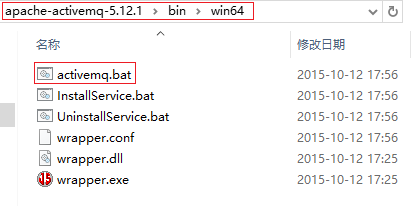
3. 双击activemq.bat启动,如果看到类似下面的页面,就代表activemq启动好了:
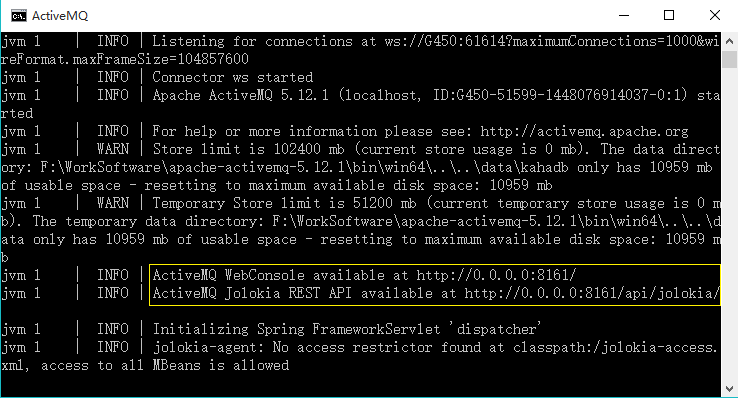
然后打开浏览器,输入地址:http://localhost:8161进入管理页面,用户名admin,密码admin:

可以点击Manage ActiveMQ broker进入Queue的查看界面。
实战
我用Maven来管理项目,方便维护各种依赖的jar包。先看下项目结构:
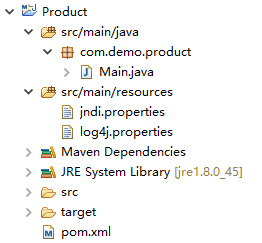
项目不复杂,主要是4个文件:pom.xml,Main.java,log4j.properties和jndi.properties
pom.xml中主要是声明项目的依赖包,其余没有什么东西了:
<!-- Use to call write log methods -->
<dependency>
    <groupId>log4j</groupId>
    <artifactId>log4j</artifactId>
    <version>1.2.17</version>
</dependency>

<!-- Log4j uses this lib -->
<dependency>
    <groupId>org.slf4j</groupId>
    <artifactId>slf4j-log4j12</artifactId>
    <version>1.7.13</version>
</dependency>

<!-- Spring jms lib -->
<dependency>
    <groupId>org.springframework</groupId>
    <artifactId>spring-jms</artifactId>
    <version>4.0.0.RELEASE</version>
</dependency>

<!-- ActiveMQ lib -->
<dependency>
    <groupId>org.apache.activemq</groupId>
    <artifactId>activemq-core</artifactId>
    <version>5.7.0</version>
</dependency>
Main.java:
package com.demo.product;

import javax.jms.Connection;
import javax.jms.Destination;
import javax.jms.Message;
import javax.jms.MessageConsumer;
import javax.jms.MessageListener;
import javax.jms.Session;

import org.apache.activemq.ActiveMQConnectionFactory;
import org.apache.activemq.command.ActiveMQObjectMessage;
import org.apache.log4j.Logger;
import org.apache.log4j.spi.LoggingEvent;

public class Main implements MessageListener {

    public Main() throws Exception {
        // create consumer and listen queue
        ActiveMQConnectionFactory factory =
                new ActiveMQConnectionFactory("tcp://localhost:61616");
        Connection connection = factory.createConnection();
        Session session = connection.createSession(false, Session.AUTO_ACKNOWLEDGE);
        connection.start();
        //////////////注意这里JMSAppender只支持TopicDestination,下面会说到////////////////
        Destination topicDestination = session.createTopic("logTopic");
        MessageConsumer consumer = session.createConsumer(topicDestination);
        consumer.setMessageListener(this);

        // log a message
        Logger logger = Logger.getLogger(Main.class);
        logger.info("Info Log.");
        logger.warn("Warn Log");
        logger.error("Error Log.");

        // clean up
        Thread.sleep(1000);
        consumer.close();
        session.close();
        connection.close();
        System.exit(1);
    }

    public static void main(String[] args) throws Exception {
        new Main();
    }

    public void onMessage(Message message) {
        try {
            // receive log event in your consumer
            LoggingEvent event = (LoggingEvent)((ActiveMQObjectMessage)message).getObject();
            System.out.println("Received log [" + event.getLevel() + "]: "+ event.getMessage());
        } catch (Exception e) {
            e.printStackTrace();
        }
    }

}
说明:然后是log4j.properties:
log4j.rootLogger=INFO, stdout, jms

## Be sure that ActiveMQ messages are not logged to 'jms' appender
log4j.logger.org.apache.activemq=INFO, stdout

log4j.appender.stdout=org.apache.log4j.ConsoleAppender
log4j.appender.stdout.layout=org.apache.log4j.PatternLayout
log4j.appender.stdout.layout.ConversionPattern=%d %-5p %c - %m%n

## Configure 'jms' appender. You'll also need jndi.properties file in order to make it work
log4j.appender.jms=org.apache.log4j.net.JMSAppender
log4j.appender.jms.InitialContextFactoryName=org.apache.activemq.jndi.ActiveMQInitialContextFactory
log4j.appender.jms.ProviderURL=tcp://localhost:61616
log4j.appender.jms.TopicBindingName=logTopic
log4j.appender.jms.TopicConnectionFactoryBindingName=ConnectionFactory
其实按理说只需要这么三个文件就可以了,但是这时候执行会报错:
javax.naming.NameNotFoundException: logTopic
	at org.apache.activemq.jndi.ReadOnlyContext.lookup(ReadOnlyContext.java:235)
	at javax.naming.InitialContext.lookup(Unknown Source)
	at org.apache.log4j.net.JMSAppender.lookup(JMSAppender.java:245)
	at org.apache.log4j.net.JMSAppender.activateOptions(JMSAppender.java:222)
	at org.apache.log4j.config.PropertySetter.activate(PropertySetter.java:307)
        ...
	at org.apache.activemq.ActiveMQPrefetchPolicy.<clinit>(ActiveMQPrefetchPolicy.java:39)
	at org.apache.activemq.ActiveMQConnectionFactory.<init>(ActiveMQConnectionFactory.java:84)
	at org.apache.activemq.ActiveMQConnectionFactory.<init>(ActiveMQConnectionFactory.java:137)
	at com.demo.product.Main.<init>(Main.java:20)
	at com.demo.product.Main.main(Main.java:43)
为什么会报错呢?来看看JMSAppender的javadoc文档,它是这么描述的:
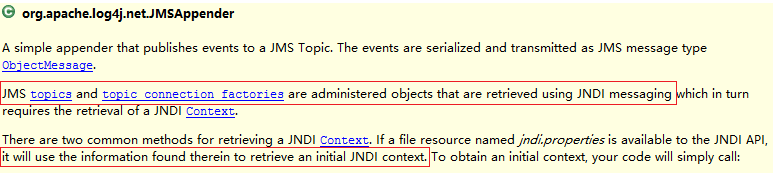
大意是说,JMSAppender需要一个jndi配置来初始化一个JNDI上下文(Context)。因为有了这个上下文才能管理JMS Topic和topic的连接。于是为项目配置一个叫jndi.properties的文件,其内容为:
topic.logTopic=logTopic然后再运行就不会报错了。我们先来看看ActiveMQ(注意切换到Topic标签页下):
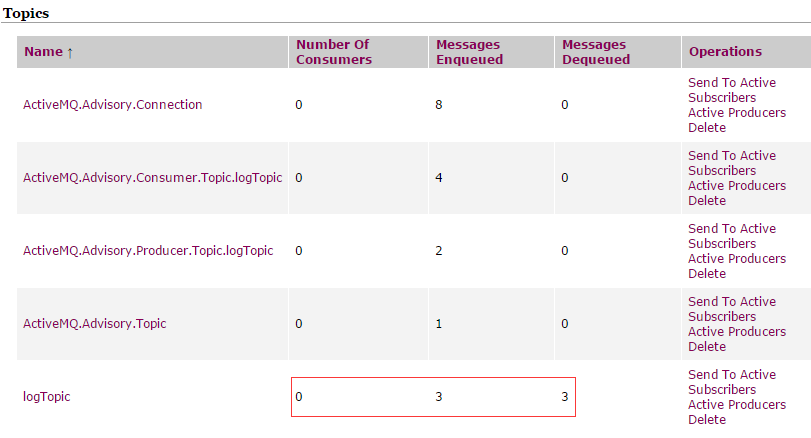
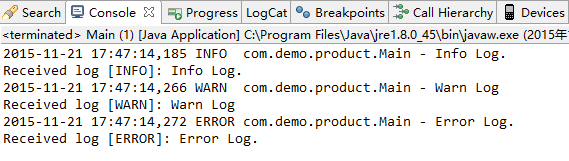
可以看到,主题为logTopic的消息,有3条进Queue,这3条也出Queue了。而出Queue的消息,已经被我们的监听器收到并打印出来了:
Spring整合
需要注意的是,本例只是一个很简单的例子,目的是阐明远程打印日志的原理。实际项目中,一般日志服务器上运行着的,不是项目,而是专用的日志记录器。下面,我们就把这个项目拆分成两个项目,并用Spring来管理这些用到的Bean
修改Product项目
修改后的Product的项目结构并没有改变,改变的只是Main类:
package com.demo.product;

import org.apache.log4j.Logger;

public class Main{
    private static final Logger logger = Logger.getLogger(Main.class);
    public static void main(String[] args) throws Exception {
        // just log a message
        logger.info("Info Log.");
        logger.warn("Warn Log");
        logger.error("Error Log.");
        System.exit(0);
    }
}
这个Main类和普通的logger调用一样,仅仅负责打印日志。有没有觉得太简单了呢?
Logging项目
来看看项目结构图:
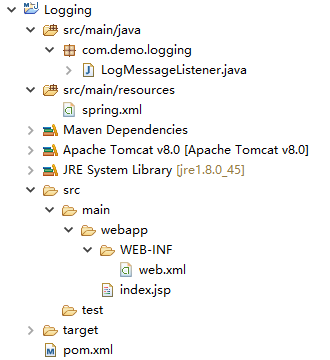
为了让监听器一直活着,我把Logging写成了一个Web项目,跑在Tomcat上。index.jsp就是个Hello World字符串而已,用来验证Logging活着。注意,在Logging项目中,已没有Product项目中的log4j.properties和jndi.properties两个文件。
来看看另外几个文件:
pom.xml(每个包的目的都写在注释里了):
<!-- Use to cast object to LogEvent when received a log -->
<dependency>
    <groupId>log4j</groupId>
    <artifactId>log4j</artifactId>
    <version>1.2.17</version>
</dependency>

<!-- Use to receive jms message -->
<dependency>
    <groupId>org.springframework</groupId>
    <artifactId>spring-jms</artifactId>
    <version>4.0.0.RELEASE</version>
</dependency>

<!-- Use to load spring.xml -->
<dependency>
    <groupId>org.springframework</groupId>
    <artifactId>spring-web</artifactId>
    <version>4.0.0.RELEASE</version>
</dependency>

<!-- ActiveMQ lib -->
<dependency>
    <groupId>org.apache.activemq</groupId>
    <artifactId>activemq-core</artifactId>
    <version>5.7.0</version>
</dependency>
web.xml
<!DOCTYPE web-app PUBLIC
 "-//Sun Microsystems, Inc.//DTD Web Application 2.3//EN"
 "http://java.sun.com/dtd/web-app_2_3.dtd" >

<web-app>
    <context-param>
        <param-name>contextConfigLocation</param-name>
        <param-value>classpath:spring.xml</param-value>
    </context-param>

    <!-- Use to load spring.xml -->
    <listener>
        <listener-class>
            org.springframework.web.context.ContextLoaderListener
        </listener-class>
    </listener>

    <welcome-file-list>
        <welcome-file>index.jsp</welcome-file>
    </welcome-file-list>
</web-app>
spring.xml
<?xml version="1.0" encoding="UTF-8"?>
<beans xmlns="http://www.springframework.org/schema/beans"
    xmlns:xsi="http://www.w3.org/2001/XMLSchema-instance"
    xsi:schemaLocation="
        http://www.springframework.org/schema/beans
        http://www.springframework.org/schema/beans/spring-beans-4.0.xsd">

    <bean id="jmsTemplate" class="org.springframework.jms.core.JmsTemplate">
        <property name="connectionFactory" ref="connectionFactory"/>
    </bean>
    <bean id="connectionFactory" class="org.springframework.jms.connection.SingleConnectionFactory">
        <property name="targetConnectionFactory" ref="targetConnectionFactory"/>
    </bean>
    <bean id="targetConnectionFactory" class="org.apache.activemq.ActiveMQConnectionFactory">
        <property name="brokerURL" value="tcp://localhost:61616"/>
    </bean>
<!-- As JMSAppender only support the topic way to send messages,
     thus queueDestination here is useless.
    <bean id="queueDestination" class="org.apache.activemq.command.ActiveMQQueue">
        <constructor-arg name="name" value="queue" />
    </bean>
 -->
    <bean id="topicDestination" class="org.apache.activemq.command.ActiveMQTopic">
        <constructor-arg name="name" value="logTopic" />