
Mybatis第二天
-
输入映射和输出映射
-
输入参数映射
-
返回值映射
-
-
动态sql
-
If
-
Where
-
Foreach
-
Sql片段
-
-
关联查询
-
一对一关联
-
一对多关联
-
-
Mybatis整合spring
-
输入映射
结论: 如果传入的参数是pojo类型,那么#{}和${}中的变量名称必须是pojo中的属性.属性.属性...
接第一天的项目,再创建如下文件:
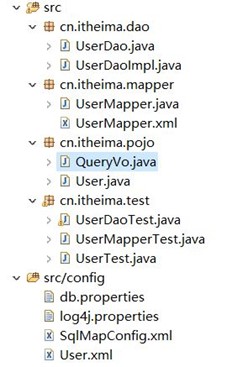
QueryVo:
|
package cn.itheima.pojo;
public class QueryVo { private User user;
public User getUser() { return user; } public void setUser(User user) { this.user = user; } } |
SqlMapConfig:
|
<?xml version="1.0" encoding="UTF-8" ?> <!DOCTYPE configuration PUBLIC "-//mybatis.org//DTD Config 3.0//EN" "http://mybatis.org/dtd/mybatis-3-config.dtd"> <configuration> <properties resource="db.properties"></properties>
<typeAliases> <!-- 定义单个pojo类别名 type:类的全路劲名称 alias:别名 --> <!--<typeAlias type="cn.itheima.pojo.User" alias="user"/> -->
<!-- 使用包扫描的方式批量定义别名 定以后别名等于类名,不区分大小写,但是建议按照java命名规则来,首字母小写,以后每个单词的首字母大写 --> <package name="cn.itheima.pojo"/> </typeAliases>
<!-- 和spring整合后 environments配置将废除--> <environments default="development"> <environment id="development"> <!-- 使用jdbc事务管理--> <transactionManager type="JDBC" /> <!-- 数据库连接池--> <dataSource type="POOLED"> <property name="driver" value="${jdbc.driver}" /> <property name="url" value="${jdbc.url}" /> <property name="username" value="${jdbc.username}" /> <property name="password" value="${jdbc.password}" /> </dataSource> </environment> </environments>
<mappers> <mapper resource="User.xml"/>
<!-- 使用class属性引入接口的全路径名称: 使用规则: 1. 接口的名称和映射文件名称除扩展名外要完全相同 2. 接口和映射文件要放在同一个目录下 --> <!--<mapper class="cn.itheima.mapper.UserMapper"/>-->
<!-- 使用包扫描的方式批量引入Mapper接口 使用规则: 1. 接口的名称和映射文件名称除扩展名外要完全相同 2. 接口和映射文件要放在同一个目录下 --> <package name="cn.itheima.mapper"/> </mappers> </configuration> |
UserMapper.xml:
|
<?xml version="1.0" encoding="UTF-8" ?> <!DOCTYPE mapper PUBLIC "-//mybatis.org//DTD Mapper 3.0//EN" "http://mybatis.org/dtd/mybatis-3-mapper.dtd"> <!-- mapper接口代理实现编写规则: 1. 映射文件中namespace要等于接口的全路径名称 2. 映射文件中sql语句id要等于接口的方法名称 3. 映射文件中传入参数类型要等于接口方法的传入参数类型 4. 映射文件中返回结果集类型要等于接口方法的返回值类型 --> <mapper namespace="cn.itheima.mapper.UserMapper"> <!-- 如果传入的参数是pojo类型,那么#{}和${}中的变量名称必须是pojo中的属性.属性.属性... --> <select id="findByVo" parameterType="queryVo" resultType="user"> SELECT * FROM USER WHERE username LIKE '%${user.username}%' AND sex =#{user.sex} </select> </mapper> |
UserMapper.java:
|
package cn.itheima.mapper;
import java.util.List;
import cn.itheima.pojo.QueryVo; import cn.itheima.pojo.User;
public interface UserMapper { public List<User> findByVo(QueryVo vo); } |
UserMapperTest:
|
…… import org.apache.ibatis.io.Resources; …… public class UserMapperTest { private SqlSessionFactory factory;
//作用:在测试方法前执行这个方法 @Before public void setUp() throws Exception{ String resource = "SqlMapConfig.xml"; //通过流将核心配置文件读取进来 InputStream inputStream = Resources.getResourceAsStream(resource); //通过核心配置文件输入流来创建会话工厂 factory = new SqlSessionFactoryBuilder().build(inputStream); }
@Test public void testFindUserByVo() throws Exception{ SqlSession openSession = factory.openSession(); //通过getMapper方法来实例化接口 UserMapper mapper = openSession.getMapper(UserMapper.class);
QueryVo vo = new QueryVo(); User user = new User(); user.setUsername("王"); user.setSex("男"); vo.setUser(user);
List<User> u = mapper.findByVo(vo); System.out.println("======================"+u); } } |
-
输出映射
结论:只有返回结果为一行一列的时候,返回类型才可以指定为基本类型.
UserMapper.xml:
|
<?xml version="1.0" encoding="UTF-8" ?> <!DOCTYPE mapper PUBLIC "-//mybatis.org//DTD Mapper 3.0//EN" "http://mybatis.org/dtd/mybatis-3-mapper.dtd"> <!-- mapper接口代理实现编写规则: 1. 映射文件中namespace要等于接口的全路径名称 2. 映射文件中sql语句id要等于接口的方法名称 3. 映射文件中传入参数类型要等于接口方法的传入参数类型 4. 映射文件中返回结果集类型要等于接口方法的返回值类型 --> <mapper namespace="cn.itheima.mapper.UserMapper"> <!-- 如果传入的参数是pojo类型,那么#{}和${}中的变量名称必须是pojo中的属性.属性.属性... --> <select id="findByVo" parameterType="queryVo" resultType="user"> SELECT * FROM USER WHERE username LIKE '%${user.username}%' AND sex =#{user.sex} </select> <!-- 只有返回结果为一行一列的时候,那么返回值类型才可以指定成基本类型 --> <select id="findUserCount" resultType="java.lang.Integer"> SELECT COUNT(*) FROM user </select> </mapper> |
UserMapper.java:
|
package cn.itheima.mapper;
import java.util.List;
import cn.itheima.pojo.QueryVo; import cn.itheima.pojo.User;
public interface UserMapper {
public List<User> findByVo(QueryVo vo);
public Integer findUserCount(); } |
UserMapperTest:
|
package cn.itheima.test;
import java.io.InputStream; import java.util.Date; import java.util.List;
import org.apache.ibatis.io.Resources; import org.apache.ibatis.session.SqlSession; import org.apache.ibatis.session.SqlSessionFactory; import org.apache.ibatis.session.SqlSessionFactoryBuilder; import org.junit.Before; import org.junit.Test;
import cn.itheima.mapper.UserMapper; import cn.itheima.pojo.QueryVo; import cn.itheima.pojo.User;
public class UserMapperTest { private SqlSessionFactory factory;
//作用:在测试方法前执行这个方法 @Before public void setUp() throws Exception{ String resource = "SqlMapConfig.xml"; //通过流将核心配置文件读取进来 InputStream inputStream = Resources.getResourceAsStream(resource); //通过核心配置文件输入流来创建会话工厂 factory = new SqlSessionFactoryBuilder().build(inputStream); }
@Test public void testFindUserByVo() throws Exception{ SqlSession openSession = factory.openSession(); //通过getMapper方法来实例化接口 UserMapper mapper = openSession.getMapper(UserMapper.class);
QueryVo vo = new QueryVo(); User user = new User(); user.setUsername("王"); user.setSex("男"); vo.setUser(user);
List<User> u = mapper.findByVo(vo); System.out.println("======================"+u); }
@Test public void testFindUserCount() throws Exception{ SqlSession openSession = factory.openSession(); //通过getMapper方法来实例化接口 UserMapper mapper = openSession.getMapper(UserMapper.class);
Integer count = mapper.findUserCount(); System.out.println("======================"+count); } } |
UserMapper .java和UserMapperTest.java中的Integer如果写成int,会报错.
-
动态sql
If,where,sql:
Sql中可将重复的sql提取出来,使用时用include引用即可,最终达到sql重用的目的.
UserMapper.xml:
|
<?xml version="1.0" encoding="UTF-8" ?> <!DOCTYPE mapper PUBLIC "-//mybatis.org//DTD Mapper 3.0//EN" "http://mybatis.org/dtd/mybatis-3-mapper.dtd"> <!-- mapper接口代理实现编写规则: 1. 映射文件中namespace要等于接口的全路径名称 2. 映射文件中sql语句id要等于接口的方法名称 3. 映射文件中传入参数类型要等于接口方法的传入参数类型 4. 映射文件中返回结果集类型要等于接口方法的返回值类型 --> <mapper namespace="cn.itheima.mapper.UserMapper">
<sql id="user_where"> <!-- where的作用:1,自动在sql语句中加上where关键字2,自动去掉第一条语句的and关键字 --> <where> <if test="username != null and username != ''"> and username like '%${username}%' </if> <if test="sex != null and sex != ''"> and sex = #{sex} </if> </where> </sql> <select id="findByUserNameAndSex" parameterType="user" resultType="user"> select * from user <include refid="user_where"></include> </select> </mapper> |
UserMapper.java:
|
public interface UserMapper { public List<User> findByUserNameAndSex(User user); } |
UserMapperTest.java:
|
import org.apache.ibatis.io.Resources; public class UserMapperTest { private SqlSessionFactory factory;
//作用:在测试方法前执行这个方法 @Before public void setUp() throws Exception{ String resource = "SqlMapConfig.xml"; //通过流将核心配置文件读取进来 InputStream inputStream = Resources.getResourceAsStream(resource); //通过核心配置文件输入流来创建会话工厂 factory = new SqlSessionFactoryBuilder().build(inputStream); } @Test public void testFindByUserNameAndSex() throws Exception{ SqlSession openSession = factory.openSession(); UserMapper mapper = openSession.getMapper(UserMapper.class);
User user = new User(); //user.setUsername("王"); //user.setSex("男");
List<User> list = mapper.findByUserNameAndSex(user); System.out.println(list); } } |
foreach的用法:
foreach是要对集合进行遍历的语句,所以pojo中首先要有list.在QueryVo中定义ids,还要添加get,set方法.
|
package cn.itheima.pojo;
import java.util.List;
public class QueryVo {
private User user;
private List<Integer> ids;
public List<Integer> getIds() { return ids; }
public void setIds(List<Integer> ids) { this.ids = ids; }
public User getUser() { return user; }
public void setUser(User user) { this.user = user; } } |
正常的sql语句: SELECT * FROM USER WHERE id IN (1,10,24,25)
UserMapper.xml:
|
<?xml version="1.0" encoding="UTF-8" ?> <!DOCTYPE mapper PUBLIC "-//mybatis.org//DTD Mapper 3.0//EN" "http://mybatis.org/dtd/mybatis-3-mapper.dtd"> <!-- mapper接口代理实现编写规则: 1. 映射文件中namespace要等于接口的全路径名称 2. 映射文件中sql语句id要等于接口的方法名称 3. 映射文件中传入参数类型要等于接口方法的传入参数类型 4. 映射文件中返回结果集类型要等于接口方法的返回值类型 --> <mapper namespace="cn.itheima.mapper.UserMapper"> <select id="findUserByIds" parameterType="queryVo" resultType="user"> SELECT * FROM USER <where> <if test="ids != null"> <!-- collection:要遍历的集合 item:每次循环后得到的结果放入这个变量中 open:循环开始后要拼接的字符串 close:循环结束后要拼接的字符串 separator:循环中拼接的分隔符--> <foreach collection="ids" item="id" open="id IN (" close=")" separator=","> #{id} </foreach> </if> </where> </select> </mapper> |
UserMapper.java:
|
public interface UserMapper { public List<User> findUserByIds(QueryVo vo); } |
UserMapperTest.java:
|
public class UserMapperTest { private SqlSessionFactory factory;
//作用:在测试方法前执行这个方法 @Before public void setUp() throws Exception{ String resource = "SqlMapConfig.xml"; //通过流将核心配置文件读取进来 InputStream inputStream = Resources.getResourceAsStream(resource); //通过核心配置文件输入流来创建会话工厂 factory = new SqlSessionFactoryBuilder().build(inputStream); }
@Test public void testfindUserByIds() throws Exception{ SqlSession openSession = factory.openSession(); UserMapper mapper = openSession.getMapper(UserMapper.class);
QueryVo vo = new QueryVo(); List<Integer> ids = new ArrayList<Integer>(); ids.add(1); ids.add(10); ids.add(24); ids.add(25); vo.setIds(ids);
List<User> list = mapper.findUserByIds(vo); System.out.println(list);
} } |
-
单个对象映射关系
- 首先得明白一个概念:在数据库中才存在一对一,一对多关系,这些关系在java中分别对应单个对象映射关系和集合对象映射关系.
一对一映射:自动映射
Sql语句:
SELECT o.*,u.id uid, u.username, u.birthday, u.sex, u.address
FROM orders o, USER u
WHERE o.user_id = u.id
因为orders和user表中的主键都叫id,所以给user的id起个别名叫uid.
UserMapper.xml中,这条关联查询的语句返回值不是单纯的user,也不是单纯的orders,得新建一个pojo类CustomerOrders:
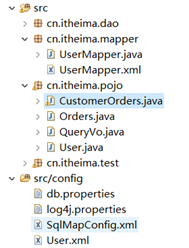
|
public class CustomerOrders extends Orders{ private intuid; private String username;// 用户姓名 private String sex;// 性别 private Date birthday;// 生日 private String address;// 地址 get,set方法…… } |
这么写的话,CustomerOrders就包含了orders和user,就能作为该sql语句的返回值类型了.注意,不能写成private User user;因为mybatis没那么强大,这么写的话,他读取不到user中的属性.
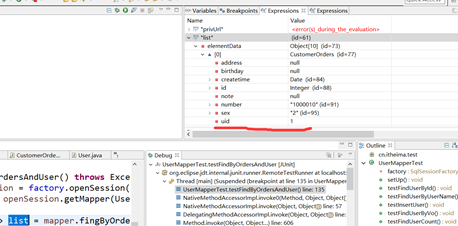
Sql语句中已经为user的id起了别名:uid,所以查询出来的表中,user的id就叫uid,那么这张表作为返回值类型,属性名就要和数据库表中字段的名称一样!!
UserMapper.xml:
|
<?xml version="1.0" encoding="UTF-8" ?> <!DOCTYPE mapper PUBLIC "-//mybatis.org//DTD Mapper 3.0//EN" "http://mybatis.org/dtd/mybatis-3-mapper.dtd"> <!-- mapper接口代理实现编写规则: 1. 映射文件中namespace要等于接口的全路径名称 2. 映射文件中sql语句id要等于接口的方法名称 3. 映射文件中传入参数类型要等于接口方法的传入参数类型 4. 映射文件中返回结果集类型要等于接口方法的返回值类型 --> <mapper namespace="cn.itheima.mapper.UserMapper"> <!-- 一对一映射:自动映射 --> <select id="fingByOrdersAndUser1" resultType="customerOrders"> SELECT o.*,u.id uid, u.username, u.birthday, u.sex, u.address FROM orders o, USER u WHERE o.user_id = u.id </select>
</mapper> |
UserMapper.java:
|
public List<CustomerOrders> fingByOrdersAndUser1(); |
UserMapperTest.java:
|
public class UserMapperTest { private SqlSessionFactory factory;
//作用:在测试方法前执行这个方法 @Before public void setUp() throws Exception{ String resource = "SqlMapConfig.xml"; //通过流将核心配置文件读取进来 InputStream inputStream = Resources.getResourceAsStream(resource); //通过核心配置文件输入流来创建会话工厂 factory = new SqlSessionFactoryBuilder().build(inputStream); }
@Test public void testFindByOrdersAndUser1() throws Exception{ SqlSession openSession = factory.openSession(); UserMapper mapper = openSession.getMapper(UserMapper.class);
List<CustomerOrders> list = mapper.fingByOrdersAndUser1(); System.out.println(list); } } |
查看user是否有值,可以打断点进入debug模式,查看list的值:

查看list的值方法1:
选中list,右键àwatch会跳出如下界面:
方法2:
选中list,按快捷键CTRL+SHIFT+I,会跳出如下界面:
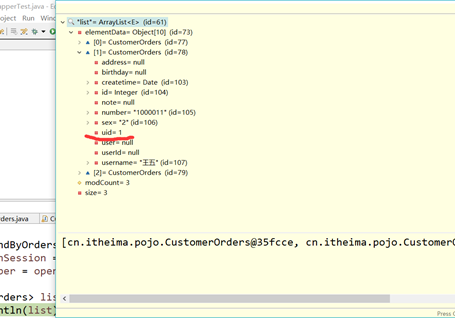
一对一映射:手动映射
案例:查询所有订单信息,关联查询下单用户信息。
注意:因为一个订单信息只会是一个人下的订单,所以从查询订单信息出发关联查询用户信息为一对一查询。如果从用户信息出发查询用户下的订单信息则为一对多查询,因为一个用户可以下多个订单。
具体操作:
在Orders中添加user对象: (订单对用户:多对一)
|
public class Orders { private Integer id;
private Integer userId;
private String number;
private Date createtime;
private String note;
private User user;
orders属性的get,set方法……
public User getUser() { return user; }
public void setUser(User user) { this.user = user; } } |
UserMapper.xml:
|
<?xml version="1.0" encoding="UTF-8" ?> <!DOCTYPE mapper PUBLIC "-//mybatis.org//DTD Mapper 3.0//EN" "http://mybatis.org/dtd/mybatis-3-mapper.dtd"> <!-- mapper接口代理实现编写规则: 1. 映射文件中namespace要等于接口的全路径名称 2. 映射文件中sql语句id要等于接口的方法名称 3. 映射文件中传入参数类型要等于接口方法的传入参数类型 4. 映射文件中返回结果集类型要等于接口方法的返回值类型 --> <mapper namespace="cn.itheima.mapper.UserMapper"> <!-- 一对一:手动映射 --> <!-- id:resultMap的唯一标识 type:将查询出的数据放入这个指定的对象中 注意:手动映射需要指定数据库中表的字段名与java中pojo类的属性名称的对应关系 --> <resultMap type="orders" id="ordersAndUserResultMap"> <id column="id" property="id"/> <result column="user_id" property="userId"/> <result column="number" property="number"/> <result column="createtime" property="createtime"/> <result column="note" property="note"/>
<!-- 这个标签指定单个对象的对应关系 property:指定将数据放入Orders中的user属性中 javaType:user属性的类型 --> <association property="user" javaType="cn.itheima.pojo.User"> <id column="uid" property="id"/> <result column="username" property="username"/> <result column="sex" property="sex"/> <result column="birthday" property="birthday"/> <result column="address" property="address"/> </association> </resultMap>
<select id="findByOrdersAndUser2" resultMap="ordersAndUserResultMap"> SELECT o.*,u.id uid, u.username, u.birthday, u.sex, u.address FROM orders o, USER u WHERE o.user_id = u.id </select> </mapper> |
UserMapper.java:
|
public List<Orders> findByOrdersAndUser2(); |
UserMapperTest.java:
|
public class UserMapperTest { private SqlSessionFactory factory;
//作用:在测试方法前执行这个方法 @Before public void setUp() throws Exception{ String resource = "SqlMapConfig.xml"; //通过流将核心配置文件读取进来 InputStream inputStream = Resources.getResourceAsStream(resource); //通过核心配置文件输入流来创建会话工厂 factory = new SqlSessionFactoryBuilder().build(inputStream); }
@Test public void testFindByOrdersAndUser() throws Exception{ SqlSession openSession = factory.openSession(); UserMapper mapper = openSession.getMapper(UserMapper.class);
List<Orders> list = mapper.findByOrdersAndUser2(); System.out.println(list);
} } |
五.对集合对象的映射
一对多映射
案例:查询所有用户信息及用户关联的订单信息。
用户信息和订单信息为一对多关系。
所以在User类中加入List<Orders> orders属性
|
package cn.itheima.pojo;
import java.util.Date; import java.util.List;
public class User { private int id; private String username;// 用户姓名 private String sex;// 性别 private Date birthday;// 生日 private String address;// 地址
private List<Orders> ordersList; //不用给他new????
public List<Orders> getOrdersList() { return ordersList; } public void setOrdersList(List<Orders> ordersList) { this.ordersList = ordersList; } User属性的get,set方法 @Override public String toString() { return "User [id=" + id + ", username=" + username + ", sex=" + sex + ", birthday=" + birthday + ", address=" + address + "]"; } } |
Sql语句:
SELECT u.*, o.id oid, o.user_id, o.number, o.createtime, o.note
FROM USER u, orders o WHERE u.id = o.user_id
|
<?xml version="1.0" encoding="UTF-8" ?> <!DOCTYPE mapper PUBLIC "-//mybatis.org//DTD Mapper 3.0//EN" "http://mybatis.org/dtd/mybatis-3-mapper.dtd"> <!-- mapper接口代理实现编写规则: 1. 映射文件中namespace要等于接口的全路径名称 2. 映射文件中sql语句id要等于接口的方法名称 3. 映射文件中传入参数类型要等于接口方法的传入参数类型 4. 映射文件中返回结果集类型要等于接口方法的返回值类型 --> <mapper namespace="cn.itheima.mapper.UserMapper"> <resultMap type="user" id="UserAndOrdersResultMap"> <id column="id" property="id"/> <result column="username" property="username"/> <result column="sex" property="sex"/> <result column="birthday" property="birthday"/> <result column="address" property="address"/>
<!-- 指定对应的集合对象关系映射 property:将数据放入User对象中的ordersList属性中 ofType:指定ordersList属性的泛型类型 --> <collection property="ordersList" ofType="cn.itheima.pojo.Orders"> <id column="oid" property="id"/> <result column="user_id" property="userId"/> <result column="number" property="number"/> <result column="createtime" property="createtime"/> <result column="note" property="note"/> </collection> </resultMap> <select id="findByUserAndOrders" resultMap="UserAndOrdersResultMap"> SELECT u.*, o.id oid, o.user_id, o.number, o.createtime, o.note FROM USER u, orders o WHERE u.id = o.user_id </select> </mapper> |
UserMapper.java:
|
public List<User> findByUserAndOrders(); |
UserMapperTest.java:
|
public class UserMapperTest { private SqlSessionFactory factory;
//作用:在测试方法前执行这个方法 @Before public void setUp() throws Exception{ String resource = "SqlMapConfig.xml"; //通过流将核心配置文件读取进来 InputStream inputStream = Resources.getResourceAsStream(resource); //通过核心配置文件输入流来创建会话工厂 factory = new SqlSessionFactoryBuilder().build(inputStream); }
@Test public void testFindByUserAndOrders() throws Exception{ SqlSession openSession = factory.openSession(); UserMapper mapper = openSession.getMapper(UserMapper.class);
List<User> list = mapper.findByUserAndOrders(); System.out.println(list); } } |
-
Mybatis整合spring
整合思路
-
SqlSessionFactory对象应该放到spring容器中作为单例存在。
-
传统dao的开发方式中,应该从spring容器中获得sqlsession对象。
-
Mapper代理形式中,应该从spring容器中直接获得mapper的代理对象。
-
数据库的连接以及数据库连接池事务管理都交给spring容器来完成。
整合后原生Dao实现:
新建一个工程:
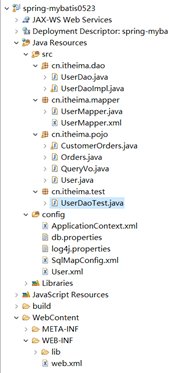
这些文件都是从上一个工程中拷贝过来的.
SqlMapConfig.xml:
<?xml version="1.0" encoding="UTF-8" ?>
<!DOCTYPE configuration
PUBLIC "-//mybatis.org//DTD Config 3.0//EN"
"http://mybatis.org/dtd/mybatis-3-config.dtd">
<configuration>
<typeAliases>
<package name="cn.itheima.pojo"/>
</typeAliases>
<mappers>
<mapper resource="User.xml"/>
<package name="cn.itheima.mapper"/>
</mappers>
</configuration>
ApplicationContext.xml:
<?xml version="1.0" encoding="UTF-8"?>
<beans xmlns="http://www.springframework.org/schema/beans"
xmlns:context="http://www.springframework.org/schema/context" xmlns:p="http://www.springframework.org/schema/p"
xmlns:aop="http://www.springframework.org/schema/aop" xmlns:tx="http://www.springframework.org/schema/tx"
xmlns:xsi="http://www.w3.org/2001/XMLSchema-instance"
xsi:schemaLocation="http://www.springframework.org/schema/beans http://www.springframework.org/schema/beans/spring-beans-4.0.xsd
http://www.springframework.org/schema/context http://www.springframework.org/schema/context/spring-context-4.0.xsd
http://www.springframework.org/schema/aop http://www.springframework.org/schema/aop/spring-aop-4.0.xsd http://www.springframework.org/schema/tx http://www.springframework.org/schema/tx/spring-tx-4.0.xsd
http://www.springframework.org/schema/util http://www.springframework.org/schema/util/spring-util-4.0.xsd">
<!-- 加载配置文件 -->
<context:property-placeholder location="classpath:db.properties" />
<!-- 数据库连接池 -->
<bean id="dataSource" class="org.apache.commons.dbcp.BasicDataSource"
destroy-method="close">
<property name="driverClassName" value="${jdbc.driver}" />
<property name="url" value="${jdbc.url}" />
<property name="username" value="${jdbc.username}" />
<property name="password" value="${jdbc.password}" />
<property name="maxActive" value="10" />
<property name="maxIdle" value="5" />
</bean>
<!-- 整合后工厂归spring管理 -->
<bean id="sqlSessionFactory" class="org.mybatis.spring.SqlSessionFactoryBean">
<!-- 指定mybatis核心配置文件 -->
<property name="configLocation" value="classpath:SqlMapConfig.xml"></property>
<!-- 指定会话工厂使用的数据源 -->
<property name="dataSource" ref="dataSource"></property>
</bean>
<!-- 配置原生Dao实现,注意class必须指定Dao实现类的全路径名称 -->
<bean id="userDao" class="cn.itheima.dao.UserDaoImpl">
<property name="sqlSessionFactory" ref="sqlSessionFactory"></property>
</bean>
</beans>
想在spring核心配置文件中加载其他配置文件,就一定要加classpath:
org.mybatis.spring.SqlSessionFactoryBean所在位置:

User.xml:
<?xml version="1.0" encoding="UTF-8" ?>
<!DOCTYPE mapper
PUBLIC "-//mybatis.org//DTD Mapper 3.0//EN"
"http://mybatis.org/dtd/mybatis-3-mapper.dtd">
<!-- namespace:命名空间,做sql隔离 -->
<mapper namespace="test">
<!--
id:sql语句唯一标识
parameterType:指定传入参数类型
resultType:返回结果集类型
#{}占位符:起到占位作用,如果传入的是基本类型(string,long,double,int,boolean,float等),那么#{}中的变量名称可以随意写.
-->
<select id="findUserById" parameterType="java.lang.Integer" resultType="cn.itheima.pojo.User">
SELECT * FROM USER WHERE id = #{id}
</select>
</mapper>
UserDao:
public interface UserDao {
public User findById(Integer id);
}
UserDaoImpl:
public class UserDaoImpl extends SqlSessionDaoSupport implements UserDao{
public User findById(Integer id) {
//sessionFactory是线程不安全的,所以他应该在方法体内注入
SqlSession session = this.getSqlSession();
User user = session.selectOne("test.findUserById", id);
return user;
}
}
UserDaoTest.java:
public class UserDaoTest {
private ApplicationContext applicationContext;
@Before
public void setUp(){
String configLocation = "ApplicationContext.xml";
applicationContext = new ClassPathXmlApplicationContext(configLocation);
}
@Test
public void testFindUserById() throws Exception{
UserDao userDao = (UserDao) applicationContext.getBean("userDao");
User user = userDao.findById(1);
System.out.println(user);
}
}
整合后Mpper接口代理实现
有两种方法,第一种是需要一个一个配的(如下所示),太麻烦,工作中也不会用这样方式,所以直接用第二种方式.
<!-- Mapper接口代理实现 -->
<bean id="userMapper" class="org.mybatis.spring.mapper.MapperFactoryBean"> -->
<!-- 配置mapper接口的全路径名称 -->
<property name="mapperInterface" value="cn.itheima.mapper.UserMapper"></property> -->
<property name="sqlSessionFactory" ref="sqlSessionFactory"></property> -->
</bean> -->
ApplicationContext.xml:
<?xml version="1.0" encoding="UTF-8"?>
<beans xmlns="http://www.springframework.org/schema/beans"
xmlns:context="http://www.springframework.org/schema/context" xmlns:p="http://www.springframework.org/schema/p"
xmlns:aop="http://www.springframework.org/schema/aop" xmlns:tx="http://www.springframework.org/schema/tx"
xmlns:xsi="http://www.w3.org/2001/XMLSchema-instance"
xsi:schemaLocation="http://www.springframework.org/schema/beans http://www.springframework.org/schema/beans/spring-beans-4.0.xsd
http://www.springframework.org/schema/context http://www.springframework.org/schema/context/spring-context-4.0.xsd
http://www.springframework.org/schema/aop http://www.springframework.org/schema/aop/spring-aop-4.0.xsd http://www.springframework.org/schema/tx http://www.springframework.org/schema/tx/spring-tx-4.0.xsd
http://www.springframework.org/schema/util http://www.springframework.org/schema/util/spring-util-4.0.xsd">
<!-- 加载配置文件 -->
<context:property-placeholder location="classpath:db.properties" />
<!-- 数据库连接池 -->
<bean id="dataSource" class="org.apache.commons.dbcp.BasicDataSource"
destroy-method="close">
<property name="driverClassName" value="${jdbc.driver}" />
<property name="url" value="${jdbc.url}" />
<property name="username" value="${jdbc.username}" />
<property name="password" value="${jdbc.password}" />
<property name="maxActive" value="10" />
<property name="maxIdle" value="5" />
</bean>
<!-- 整合后工厂归spring管理 -->
<bean id="sqlSessionFactory" class="org.mybatis.spring.SqlSessionFactoryBean">
<!-- 指定mybatis核心配置文件 -->
<property name="configLocation" value="classpath:SqlMapConfig.xml"></property>
<!-- 指定会话工厂使用的数据源 -->
<property name="dataSource" ref="dataSource"></property>
</bean>
<!-- 配置原生Dao实现,注意class必须指定Dao实现类的全路径名称 -->
<bean id="userDao" class="cn.itheima.dao.UserDaoImpl">
<property name="sqlSessionFactory" ref="sqlSessionFactory"></property>
</bean>
<!-- 使用包扫描的方式批量引入Mapper
扫描后引用的时候可以使用类名,首字母小写.
-->
<bean class="org.mybatis.spring.mapper.MapperScannerConfigurer">
<!-- 指定要扫描的包的全路径名称,如果有多个包用英文状态下的逗号分隔 -->
<property name="basePackage" value="cn.itheima.mapper"></property>
</bean>
</beans>
org.mybatis.spring.mapper.MapperScannerConfigurer所在位置:

想要知道<bean/>下的<property/>里都写些什么,只要按住CTRL,鼠标点击相应class(在这里是点org.mybatis.spring.mapper.MapperScannerConfigurer)即可.
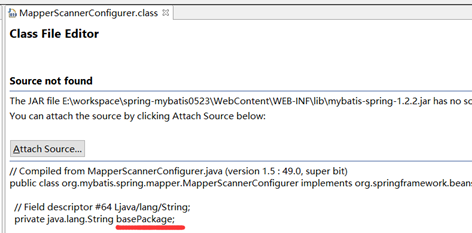
Spring核心配置文件扫描了mapper一次,所以SqlMaoConfig.xml就不用扫描了:
<?xml version="1.0" encoding="UTF-8" ?>
<!DOCTYPE configuration
PUBLIC "-//mybatis.org//DTD Config 3.0//EN"
"http://mybatis.org/dtd/mybatis-3-config.dtd">
<configuration>
<typeAliases>
<!-- 定义单个pojo类别名
type:类的全路劲名称
alias:别名
-->
<!--<typeAlias type="cn.itheima.pojo.User" alias="user"/> -->
<!-- 使用包扫描的方式批量定义别名
定以后别名等于类名,不区分大小写,但是建议按照java命名规则来,首字母小写,以后每个单词的首字母大写
-->
<package name="cn.itheima.pojo"/>
</typeAliases>
<mappers>
<mapper resource="User.xml"/>
<!--
使用class属性引入接口的全路径名称:
使用规则:
1. 接口的名称和映射文件名称除扩展名外要完全相同
2. 接口和映射文件要放在同一个目录下
-->
<!--<mapper class="cn.itheima.mapper.UserMapper"/>-->
<!-- 使用包扫描的方式批量引入Mapper接口
使用规则:
1. 接口的名称和映射文件名称除扩展名外要完全相同
2. 接口和映射文件要放在同一个目录下
-->
<!-- <package name="cn.itheima.mapper"/> -->
</mappers>
</configuration>
UserMapper.xml:
<?xml version="1.0" encoding="UTF-8" ?>
<!DOCTYPE mapper
PUBLIC "-//mybatis.org//DTD Mapper 3.0//EN"
"http://mybatis.org/dtd/mybatis-3-mapper.dtd">
<!--
mapper接口代理实现编写规则:
1. 映射文件中namespace要等于接口的全路径名称
2. 映射文件中sql语句id要等于接口的方法名称
3. 映射文件中传入参数类型要等于接口方法的传入参数类型
4. 映射文件中返回结果集类型要等于接口方法的返回值类型
-->
<mapper namespace="cn.itheima.mapper.UserMapper">
<!--
id:sql语句唯一标识
parameterType:指定传入参数类型
resultType:返回结果集类型
#{}占位符:起到占位作用,如果传入的是基本类型(string,long,double,int,boolean,float等),那么#{}中的变量名称可以随意写.
-->
<select id="findUserById" parameterType="java.lang.Integer" resultType="cn.itheima.pojo.User">
select * from user where id=#{id}
</select>
</mapper>
UserMapper.java:
public interface UserMapper {
public User findUserById(Integer id);
}
UserMapperTest.java:
public class UserMapperTest {
private ApplicationContext applicationContext;
@Before
public void setUp() throws Exception{
String configLocation = "ApplicationContext.xml";
applicationContext = new ClassPathXmlApplicationContext(configLocation);
}
@Test
public void testFindById() throws Exception{
UserMapper userMapper = (UserMapper) applicationContext.getBean("userMapper");
User user = userMapper.findUserById(1);
System.out.println(user);
}
}
-
Mybatis逆向工程
使用官方网站的mapper自动生成工具mybatis-generator-core-1.3.2来生成pojo类和mapper映射文件。
作用:mybatis官方提供逆向工程,可以使用它通过数据库中的表来自动生成Mapper接口和映射文件(单表增删改查)和Po类.(得先有表才能生成,只针对单表查询,对多表查询无效!!)
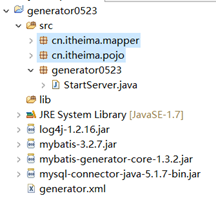
正确的工程结构:
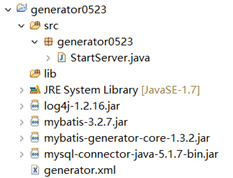
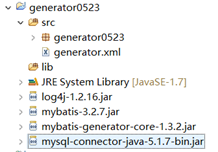
一定要将generator.xml直接放到工程目录下,而不是src目录下,若是放到了src目录下,则会提示找不到文件:

用逆向工程生成pojo类和mapper映射文件,只需三个步骤:
新建generator工程,导入三个必备jar和一个log4j的jarà将generator.xml复制到工程下,并修改其中的一些值à新建一个generator包,将StarServer.java复制到包下, 并修改其中的一些值.
generator.xml:
<?xml version="1.0" encoding="UTF-8"?>
<!DOCTYPE generatorConfiguration
PUBLIC "-//mybatis.org//DTD MyBatis Generator Configuration 1.0//EN"
"http://mybatis.org/dtd/mybatis-generator-config_1_0.dtd">
<generatorConfiguration>
<context id="testTables" targetRuntime="MyBatis3">
<commentGenerator>
<!-- 是否去除自动生成的注释 true:是: false:否 -->
<property name="suppressAllComments" value="true" />
</commentGenerator>
<!--数据库连接的信息:驱动类、连接地址、用户名、密码 -->
<jdbcConnection driverClass="com.mysql.jdbc.Driver"
connectionURL="jdbc:mysql://localhost:3306/mybatis" userId="root"
password="root">
</jdbcConnection>
<!-- <jdbcConnection driverClass="oracle.jdbc.OracleDriver"
connectionURL="jdbc:oracle:thin:@127.0.0.1:1521:yycg"
userId="yycg"
password="yycg">
</jdbcConnection> -->
<!-- 默认false,把JDBC DECIMAL 和 NUMERIC 类型解析为 Integer,为 true时把JDBC DECIMAL 和
NUMERIC 类型解析为java.math.BigDecimal -->
<javaTypeResolver>
<property name="forceBigDecimals" value="false" />
</javaTypeResolver>
<!-- targetProject:生成PO类的位置 -->
<javaModelGenerator targetPackage="cn.itheima.pojo"
targetProject=".\src">
<!-- enableSubPackages:是否让schema作为包的后缀 -->
<property name="enableSubPackages" value="false" />
<!-- 从数据库返回的值被清理前后的空格 -->
<property name="trimStrings" value="true" />
</javaModelGenerator>
<!-- targetProject:mapper映射文件生成的位置 -->
<sqlMapGenerator targetPackage="cn.itheima.mapper"
targetProject=".\src">
<!-- enableSubPackages:是否让schema作为包的后缀 -->
<property name="enableSubPackages" value="false" />
</sqlMapGenerator>
<!-- targetPackage:mapper接口生成的位置 -->
<javaClientGenerator type="XMLMAPPER"
targetPackage="cn.itheima.mapper"
targetProject=".\src">
<!-- enableSubPackages:是否让schema作为包的后缀 -->
<property name="enableSubPackages" value="false" />
</javaClientGenerator>
<!-- 指定数据库表 -->
<!-- <table tableName="items"></table> -->
<table tableName="orders"></table>
<!-- <table tableName="orderdetail"></table> -->
<table tableName="user"></table>
<!-- <table schema="" tableName="sys_user"></table>
<table schema="" tableName="sys_role"></table>
<table schema="" tableName="sys_permission"></table>
<table schema="" tableName="sys_user_role"></table>
<table schema="" tableName="sys_role_permission"></table> -->
<!-- 有些表的字段需要指定java类型
<table schema="" tableName="">
<columnOverride column="" javaType="" />
</table> -->
</context>
</generatorConfiguration>
StarServer.java:
package generator0523;
import java.io.File;
import java.util.ArrayList;
import java.util.List;
import org.mybatis.generator.api.MyBatisGenerator;
import org.mybatis.generator.config.Configuration;
import org.mybatis.generator.config.xml.ConfigurationParser;
import org.mybatis.generator.internal.DefaultShellCallback;
public class StartServer {
public void generator() throws Exception{
List<String> warnings = new ArrayList<String>();
boolean overwrite = true;
File configFile = new File("generator.xml");
ConfigurationParser cp = new ConfigurationParser(warnings);
Configuration config = cp.parseConfiguration(configFile);
DefaultShellCallback callback = new DefaultShellCallback(overwrite);
MyBatisGenerator myBatisGenerator = new MyBatisGenerator(config,
callback, warnings);
myBatisGenerator.generate(null);
}
public static void main(String[] args) throws Exception {
try {
StartServer startServer = new StartServer();
startServer.generator();
} catch (Exception e) {
e.printStackTrace();
}
}
}
运行StarServer.java中的main函数,然后刷新左边目录(有时候刷新不出来,需要直接刷新工程:选中工程,右键àRefresh),会出现自己想要的pojo和mapper:
注意:main函数只能执行一次!!! 因为:
Mapper文件内容不是覆盖而是追加!!!
XXXMapper.xml文件已经存在时,如果进行重新生成则mapper.xml文件内容不被覆盖而是进行内容追加,结果导致mybatis解析失败。
解决方法:删除原来已经生成的mapper xml文件再进行生成。
Mybatis自动生成的po及mapper.java文件不是内容而是直接覆盖没有此问题。
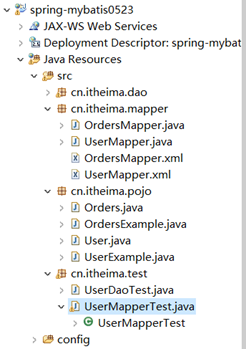
这时将生成好的pojo和mapper包直接复制到目标工程下,进行测试:
注意:mapper xml文件和mapper.java文件在一个目录内且文件名相同。
UserMapperTest.java:
public class UserMapperTest {
private ApplicationContext applicationContext;
@Before
public void setUp() throws Exception{
String configLocation = "ApplicationContext.xml";
applicationContext = new ClassPathXmlApplicationContext(configLocation);
}
@Test
public void testFindUserById() throws Exception{
UserMapper userMapper = (UserMapper) applicationContext.getBean("userMapper");
User user = userMapper.selectByPrimaryKey(1);
System.out.println(user);
}
@Test
public void testFindByUserNameAndSex() throws Exception{
UserMapper userMapper = (UserMapper) applicationContext.getBean("userMapper");
//创建UserExample对象
UserExample userExample = new UserExample();
//通过UserExample创建查询条件封装对象(Criteria中封装的是查询条件)
Criteria criteria = userExample.createCriteria();
//加入查询条件
criteria.andUsernameLike("%王%");
criteria.andSexEqualTo("男");
userMapper.selectByExample(userExample);
}
}
mapper自动生成的增、删、改、查方法:
//删除符合条件的记录
int deleteByExample(UserExample example);
//根据主键删除
int deleteByPrimaryKey(String id);
//插入对象所有字段
int insert(User record);
//插入对象不为空的字段
int insertSelective(User record);
//自定义查询条件查询结果集
List<User> selectByExample(UserExample example);
//根据主键查询
UserselectByPrimaryKey(String id);
//根据主键将对象中不为空的值更新至数据库
int updateByPrimaryKeySelective(User record);
//根据主键将对象中所有字段的值更新至数据库
int updateByPrimaryKey(User record);
总结:
1. 输入映射(就是映射文件中可以传入哪些参数类型)
1)基本类型
2)pojo类型
3)Vo类型
2. 输出映射(返回的结果集可以有哪些类型)
1)基本类型
2)pojo类型
3)List类型
3. 动态sql:动态的拼接sql语句,因为sql中where条件有可能多也有可能少
1)where:可以自动添加where关键字,还可以去掉第一个条件的and关键字
2)if:判断传入的参数是否为空
3)foreach:循环遍历传入的集合参数
4)sql:封装查询条件,以达到重用的目的
4. 对单个对象的映射关系:
1)自动关联(偷懒的办法):可以自定义一个大而全的pojo类,然后自动映射其实是根据数据库总的字段名称和
pojo中的属性名称对应.
2)手动关联: 需要指定数据库中表的字段名称和java的pojo类中的属性名称的对应关系.
使用association标签
5. 对集合对象的映射关系
只能使用手动映射:指定表中字段名称和pojo中属性名称的对应关系
使用collection标签
6. spring和mybatis整合
整合后会话工厂都归spring管理
1)原生Dao实现:
需要在spring配置文件中指定dao实现类
dao实现类需要继承SqlSessionDaoSupport超类
在dao实现类中不要手动关闭会话,不要自己提交事务.
2)Mapper接口代理实现:
在spring配置文件中可以使用包扫描的方式,一次性的将所有mapper加载
7. 逆向工程:自动生成Pojo类,还可以自动生成Mapper接口和映射文件
注意:生成的方式是追加而不是覆盖,所以不可以重复生成,重复生成的文件有问题.
如果想重复生成将原来生成的文件删除
-

 浙公网安备 33010602011771号