
1: public partial class PropertyTableTest : Form
2: {3: public PropertyTableTest()
4: {5: InitializeComponent();
6: m_PropertyTable.Targets = new object[] { new TestObject(), new TestObject(), new TestObject(), new TestObject(), new TestObject() };
7: } 8: }9: public enum Te
10: { 11: A,B,C 12: }13: public class TestObject : MarshalByRefObject
14: {15: private int m_int;
16: private float m_float;
17: private double m_double;
18: private bool m_bool;
19: private DateTime m_datetime;
20: private string m_string;
21: private Te m_Enum;
22: private Color m_color;
23: [DisplayOrder(0)]24: public int Int
25: {26: get { return m_int; }
27: set { m_int = value; }
28: }29: [ReadOnly(true)]
30: [DisplayOrder(1)]31: [DisplayName("只读Float")]
32: public float Float
33: {34: get { return m_float; }
35: set { m_float = value; }
36: } 37: [DisplayOrder(2)]38: public double Double
39: {40: get { return m_double; }
41: set { m_double = value; }
42: } 43: [DisplayOrder(-1)]44: public bool Bool
45: {46: get { return m_bool; }
47: set { m_bool = value; }
48: } 49: [DisplayOrder(3)]50: public DateTime DateTime
51: {52: get { return m_datetime; }
53: set { m_datetime = value; }
54: } 55: [DisplayOrder(4)]56: public string String
57: {58: get { return m_string; }
59: set { m_string = value; }
60: } 61: [DisplayOrder(5)]62: public Te Enum
63: {64: get { return m_Enum; }
65: set { m_Enum = value; }
66: }67: [DisplayName("颜色")]
68: [DisplayOrder(6)]69: public Color Color
70: {71: get { return m_color; }
72: set { m_color = value; }
73: } 74: }以上这些示例程序中的代码
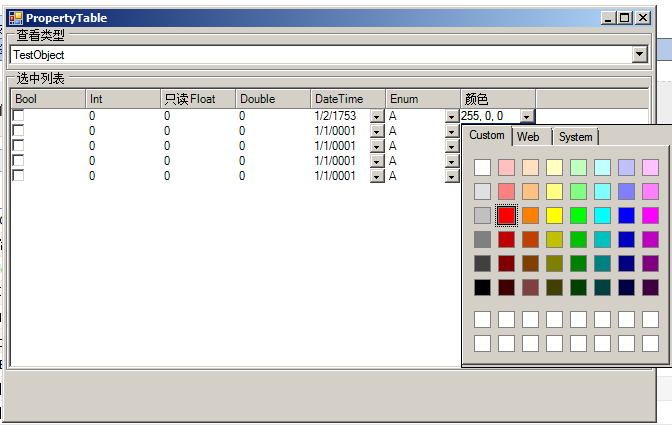
PropertyTable中表格基于XPTable(稍作增强),采用反射读取设置属性值
能够对基本的DisplayName,ReadOnly等Attrbiute作响应,添加DisplayOrder以便对列作排序

 浙公网安备 33010602011771号