
spring mvc + jqgrid 示例
spring mvc + jqgrid 示例
页面效果:
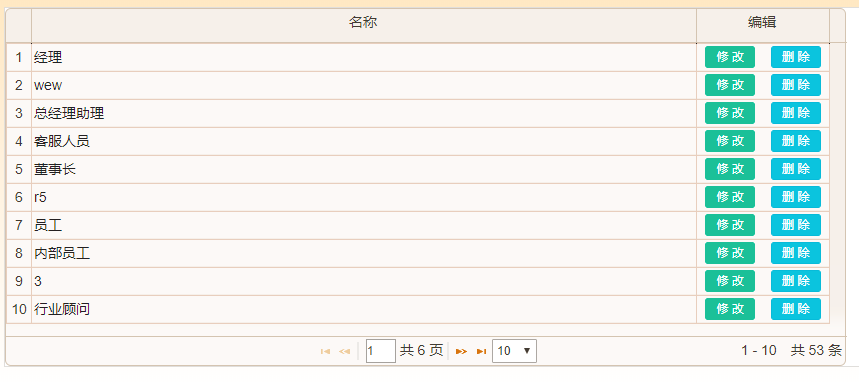
spring mvc 中的controller代码如下
@RequestMapping("GetGridJson")
    public @ResponseBody GridData<SysRole> GetGridJson(Model model, Pagination page, SysRole role) throws Exception {
        Map<String, Object> map = new HashMap<String, Object>();// 构建mybatis中要使用的查询条件
        map.put("fFullname", role.getfFullname());
        map.put("startPage", page.getStartRow());// 起始行
        map.put("pageSize", page.getRows());// 每页记录数
        List<SysRole> l = roleService.find(map);// 返回符合条件的分页记录数
        int count = roleService.count(map);// 返回符合条件的总记录数
        page.setRecords(count);
        GridData<SysRole> t = new GridData<SysRole>(page);// 构建返回给前台页面使用的实体对象
        t.setRows(l);
        return t;
    }
入参有三个,一个是mvc中的model,第二个是分页实体对象(需要自定义,结构要和jqgird的要求符合,后面附上代码),第三个是用于查询条件的实体对象
返回自定义的GridData泛型对象,该对象的结构如下:
public class GridData<T>  {

    /**
     * 每页显示记录数
     */
    private int total;
    /**
     * 当前第几页
     */
    private int page;
    /**
     * 总记录数
     */
    private int records;

    private Pagination pagination;

    public GridData() {

    }

    public GridData(Pagination _pagination) {
        this.pagination = _pagination;
        this.total = _pagination.getTotal();
        this.page = _pagination.getPage();
        this.records = _pagination.getRecords();
    }
    public  void setTotal(int _total) {
        this.total = _total;

    }
    public  int getTotal() {
        return this.total;
    }

    public void setPage(int _page) {
        this.page = _page;
    }

    public  int getPage() {
        return this.page;
    }

    public void setRecords(int _records) {
        this.records = _records;
    }

    public  int getRecords() {
        return this.records;
    }

    public  Pagination getPagination() {
        return this.pagination;
    }
   /**
     * 要展示(包装)的实体对象集合
     */
    private List<T> rows;

    public void setRows(List<T> _rows) {
        this.rows = _rows;
    }

    public List<T> getRows() {
        return this.rows;
    }
}
Pagination类代码如下,该类中的字段是和前台jqgrid中返回后台的参数一致(post的时候直接返回给后台的是json对象;get的时候是在url中拼的串,mvc框架自动转换成json对象再序列化成java对象)
public class Pagination {
    /**
     * 每页行数
     */
    private int rows;
    /**
     * 当前页
     */
    private int page;
    /**
     * 排序列
     */
    private String sidx;
    /**
     * 排序类型
     */
    private String sord;
    /**
     * 总记录数
     */
    private int records;


    /**
     * 开始于第几行,由当前页和每页的记录数计算而得
     * @return
     */
    public int getStartRow() {
        return (this.getPage()-1)* this.getRows();
    }


    public int getRows() {return rows;}

    public void setRows(int _rows) {
        rows = _rows;
    }


    public int getPage() { return page; }

    public  void  setPage(int _page) {
        page =_page;

    }

    public String getSidx() { return sidx; }

    public void setSidx(String _sidx) {
        sidx = _sidx;

    }

    public String getSord() { return sord; }

    public  void setSord(String _sord) {
        sord = _sord;

    }
    /// <summary>
    /// 总记录数
    /// </summary>
    public int getRecords() { return records; }

    public  void setRecords(int _records) {
        records = _records;
    }

    /**
     * 总页数
     * @return
     */
    public int getTotal()
    {
       if (records > 0)
            {
                return records % this.rows == 0 ? records / this.rows : records / this.rows + 1;
            }
            else
            {
                return 0;
            }

    }


}
前台调用代码如下:
$gridList.dataGrid({ url : "../sysrole/GetGridJson", height : $(window).height() - 200, width : setWidth, postData : { parentId : '0' }, pager : "gridPager", sortname : 'fId', sortorder : "desc", rowNum : 10, rowList : [ 10, 200, 300 ], viewrecords : true, gridComplete : function() { removeHorizontalScrollBar("list"); }, colModel : [ { label : "主键", name : "fId", hidden : true, key : true }, { label : '名称', name : 'fFullname', width : 100, align : 'left' }, { label : '编辑', name : '', width : 20, align : 'center', formatter : function(cellvalue, options, rowObject) { return "<a href=\"#\" title=\"修改\" style=\"width:50px\" class=\"btn btn-success btn-xs \" onclick=\"edit('" + rowObject.fId + "')\"><span> 修 改 </span></a>" + " " + "<a href=\"#\" style=\"width:50px\" class=\"btn btn-info btn-xs\" title=\"删除\" onclick=\"btn_delete('" + rowObject.fId + "')\"> 删 除 <span style=\"color:#fff\"></span></a>"; } } ] });
$gridList.dataGrid 函数的代码如下:
$.fn.dataGrid = function (options) {
    var setWidth = ($(window).width() - 30);
    var defaults = {
        datatype: "json",
        width: setWidth,
        //autowidth: false,
        rownumbers: true,
        // shrinkToFit: true,
        gridview: true
    };
    //console.log(options);
    var options = $.extend(defaults, options);
    var $element = $(this);
    options["onSelectRow"] = function (rowid) {
        if ($(this).jqGrid("getGridParam", "selrow") != null && $(this).jqGrid("getGridParam", "selrow") != undefined) {
            var length = $(this).jqGrid("getGridParam", "selrow").length;
            var $operate = $(".operate");
            if (length > 0) {
                $operate.animate({ "left": 0 }, 200);
            } else {
                $operate.animate({ "left": '-100.1%' }, 200);
            }
            $operate.find('.close').click(function () {
                $operate.animate({ "left": '-100.1%' }, 200);
            })
            if (typeof (selectRowCallBack) != "undefined")
                selectRowCallBack($(this).jqGrid("getGridParam", "selrow"));
        }

    };
    $element.jqGrid(options);
};

 浙公网安备 33010602011771号