
spring mvc4 中使用 juploader 上传文件 在ie8中异常
原来一直是在.net平台下使用juploader组件上传文件,后台也没有用mvc的方式,使用的是handler接收请求,现在尝试着在java平台上使用spring mvc的框架继续使用juploader组件上传文件,却遇到了很多问题,好在目前都已经解决了,因为刚刚转到java平台,有很多知识经验都不够,也许还有更好的解决方法。
由于juploader返回的内容是嵌套在一个iframe中的form表单中,并且是一个字符串(不是json),接收到后台服务器返回的字符串后,juploader会将该字符串转化为json格式的对象,代码如下:(黄色高亮部分)
var complete = function () {
            try {
                options.uploading = false;
                $('#jUploader-file' + options.id).show();
                options.button.children('span').text(options.messages.upload);

                var iframe = $('#jUploaderIframe' + options.id).get(0);

                // when we remove iframe from dom
                // the request stops, but in IE load
                // event fires
                if (!iframe.parentNode) {
                    return;
                }

                // fixing Opera 10.53
                if ((iframe.contentDocument &&
                iframe.contentDocument.body &&
                iframe.contentDocument.body.innerHTML == "false")
                || (iframe.contentWindow.document &&
                iframe.contentWindow.document.body &&
                iframe.contentWindow.document.body.innerHTML == "false")) {
                    // In Opera event is fired second time
                    // when body.innerHTML changed from false
                    // to server response approx. after 1 sec
                    // when we upload file with iframe
                    return;
                }


                // iframe.contentWindow.document - for IE<7
                var doc = iframe.contentDocument ? iframe.contentDocument : iframe.contentWindow.document;
                var response;

                log("innerHTML = " + doc.body.innerHTML);

                try {
                    var json = doc.body.innerHTML.replace(/<pre>(.*)<\/pre>/g, '$1');
                    response = eval("(" + json + ")");
                } catch (e) {
                    response = { "Msg": "error" };
                    //throw e;
                }
                // timeout added to fix busy state in FF3.6
                setTimeout(function () {
                    $('#jUploaderForm' + options.id).remove();
                    $('#jUploaderIframe' + options.id).remove();
                }, 10);

                options.onComplete(options.fileName, response);
            }
            catch (e) {
                setTimeout(function () {
                    $('#jUploaderForm' + options.id).remove();
                    $('#jUploaderIframe' + options.id).remove();
                }, 10);
                response = { "Msg": "error" };
                options.onComplete(options.fileName, response);
            }
        };
因此,服务器后台需要返回一个能被格式化为json对象的String,具体代码如下:
public  @ResponseBody String UploadFile(HttpServletRequest request, Model model,
            @RequestParam("jUploaderFile") MultipartFile file,
            HttpServletResponse response) throws Exception {

        String originalFileName = file.getOriginalFilename();
        String newFileName = null;
        if(file != null && originalFileName != null && originalFileName.length() > 0)
        {
            String path = "c:\\upload\\";
            newFileName = UUID.randomUUID() +originalFileName.substring(originalFileName.lastIndexOf("."));
            File newFile = new File(path + newFileName);
            file.transferTo(newFile);
        }

        return "{state:\"success\"}"
这种方式在chrome、ie edge浏览器下没有问题,可以正常上传文件,在上传完成后返回成功信息,但是在ie8中却提示如下信息:
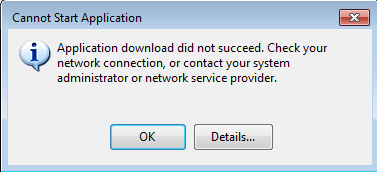
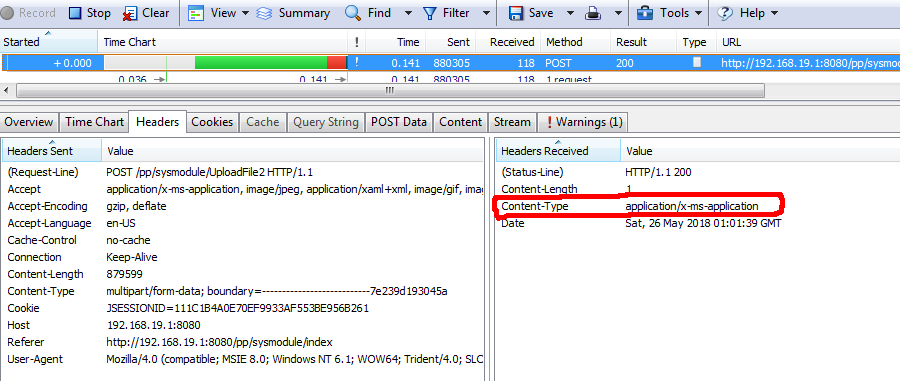
而实际上文件已经上传到服务器上,只是在返回的时候报错,使用httpwatch查看request以及response信息,发现response的content-type和chrome中的response不同
ie8中的request以及response信息如下图:
chrome中的request以及response信息
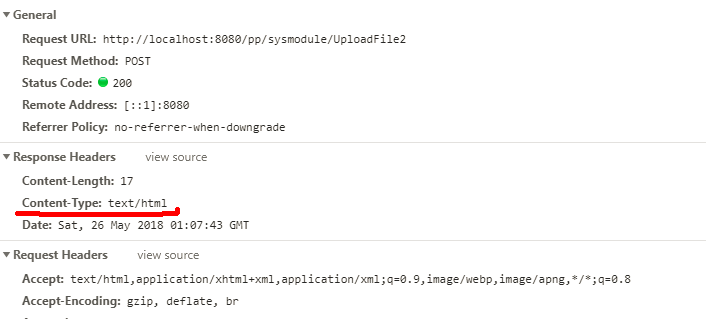
可以看到,chrome中返回的是text/html,这符合我们的预期和代码逻辑,但是在IE8中返回的却是application/x-ms-application,具体原因不清楚,还需要好好研究spring mvc的原理,而不能仅仅停留在使用上,话说回来,目前还是要解决ie8中上传异常的问题。
尝试着将返回值设定为对象,返回的content-type在spring mvc中自动设定为json,但是出现了另一个问题,ie8中提示下载(这个问题,可以搜索“springmvc返回json数据,ie出现文件下载”的关键词,有很多),依照网上的解决方案(在springmvc.xml中修改mvc:annotation-driven等)在我的项目中依然没有解决,最后没有办法,只能用HttpServletResponse对象输出返回值,这样可以在HttpServletResponse中设定返回值的content-type,代码如下:
@RequestMapping("UploadFile")
    public  void UploadFile(HttpServletRequest request, Model model,
            @RequestParam("jUploaderFile") MultipartFile file,
            HttpServletResponse response) throws Exception {

        String originalFileName = file.getOriginalFilename();
        String newFileName = null;
        if(file != null && originalFileName != null && originalFileName.length() > 0)
        {
            String path = "c:\\upload\\";
            newFileName = UUID.randomUUID() +originalFileName.substring(originalFileName.lastIndexOf("."));
            File newFile = new File(path + newFileName);
            file.transferTo(newFile);
        }
        response.setContentType("text/html");
        response.getWriter().write("{state:\"success\"}");
    }
至此,juploader组件上传文件在ie8中就可以正常使用了

 浙公网安备 33010602011771号