
Windows中的Kafka集群配置和Spring Cloud Stream操作kafka
操作环境
Zk没有使用集群,只是一台单节点的机器,ip为192.168.1.74
两台kafka的服务,ip为192.168.1.75,192.168.1.76
服务器的操作系统都是windows的
spring cloud stream kafka的版本号为2.2.1.RELEASE ,spring boot 版本号为2.1.8
1.配置kafka
|
配置项 |
192.168.1.75 |
192.168.1.76 |
备注 |
|
host.name |
192.168.1.75 |
192.168.1.76 |
Kafka服务主机名称 |
|
broker.id |
0 |
1 |
默认为0,kafka集群配置必须为每一个kafka服务设置id为唯一值 |
|
listeners |
PLAINTEXT://192.168.1.75:9092 |
PLAINTEXT://192.168.1.76:9092 |
|
|
advertised.listeners |
PLAINTEXT://192.168.1.75:9092 |
PLAINTEXT://192.168.1.76:9092 |
|
|
num.patitions |
2 |
2 |
分区数,默认为1。这里有两个kafka服务器,所以设置为了2 |
|
zookeeper.connect |
zk1:2181/kafka |
zk1:2181/kafka |
zk1是在hosts文件中自定义的域名,如果直接使用ip的话,可能连不上zk |
2.异常情况
一.开始的时候配置了num.partitions为1,然后创建了topic,这时再修改num.partitions为2,此时操作topic,会报The number of expected partitions was: 2, but 1 has been found instead。
解决方式:
删除topic,重新创建
或者设置spring.cloud.stream.kafka.binder. autoAddPartitions=true(参见http://www.suoniao.com/article/5ea3999bfda6d615af0517e1)
二.报LEADER_NOT_AVAILABLE,这个可能是没有设置host.name造成的,
解决方式:
修改server.properties配置文件,增加host.name,然后重启各节点服务,同时注意防火墙端口是否互通。
3.Spring cloud stream 中需要注意事项
一. producer中的partitionCount设置,默认为1,虽然kafka服务器上设置了num.partitions=2,但是生产者发送消息的时候还是会发送到一个分区里。只有partitionCount设置成和num.partitions一致时,才会轮询发送到两个分区内,使用如下命令可以查看分区内的内容
./kafka-console-consumer.sh --bootstrap-server localhost:9092 --from-beginning --topic WordCount --partition 0
如果想将一类消息发送到同一个分区,可以设置
spring.cloud.stream.bindings.mychannel.producer.partitionKeyExpression=payload         #相当于kafka中的key-value中的key
spring.cloud.stream.bindings.mychannel.producer.partitionCount=2
但是对于kafka来说,上上面的设置并不起作用。调试源代码的时候也发现是查找的spring.cloud.stream.kafka.bindings下的spl表达式。所以对于binder为kafka来说,还需要在发送消息的时候设置kafka_message_key,如:
Message<OperateTypeMessage> build = MessageBuilder.withPayload(“ss”)
                .setHeader("operateType", "update")
                .setHeader(KafkaHeaders.MESSAGE_KEY, "sysuser".getBytes())
                .setHeader(MessageHeaders.CONTENT_TYPE,"application/json")
                .build();
        boolean send = sinkSender.channel().send(build);
另外设置kafka的key 的序列化方式为:
spring:
  kafka:
    producer:
      key-serializer: org.apache.kafka.common.serialization.StringSerializer
二. 消息同步的方式是异步还是同步,是设置sync属性,默认为true。虽然从字面解释上来说,sync指的是同步,而设置为true,那么就是同步了,但是实际操作中和看手册说明,如果要同步的方式的话,应该设置为false。
三. 在试验的过程中,在同一个topic中插入了不同类型的实体消息,stream在消费的时候报异常
四. 消费者中使用condition区分不同处理方式的消息
 @StreamListener(target = TestSink.CHANNEL_NAME,condition = "headers['operateType']=='update'")
    public void recive(OperateTypeMessage<List<User>> message, @Headers Map<String,Object> header){
        if(message != null){
            logger.info("received:"+message.getPayLoad().get(0).getUserAccount());
            logger.info("received:"+message.getPayLoad().get(0).toString());
        }
        logger.info("received:"+message);
        //System.out.println("received:"+payload);
    }

    @StreamListener(target = TestSink.CHANNEL_NAME,condition = "headers['operateType']=='create'")
    public void reciveMessage(OperateTypeMessage<List<User>> message, @Headers Map<String,Object> header) throws InterruptedException {
        if(message != null){
            logger.info("received:"+message.getPayLoad().size());
            logger.info("received:"+message.getPayLoad().get(0).toString());
        }
        logger.info("received:"+message);
        logger.info("sleep start-------------------------------------");
        //Thread.sleep(100000);
/*        for (int i = 0; i < 1000*10000 ; i++) {
            System.out.println(i);
        }*/
        logger.info("sleep end-------------------------------------");
        //System.out.println("received:"+payload);
    }
如果是同一分区的数据,headers['operateType']=='create'和'update'是有序的
五. 消费者分组的问题
如果一个服务中有定义了多个通道(主题),不同通道的group名字不能命名成一样的,否则stream会按照一个主题处理。
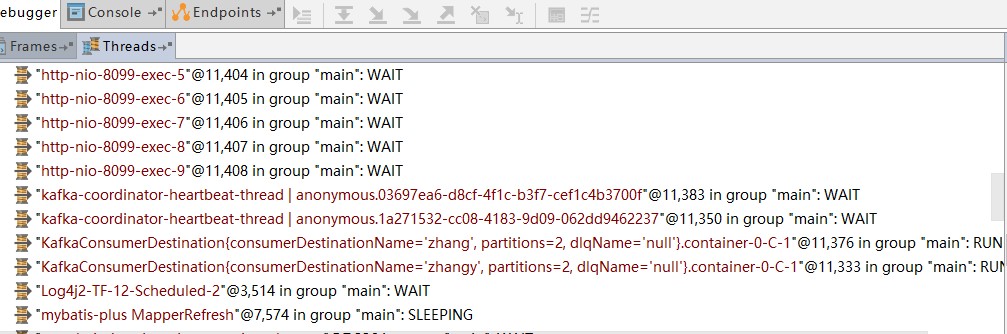
而我项目中的配置如下:
spring:
  cloud:
  ###################  消息队列框架配置  ###################
    stream:            #
      kafka:
        binder:
          brokers: 1.1.1.1:9092,2.2.2.2:9092
        bindings:                    #spring cloud stream 实现的kafka绑定器的通用设置,只对kafka生效
          sysuser_input:
            consumer:
              enableDlq: true        #是否启动死信队列设置,默认为false,设置为true时,引起错误的消息会被发送到名为error.<destination>.<group>的主题中

          employee_input:
            consumer:
              enableDlq: true        #是否启动死信队列设置,默认为false,设置为true时,引起错误的消息会被发送到名为error.<destination>.<group>的主题中

      bindings:
        sysuser_input:
          destination: sys_user1     #消息主题名称,消费者可以监听多个主题,不同的主题用逗号隔开,但是如果设置了group则会报错,必须是匿名的group才可以监听多个主题
          group: user_001            #分组,命名规则是业务名称+单位名称,不同channel的group名字不能相同

        employee_input:
          destination: sys_employee2
          group: employee_001

 浙公网安备 33010602011771号