


C#--事件驱动在上位机中的应用【三】(自定义控件)
以下是学习笔记:
1,分析事件
【1】
sender是自定义控件的PictureBox,通过PictureBox拿不到地址。需要通过这个自定义的控件this.deviceControl1才能拿到地址。
如果sender是这个自定义的控件this.deviceControl1就可以解决上面的问题了
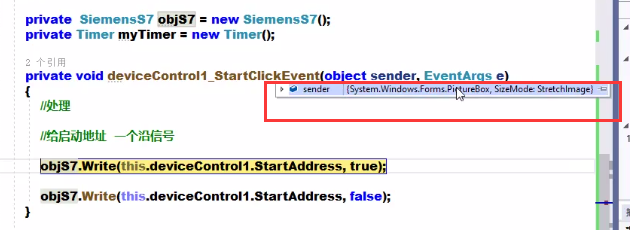
【2】往上查找deviceControl1_StartCliclkEvent这事件是怎么来的

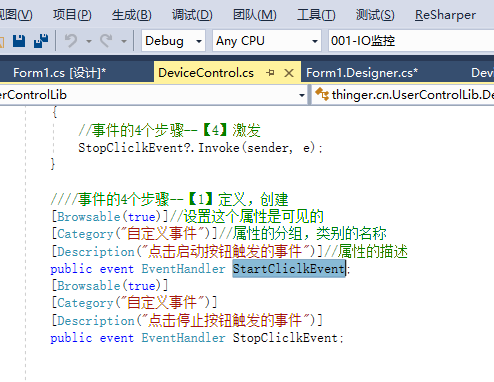
【3】再往上查找StartCliclkEvent这个事件怎么来的,是在自定义控件中自定义的事件
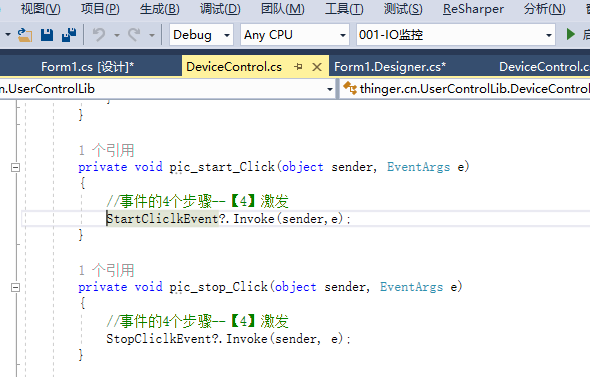
【4】在往上查找StartCliclkEvent是怎么调用的,这里可以看到sender是怎么来的
2,解决sender的问题
【1】所以就只需要把sender换成this就可以了
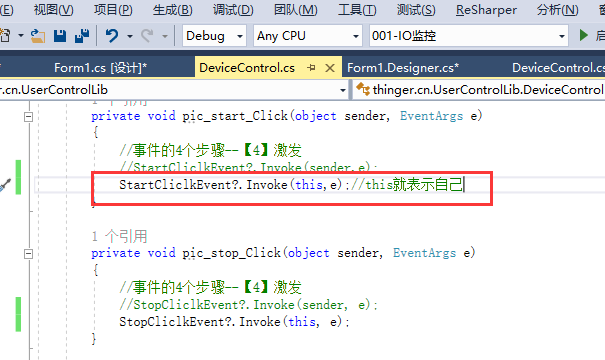
【2】再运行代码,sender就是DeviceControl类型了
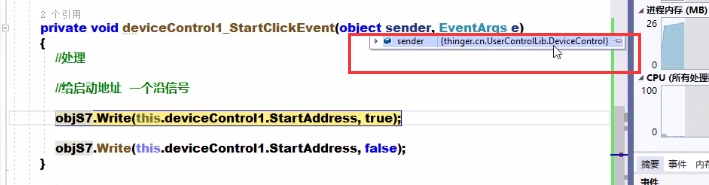
3,这个时候就能做成通用的方法了
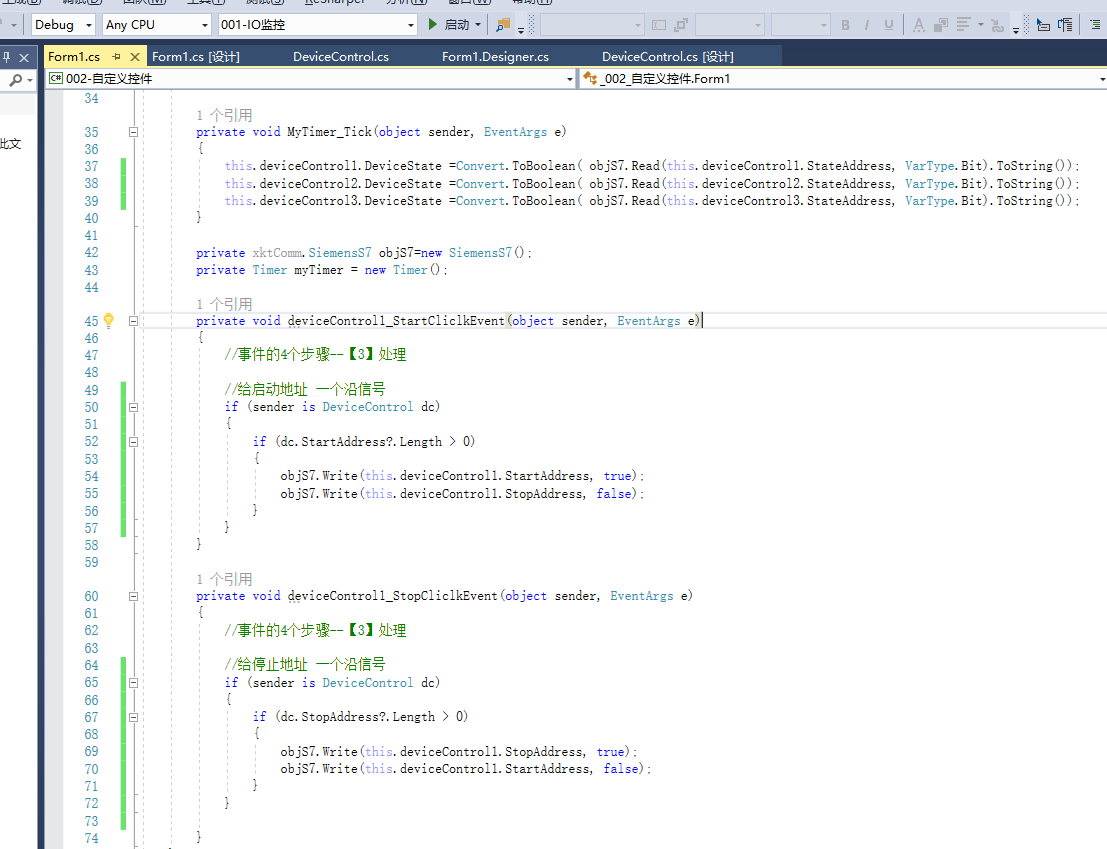
4,继续优化,要实现拖入控件后不用绑定事件就能直接用,优化后的代码:
通过代码绑定事件
using System;
using System.Collections.Generic;
using System.ComponentModel;
using System.Data;
using System.Drawing;
using System.Linq;
using System.Text;
using System.Threading.Tasks;
using System.Windows.Forms;
using thinger.cn.UserControlLib;
using xktComm;

namespace _002_自定义控件
{
    public partial class Form1 : Form
    {
        public Form1()
        {
            InitializeComponent();

            if (!objS7.Connect("192.168.1.123", CPU_Type.S71500, 0, 0))
            {
                MessageBox.Show("PLC连接失败");
            }
            else
            {
                myTimer.Interval = 100;
                myTimer.Tick += MyTimer_Tick;
                myTimer.Enabled = true;

                BindEvent();//在这里绑定控件的事件,不要通过双击去绑定。如果已经有绑定过的事件,需要重置一下
            }          ;
        }

        private void BindEvent()
        {
            foreach (var item in this.Controls)
            {
                if (item is DeviceControl dc)
                {
                    if (dc.StartAddress?.Length > 0 && dc.StopAddress?.Length > 0)
                    {
                        dc.StartCliclkEvent += deviceControl1_StartCliclkEvent;
                        dc.StopCliclkEvent += deviceControl1_StopCliclkEvent;
                    }
                }
            }
        }

        private void MyTimer_Tick(object sender, EventArgs e)
        {
            //this.deviceControl1.DeviceState =Convert.ToBoolean( objS7.Read(this.deviceControl1.StateAddress, VarType.Bit).ToString());
            //this.deviceControl2.DeviceState =Convert.ToBoolean( objS7.Read(this.deviceControl2.StateAddress, VarType.Bit).ToString());
            //this.deviceControl3.DeviceState =Convert.ToBoolean( objS7.Read(this.deviceControl3.StateAddress, VarType.Bit).ToString());
            foreach (var item in this.Controls)
            {
                if (item is DeviceControl dc)
                {
                    if (dc.StartAddress?.Length > 0 )
                    {
                        dc.DeviceState = Convert.ToBoolean(objS7.Read(dc.StateAddress, VarType.Bit).ToString());
                    }
                }
            }
        }

        private xktComm.SiemensS7 objS7=new SiemensS7();
        private Timer myTimer = new Timer();

        private void deviceControl1_StartCliclkEvent(object sender, EventArgs e)
        {
            //事件的4个步骤--【3】处理

            //给启动地址 一个沿信号
            if (sender is DeviceControl dc)
            {
                if (dc.StartAddress?.Length > 0)
                {
                    objS7.Write(this.deviceControl1.StartAddress, true);
                    objS7.Write(this.deviceControl1.StopAddress, false);
                }
            }
        }

        private void deviceControl1_StopCliclkEvent(object sender, EventArgs e)
        {
            //事件的4个步骤--【3】处理

            //给停止地址 一个沿信号
            if (sender is DeviceControl dc)
            {
                if (dc.StopAddress?.Length > 0)
                {
                    objS7.Write(this.deviceControl1.StopAddress, true);
                    objS7.Write(this.deviceControl1.StartAddress, false);
                }
            }

        }
    }
}
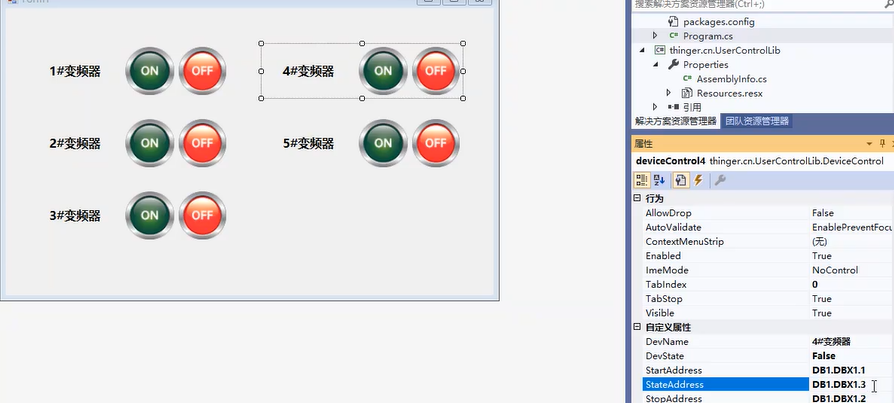
5,以后要增加设备的话,只用拖入自定义控件,修改 设备名称和需要控制的PLC的DB地址就好了

 浙公网安备 33010602011771号