
google 三种跳过开机向导的方式
前言:在预置了GMS之后,首次开机会进入开机向导,其实就是因为预置了gms包里的SetupWizard应用(com.google.android.setupwizard),开机向导里的部分页面,其实也是用的其他应用里的页面,通过页面跳转实现的,
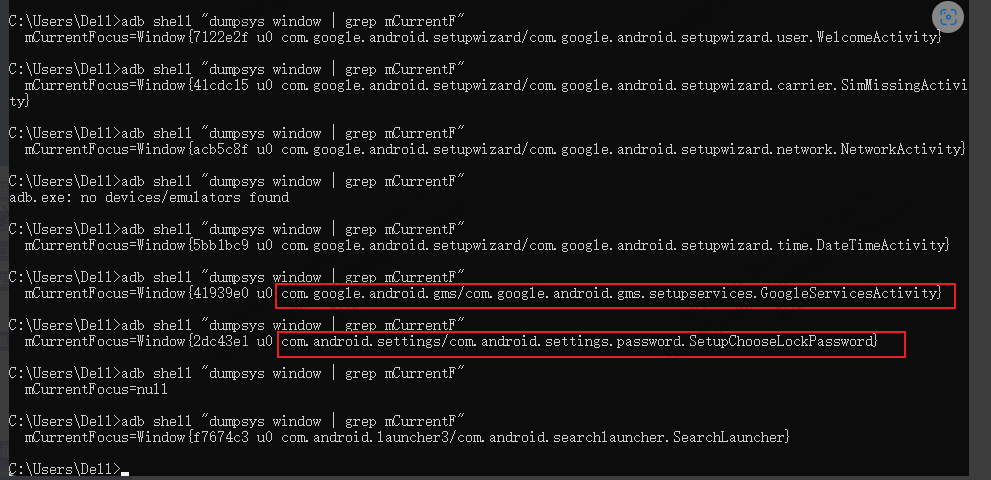
跟开机向导有关的两个重要的属性:
Settings.Secure.USER_SETUP_COMPLETE
Settings.Global.DEVICE_PROVISIONED
这两个属性值为1的时候再次开机时就不会再出现开机向导了,一般在执行完开机向导后会将这两个值设为1
在T1621项目上,需要做一个跳过开机向导的需求,SetupWizard应用是google的,我们并没有源码,所以只能通过其他方式来实现,下面是三种跳过开机向导的方式
1.第一种:
直接屏蔽掉开机向导
将ro.setupwizard.mode值置为DISABLED,
大致代码:ro.setupwizard.mode=DISABLED
2.第二种:
拦截com.google.android.setupwizard,把他kill掉,然后将
Settings.Secure.USER_SETUP_COMPLETE
Settings.Global.DEVICE_PROVISIONED
值设置为1
大致代码:
private static final String SETUP_WIZARD_PKG_NAME = "com.google.android.setupwizard";
PackageManager pm = getPackageManager();
pm.setApplicationEnabledSetting(SETUP_WIZARD_PKG_NAME,
PackageManager.COMPONENT_ENABLED_STATE_DISABLED,0/* kill process */);
Settings.Secure.putInt(getApplicationContext().getContentResolver(), Settings.Secure.USER_SETUP_COMPLETE, 1);
Settings.Secure.putInt(getApplicationContext().getContentResolver(), Settings.Global.DEVICE_PROVISIONED, 1);
3.第三种:
在开机向导中通过intent直接跳到launcher页面,
并将
Settings.Secure.USER_SETUP_COMPLETE
Settings.Global.DEVICE_PROVISIONED
值设置为1
大致代码:
Intent intent_launcher = new Intent();
intent_launcher.setAction("android.intent.action.MAIN");
intent_launcher.addCategory("android.intent.category.HOME");
intent_launcher.addFlags(0x10000000);
intent_launcher.setComponent(new ComponentName("com.android.launcher3","com.android.searchlauncher.SearchLauncher"));
context.startActivity(intent_launcher);
Settings.Secure.putInt(getApplicationContext().getContentResolver(), Settings.Secure.USER_SETUP_COMPLETE, 1);
Settings.Secure.putInt(getApplicationContext().getContentResolver(), Settings.Global.DEVICE_PROVISIONED, 1);

 浙公网安备 33010602011771号