
I/O笔记
I/O流
输入/输出:
- 输入机制:允许程序读取外部数据(包括磁盘、光盘)、用户输入数据;
- 输出机制:允许程序记录运行状态,将程序数据输出到磁盘、光盘等存储设备中
1、File类
如果希望在程序中操作文件和目录,都可以通过File类来完成。File能新建、删除、重命名文件和目录,File不能访问文件内容本身。如果要访问内容本身,则需要使用输入\输出流
相关操作
public class FileTest {
    public static void main(String[] args)throws IOException {
        //以当前路径来创建一个File对象
        File file = new File(".");
        //直接获取文件名,输出一点
        System.out.println(file.getName());
        //获取相对路径的父路径可能出错,下面代码输出null
        System.out.println(file.getParent());
        //获取绝对路径
        System.out.println(file.getAbsoluteFile());
        //获取上一级路径
        System.out.println(file.getAbsoluteFile().getParent());
        //在当前路径下创建一个临时文件
        File temFile = File.createTempFile("aaa",".txt",file);
        //指定当JVM退出时删除该文件
        temFile.deleteOnExit();
        //以系统当前时间作为新文件名来创建新文件
        File newFile = new File(System.currentTimeMillis()+"");
        System.out.println("newFile对象是否存在"+ newFile.exists());
        //以指定newFile 对象来创建一个文件
        newFile.createNewFile();
        //以newFile对象来创建一个目录,因为newFile已经存在
        newFile.mkdir();
        //使用list()方法列出当前路径下的所有文件和路径
        String[] fileList = file.list();
        System.out.println("=============当前路径下所有文件和路径如下=============");
        for (String fileName : fileList){
            System.out.println(fileName);
        }
        //listRoot()静态方法列出所有磁盘根路径
        File[] roots = File.listRoots();
        System.out.println("=========系统所有根路径如下=========");
        for (File root : roots){
            System.out.println(root);
        }
    }
}
文件过滤器
import java.io.File;

public class FilenameFilterTest {
    public static void main(String[] args) {
        File file = new File(".");
        //使用Lambda表达式(目标类型为FilenameFilter)实现文件过滤器
        //如果文件以.java结尾,或者文件对应一个路径,则返回true
        String[] nameList = file.list((dir , name) -> name.endsWith(".java")
        || new File(name).isDirectory());
        for (String name : nameList){
            System.out.println(name);
        }
    }
}
2、InputStream和Reader
InputStream例子
import java.io.FileInputStream;
import java.io.FileNotFoundException;
import java.io.IOException;

public class FileInputStreamTest {

    public static void main(String[] args) throws IOException {
    //自行在路径下创建一个aaa.txt文件
        FileInputStream fis = new FileInputStream("aaa.txt");
        byte[] bytes = new byte[1024];
        int hasRead= 0 ;
        while((hasRead = fis.read(bytes))>0){
            System.out.println(new String(bytes,0 , hasRead));
        }

        fis.close();

    }


}
Reader例子
import java.io.FileNotFoundException;
import java.io.FileReader;
import java.io.IOException;

public class FileReaderTest {

    public static void main(String[] args) {
        try (
                //创建字符输入流
                FileReader fr= new FileReader("aaa.txt")){
            char[] chars = new char[32];
            //用于保存实际读取的字符数
            int hasRead = 0 ;
            while ((hasRead = fr.read(chars))>0){
                System.out.println(new String(chars , 0 , hasRead));
            }

        } catch (IOException e) {
            e.printStackTrace();
        }
    }
}
3、OutputStream和Writer
OutputStream
import java.io.FileInputStream;
import java.io.FileNotFoundException;
import java.io.FileOutputStream;
import java.io.IOException;

public class FileOutputStreamTest {
    public static void main(String[] args) {

        try (  //创建字节输入流
                FileInputStream fis = new FileInputStream(
                "FileOutputStreamTest.java");
             //创建字节输出流
             FileOutputStream fos = new FileOutputStream("newFile.txt");){
            byte[] bytes = new byte[1024];
            int hasRead = 0;
            while ((hasRead = fis.read(bytes)) > 0 ){
                fos.write(bytes , 0 , hasRead);
            }
        } catch (IOException e) {
            e.printStackTrace();
        }
    }
}
FileWriter
import java.io.FileWriter;
import java.io.IOException;

public class FileWriterTest {

    public static void main(String[] args) {
        try (
                FileWriter fw = new FileWriter("pome.txt");

        ){
            fw.write("锦瑟\r\n");
            fw.write("锦瑟无端五十弦,一弦一柱思华年\r\n");
        } catch (IOException e) {
            e.printStackTrace();
        }
    }
}
4、输入/输出流体系
使用PrintStream处理流来包装OutputStream
import java.io.FileNotFoundException;
import java.io.FileOutputStream;
import java.io.IOException;
import java.io.PrintStream;

public class PrintStreamTest {
    public static void main(String[] args) {
        try(
                FileOutputStream fos = new FileOutputStream("test.txt");
                PrintStream ps = new PrintStream(fos)
        ) {
            //使用PrintStream执行输出
            ps.println("普通字符串");
            //直接使用PrintStream输出对象
            ps.println(new PrintStreamTest());
        } catch (IOException e) {
            e.printStackTrace();
        }
    }
}
使用字符串作为物理节点的字符输入/输出流
import java.io.IOException;
import java.io.StringReader;
import java.io.StringWriter;

public class StringNodeTest {

    public static void main(String[] args) {
        String src = "一生俯首拜阳明";
        StringReader sr = new StringReader(src);
        char[] aChar = new char[32];
        int hasRead = 0;

            try {
                while ((hasRead = sr.read(aChar))> 0 ){
                    System.out.println(new String(aChar , 0 , hasRead));
                }

            } catch (IOException e) {
                e.printStackTrace();
            }


        StringWriter  sw = new StringWriter();
        sw.write("明天要做什么事情?");
        System.out.println(sw.toString());
    }

}
使用键盘输入来展示转换流
import java.io.BufferedReader;
import java.io.IOException;
import java.io.InputStreamReader;

public class KeyinTest {
    public static void main(String[] args) {

        try(
        InputStreamReader is = new InputStreamReader(System.in);
        BufferedReader bf = new BufferedReader(is)){
        String line = null;

        while ((line = bf.readLine()) != null) {
            if (line.equals("exit")){
                System.exit(1);
            }
            System.out.println("内容:" + line);
        }
        }catch (IOException e){
            e.printStackTrace();
        }
    }
}
推回流输入
import java.io.FileReader;
import java.io.IOException;
import java.io.PushbackReader;

public class PushbackTest {
    public static void main(String[] args) {
        try(
                //创建一个PushbackReader对象,指定推回缓冲区的长度为64
                PushbackReader pr = new PushbackReader(new FileReader(
                        "PushbackTest.java"),64)){
            char[] buf = new char[32];
            //用以保存上次读取的字符串内容
            String lastContent = "";
            int hasRead = 0;
            //循环读取文件内容
            while ((hasRead = pr.read(buf)) > 0){
                //将读取的文件内容转换成字符串
             String content = new String(buf ,0  , hasRead);
             int targetIndex = 0;
             //将上次读取的字符串和本次读取的字符串拼起来
                // 查看是否包含目标字符串,如何包含目标字符串
                if ((targetIndex = (lastContent + content).indexOf("new PushbackReader")) > 0){
                    //本次内容和上次内容一起推回缓冲区
                    pr.unread((lastContent+content).toCharArray());
                    //重新定义一个长度为targetIndex的char数组
                    if (targetIndex > 32){
                        buf = new char[targetIndex];
                    }
                    //再次读取指定长度的内容(就是目标字符串之前的内容)
                    pr.read(buf,0,targetIndex);
                    //打印读取的内容
                    System.out.println(new String(buf , 0 , targetIndex));
                    System.exit(0);
                }else{
                    //打印上次读取的内容
                    System.out.println(lastContent);
                    //将本次内容设为上次读取的内容
                    lastContent = content;
                }

            }
        }catch (IOException e){
            e.printStackTrace();
        }
    }
}
5、重定向标准输入/输出
重定向标准输出
import java.io.FileNotFoundException;
import java.io.FileOutputStream;
import java.io.PrintStream;

public class RedirectOut {
    public static void main(String[] args) {
        try(
                PrintStream ps = new PrintStream(new FileOutputStream("out.txt"));

        ) {
            System.setOut(ps);
            System.out.println("普通字符串");
            System.out.println(new RedirectOut());
        } catch (FileNotFoundException e) {
            e.printStackTrace();
        }

    }
}
重定向标准输入
import java.io.FileInputStream;
import java.io.FileNotFoundException;
import java.io.FileInputStream;
import java.io.IOException;
import java.util.Scanner;

public class RedirectIn {
    public static void main(String[] args) {
        try (
                FileInputStream fis = new FileInputStream("aaa.txt")
        ){
            //使用System.in创建Scanner对象,用于获取标准输入
            System.setIn(fis);
            //使用System.in创建Scanner对象,用于获取标准输入
            Scanner sc = new Scanner(System.in);
            //增加下面一行只把回车作为分隔符
            sc.useDelimiter("\n");
            //判断是否还有下一个输入项
            while (sc.hasNext()){
                //输出输入项
                System.out.println("从文件中获取的内容是:" + sc.next());
            }

        } catch (IOException e) {
            e.printStackTrace();
        }
    }
}
6、Java虚拟机读写其他进程的数据
读取了其他进程的输出信息
注意:对于程序来说,这是输入流;对于读取的子程序来说,这是输出流
import java.io.BufferedReader;
import java.io.IOException;
import java.io.InputStreamReader;

public class ReadFromProcess {
    public static void main(String[] args) throws IOException {
        //运行javac命令,返回运行该命令的子进程
        Process  p = Runtime.getRuntime().exec("javac");

        //以p进程的错误流创建BufferedReader对象
        //对这个错误流本程序是输入流,对p进程是输出流
        BufferedReader br = new BufferedReader(new InputStreamReader(p.getErrorStream()));
        String buff = null;
        //采用循环方式来读取p进程的错误输出
        while((buff = br.readLine()) !=null){
            System.out.println(buff);
        }
    }
}
Java程序启动java虚拟机,运行另一个Java程序,并且对该程序输入数据
import java.io.*;
import java.util.*;

public class WriteToProcess {
    public static void main(String[] args) throws IOException {
        //运行java ReadStandard命令,返回运行该命令的子程序
		 Process p = Runtime.getRuntime().exec("java ReadStandard");
		 //这里一定要把对象放在try的括号内建立
		try(
             PrintStream ps = new PrintStream(p.getOutputStream());
		)
		{
			   ps.println("aaaasssdasdasdasd");
        ps.println(new WriteToProcess());
		}

        //以p进程的输出流创建PrintStream对象
        //这个输出流对本程序是输出流,对p进程是输入流

        //想ReadStand程序写入内容,这些内容将被ReadStandard读取
    }
}

//定义一个ReadStandard类,该类可以接受标准输入
//并将标准输入写入out.txt文件
class  ReadStandard
{
    public static void main(String[] args) {
        try (
                Scanner scanner = new Scanner(System.in);
                PrintStream ps = new PrintStream(new FileOutputStream("out1.txt"))
                ){
           //增加下面一行只把回车作为分隔符
            scanner.useDelimiter("\n");
            //判断是否还有下一个输入项
            while (scanner.hasNext()){
                //输出输入项
                ps.println("键盘输入的内容是"+ scanner.next());
            }
        } catch (FileNotFoundException e) {
            e.printStackTrace();
        }
    }
}
7、RandomAccessFile
使用RandomAccessFile应该制定以下参数值
- "r":以只读方式打开指定文件
- "rw":以读写方式打开指定文件
- "rws":以读写方式打卡指定文件,还要求对文件的内容或元数据的每个更新都同步写入到底层存储设备
- "rwd":以读写方式打开指定文件,要求对文件内容的每个更新都同步写入到底层存储设备
使用RandomAccessFile来访问中间部分的数据
import java.io.IOException;
import java.io.RandomAccessFile;

public class RandomAccessFileTest {
    public static void main(String[] args) {

        try(
                RandomAccessFile raf = new RandomAccessFile("RandomAccessFileTest.java","r")){
                 //获取RandomAccessFile对象文件指针的位置,初始位置是0
            System.out.println("RandomAccessFile的文件指针的初始位置:"+ raf.getFilePointer());
            raf.seek(300);
            byte[] bytes = new byte[32];
            int hasRead = 0 ;
            while ((hasRead = raf.read(bytes))>0){
                System.out.println(new String(bytes , 0 , hasRead));
            }
        }
        catch(IOException e){
            e.printStackTrace();
        }
    }
}
使用RandomAccessFile增加数据
import java.io.FileNotFoundException;
import java.io.IOException;
import java.io.RandomAccessFile;

public class AppendContent {
    public static void main(String[] args) throws IOException {
        try(
                //以读写方式打开一个RandomAccessFile对象
                RandomAccessFile raf = new RandomAccessFile("out.txt","rw")
                ) {
                //将指针移动到out.txt文件的最后
            raf.seek(raf.length());
            raf.write("更新数据\n\r".getBytes());
        } catch (FileNotFoundException e) {
            e.printStackTrace();
        }
    }
}
向指定文件、指定位置,插入数据
如果直接将文件记录指针移动到中间某位置开始输出,新输出的内容会覆盖文件中原有的内容。因此需要向指定位置插入内容,程序需要先把插入点后面的内容读入缓冲区,等把需要插入的数据写入文件后,再将缓冲区的内容追加到文件后面
import java.io.*;

public class InsertContent {
    public static  void insert(String fileName , long pos , String insertContent)throws IOException{
        File tmp = File.createTempFile("tmp",null);
        tmp.deleteOnExit();

                RandomAccessFile raf= new RandomAccessFile(fileName , "rw");
                //使用临时文件来保存插入点后的数据
                FileOutputStream tmpOut = new FileOutputStream(tmp);
                FileInputStream  tmpIn = new FileInputStream(tmp);

            raf.seek(pos);
            //------------下面代码将插入点后的内容读入临时文件中保存
            byte[] bytes = new byte[64];
            //用于保存实际读取的字节数
            int hasRead = 0;
            //使用循环方式读取插入点后的数据
            while ((hasRead = raf.read(bytes)) > 0 ){
                tmpOut.write(bytes , 0 , hasRead);
            }
            //--------下面代码用于插入内容
            //把文件记录指针重新定位到pos位置
            raf.seek(pos);
            //追加需要插入的内容
            raf.write(insertContent.getBytes());
            //追加临时文件中的内容
            while ((hasRead = tmpIn.read(bytes)) > 0){
                raf.write(bytes, 0 , hasRead);
            }
        }

    public static void main(String[] args) throws IOException {
        insert("aaa.txt",5,"重新插入的内容");
    }
}
为什么读取文件和输出文件都用对象raf?因为RandomAccess的读写和pos直接相关,对象raf的读写目标都是pos后的内容。
8、对象序列化
目标是将对象保存到磁盘中,或允许在网络中直接传输对象
对象序列化机制允许把内存中的Java对象转换成无关的二进制流,从而把这种二进制流持久地保存在磁盘上,通过网络将这种二进制流传输到另一个网络节点。其他程序一旦获得了这种二进制流(无论是从磁盘中获取的,还是从网络中获取的),都可以将这种二进制流恢复成原来的Java对象
序列化对象
public class Person implements java.io.Serializable {

    private  String name ;
    private  int  age;
    //注意此处没有提供无参的构造器
    public Person(String name , int age){
        System.out.println("有参数的构造器");
        this.name = name;
        this.age = age;
    }

    public String getName() {
        return name;
    }

    public void setName(String name) {
        this.name = name;
    }

    public int getAge() {
        return age;
    }

    public void setAge(int age) {
        this.age = age;
    }
}
import java.io.FileOutputStream;
import java.io.IOException;
import java.io.ObjectOutputStream;

public class WriteObject {
    public static void main(String[] args) {
        try(//创建一个ObjectOutputStream输出流
            ObjectOutputStream oos = new ObjectOutputStream(new FileOutputStream("object.txt"))){

            Person p = new Person("孙悟空家",500);
            oos.writeObject(p);
        }catch(IOException e){
            e.printStackTrace();
        }
    }
}
上面程序第一行粗体字代码创建了一个ObjectOutputStream输出流,这个ObjectOutputStream输出流建立在一个文件输出流的基础上;程序使用了writeObject()方法将一个Person对象写入输出流。运行上面程序,将会看到一个object.txt文件,该文件的内容被个就是Person对象
将文件中的对象读取出来
import java.io.FileInputStream;
import java.io.FileNotFoundException;
import java.io.IOException;
import java.io.ObjectInputStream;

public class ReadObject {
    public static void main(String[] args) throws IOException, ClassNotFoundException {
        //创建一个ObjectInputStream输入流
        ObjectInputStream ois = new ObjectInputStream(
                new FileInputStream("object.txt"));
        //从输出流中读取一个Java对象,并将其强制类型转换为Perosn类
        Person p = (Person) ois.readObject();
        System.out.println("名字为:" + p.getName() + "\n年龄为:" + p.getAge());
    }
}
反序列化读取的仅仅是Java对象的数据,而不是Java类,因此采取反序列化恢复Java对象时,必须提供J该Java对象所属类的class维诺健,否则将会应阿发ClassNotFoundException异常。
还有一点必须指出的是,反序列化没有使用构造器来初始化对象(例子的构造器中打印了一句话,但是反序列化读取对象时并没有看到)。
- 当一个序列化对象有多个父类时,这些父类要么有无参数构造器,要么是可序列化的,不然会引发InvalidClassException异常
序列化引用对象
前面的成员变量都是Stirng、int等基本类型,当使用引用类型时,引用对象也应该是序列化的对象,且序列化截止采取了特殊的算法来解决反序列化时,同一个对象引用多次的问题。
同一个对象引用多次
Person per = new Person("孙悟空",500);
Teacher t1 = new Teacher("唐僧",per);//Teacher的成员变量是Stringname 和Person student
Teacher t2 = new Teachet("菩提祖师",per)//t1和t2的per都引用了同一个对象,即孙悟空
但是在反序列化时,会得到三个Person对象,而不是同一个Person对象
算法的内容:
- 所有保存到磁盘中的对象都有一个序列化编号
- 当程序试图序列化一个对象时,程序先检查该对象是否已经被序列化过,只有该对象从未(在本次虚拟机中)被序列化过,系统才会将该对象转换成字节序列并输出
- 如果某个对象已经序列化过,程序将只是直接输出一个序列化编号,而不是再次重新序列化该对象
案例
序列化对象
public class Teacher implements java.io.Serializable {
    private String name;
    private Person student;

    public Teacher(String name, Person student) {
        this.name = name;
        this.student = student;
    }

    public String getName() {
        return name;
    }

    public void setName(String name) {
        this.name = name;
    }

    public Person getStudent() {
        return student;
    }

    public void setStudent(Person student) {
        this.student = student;
    }
}
序列化
import java.io.*;

public class WriteTeacher {
    public static void main(String[] args) throws IOException {
        //创建一个ObjectInputStream输入流
        ObjectOutputStream oos = new ObjectOutputStream(
                new FileOutputStream("teacher.txt"));
        //依次读取ObjectInputStream输入流中的4个对象
        Person per = new Person("孙悟空",500);
        Teacher t1 = new Teacher("唐僧",per);
        Teacher t2 = new Teacher("菩提祖师",per);
        //依次将对象序列化
        oos.writeObject(t1);
        oos.writeObject(t2);
        oos.writeObject(per);
        oos.writeObject(t2);

    }
}
反序列化
import java.io.FileInputStream;
import java.io.IOException;
import java.io.ObjectInputStream;

public class ReadTeacher {
    public static void main(String[] args) throws IOException, ClassNotFoundException {
        ObjectInputStream ois = new ObjectInputStream(new FileInputStream("teacher.txt"));
             Teacher t1 = (Teacher)ois.readObject();
             Teacher t2 = (Teacher)ois.readObject();
             Person p  = (Person) ois.readObject();
             Teacher t3 = (Teacher)ois.readObject();
             //输出true
        System.out.println("t1的student应用和p是否相同" + (t1.getStudent() ==p));//true
        System.out.println("t2的student应用和p是否相同" + (t2.getStudent() ==p));//true
        System.out.println("t2的t3是否相同" + (t2== t3));//true
    }
}
潜在问题
writeObject()方法输出时才会将该对象转换成字节序列并输出,当程序再次调用writeObject()方法时,程序只是输出前面的序列化对象,即使后面该对象的实例变量值已经被改变,改变的实例变量值也不会被输出
例子
import java.io.*;

public class SerializeMutable {
    public static void main(String[] args) throws IOException, ClassNotFoundException {
        //序列化对象
        ObjectOutputStream oos = new ObjectOutputStream(new FileOutputStream("Mutable.txt"));
        //反序列化对象
        ObjectInputStream  ois = new ObjectInputStream(new FileInputStream("Mutable.txt"));

        //建立一个对象
        Person per = new Person("孙悟空",500);

        //将对象序列化进文件
        oos.writeObject(per);
        //重新设置序列化对象的名字
        Person p1 = (Person) ois.readObject();


        per.setName("猪八戒");
        //再次将对象序列化文件
        oos.writeObject(per);
        Person p2 = (Person) ois.readObject();

        //输出true
        System.out.println(p1 == p2);
        //输出”孙悟空“
        System.out.println(p1.getName());
    }
}
通过transient 修饰实例变量,让该变量不可序列化
自定义序列化
import java.utiArrayList;

public class Person implements java.io.Serializable {

    private  String name ;
    private  int  age;
    //注意此处没有提供无参的构造器
    public Person(String name , int age){
        System.out.println("有参数的构造器");
        this.name = name;
        this.age = age;
    }

    public String getName() {
        return name;
    }

    public void setName(String name) {
        this.name = name;
    }

    public int getAge() {
        return age;
    }

    public void setAge(int age) {
        this.age = age;
    }

    //重写writeReplace方法,程序在序列化该对象之前,先调用该方法
    private Object writeReplace(){
        ArrayList<Object> list = new ArrayList<Object>();
        list.add(name);
        list.add(age);
        return list;
    }
}
还有一种自定义方法是实现Externalizable接口,但是因为增加编程的复杂度,所以大部分时候还是使用Serializable接口
版本
根据前面的介绍可以知道,反序列化Java对象时必须提供该对象的class文件,现在的问题是,随着项目的升级,系统的class文件也会升级,Java如何保证两个class文件的兼容性?
Java序列化机制允许为序列化类提供一个private static final的serialVersionUID值,该类变量的值用于便是该Java类的序列化版本,也就是说,如果一个类升级后,只要它的serialVersionUID类变量值保持不变,序列化机制也会把它们当成同一个序列化版本.
分配serialVersionUID类变量的值非常简单,例如下面代码片段:
public class Test
{
//为该类指定一个serialVerionUID类变量值
private static final long serialVersionUID = 512L;
...
}
为了在反序列化时确保序列化版本的兼容性,最好在每个要序列化的勒种加入private static final long serialVersionUID这个类变量,具体数值自己定义。这样即使在某个对象被序列化之后,它所对应的类被修改了,该对象也依然可以被正确地序列化。
如果不自己定值,JVM会随机生成一个值,这样会造成版本的不兼容。
获取变量:
serialver Person
9、NIO
为了改进传统I/O效率不高、阻塞式的输入与输出问题,java.io包中很多类以NIO为基础进行改进
Buffer
buffer的三个重要概念:
- 容量(capacity):表示Buffer的最大数据容量。不能为负,不能改变
- 界限(limit):第一个不应该被独处或者写入的缓冲区位置索引
- 位置(position):用于知名下一个可以被独处的或者写入的缓冲区位置索引
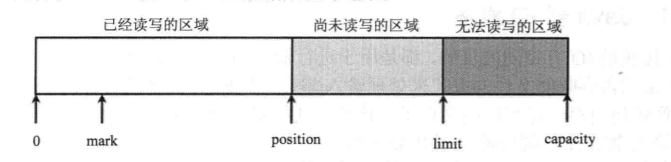
Buffer的主要作用就是装入数据,然后输出数据
Buffer有两个重要的方法flip()为Buffer中取出数据做好准备,clear()为再次向Buffer中装入数据做好准备
案例代码
import java.nio.CharBuffer;

public class BufferTest {
    public static void main(String[] args) {
        //创建Buffer
        CharBuffer buff =CharBuffer.allocate(8);
        System.out.println("capacity"+buff.capacity());
        System.out.println("limit"+buff.limit());
        System.out.println("position"+ buff.position());
        //放入元素
        buff.put('a');
        buff.put('b');
        buff.put('c');
        System.out.println("加入三个元素后,position=" + buff.position());
        //调用flip()方法
        buff.flip();
        System.out.println("执行flip后,limit=" + buff.limit());
        System.out.println("position=" + buff.position());
        //取出第一个元素
        System.out.println("第一个元素(position=0)" + buff.get());
        System.out.println("取出一个元素后,position="+buff.position());
        //调用clear方法
        buff.clear();
        System.out.println("执行clear()后,limit=" + buff.limit());
        System.out.println("执行clear()后,position"+buff.position());
        System.out.println("执行clear()后,缓冲区内容并没有被清楚" + "第三个元素为:"+ buff.get(2));
        System.out.println("执行绝对读取后,position="+ buff.position());
    }
}
Channel
Channal类似于传统的流对象,但与传统的流对象有两个主要区别
- Channal可以直接将制定文件的部分或全部直接映射成Buffer
- 程序不能直接访问Channal中的数据,读写都不行。只能与Buffer进行交互
import java.io.File;
import java.io.FileInputStream;
import java.io.FileNotFoundException;
import java.io.FileOutputStream;
import java.nio.CharBuffer;
import java.nio.MappedByteBuffer;
import java.nio.channels.FileChannel;
import java.nio.charset.Charset;
import java.nio.charset.CharsetDecoder;

public class FileChannelTest {
    public static void main(String[] args) {
        File f = new File("FileChannelTest.java");


        try (
                //创建FileInputStream , 以文件输入流创建FileChannel
                FileChannel inChannel = new FileInputStream(f).getChannel();
                //以文件输出流创建FileChannel,用以控制输出
                FileChannel outChannel = new FileOutputStream("a.txt").getChannel();

        ){
            //将FileChannel里的全部数据映射成ByteBuffer
            MappedByteBuffer buffer = inChannel.map(FileChannel.MapMode.READ_ONLY,0,f.length());
            //使用UTF-8的字符集来创建解码器
            Charset charset = Charset.forName("UTF-8");
            //直接将buffer里的数据全部输出
            outChannel.write(buffer);
            //再次调用buffer的clear()方法,复原limit、position的位置
            buffer.clear();
            //创建解码器(CharsetDocoder)对象
            CharsetDecoder decoder = charset.newDecoder();
            //使用解码器将byteBuffer转换成CharBuffer
            CharBuffer charBuffer = decoder.decode(buffer);
            //CharBuffer的toString方法可以获取对应的字符串
            System.out.println(charBuffer);
        } catch (Exception e) {
            e.printStackTrace();
        }
    }

}
RandomAccessFile也有Channel
import java.io.File;
import java.io.FileNotFoundException;
import java.io.IOException;
import java.io.RandomAccessFile;
import java.nio.ByteBuffer;
import java.nio.channels.FileChannel;

public class RandomFileChannelTest {
    public static void main(String[] args) throws IOException {
        File f = new File("a.txt");


                //创建一个RandomAccessFile对象
                RandomAccessFile raf = new RandomAccessFile(f,"rw");
                //获取RandomAccessFile对应的Channel
                FileChannel randomChannel  =raf.getChannel();

            //将Channel中的所有数据映射成ByteBuffer
            ByteBuffer byteBuffer = randomChannel.map(FileChannel.MapMode.READ_ONLY,0,f.length());
            //把Channel的记录指针移动到最后
            randomChannel.position(f.length());
            //将buffer中的所有数据输出
            randomChannel.write(byteBuffer);

    }
}
编码与解码
import java.nio.ByteBuffer;
import java.nio.CharBuffer;
import java.nio.charset.CharacterCodingException;
import java.nio.charset.Charset;
import java.nio.charset.CharsetDecoder;
import java.nio.charset.CharsetEncoder;

public class CharsetTransform {
    public static void main(String[] args) throws CharacterCodingException {
        //创建简体中文对应的Charset
        Charset cn = Charset.forName("GBK");

        //获取cn对象对应的编码和解码器
        CharsetEncoder cnEncoder = cn.newEncoder();
        CharsetDecoder cnDecoder = cn.newDecoder();
        //创建一个CharBuffer对象
        CharBuffer cbuff = CharBuffer.allocate(8);
        cbuff.put('孙');
        cbuff.put('悟');
        cbuff.put('空');
        cbuff.flip();
        //将CharBuffer中的字符序列转换成字节序列
        ByteBuffer buffer = cnEncoder.encode(cbuff);
        //循环访问ByteBuffer中的每个字节
        for (int i = 0  ; i < buffer.capacity();i++){
            System.out.println(buffer.get(i) + " ");
        }
        //将ByteBuffer的数据解码成字符序列
        System.out.println("\n"+cnDecoder.decode(buffer));
    }
}
文件锁
import java.io.FileOutputStream;
import java.io.IOException;
import java.nio.channels.FileChannel;
import java.nio.channels.FileLock;

public class FileLockTest {
    public static void main(String[] args) {
        try(
            //使用FileOutputStream获取FileChannel
            FileChannel channel = new FileOutputStream("a.txt").getChannel()){
            //使用非阻塞式方式对指定文件加锁
            FileLock lock = channel.tryLock();
            //程序暂停10s
            Thread.sleep(10000);
            //释放锁
            lock.release();

        }catch (IOException | InterruptedException e){
         e.printStackTrace();
        }
    }
}
10、NIO.2
-
NIO.2提供了对IO系统的全貌支持
-
基于异步的Channel的IO
NIO.2新引入的Path接口,并且提供Paths 和Files两个工具类
import java.nio.file.Path;
import java.nio.file.Paths;

public class PathTest {
    public static void main(String[] args) {
        //以当期路径来创建Path对象
        Path path  = Paths.get(".");
        System.out.println("path里包含的路径数量"+ path.getNameCount());
        System.out.println("path的根路径"+ path.getRoot());
        //获取path对应的绝对路径
        Path absolutePath = path.toAbsolutePath();
        System.out.println(absolutePath);
        //获取绝对路径的根路径
        System.out.println("absolutePath的根路径"+ absolutePath.getRoot());
        //获取绝对路径所包含的路径数量
        System.out.println("absolutePath里包含的路径数量"+absolutePath.getNameCount());

        //以多个String来构建Paht对象
        Path path2 = Paths.get("g","publish","codes");
        System.out.println(path2);
    }
}
FileVisitor遍历文件和目录
import java.nio.file.*;
import java.nio.file.attribute.BasicFileAttributes;

public class FileVisitorTest {
    public static void main(String[] args) throws  Exception{
        Files.walkFileTree(Paths.get("d:","AJAVA") , new SimpleFileVisitor<Path>(){
            //访问文件时触发该方法
            @Override
            public FileVisitResult visitFile(Path file , BasicFileAttributes attrs){
                System.out.println("正在访问"+ file + "文件");
                //找到了FileVisitor.java文件
                if (file.endsWith("FileVisitorTest.java")){
                    System.out.println("---已经找到目标文件---");
                    return FileVisitResult.TERMINATE;
                }
                return FileVisitResult.CONTINUE;
            }
            //开始访问目录时触发该方法
            @Override
            public FileVisitResult preVisitDirectory(Path dir , BasicFileAttributes attrs){
                System.out.println("正在访问"+ dir + "路径");
                return FileVisitResult.CONTINUE;
            }
        });
    }
}
访问文件属性
import java.io.*;
import java.util.*;
import java.nio.file.*;
import java.nio.*;
import java.nio.charset.*;
import java.nio.file.attribute.*;

public class AttributeViewTest
{
	public static void main(String[] args)
		throws Exception
	{
		// 获取将要操作的文件
		Path testPath = Paths.get("AttributeViewTest.java");
		// 获取访问基本属性的BasicFileAttributeView
		BasicFileAttributeView basicView = Files.getFileAttributeView(
			testPath , BasicFileAttributeView.class);
		// 获取访问基本属性的BasicFileAttributes
		BasicFileAttributes basicAttribs = basicView.readAttributes();
		// 访问文件的基本属性
		System.out.println("创建时间:" + new Date(basicAttribs
			.creationTime().toMillis()));
		System.out.println("最后访问时间:" + new Date(basicAttribs
			.lastAccessTime().toMillis()));
		System.out.println("最后修改时间:" + new Date(basicAttribs
			.lastModifiedTime().toMillis()));
		System.out.println("文件大小:" + basicAttribs.size());
		// 获取访问文件属主信息的FileOwnerAttributeView
		FileOwnerAttributeView ownerView = Files.getFileAttributeView(
			testPath, FileOwnerAttributeView.class);
		// 获取该文件所属的用户
		System.out.println(ownerView.getOwner());
		// 获取系统中guest对应的用户
		UserPrincipal user = FileSystems.getDefault()
			.getUserPrincipalLookupService()
			.lookupPrincipalByName("guest");
		// 修改用户
		ownerView.setOwner(user);
		// 获取访问自定义属性的FileOwnerAttributeView
		UserDefinedFileAttributeView userView = Files.getFileAttributeView(
			testPath, UserDefinedFileAttributeView.class);
		List<String> attrNames = userView.list();
		// 遍历所有的自定义属性
		for (String name : attrNames)
		{
			ByteBuffer buf = ByteBuffer.allocate(userView.size(name));
			userView.read(name, buf);
			buf.flip();
			String value = Charset.defaultCharset().decode(buf).toString();
			System.out.println(name + "--->" + value) ;
		}
		// 添加一个自定义属性
		userView.write("发行者", Charset.defaultCharset()
			.encode("疯狂Java联盟"));
		// 获取访问DOS属性的DosFileAttributeView
		DosFileAttributeView dosView = Files.getFileAttributeView(testPath
			, DosFileAttributeView.class);
		// 将文件设置隐藏、只读
		dosView.setHidden(true);
		dosView.setReadOnly(true);
	}
}

 浙公网安备 33010602011771号