
Django-4.2博客开发教程:欢迎页面(三)
1.首先进入Python虚拟环境:
cmd 窗口cd 到 项目下的 cd D:\git_lab\myblog\Scripts>,执行激活 activate
变成如下
(myblog) D:\git_lab\myblog\Scripts>
2.执行数据迁移:
首次会自动创建sql文件,创建数据库表。
(myblog) D:\git_lab\myblog>py manage.py makemigrations
System check identified some issues:

WARNINGS:
?: (staticfiles.W004) The directory 'D:\git_lab\myblog\static' in the STATICFILES_DIRS setting does not exist.
No changes detected

(myblog) D:\git_lab\myblog>py manage.py migrate
System check identified some issues:

WARNINGS:
?: (staticfiles.W004) The directory 'D:\git_lab\myblog\static' in the STATICFILES_DIRS setting does not exist.
Operations to perform:
  Apply all migrations: admin, auth, contenttypes, sessions
Running migrations:
  Applying contenttypes.0001_initial... OK
  Applying auth.0001_initial... OK
  Applying admin.0001_initial... OK
  Applying admin.0002_logentry_remove_auto_add... OK
  Applying admin.0003_logentry_add_action_flag_choices... OK
  Applying contenttypes.0002_remove_content_type_name... OK
  Applying auth.0002_alter_permission_name_max_length... OK
  Applying auth.0003_alter_user_email_max_length... OK
  Applying auth.0004_alter_user_username_opts... OK
  Applying auth.0005_alter_user_last_login_null... OK
  Applying auth.0006_require_contenttypes_0002... OK
  Applying auth.0007_alter_validators_add_error_messages... OK
  Applying auth.0008_alter_user_username_max_length... OK
  Applying auth.0009_alter_user_last_name_max_length... OK
  Applying auth.0010_alter_group_name_max_length... OK
  Applying auth.0011_update_proxy_permissions... OK
  Applying auth.0012_alter_user_first_name_max_length... OK
  Applying sessions.0001_initial... OK

(myblog) D:\git_lab\myblog>
3.创建管理帐号和密码
python manage.py createsuperuser
(myblog) D:\git_lab\myblog>python manage.py createsuperuser
System check identified some issues:

WARNINGS:
?: (staticfiles.W004) The directory 'D:\git_lab\myblog\static' in the STATICFILES_DIRS setting does not exist.
用户名 (leave blank to use 'administrator'): admin
电子邮件地址: admin@qq.com
Password:
Password (again):
密码长度太短。密码必须包含至少 8 个字符。
这个密码太常见了。
密码只包含数字。
Bypass password validation and create user anyway? [y/N]: y
Superuser created successfully.
4.启动服务
python manage.py runserver 127.0.0.1:8080 #指定IP和端口,然后通过浏览器访问这个地址
(myblog) D:\git_lab\myblog>python manage.py runserver 127.0.0.1:8080
Watching for file changes with StatReloader
Performing system checks...

System check identified some issues:

WARNINGS:
?: (staticfiles.W004) The directory 'D:\git_lab\myblog\static' in the STATICFILES_DIRS setting does not exist.

System check identified 1 issue (0 silenced).
July 17, 2023 - 17:29:20
Django version 4.2.3, using settings 'myblog.settings'
Starting development server at http://127.0.0.1:8080/
Quit the server with CTRL-BREAK.

上面访问成功是自带的,我们可以自己做一个欢迎页:
首先,打开打开bolg目录下的views.py文件,在里面输入:
myblog/blog/views.py

from django.http import HttpResponse

def hello(request):
    return HttpResponse('hello!')
再打开myblog目录下的urls.py文件,在文件里添加两行代码:
myblog/myblog/urls.py

from django.contrib import admin
from django.urls import path
from blog import views
urlpatterns = [
    path('admin/', admin.site.urls),
    path('', views.hello),
]
以上两个文件写成这个样子,你就可以直接刷新看结果了。
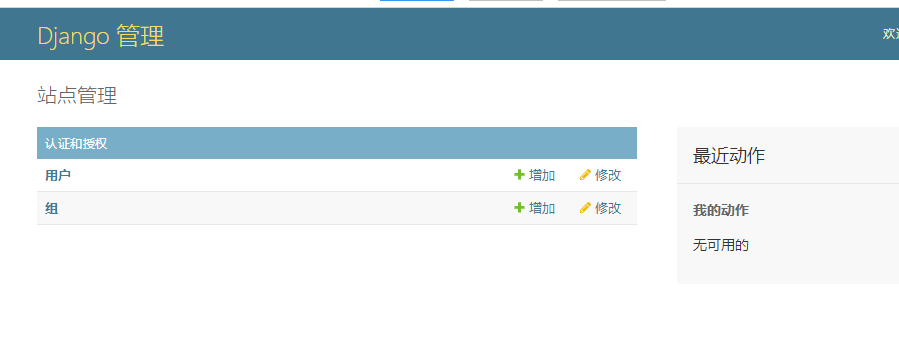
访问: http://127.0.0.1:8080/admin
输入上面新建的超级管理员,就可以登录管理用户信息了。

 浙公网安备 33010602011771号