

css3中content属性的应用
可以使用css3中content功能为html元素增减内容。content需要配合 E:before和E:after使用。
废话少说,看代码和效果说明:
第一种:
css代码:
#div1:before {
	content: "你使用的浏览器属性太低。";
}
html代码:
<div id="div1">div</div>
显示效果:

第二种:
css代码:
#div1:after {
	 	content:"我使用的浏览器版本不低呀。";
	}
html代码:
<div id="div1">div</div>
浏览器中显示效果:

第三种:
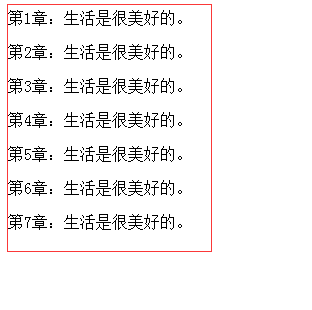
css代码:
#div2 p:before{
		content:'第'counter(count)'章:';
	}
	#div2 p{
		counter-increment:count;
	}
html代码:
<div id="div2">
    	<p>生活是很美好的。</p>
        <p>生活是很美好的。</p>
        <p>生活是很美好的。</p>
        <p>生活是很美好的。</p>
        <p>生活是很美好的。</p>
        <p>生活是很美好的。</p>
        <p>生活是很美好的。</p>
    </div>
浏览器显示效果:
查看源代码:


 浙公网安备 33010602011771号