
EdgeX foundry树莓派搭建与MQTT通讯
参考资料
使用容器方法管理和搭建EdgeX:https://docs.edgexfoundry.org/1.2/getting-started/quick-start/
什么是微服务,为什么要用微服务:https://www.zhihu.com/question/65502802
什么是MQTT,一个最简单的demo是什么:https://www.jianshu.com/p/14b34e537fd4
针对树莓派的EdgeX是如何的?这里使用的是树莓派4B,将之前的系统重新刷成64位arm,便于使用。(EdgeX对64位arm支持度较高)
MQTT通信命令
订阅
mosquitto_sub -d -t topic1
mosquitto_sub -d -h localhost -p 1883 -i subscriber-test -t topic1
发布
mosquitto_pub -d -t topic1 -m "Hello MQTT"
树莓派Ubuntu mate20系统安装
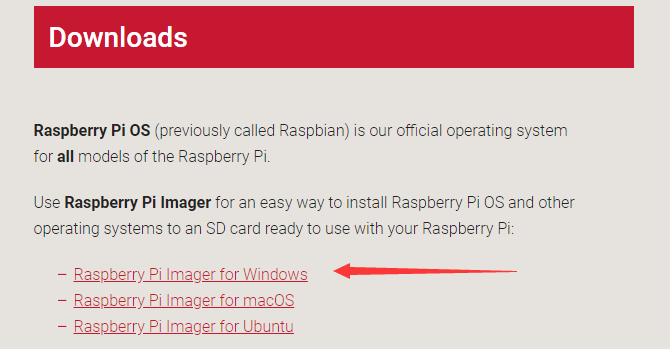
1 选择合适的镜像烧录工具
https://www.raspberrypi.org/downloads/
2 下载镜像
https://ubuntu-mate.org/download/arm64/focal/
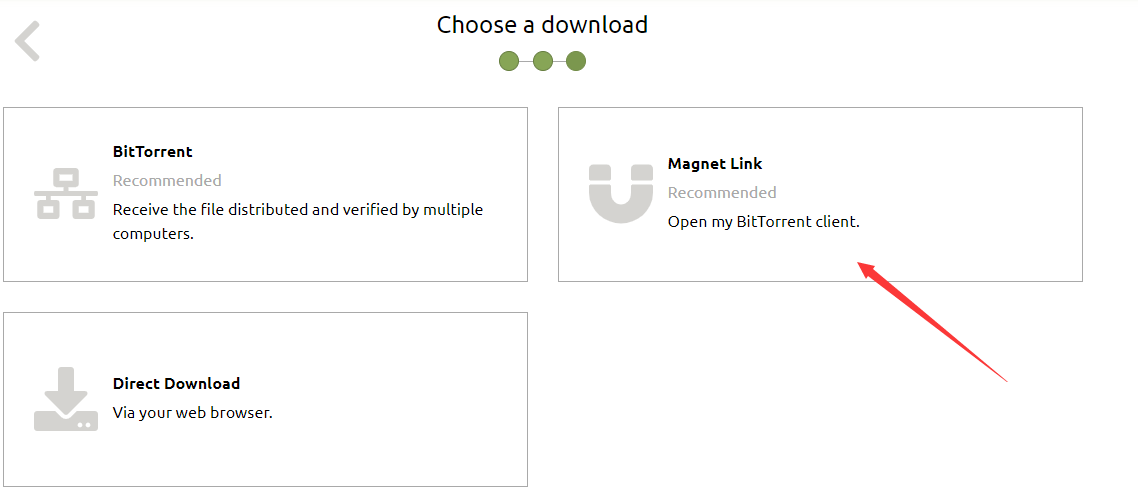
3 使用镜像烧录工具打开镜像,插入SD卡,开始烧录。(镜像下载比较慢,使用第二步的离线迅雷下载完以后直接烧录比较好)
4 给树莓派接上鼠标和键盘和重要的显示器,上电后根据屏幕引导进行安装即可。该系统对HDMI的输出电流可能不够,导致屏幕不亮。而从树莓派直接引电增强HDMI信号则仍然不够,需要外部引电(建议3A)。
5 排错的方法:插上网口看网口灯是都闪烁,闪烁则系统安装正确。树莓派3B的系统直接装到4B上是不行的,系统安装不正确。
Docker安装
按照其中提供的两个链接进行安装。https://docs.edgexfoundry.org/1.2/getting-started/quick-start/
其中第二个:docker-compose安装,如果不正确,则使用pip3进行安装(和python3有关)。
pip3可以通过apt-get 方式安装。
pip3 install docker-compose
安装完后通过以下命令查看
docker-compose --version
MQTT测试注意事项
如下链接中提供了MQTT的测试demo。其过程是通过重复向HiveMQ发布一个主题为EdgeXEvents,内容为一个json数据。
然后客户端也通过HiveMQ连接到broker.mqttdashboard.com,订阅EdgeXEvents主题,则可以获取到json数据。
https://docs.edgexfoundry.org/1.2/getting-started/quick-start/
有两点要注意:提供的HiveMQ网站,其js脚本中的JQuery可能会由于外网的原因无法加载,导致$符号无法识别,这时则需要更换网络,以正确加载和连接。
另外是在docker-compose.yml文件中添加的一段配置,其中
image: edgexfoundry/docker-app-service-configurable:1.1.0
应该改为
image: edgexfoundry/docker-app-service-configurable-arm64:1.1.0
另外
判断服务是否正常的方法是
docker-compose ps
如果某个进程卡掉,则该进程配置不正确,如mqtt
docker服务需要启动才可运行EdgeX的容器
service docker start
2020年9月15日22:53:36
补充通信-边缘到设备
之前的MQTT通信方式是:
树莓派部署了EdgeXFoundry,其发送随机json数据到Hive MQ的公共云平台上,然后传感器设备从云平台上使用MQTT订阅功能获取。这样不太符合边缘计算的思路。
边缘计算应该是将数据在边缘节点直接处理,直接和传感器设备交互。
准备工作:
consul监控服务。其端口是8500,因为监控了整个微服务的健康状态,所以非常重要。如果哪个服务没有ping通,则应该用以下等命令,分析日志。
docker-compose up -d
dokcer logs -f xxx
UI管理界面端口4000,也是后面要用到的。
重要配置文件
需要另外写到docker-compose.yml中。使用我这个就可以。
# /*******************************************************************************
#  * Copyright 2020 Redis Labs Inc.
#  * Copyright 2020 Intel Corporation.
#  *
#  * Licensed under the Apache License, Version 2.0 (the "License"); you may not use this file except
#  * in compliance with the License. You may obtain a copy of the License at
#  *
#  * http://www.apache.org/licenses/LICENSE-2.0
#  *
#  * Unless required by applicable law or agreed to in writing, software distributed under the License
#  * is distributed on an "AS IS" BASIS, WITHOUT WARRANTIES OR CONDITIONS OF ANY KIND, either express
#  * or implied. See the License for the specific language governing permissions and limitations under
#  * the License.
#  *
#  * @author: Jim White, Dell
#  * @author: Andre Srinivasan, Redis Labs
#  * @author: Leonard Goodell, Intel
#  * EdgeX Foundry, Geneva, version 1.2.0
#  * added: May 14, 2020
#  *******************************************************************************/

# NOTE:  this Docker Compose file does not contain the security services - namely the API Gateway
# and Secret Store

version: '3.4'

# all common shared environment variables defined here:
x-common-env-variables: &common-variables
  EDGEX_SECURITY_SECRET_STORE: "false"
  Registry_Host: edgex-core-consul
  Clients_CoreData_Host: edgex-core-data
  Clients_Data_Host: edgex-core-data # For device Services
  Clients_Notifications_Host: edgex-support-notifications
  Clients_Metadata_Host: edgex-core-metadata
  Clients_Command_Host: edgex-core-command
  Clients_Scheduler_Host: edgex-support-scheduler
  Clients_RulesEngine_Host: edgex-kuiper
  Clients_VirtualDevice_Host: edgex-device-virtual
  Databases_Primary_Host: edgex-redis
  # Required in case old configuration from previous release used.
  # Change to "true" if re-enabling logging service for remote logging
  Logging_EnableRemote: "false"
  Clients_Logging_Host: edgex-support-logging # un-comment if re-enabling logging service for remote logging

volumes:
  db-data:
  log-data:
  consul-config:
  consul-data:

services:
  consul:
    image: edgexfoundry/docker-edgex-consul-arm64:1.2.0
    ports:
      - "8400:8400"
      - "8500:8500"
    container_name: edgex-core-consul
    hostname: edgex-core-consul
    networks:
      - edgex-network
    volumes:
      - consul-config:/consul/config:z
      - consul-data:/consul/data:z
    environment:
      - EDGEX_DB=redis
      - EDGEX_SECURE=false

  redis:
    image: arm64v8/redis:5.0.8-alpine
    ports:
      - "6379:6379"
    container_name: edgex-redis
    hostname: edgex-redis
    networks:
      - edgex-network
    environment:
      <<: *common-variables
    volumes:
      - db-data:/data:z

# The logging service has been deprecated in Geneva release and will be removed in the Hanoi release.
# All services are configure to send logging to STDOUT, i.e. not remote which requires this logging service
# If you still must use remote logging, un-comment the block below, all the related depends that have been commented out
# and the related global override that are commented out at the top.
#
  logging:
    image: edgexfoundry/docker-support-logging-go-arm64:1.2.1
    ports:
      - "48061:48061"
    container_name: edgex-support-logging
    hostname: edgex-support-logging
    networks:
      - edgex-network
    environment:
      <<: *common-variables
      Service_Host: edgex-support-logging
      Writable_Persistence: file
      Databases_Primary_Type: file
      Logging_EnableRemote: "false"
    depends_on:
      - consul

  system:
    image: edgexfoundry/docker-sys-mgmt-agent-go-arm64:1.2.1
    ports:
      - "48090:48090"
    container_name: edgex-sys-mgmt-agent
    hostname: edgex-sys-mgmt-agent
    networks:
      - edgex-network
    environment:
      <<: *common-variables
      Service_Host: edgex-sys-mgmt-agent
      ExecutorPath: /sys-mgmt-executor
      MetricsMechanism: executor
    volumes:
      - /var/run/docker.sock:/var/run/docker.sock:z
    depends_on:
      - consul
#      - logging  # uncomment if re-enabled remote logging
      - scheduler
      - notifications
      - metadata
      - data
      - command

  notifications:
    image: edgexfoundry/docker-support-notifications-go-arm64:1.2.1
    ports:
      - "48060:48060"
    container_name: edgex-support-notifications
    hostname: edgex-support-notifications
    networks:
      - edgex-network
    environment:
      <<: *common-variables
      Service_Host: edgex-support-notifications
    depends_on:
      - consul
#      - logging  # uncomment if re-enabled remote logging
      - redis

  metadata:
    image: edgexfoundry/docker-core-metadata-go-arm64:1.2.1
    ports:
      - "48081:48081"
    container_name: edgex-core-metadata
    hostname: edgex-core-metadata
    networks:
      - edgex-network
    environment:
      <<: *common-variables
      Service_Host: edgex-core-metadata
      Service_Timeout: "20000"
      Notifications_Sender: edgex-core-metadata
    depends_on:
      - consul
#      - logging  # uncomment if re-enabled remote logging
      - redis
      - notifications

  data:
    image: edgexfoundry/docker-core-data-go-arm64:1.2.1
    ports:
      - "48080:48080"
      - "5563:5563"
    container_name: edgex-core-data
    hostname: edgex-core-data
    networks:
      - edgex-network
    environment:
      <<: *common-variables
      Service_Host: edgex-core-data
    depends_on:
      - consul
#      - logging  # uncomment if re-enabled remote logging
      - redis
      - metadata

  command:
    image: edgexfoundry/docker-core-command-go-arm64:1.2.1
    ports:
      - "48082:48082"
    container_name: edgex-core-command
    hostname: edgex-core-command
    networks:
      - edgex-network
    environment:
      <<: *common-variables
      Service_Host: edgex-core-command
    depends_on:
      - consul
#      - logging  # uncomment if re-enabled remote logging
      - redis
      - metadata

  scheduler:
    image: edgexfoundry/docker-support-scheduler-go-arm64:1.2.1
    ports:
      - "48085:48085"
    container_name: edgex-support-scheduler
    hostname: edgex-support-scheduler
    networks:
      - edgex-network
    environment:
      <<: *common-variables
      Service_Host: edgex-support-scheduler
      IntervalActions_ScrubPushed_Host: edgex-core-data
      IntervalActions_ScrubAged_Host: edgex-core-data
    depends_on:
      - consul
#      - logging  # uncomment if re-enabled remote logging
      - redis

  app-service-rules:
    image: edgexfoundry/docker-app-service-configurable-arm64:1.2.0
    ports:
      - "48100:48100"
    container_name: edgex-app-service-configurable-rules
    hostname: edgex-app-service-configurable-rules
    networks:
      - edgex-network
    environment:
      <<: *common-variables
      edgex_profile: rules-engine
      Service_Host: edgex-app-service-configurable-rules
      Service_Port: 48100
      MessageBus_SubscribeHost_Host: edgex-core-data
      Binding_PublishTopic: events
    depends_on:
      - consul
#      - logging  # uncomment if re-enabled remote logging
      - data

  rulesengine:
    image: emqx/kuiper:0.4.2-alpine
    ports:
      - "48075:48075"
      - "20498:20498"
    container_name: edgex-kuiper
    hostname: edgex-kuiper
    networks:
      - edgex-network
    environment:
      # KUIPER_DEBUG: "true"
      KUIPER_CONSOLE_LOG: "true"
      KUIPER_REST_PORT: 48075
      EDGEX_SERVER: edgex-app-service-configurable-rules
      EDGEX_SERVICE_SERVER: http://edgex-core-data:48080
      EDGEX_TOPIC: events
      EDGEX_PROTOCOL: tcp
      EDGEX_PORT: 5566
    depends_on:
      - app-service-rules

  # Support RulesEngine has been deprecated in the Geneva (1.2.0) release
  # If still required, simply uncomment the block below and comment out the block above.
  #
  # rulesengine:
  #   image: edgexfoundry/docker-support-rulesengine-arm64:1.2.1
  #   ports:
  #     - "48075:48075"
  #   container_name: edgex-support-rulesengine
  #   hostname: edgex-support-rulesengine
  #   networks:
  #     - edgex-network
  #   depends_on:
  #     - app-service-rules

#################################################################
# Device Services
#################################################################

  device-virtual:
    image: edgexfoundry/docker-device-virtual-go-arm64:1.2.2
    ports:
    - "49990:49990"
    container_name: edgex-device-virtual
    hostname: edgex-device-virtual
    networks:
      - edgex-network
    environment:
      <<: *common-variables
      Service_Host: edgex-device-virtual
    depends_on:
      - consul
#      - logging  # uncomment if re-enabled remote logging
      - data
      - metadata

  device-rest:
    image: edgexfoundry/docker-device-rest-go-arm64:1.1.1
    ports:
      - "49986:49986"
    container_name: edgex-device-rest
    hostname: edgex-device-rest
    networks:
      - edgex-network
    environment:
      <<: *common-variables
      Service_Host: edgex-device-rest
    depends_on:
      - data
      - command
  #      - logging  # uncomment if re-enabled remote logging

#  device-random:
#    image: edgexfoundry/docker-device-random-go-arm64:1.2.1
#    ports:
#      - "49988:49988"
#    container_name: edgex-device-random
#    hostname: edgex-device-random
#    networks:
#      - edgex-network
#    environment:
#      <<: *common-variables
#      Service_Host: edgex-device-random
#    depends_on:
#      - data
#      - command
#
  device-mqtt:
    image: edgexfoundry/docker-device-mqtt-go-arm64:1.2.1
    ports:
      - "49982:49982"
    container_name: edgex-device-mqtt
    hostname: edgex-device-mqtt
    networks:
      - edgex-network
    environment:
      <<: *common-variables
      Service_Host: edgex-device-mqtt
    depends_on:
      - data
      - command

#  device-modbus:
#    image: edgexfoundry/docker-device-modbus-go-arm64:1.2.1
#    ports:
#      - "49991:49991"
#    container_name: edgex-device-modbus
#    hostname: edgex-device-modbus
#    networks:
#      - edgex-network
#    environment:
#      <<: *common-variables
#      Service_Host: edgex-device-modbus
#    depends_on:
#      - data
#      - command
#
#  device-snmp:
#    image: edgexfoundry/docker-device-snmp-go-arm64:1.2.1
#    ports:
#      - "49993:49993"
#    container_name: edgex-device-snmp
#    hostname: edgex-device-snmp
#    networks:
#      - edgex-network
#    environment:
#      <<: *common-variables
#      Service_Host: edgex-device-snmp
#    depends_on:
#      - data
#      - command

  app-service-mqtt:
    image: edgexfoundry/docker-app-service-configurable-arm64:1.1.0
    ports:
      - "48101:48101"
    container_name: edgex-app-service-configurable-mqtt
    hostname: edgex-app-service-configurable-mqtt
    networks:
      - edgex-network
    environment:
      <<: *common-variables
      edgex_profile: mqtt-export
      Service_Host: edgex-app-service-configurable-mqtt
      Service_Port: 48101
      MessageBus_SubscribeHost_Host: edgex-core-data
      Binding_PublishTopic: events
      Writable_Pipeline_Functions_MQTTSend_Addressable_Address: 192.168.20.122
      Writable_Pipeline_Functions_MQTTSend_Addressable_Port: 1883
      Writable_Pipeline_Functions_MQTTSend_Addressable_Protocol: tcp
      Writable_Pipeline_Functions_MQTTSend_Addressable_Publisher: edgex
      Writable_Pipeline_Functions_MQTTSend_Addressable_Topic: EdgeXEvent8
    depends_on:
      - consul
      - data

  ui:
    image: edgexfoundry/docker-edgex-ui-go-arm64:1.2.1
    ports:
      - "4000:4000"
    container_name: edgex-ui-go
    hostname: edgex-ui-go
    networks:
      - edgex-network

networks:
  edgex-network:
    driver: "bridge"
另外:
该文档提供了一种MQTT交互的用例,但是起点较高,也不容易操作。建议绕过:https://docs.edgexfoundry.org/1.2/examples/Ch-ExamplesAddingMQTTDevice/
该文档是最核心的文档:https://github.com/edgexfoundry/edgex-ui-go/blob/master/docs/ExamplesAddingMQTTDevice/AddMQTTDeviceToEdgeX.md。根据该文档,相对比较好操作。
在真正启动好docker容器们以后,检查健康状态。127.0.0.11:53的报错,只是说该服务没有ping通。该服务异常。可能是挂掉了,也很可能没有配置正确。
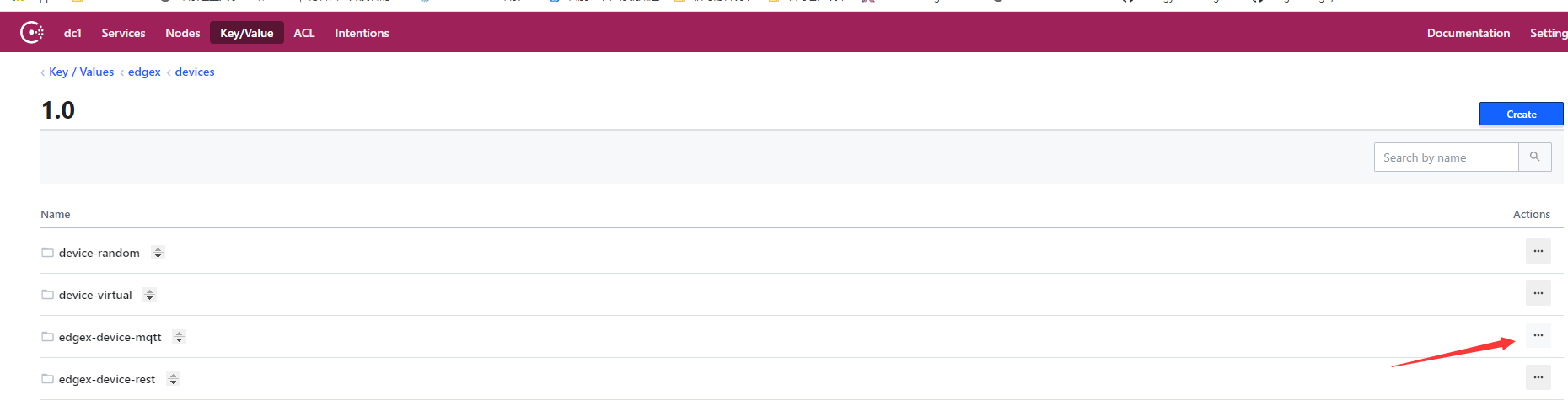
正常以后,安装核心文档里进行配置。请经常检查微服务的健康状态。device-mqtt服务经常挂掉,那就删掉,重启一下容器看看,确保服务健康。如下图,点里面的删除即可。重启以后文件夹自动生成。
另外注意事项
特别注意的是:树莓派现在安装的架构为arm64,所以在容器使用过程中,如核心文档里的模拟设备,其是不能应用的。如需模拟设备,应该在局域网中创建一套pc的Ubuntu等,运行docker。
必要的查看路径是:https://hub.docker.com/r/dersimn/mqtt-scripts,其包含了模拟设备的详细说明。
另外,在调试必要的时候,使用mosquitto,手动订阅和发布,确定问题出错点。
另外,配置完UI以后,或者更新完以后,全部刷新网页再执行操作,否则有些配置可能未生效。
Le vent se lève! . . . il faut tenter de vivre!
Le vent se lève! . . . il faut tenter de vivre!

 浙公网安备 33010602011771号