

基于mykernel 2.0编写一个操作系统内核
1.实验环境配置
实验机器采用的是ubuntu16.04.
在桌面上创建mykernel 2.0文件夹,并打开终端,执行以下命令。
wget https://raw.github.com/mengning/mykernel/master/mykernel-2.0_for_linux-5.4.34.patch
sudo apt install axel
axel -n 20 https://mirrors.edge.kernel.org/pub/linux/kernel/v5.x/linux-5.4.34.tar.xz
xz -d linux-5.4.34.tar.xz
tar -xvf linux-5.4.34.tar
cd linux-5.4.34
patch -p1 < ../mykernel-2.0_for_linux-5.4.34.patch
sudo apt install build-essential libncurses-dev bison flex libssl-dev libelf-dev
make defconfig
make -j
sudo apt install qemu-system-x86_64
qemu-system-x86_64 -kernel arch/x86/boot/bzImage
上述的操作流程为:
将Linux的内核文件进行打包,同时安装相关的库并编译,启动内核程序。结果如下:
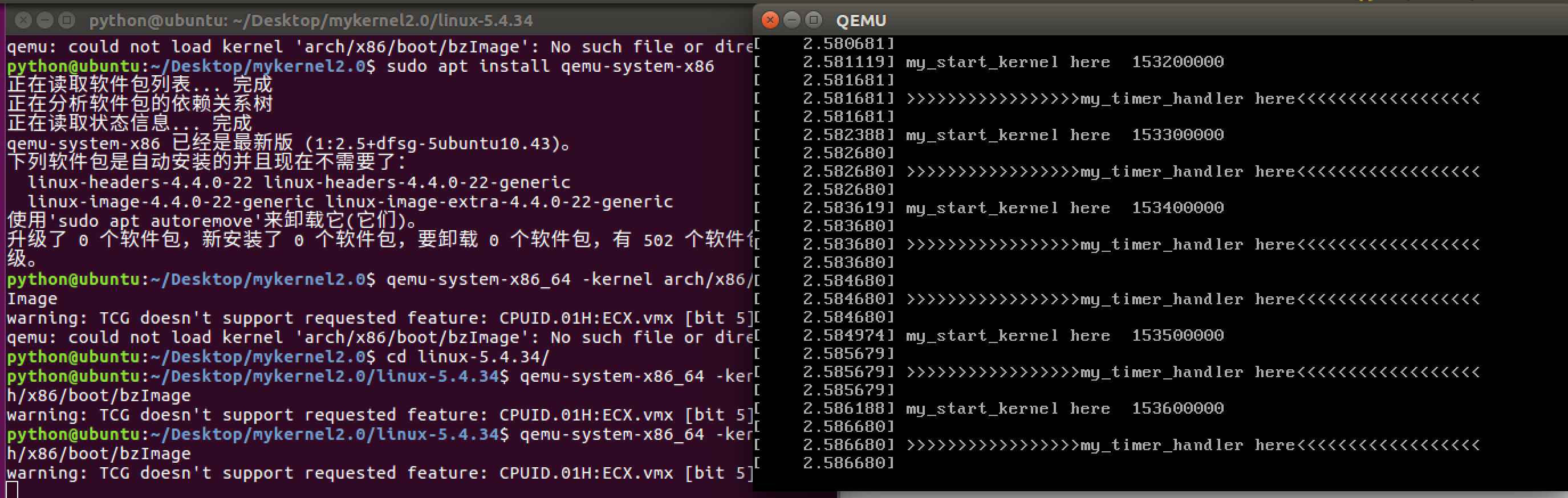
通过上面的图片可以看到:cpu在不断分运行,同时my_timer_handler时钟中断处理程序周期性执行。
可以看到qemu窗口输出的内容在代码mymain.c和myinterrupt.c中。进入mykernel文件夹下,使用cat命令将两个文件打开。
// myinterrupt.c
void my_timer_handler(void)
{
    pr_notice("\n>>>>>>>>>>>>>>>>>my_timer_handler here<<<<<<<<<<<<<<<<<<\n\n");
}
// mymain.c
void __init my_start_kernel(void)
{
    int i = 0;
    while(1)
    {
        i++;
        if(i%100000 == 0)
            pr_notice("my_start_kernel here  %d \n",i);

    }
}
2.编写内核
1. 为了完成内核上的进程切换,首先要明确进程控制信息。进入mykernel目录后,创建mypcb.h头文件,该头文件用于定义进程控制块,描述进程所需要用到的的资源和控制信息,主要有进程id、进程状态、栈和进程入口以及Thread结构等。
// mypcb.h
#define MAX_TASK_NUM        4
#define KERNEL_STACK_SIZE   1024*2
/* CPU-specific state of this task */
struct Thread {
    unsigned long        ip;
    unsigned long        sp;
};

typedef struct PCB{
    int pid;
    volatile long state;    /* -1 unrunnable, 0 runnable, >0 stopped */
    unsigned long stack[KERNEL_STACK_SIZE];
    /* CPU-specific state of this task */
    struct Thread thread;
    unsigned long    task_entry;
    struct PCB *next;
}tPCB;

void my_schedule(void);
2.mymain.c是mykernel代码的入口,负责初始化内核的各个组成部分。
将其中的my_start_kernel(void)方法进行重写。
#include <linux/types.h>
#include <linux/string.h>
#include <linux/ctype.h>
#include <linux/tty.h>
#include <linux/vmalloc.h>


#include "mypcb.h"

tPCB task[MAX_TASK_NUM];
tPCB * my_current_task = NULL;
volatile int my_need_sched = 0;

void my_process(void);


void __init my_start_kernel(void)
{
    int pid = 0;
    int i;
    /* Initialize process 0*/
    task[pid].pid = pid;
    task[pid].state = 0;/* -1 unrunnable, 0 runnable, >0 stopped */
    task[pid].task_entry = task[pid].thread.ip = (unsigned long)my_process;
    task[pid].thread.sp = (unsigned long)&task[pid].stack[KERNEL_STACK_SIZE-1];
    task[pid].next = &task[pid];
    /*fork more process */
    for(i=1;i<MAX_TASK_NUM;i++)
    {
            memcpy(&task[i],&task[0],sizeof(tPCB));
            task[i].pid = i;
        task[i].thread.sp = (unsigned long)(&task[i].stack[KERNEL_STACK_SIZE-1]);
            task[i].next = task[i-1].next;
            task[i-1].next = &task[i];
    }
    /* start process 0 by task[0] */
    pid = 0;
    my_current_task = &task[pid];
    asm volatile(
        "movq %1,%%rsp\n\t"     /* set task[pid].thread.sp to rsp */
        "pushq %1\n\t"             /* push rbp */
        "pushq %0\n\t"             /* push task[pid].thread.ip */
        "ret\n\t"                 /* pop task[pid].thread.ip to rip */
        :
        : "c" (task[pid].thread.ip),"d" (task[pid].thread.sp)    /* input c or d mean %ecx/%edx*/
    );
}

int i = 0;

void my_process(void)
{
    while(1)
    {
        i++;
        if(i%10000000 == 0)
        {
            printk(KERN_NOTICE "this is process %d -\n",my_current_task->pid);
            if(my_need_sched == 1)
            {
                my_need_sched = 0;
            my_schedule();
        }
      printk(KERN_NOTICE "this is process %d +\n",my_current_task->pid);
        }
    }
}
针对上述代码进行分析:
首先在void __init my_start_kernel(void)函数中将0号进程进行初始化,并为其设置序号,同时将进程的状态设置为可运行态,并将函数void my_process(void)设置为进程的入口地址,将其堆栈指针指向栈底,同时指向下一个进程的指针设置为指向自己。进入循环后,继续创建初始化其他进程并通过链表连接起来。当循环结束,所有进程都初始化完成后,通过汇编代码启动0号进程,将指令指针ip压入ecx寄存器,将栈顶指针sp压入edx寄存器,将栈顶指针的值放入esp寄存器,将栈顶地址sp与指令指针ip压入栈中,指令指针ip出栈保存至esp寄存器,跳转至进程入口函数开始运行0号进程。然后执行void my_process(void)函数,在该函数中,进程在运行完一个时间片后让出CPU,然后通过判断 my_need_sched是否为1,决定是否切换进程。
3.针对进程的切换,改写myinterupt.c。
// myinterrupt.c
#include <linux/types.h>
#include <linux/string.h>
#include <linux/ctype.h>
#include <linux/tty.h>
#include <linux/vmalloc.h>

#include "mypcb.h"

extern tPCB task[MAX_TASK_NUM];
extern tPCB * my_current_task;
extern volatile int my_need_sched;
volatile int time_count = 0;

/*
 * Called by timer interrupt.
 * it runs in the name of current running process,
 * so it use kernel stack of current running process
 */
void my_timer_handler(void)
{
    if(time_count%1000 == 0 && my_need_sched != 1)
    {
        printk(KERN_NOTICE ">>>my_timer_handler here<<<\n");
        my_need_sched = 1;
    }
    time_count ++ ;
    return;
}

void my_schedule(void)
{
    tPCB * next;
    tPCB * prev;

    if(my_current_task == NULL
        || my_current_task->next == NULL)
    {
        return;
    }
    printk(KERN_NOTICE ">>>my_schedule<<<\n");
    /* schedule */
    next = my_current_task->next;
    prev = my_current_task;
    if(next->state == 0)/* -1 unrunnable, 0 runnable, >0 stopped */
    {
        my_current_task = next;
        printk(KERN_NOTICE ">>>switch %d to %d<<<\n",prev->pid,next->pid);
        /* switch to next process */
        asm volatile(
            "pushq %%rbp\n\t"         /* save rbp of prev */
            "movq %%rsp,%0\n\t"     /* save rsp of prev */
            "movq %2,%%rsp\n\t"     /* restore  rsp of next */
            "movq $1f,%1\n\t"       /* save rip of prev */
            "pushq %3\n\t"
            "ret\n\t"                 /* restore  rip of next */
            "1:\t"                  /* next process start here */
            "popq %%rbp\n\t"
            : "=m" (prev->thread.sp),"=m" (prev->thread.ip)
            : "m" (next->thread.sp),"m" (next->thread.ip)
        );
    }
    return;
}
my_schedule函数是实现进程调度及上下文切换。具体功能为:
(1)保存正在运行的进程的bp指针。
(2)保存正在运行的进程的sp指针。
(3)将寄存器中的sp修改为目的切换进程的sp指针。
(4)保存正在运行的进程的ip指针。
(5)将寄存器中的ip修改为目的切换进程的ip指针。
3.运行测试
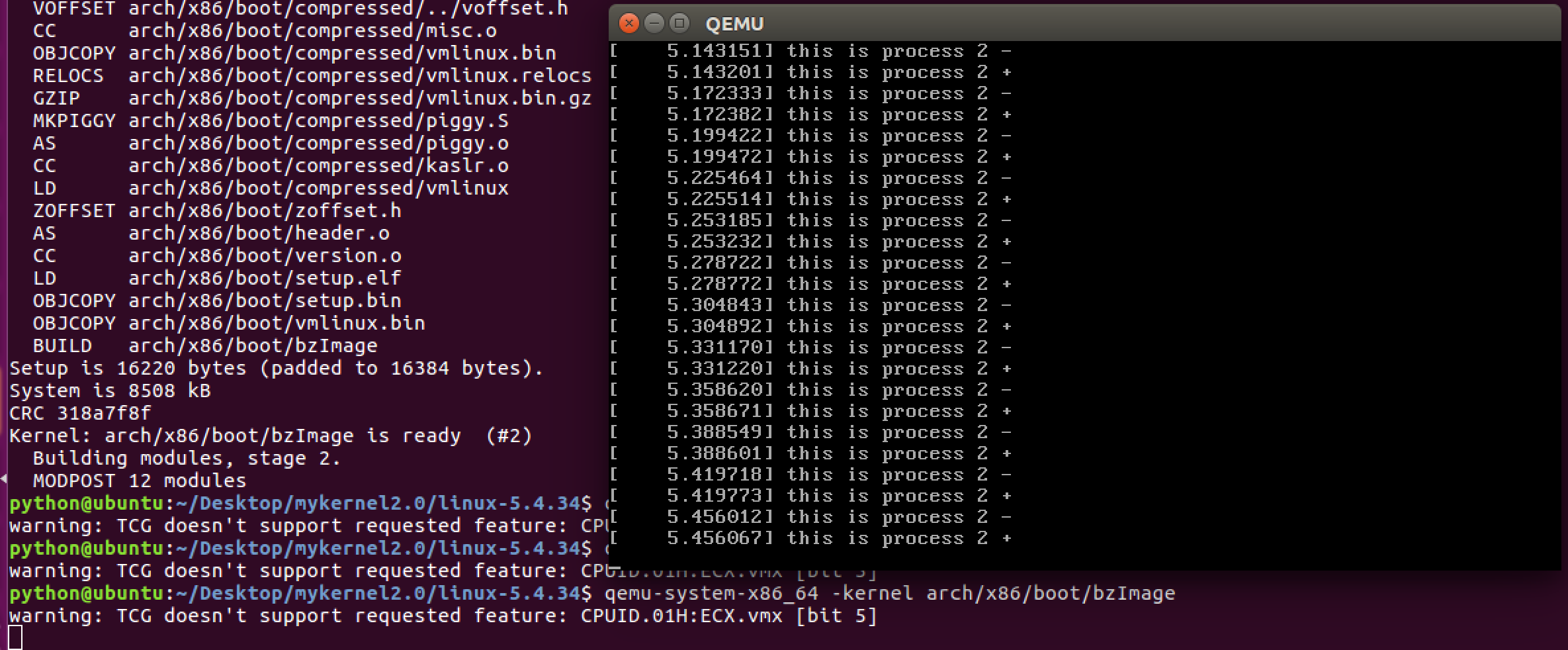
重新编译后,运行程序,结果如下。
 .总结
.总结
 .总结
.总结通过本次实验,再结合书本知识,对Linux内核的进程调度以及进程切换的相关知识有了更深入的了解,对内核中的基础知识以及其代码逻辑实现有了初步的感受和联系,受益很多。

 浙公网安备 33010602011771号