
动手动脑
1.使用Files. walkFileTree()找出指定文件夹下所有大于指定大小(比如1M)的文件。

 1 package com.test;
 2 import java.io.IOException;
 3 import java.nio.file.FileSystems;
 4 import java.nio.file.FileVisitOption;
 5 import java.nio.file.FileVisitResult;
 6 import java.nio.file.FileVisitor;
 7 import java.nio.file.Files;
 8 import java.nio.file.Path;
 9 import java.nio.file.Paths;
10 import java.nio.file.attribute.BasicFileAttributes;
11 import java.util.EnumSet;
12
13
14 public class File implements FileVisitor<Object> {
15  private final long accepted_size;
16  public  File(String glob,long accepted_size) {
17       FileSystems.getDefault().getPathMatcher("glob:" +glob);
18       this.accepted_size=accepted_size;
19     }
20    void search(Path file) throws IOException {
21     long size = (Long) Files.getAttribute(file, "basic:size");
22     if(size <=accepted_size) {
23      System.out.println(file);
24     }
25    }
26    @Override
27    public FileVisitResult postVisitDirectory(Object dir, IOException exc)throws IOException {
28     return FileVisitResult.CONTINUE;
29    }
30    @Override
31    public FileVisitResult preVisitDirectory(Object dir, BasicFileAttributes attrs)throws IOException {
32     return FileVisitResult.CONTINUE;
33    }
34    @Override
35    public FileVisitResult visitFile(Object file, BasicFileAttributes attrs)throws IOException {
36   search((Path) file);
37      return  FileVisitResult.CONTINUE;
38   }
39    @Override
40    public FileVisitResult visitFileFailed(Object file, IOException exc)throws IOException {
41   return FileVisitResult.CONTINUE;
42    }
43
44
45    public static void main(String[] args) throws IOException{
46     String glob=  "*.jpg";
47     long size = 1024;
48     Path fileTree = Paths.get("D:/");
49     File walk=new File(glob, size);
50     EnumSet<FileVisitOption> opts=EnumSet.of(FileVisitOption.FOLLOW_LINKS);
51     System.out.println("D盘中大于等于1KB的文件有");
52     Files.walkFileTree(fileTree, opts, Integer.MAX_VALUE, walk);
53    }
54 }

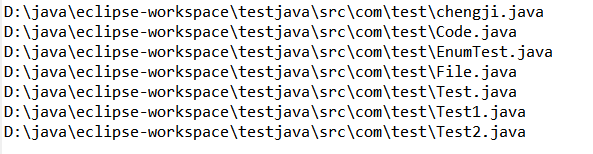
2.使用Files. walkFileTree()找出指定文件夹下所有扩展名为.txt和.java的文件。
 1 package com.test;
 2 import java.io.IOException;
 3 import java.nio.file.FileSystems;
 4 import java.nio.file.FileVisitResult;
 5 import java.nio.file.Files;
 6 import java.nio.file.Path;
 7 import java.nio.file.PathMatcher;
 8 import java.nio.file.Paths;
 9 import java.nio.file.SimpleFileVisitor;
10 import java.nio.file.attribute.BasicFileAttributes;
11
12 public class File {
13
14     public static void main(String args[]) throws IOException {
15         String glob = "glob:**/*.{java,txt}";
16         String path = "D:\\java\\eclipse-workspace\\testjava";
17         match(glob, path);
18     }
19
20     public static void match(String glob, String location) throws IOException {
21
22         final PathMatcher pathMatcher = FileSystems.getDefault().getPathMatcher( glob);
23
24         Files.walkFileTree(Paths.get(location), new SimpleFileVisitor<Path>() {
25
26             @Override
27             public FileVisitResult visitFile(Path path,
28                     BasicFileAttributes attrs) throws IOException {
29                 if (pathMatcher.matches(path)) {
30                     System.out.println(path);
31                 }
32                 return FileVisitResult.CONTINUE;
33             }
34
35             @Override
36             public FileVisitResult visitFileFailed(Path file, IOException exc)
37                     throws IOException {
38                 return FileVisitResult.CONTINUE;
39             }
40         });
41     }
42
43 }
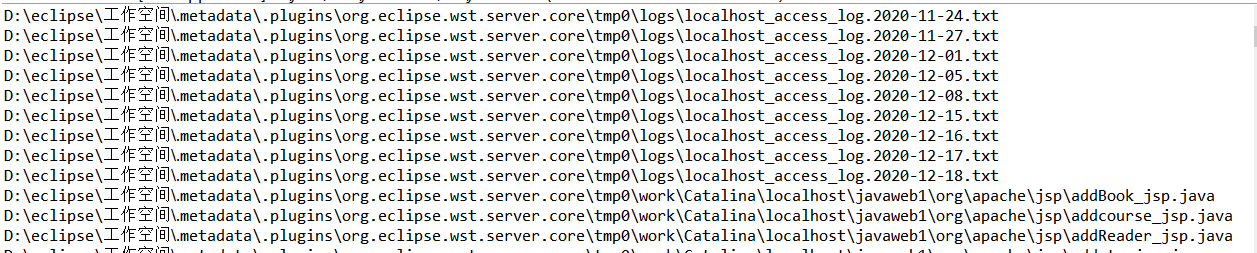
3.使用Files. walkFileTree()找出指定文件夹下所有包容指定字符串的txt文件。
 1 package com.test;
 2 import java.io.IOException;
 3 import java.nio.file.FileSystems;
 4 import java.nio.file.FileVisitResult;
 5 import java.nio.file.Files;
 6 import java.nio.file.Path;
 7 import java.nio.file.PathMatcher;
 8 import java.nio.file.Paths;
 9 import java.nio.file.SimpleFileVisitor;
10 import java.nio.file.attribute.BasicFileAttributes;
11
12  public class File {
13
14     public static void main(String args[]) throws IOException {
15          String glob = "glob:**/*.{java,txt}";
16          String path = "D:/";
17         match(glob, path);
18      }
19
20      public static void match(String glob, String location) throws IOException {
21
22          final PathMatcher pathMatcher = FileSystems.getDefault().getPathMatcher( glob);
23
24          Files.walkFileTree(Paths.get(location), new SimpleFileVisitor<Path>() {
25
26              @Override
27              public FileVisitResult visitFile(Path path,
28                      BasicFileAttributes attrs) throws IOException {
29                  if (pathMatcher.matches(path)) {
30                      System.out.println(path);
31                 }
32                  return FileVisitResult.CONTINUE;
33              }
34
35              @Override
36              public FileVisitResult visitFileFailed(Path file, IOException exc)
37                      throws IOException {
38                 return FileVisitResult.CONTINUE;
39              }
40          });
41      }
42
43  }
二、动手动脑二
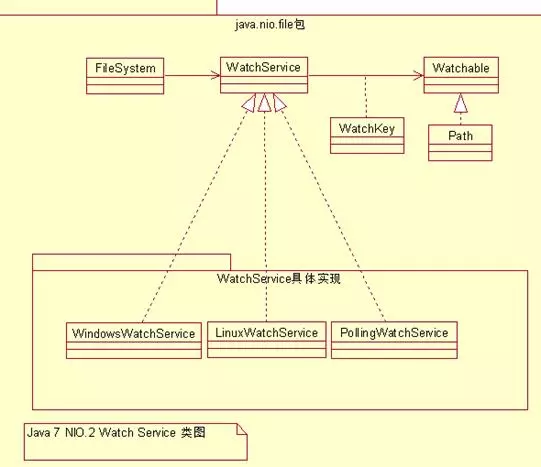
请通过查询JDK文件和使用搜索引擎等方式,看懂此示例代码,并弄明白Watchable、WatchService等类型之间的关系,使用UML类图表示出这些类之间的关系。
1.java.nio.file.WatchService文件系统监视服务的接口类,它的具体实现由监视服务提供者负责加载。
2.java.nio.file.Watchable 实现了 java.nio.file.Watchable 的对象才能注册监视服务 WatchService。java.nio.file.Path实现了 watchable 接口,后文使用 Path 对象注册监视服务。
3.java.nio.file.WatchKey 该类代表着 Watchable 对象和监视服务 WatchService 的注册关系。WatchKey 在 Watchable 对象向 WatchService 注册的时候被创建。它是 Watchable 和 WatchService 之间的关联类。

 浙公网安备 33010602011771号