
CH585蓝牙HID添加数据双向透传功能
可参考该对话链接:https://www.doubao.com/thread/wc69f9dcfd4b62213,了解自己的方案需求,决定采用哪种方式实现;
本篇为方案A形式,方案B链接:CH585蓝牙HID程序增加自定义服务 - oTvTo - 博客园
一、打开Hid_keyboard例程
二、找到Profile文件夹,Hid报表有关配置写在hidkbdservice.c中
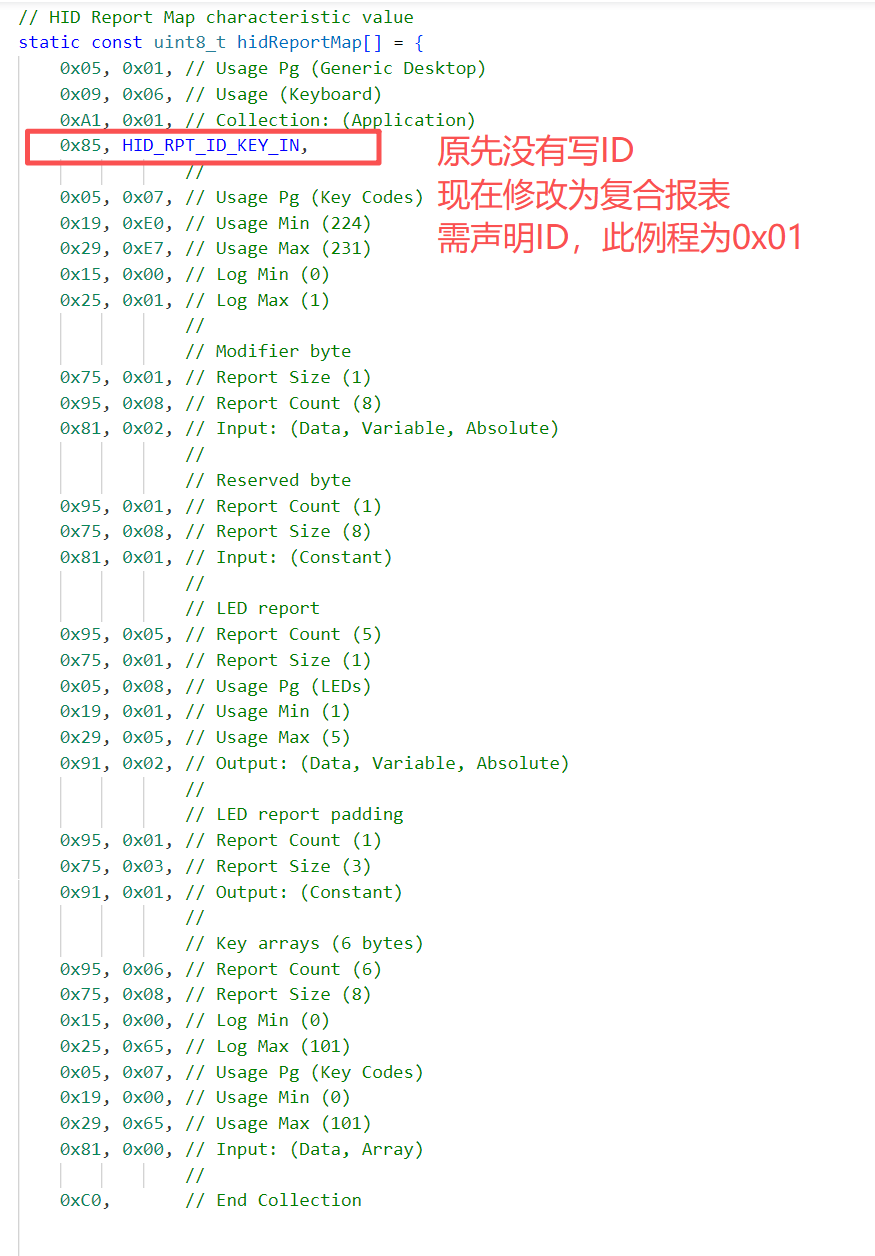
三、源工程只含有一个标准键盘描述符,其未描述上传的ID号,BLE HID中默认为ID = 0;
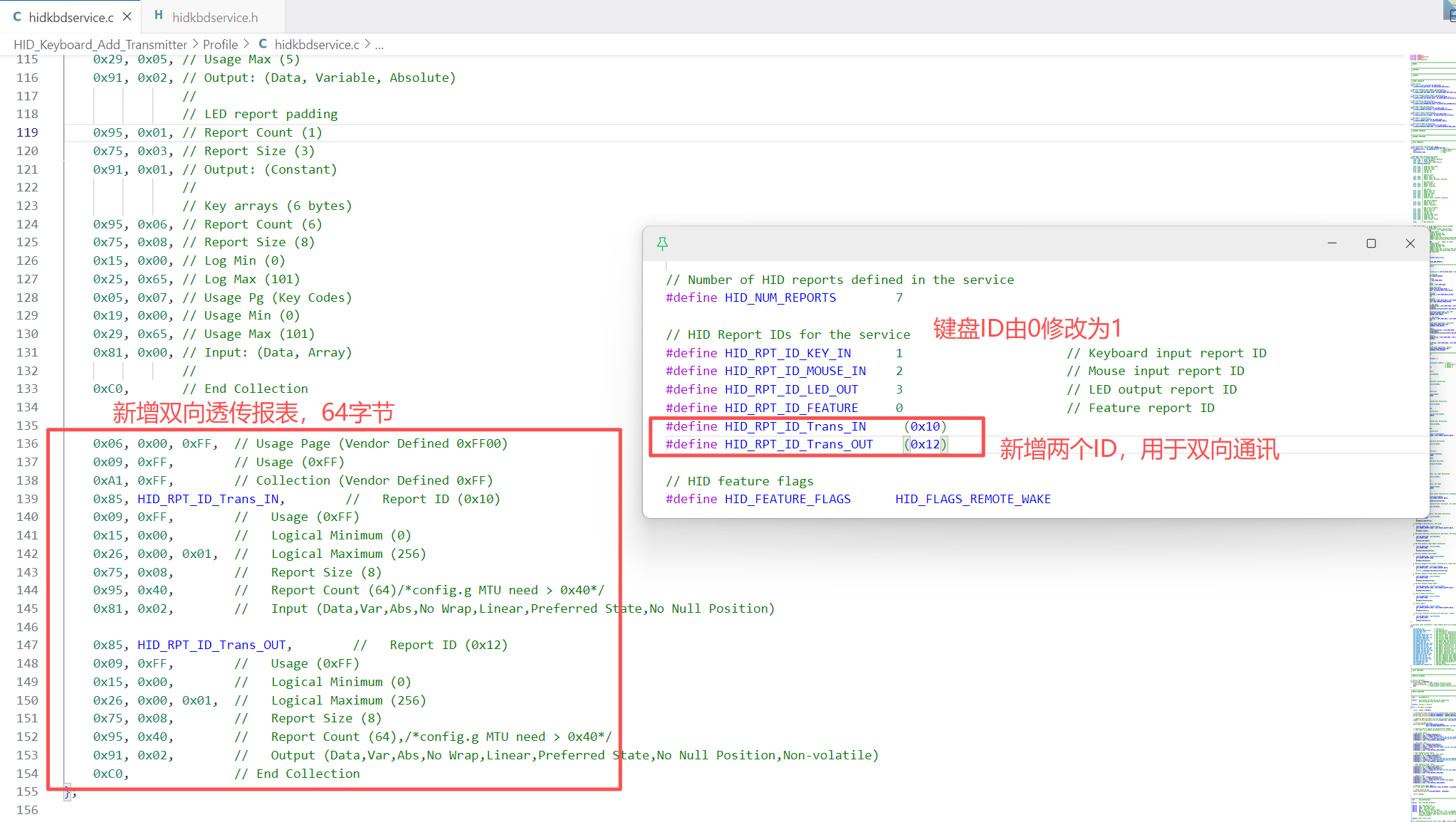
而在hidReportMap中加入透传描述符后,此描述表会转变为复合报表,因此Keyboard需指定一个非0的ID号,此工程修改为ID = 1;
注意:ID=0x07不可用,需跳过0x07


#define HID_RPT_ID_Trans_IN  (0x10)
#define HID_RPT_ID_Trans_OUT (0x12)

  0x06, 0x00, 0xFF,  // Usage Page (Vendor Defined 0xFF00)
    0x09, 0xFF,        // Usage (0xFF)
    0xA1, 0xFF,        // Collection (Vendor Defined 0xFF)
    0x85, HID_RPT_ID_Trans_IN,        //   Report ID (0x10)
    0x09, 0xFF,        //   Usage (0xFF)
    0x15, 0x00,        //   Logical Minimum (0)
    0x26, 0x00, 0x01,  //   Logical Maximum (256)
    0x75, 0x08,        //   Report Size (8)
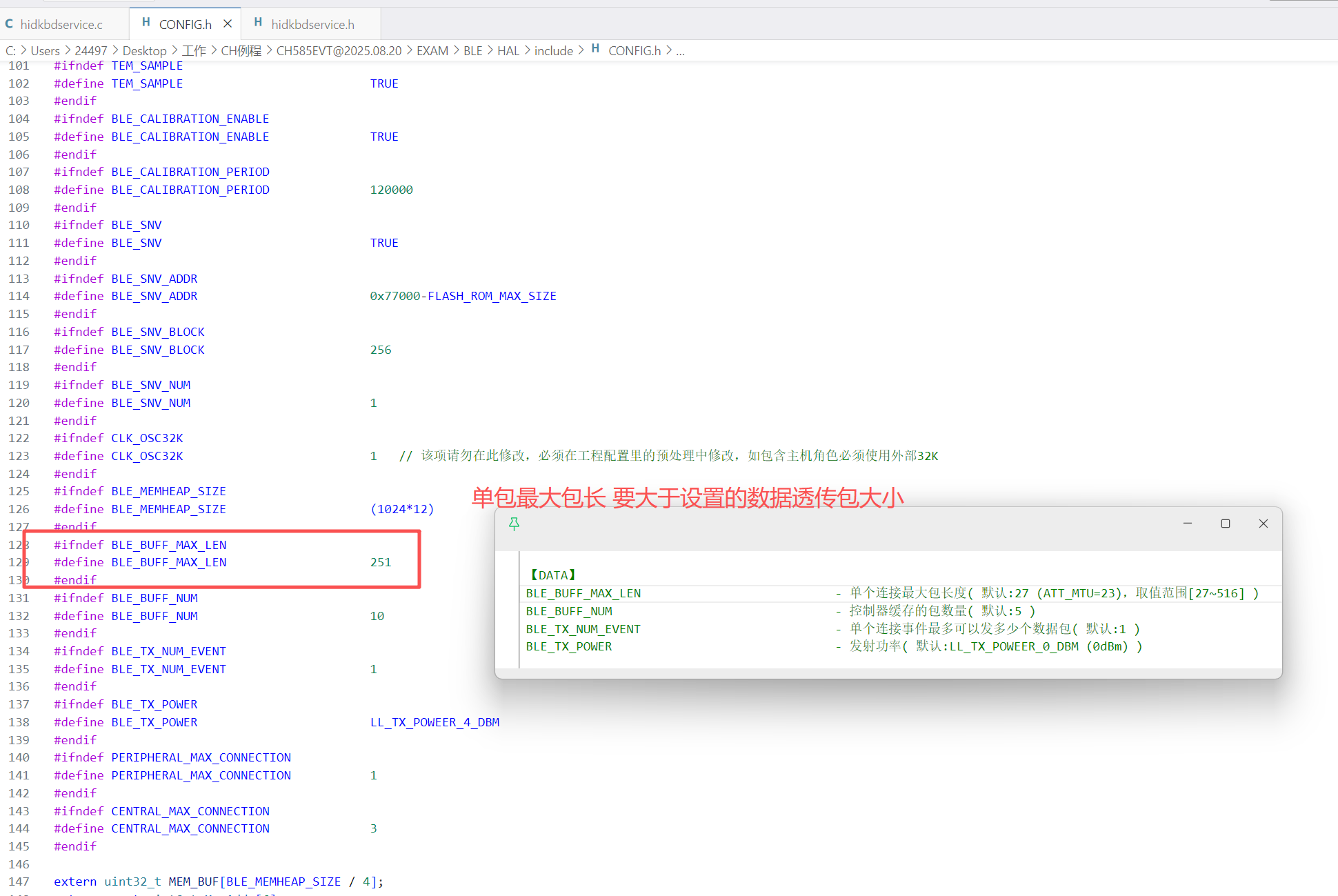
    0x95, 0x40,        //   Report Count (64)/*config.g MTU need > 0x40*/
    0x81, 0x02,        //   Input (Data,Var,Abs,No Wrap,Linear,Preferred State,No Null Position)

    0x85, HID_RPT_ID_Trans_OUT,        //   Report ID (0x12)
    0x09, 0xFF,        //   Usage (0xFF)
    0x15, 0x00,        //   Logical Minimum (0)
    0x26, 0x00, 0x01,  //   Logical Maximum (256)
    0x75, 0x08,        //   Report Size (8)
    0x95, 0x40,        //   Report Count (64),/*config.g MTU need > 0x40*/
    0x91, 0x02,        //   Output (Data,Var,Abs,No Wrap,Linear,Preferred State,No Null Position,Non-volatile)
    0xC0,              // End Collection


1. 基本结构
用途页(Usage Page) : 0xFF00(供应商自定义用途页,非标准HID设备)。
用途(Usage) : 0xFF(供应商自定义功能)。
集合(Collection) : 开启一个供应商定义的集合(0xA1, 0xFF)。
2. 输入报告(Input Report)
报告ID : 0x10(自定义标识符,用于区分不同报告)。
数据格式 :
逻辑范围: 0~256(0x00, 0x01)。
字段大小: 每字段8位(1字节)。
字段数量: 64个字段(共64字节数据)。
属性: 输入数据(0x81, 0x02),表示可变、绝对值、无空值。
3. 输出报告(Output Report)
报告ID : 0x12(与输入报告区分)。
数据格式 :
逻辑范围、字段大小和数量与输入报告相同。
属性: 输出数据(0x91, 0x02),用于主机向设备发送指令。
四、修改属性表
①添加属性定义:
// HID Report characteristic, Trans input
static uint8_t       hidReportTransInProps = GATT_PROP_READ | GATT_PROP_NOTIFY;
static uint8_t       hidReportTransIn;
static gattCharCfg_t hidReportTransInClientCharCfg[GATT_MAX_NUM_CONN];

// HID Report Reference characteristic descriptor, Consumer input
static uint8_t hidReportRefTransIn[HID_REPORT_REF_LEN] =
    {HID_RPT_ID_Trans_IN, HID_REPORT_TYPE_INPUT};


// HID Report characteristic, Trans output
static uint8_t hidReportTransOUTProps = GATT_PROP_READ | GATT_PROP_WRITE | GATT_PROP_WRITE_NO_RSP;
static uint8_t hidReportTransOUT;

static uint8_t hidReportRefTransOUT[HID_REPORT_REF_LEN] =
    {HID_RPT_ID_Trans_OUT, HID_REPORT_TYPE_OUTPUT};
②添加属性表定义,加在Feature功能描述下方:
    /*ADD TRANS TABLE*/
    // HID Report characteristic, Trans input declaration
    {
        {ATT_BT_UUID_SIZE, characterUUID},
        GATT_PERMIT_READ,
        0,
        &hidReportTransInProps},

    // HID Report characteristic, Trans input
    {
        {ATT_BT_UUID_SIZE, hidReportUUID},
        GATT_PERMIT_ENCRYPT_READ,
        0,
        &hidReportTransIn},

    // HID Report characteristic client characteristic configuration
    {
        {ATT_BT_UUID_SIZE, clientCharCfgUUID},
        GATT_PERMIT_READ | GATT_PERMIT_ENCRYPT_WRITE,
        0,
        (uint8_t *)&hidReportTransInClientCharCfg},

    // HID Report Reference characteristic descriptor, Trans input
    {
        {ATT_BT_UUID_SIZE, reportRefUUID},
        GATT_PERMIT_READ,
        0,
        hidReportRefTransIn},


    // HID Report characteristic, Trans output declaration
    {
        { ATT_BT_UUID_SIZE, characterUUID },
        GATT_PERMIT_READ,
        0,
        &hidReportTransOUTProps
    },
    // HID Report characteristic, Trans output
    {
    { ATT_BT_UUID_SIZE, hidReportUUID },
    GATT_PERMIT_ENCRYPT_READ | GATT_PERMIT_ENCRYPT_WRITE,
    0,
    &hidReportTransOUT
    },

    // HID Report Reference characteristic descriptor, Trans output
    {
    { ATT_BT_UUID_SIZE, reportRefUUID },
    GATT_PERMIT_READ,
    0,
    hidReportRefTransOUT
    },
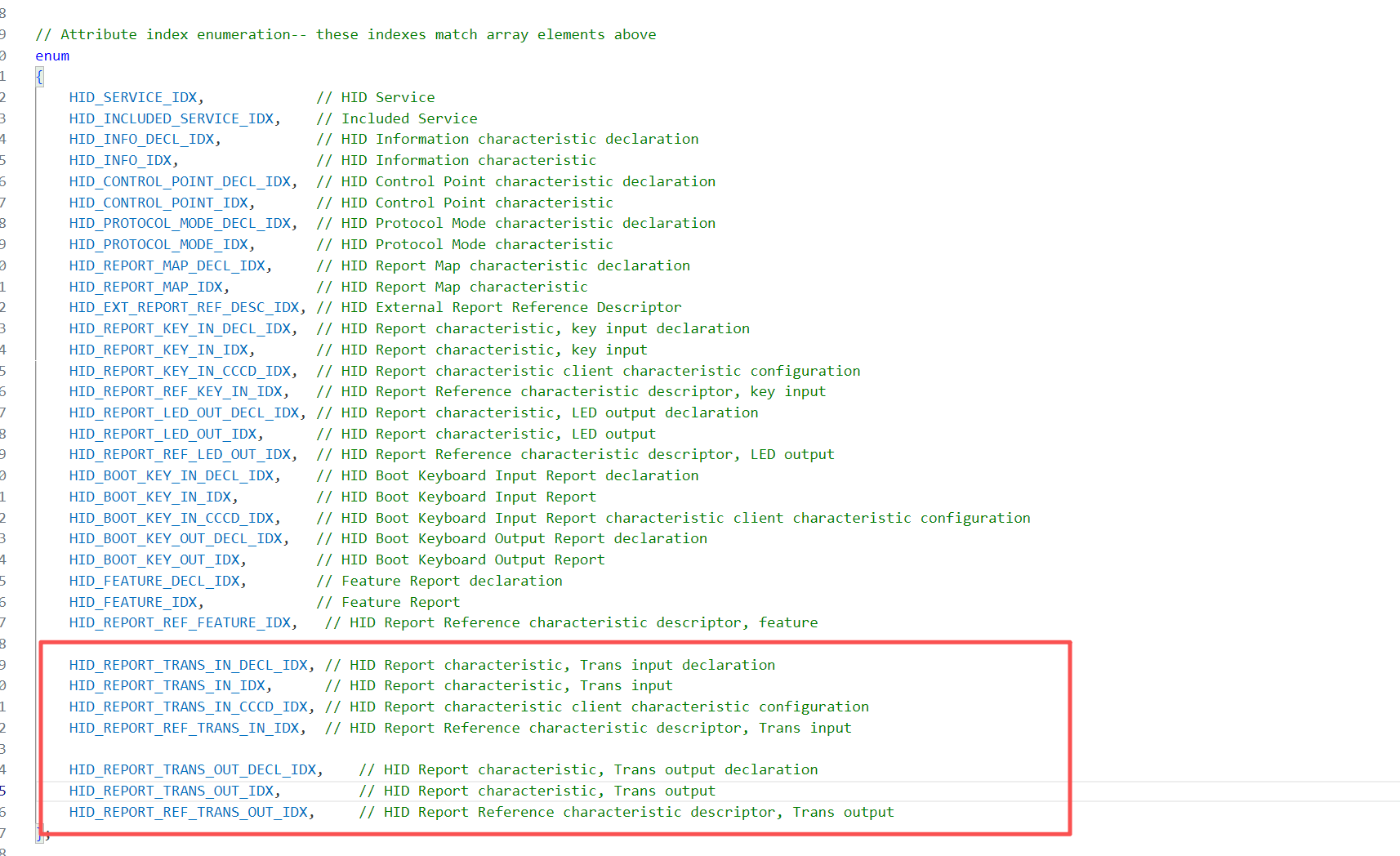
③添加属性表序列号枚举:
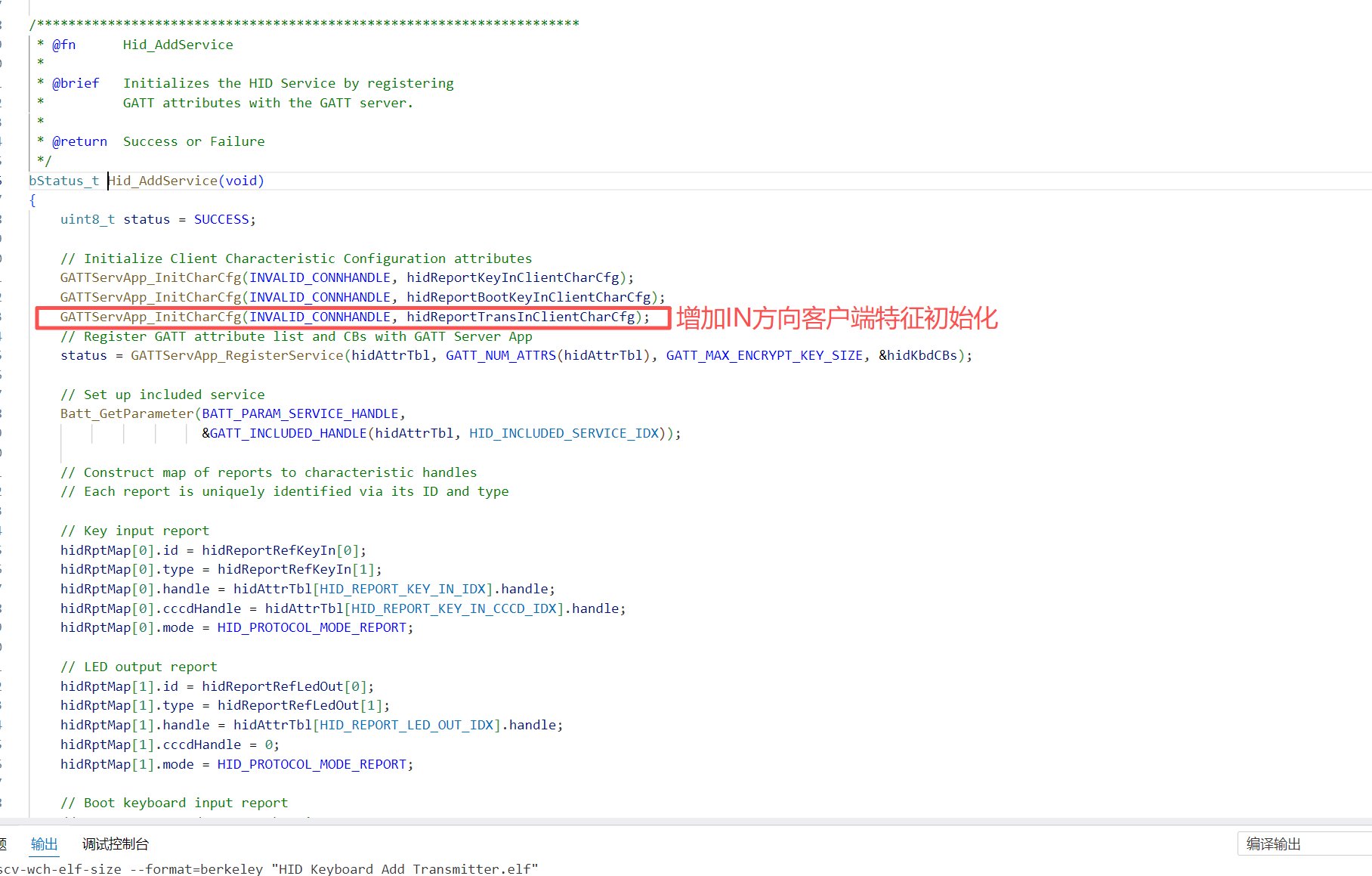
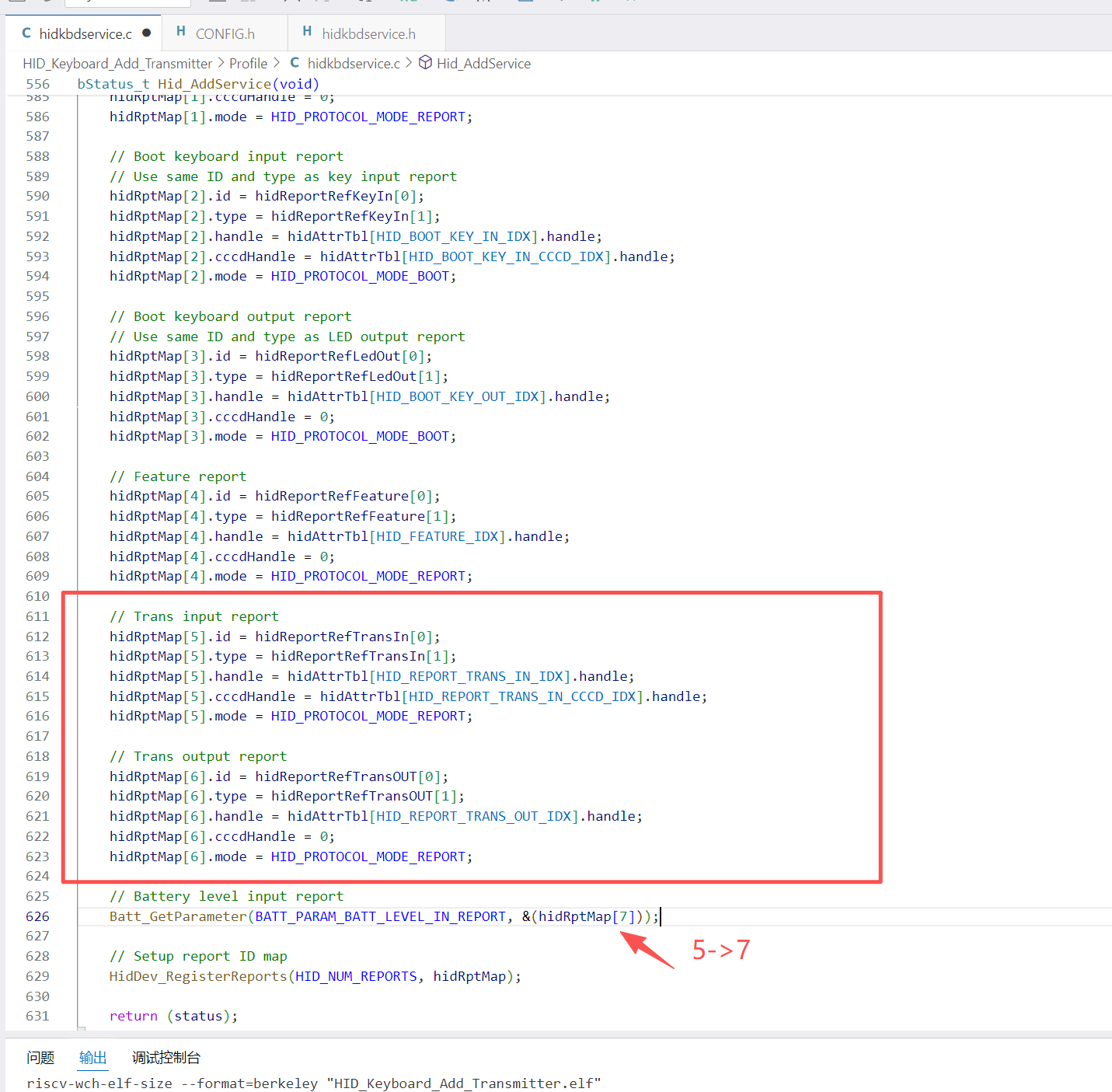
五、Hid_AddService,服务初始化添加:
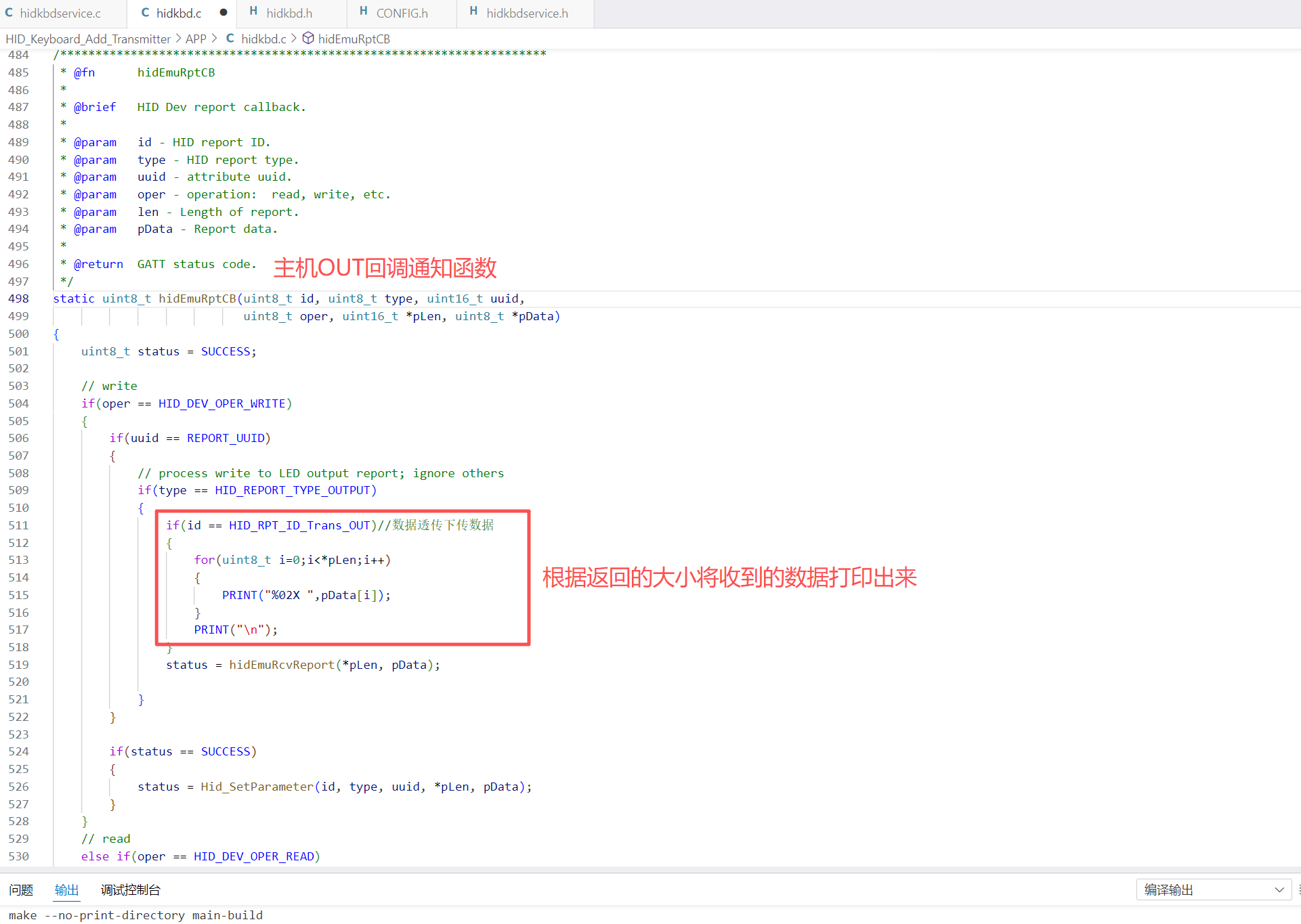
六、定义IN发送任务,修改OUT函数接收数据
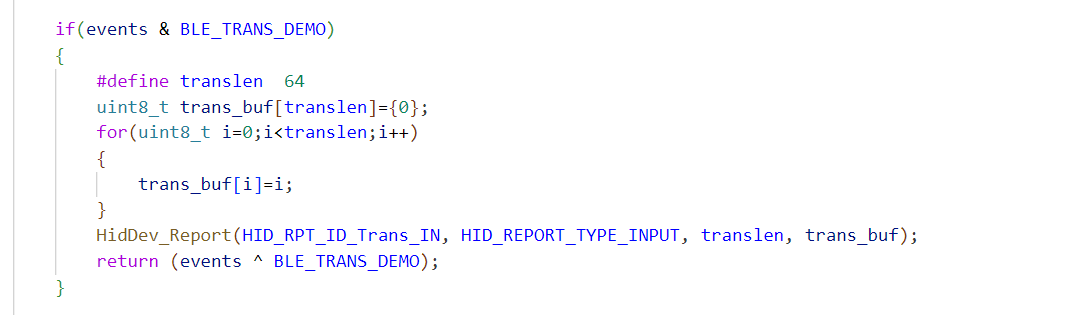
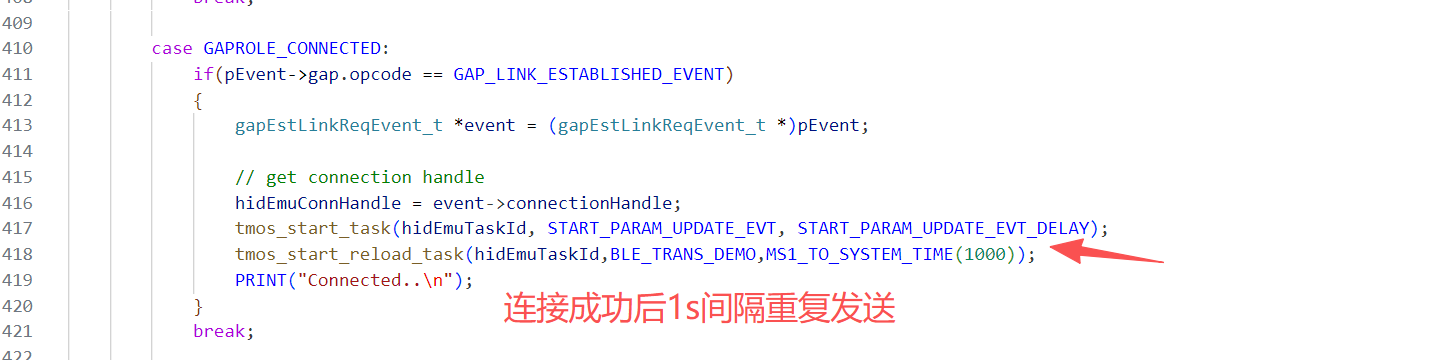
① IN 任务定义:
② OUT 函数修改:
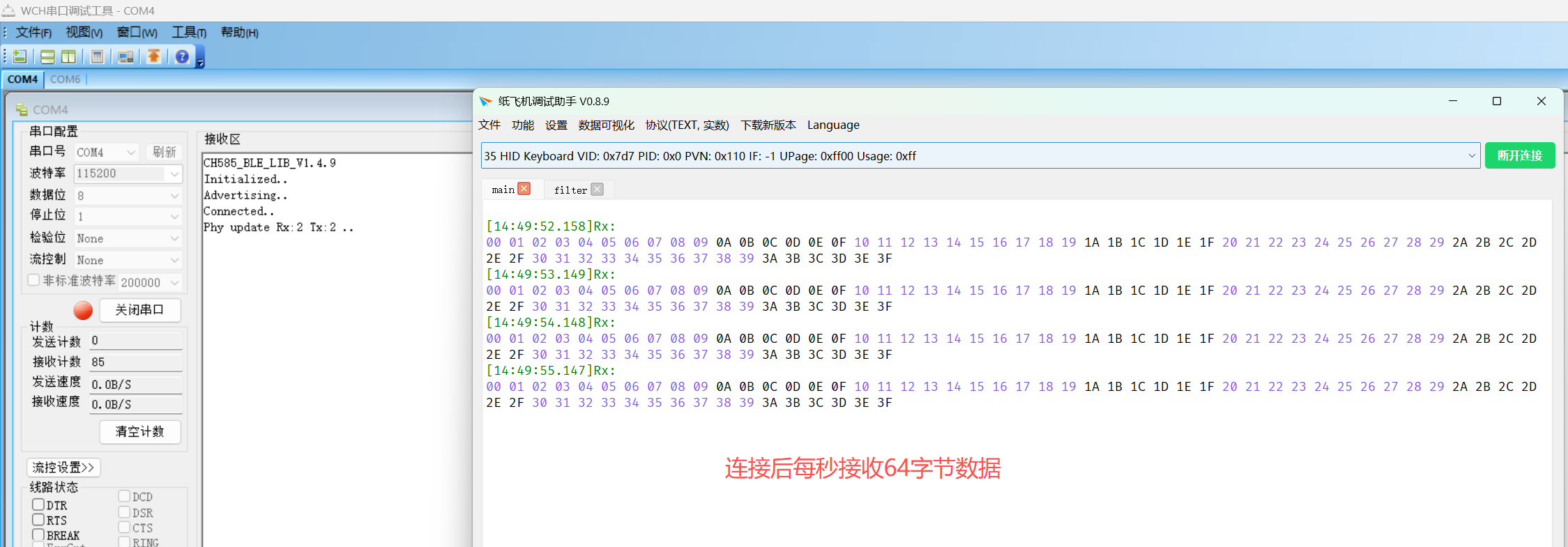
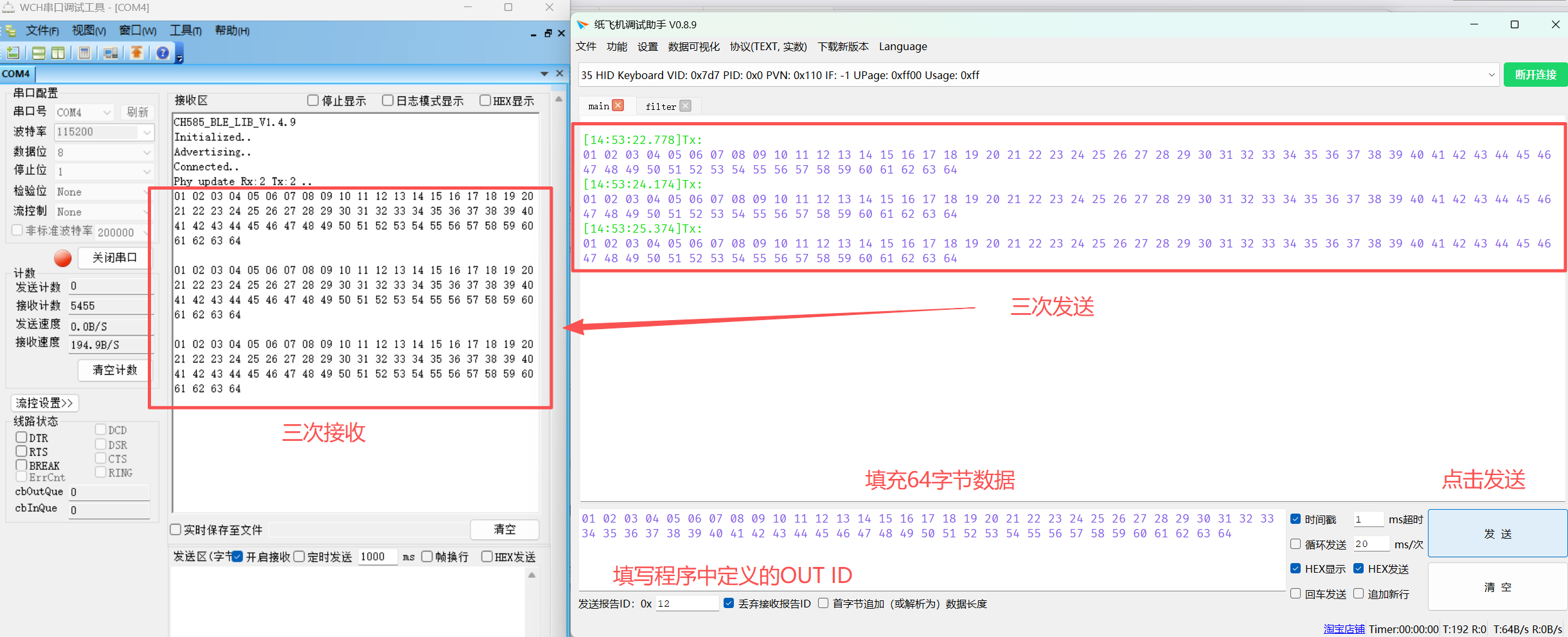
七、编译通过,开始配对测试(需通过支持HID通讯的软件调试)
① IN 测试:
② OUT 测试:

 浙公网安备 33010602011771号