
border-radius的参数
border-radius的参数:
据w3c上的官方解释,是这样子的:
border-radius: 1-4 length|% / 1-4 length|%;
1-4指的是radius的四个值,length和%指的是值的单位。
border可以带四个参数分别设置四个边框(上左下右的顺序),同样的,border-radius也可以带四个参数,并且以顺时针的方向解析,上左,上右,下右,下左
两个参数的时候,是上左和下右,上右和下左,比如.div1{border-radius: 2em 1em}
三个参数的时候,是上左,上右和下左,下右,比如.div1{border-radius: 2em 1em 3em}
.div1{border-radius: 2em/1em}
那么以斜杠/分开后面的参数是怎么回事呢?是这样子的,第一个参数表示圆角的水平半径,第二个参数表示圆角的垂直半径,所以你现在就可以画一个左右不对称的圆角啦:
实例:通过border-radius做消息数量提示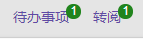
<style>
  .circel{
     position: absolute;
    background: #21841d;
    color: #fff;
    right:-5px;
    top: -2px;
    font-weight: normal;
    line-height: 20px;
    border-radius: 100%;
    min-width: 20px;
    height: 20px;
    text-align: center;
    font-size: 14px
   }
</style>

 <a href="" style="position:relative">待办事项<span class='circel'>6</span></a>

 浙公网安备 33010602011771号