
Mybatis-plus的使用
MyBatis-Plus
1.MyBatis-Plus简介
MyBatis-Plus (opens new window)(简称 MP)是一个 MyBatis (opens new window)的增强工具,在 MyBatis 的基础上只做增强不做改变,为简化开发、提高效率而生。
优点:简化开发,提高开发效率。
#简介
MyBatis-Plus (opens new window)(简称 MP)是一个 MyBatis (opens new window)的增强工具,在 MyBatis 的基础上只做增强不做改变,为简化开发、提高效率而生。
愿景
我们的愿景是成为 MyBatis 最好的搭档,就像 魂斗罗 中的 1P、2P,基友搭配,效率翻倍。

#特性
- 无侵入:只做增强不做改变,引入它不会对现有工程产生影响,如丝般顺滑
- 损耗小:启动即会自动注入基本 CURD,性能基本无损耗,直接面向对象操作
- 强大的 CRUD 操作:内置通用 Mapper、通用 Service,仅仅通过少量配置即可实现单表大部分 CRUD 操作,更有强大的条件构造器,满足各类使用需求
- 支持 Lambda 形式调用:通过 Lambda 表达式,方便的编写各类查询条件,无需再担心字段写错
- 支持主键自动生成:支持多达 4 种主键策略(内含分布式唯一 ID 生成器 - Sequence),可自由配置,完美解决主键问题
- 支持 ActiveRecord 模式:支持 ActiveRecord 形式调用,实体类只需继承 Model 类即可进行强大的 CRUD 操作
- 支持自定义全局通用操作:支持全局通用方法注入( Write once, use anywhere )
- 内置代码生成器:采用代码或者 Maven 插件可快速生成 Mapper 、 Model 、 Service 、 Controller 层代码,支持模板引擎,更有超多自定义配置等您来使用
- 内置分页插件:基于 MyBatis 物理分页,开发者无需关心具体操作,配置好插件之后,写分页等同于普通 List 查询
- 分页插件支持多种数据库:支持 MySQL、MariaDB、Oracle、DB2、H2、HSQL、SQLite、Postgre、SQLServer 等多种数据库
- 内置性能分析插件:可输出 Sql 语句以及其执行时间,建议开发测试时启用该功能,能快速揪出慢查询
- 内置全局拦截插件:提供全表 delete 、 update 操作智能分析阻断,也可自定义拦截规则,预防误操作
2.快速入门
地址:
使用第三方组件:
1.导入对应的依赖
2.研究依赖如何配置
3.代码如何编写
4.提高扩展技术能力
步骤:
1.新建项目
2.导入依赖
<!--导入数据库-->
        <dependency>
            <groupId>mysql</groupId>
            <artifactId>mysql-connector-java</artifactId>
        </dependency>
        <!--Lombok-->
        <dependency>
            <groupId>org.projectlombok</groupId>
            <artifactId>lombok</artifactId>
        </dependency>

        <!--mybatis-plus-->
        <dependency>
            <groupId>com.baomidou</groupId>
            <artifactId>mybatis-plus-boot-starter</artifactId>
            <version>3.4.2</version>
        </dependency>
3.配置数据库
spring:
  datasource:
    username: root
    password: 123456
    url: jdbc:mysql://localhost:3306/mybatis-plus?userSSL=true&useUnicode=true&characterEncoding=UTF-8&serverTimezone=UTC
    driver-class-name: com.mysql.cj.jdbc.Driver
4.编写实体类
public class User {
    private long id;
    private String name;
    private int age;
    private String email;
}
5.UserMapper
//在对应的Mapper上面继承基本的类BaseMapper<泛型>
@Mapper
public interface UserMapper extends BaseMapper<User> {
    //所有的CRUD操作已经编写完成
    //可以定义所需要额外的查询语句
}
注意:要在启动类上加上扫描mapper文件的语句 @MapperScan("com.mybatisplus.mapper")
6.编写测试类
 @Autowired
    UserMapper userMapper;

    @Test
    void contextLoads() {
        List<User> userList = userMapper.selectList(null);
        for (User user : userList) {

            System.out.println(user);
        }
    }
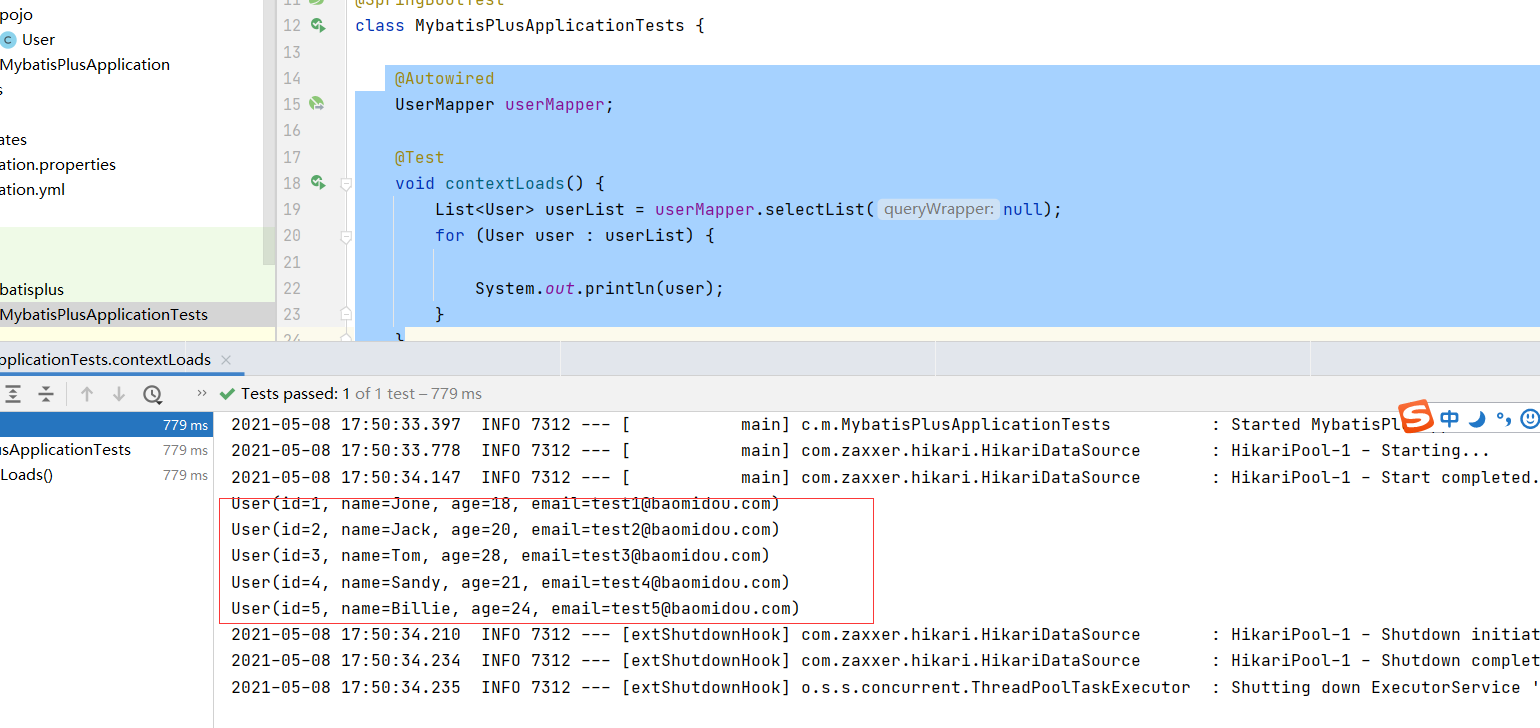
7.结果
3.配置日志
现在的sql语句是不可见的,我们在开发的过程中希望知道他是怎么运行的,所有我们必须要看日志
#配置日志
mybatis-plus:
  configuration:
    log-impl: org.apache.ibatis.logging.stdout.StdOutImpl
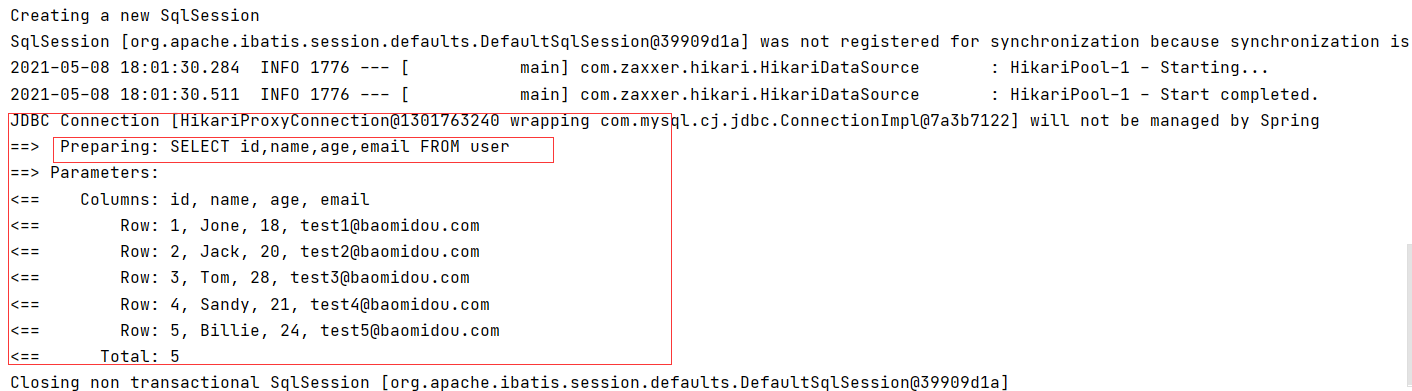
后面学习要多注意自动生成的sql
4.CRUD扩展
1.插入操作
测试代码
 @Test
    void insert() {
        User user = new User();
        user.setAge(5);
        user.setEmail("15151551");
        user.setName("张三");
        int insert = userMapper.insert(user);
        System.out.println(insert);
        System.out.println(user);
    }

}
测试结果
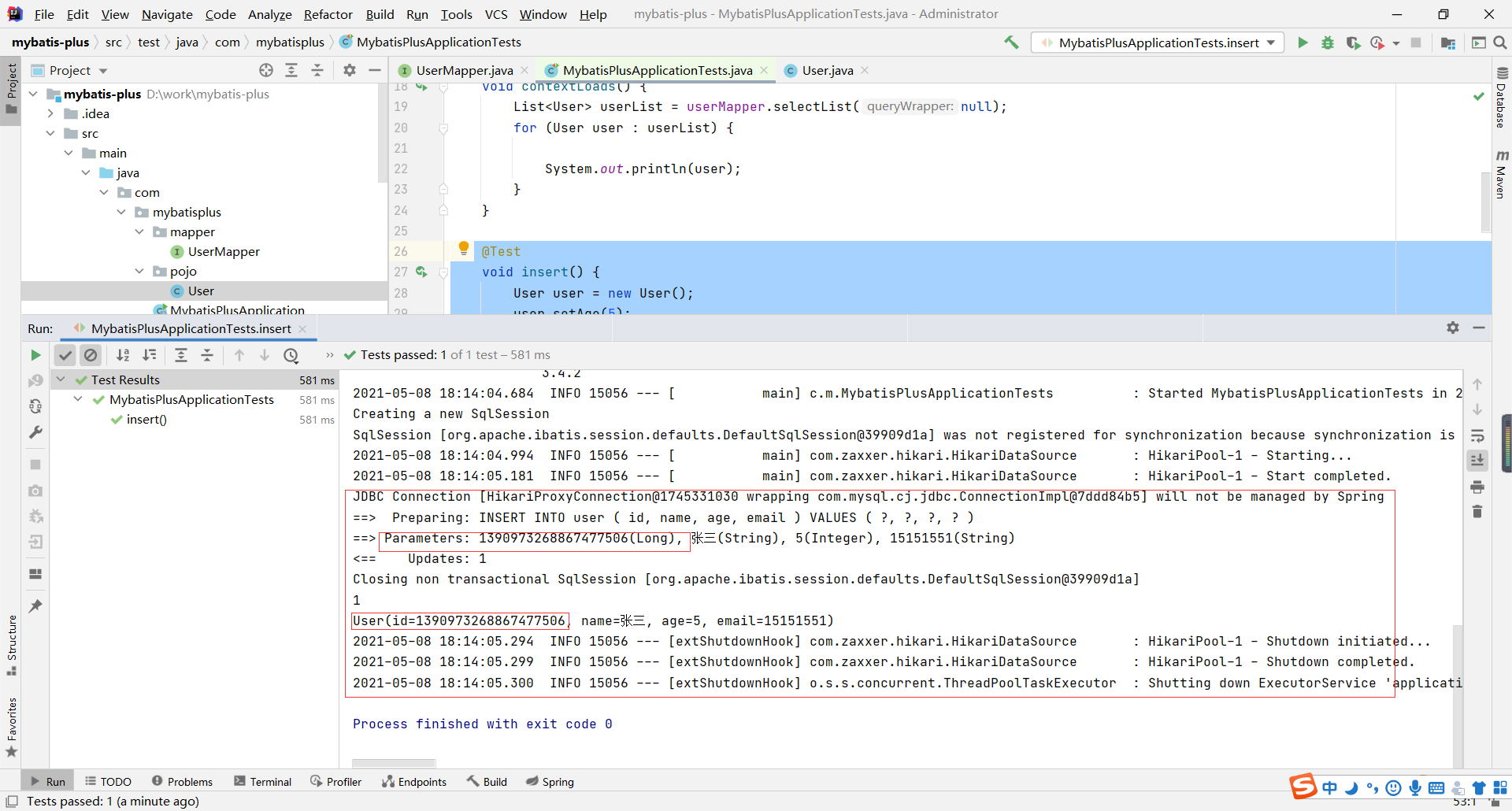
自动生成了ID,全局唯一的ID
2.主键生成策略
默认ID_WORKER全局唯一ID
分布式系统唯一ID生成:https://blog.csdn.net/rainyear/article/details/86293122
雪花算法:
snowflake是Twitter开源的分布式ID生成算法,结果是一个long型的ID。其核心思想是:使用41bit作为毫秒数,10bit作为机器的ID(5个bit是数据中心,5个bit的机器ID),12bit作为毫秒内的流水号(意味着每个节点在每毫秒可以产生 4096 个 ID),最后还有一个符号位,永远是0。具体实现的代码可以参看 https://github.com/twitter/snowflake 。
主键自增
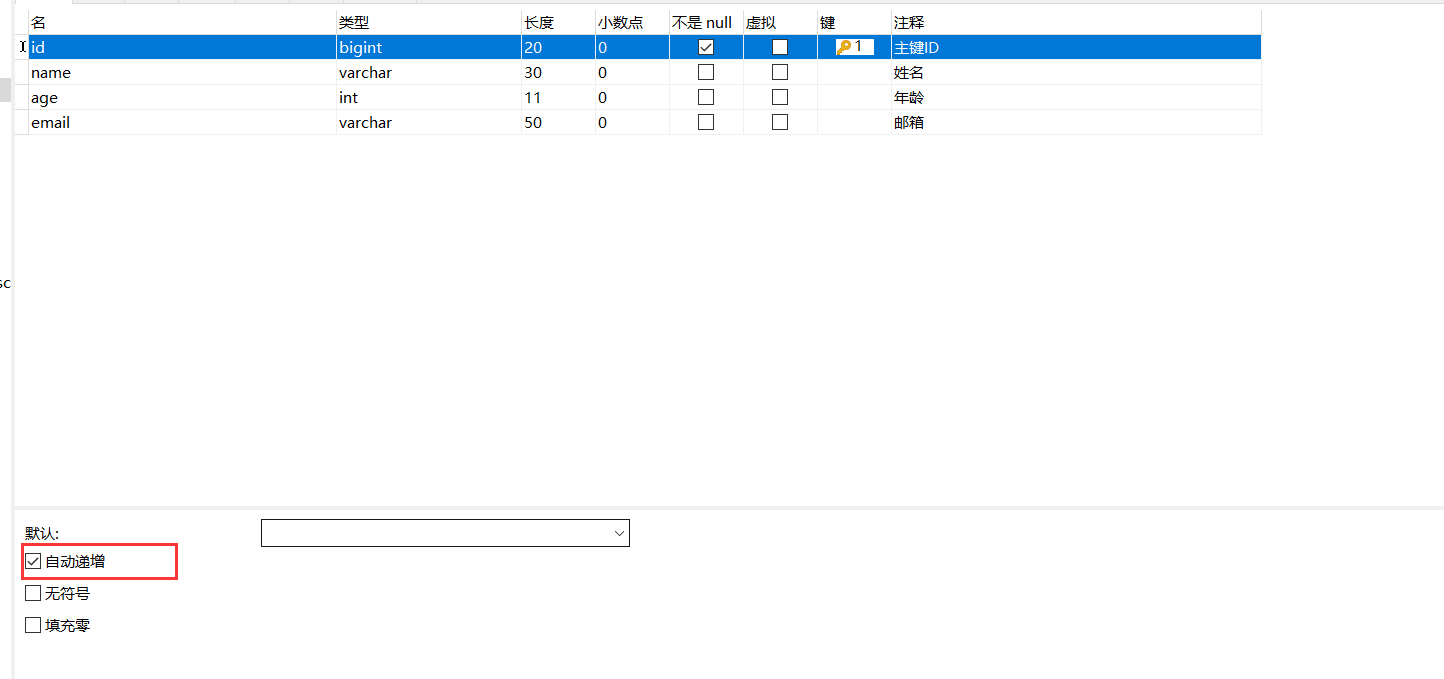
我们需要配置主键自增:
1.实体类字段上 @TableId(type = IdType.AUTO)
2.数据库字段上一定是自增的
3.再次测试即可
其余的源码解释
public enum IdType {
    AUTO(0), // 数据库id自增
    NONE(1), // 未设置主键
    INPUT(2), // 手动输入,自己写id
    ID_WORKER(3), // 默认的全局唯一id
    UUID(4), // 全局唯一id uuid
    ID_WORKER_STR(5); // ID_WORKER 字符串表示法
}
3.更新操作
测试代码
@Test
    void update() {
        User user = new User();
        user.setId(6L);
        user.setAge(12);
        user.setEmail("5858@qq.com");
        int insert = userMapper.updateById(user);
        System.out.println(insert);
    }
测试结果
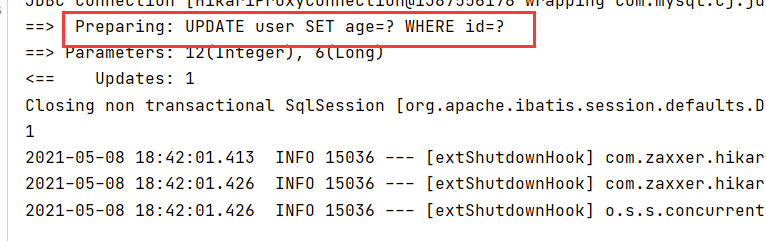

在这里可以看出来是动态的拼接sql的
4. 自动填充
创建时间、修改时间!这些个操作一般都是自动化完成的,我们不希望手动更新!
阿里巴巴开发手册:所有的数据库表:gmt_create、gmt_modified几乎所有的表都要配置上!而且需要自动化!
方式一:数据库级别
1.在表中增加字段gmt_create和gmt_modified
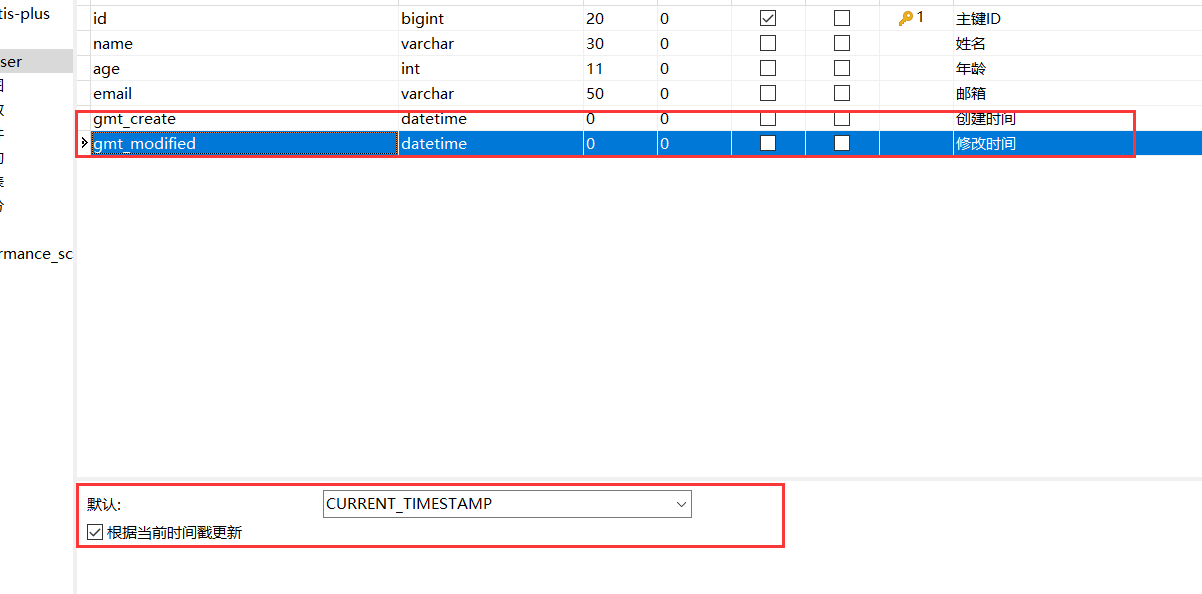
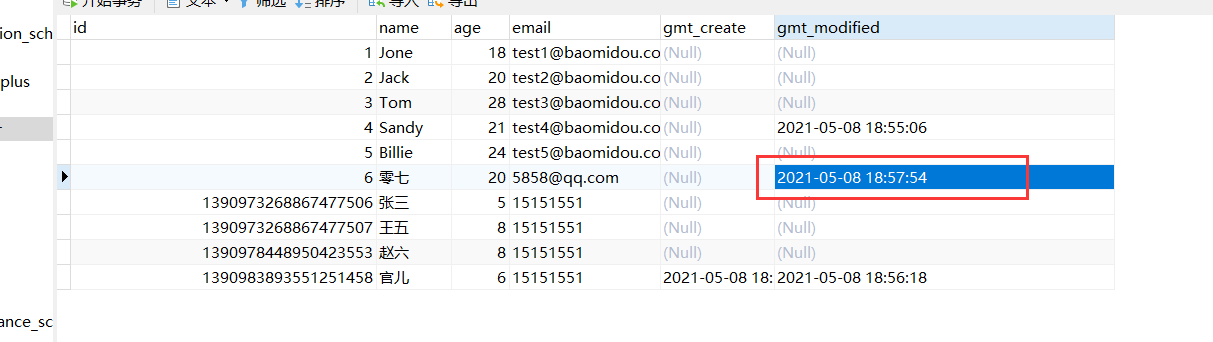
测试结果
方式二:代码级别
1.恢复数据库到默认状态
2.注解填充字段 @TableField(.. fill = FieldFill.INSERT) 生成器策略部分也可以配置!
public enum FieldFill {
    DEFAULT,  //不操作
    INSERT, //插入时
    UPDATE,  //更新时
    INSERT_UPDATE;  //插入更新时

    private FieldFill() {
    }
}
3.自定义一个处理器 MyMetaObjectHandler
@Slf4j
@Component //声明为IOC容器的一个组件
public class MyMetaObjectHandler implements MetaObjectHandler {
    //插入时的填充策略
    @Override
    public void insertFill(MetaObject metaObject) {
        log.info("start insert fill ....");
        this.setFieldValByName("gmtCreate",new Date(),metaObject);
        this.setFieldValByName("gmtModified",new Date(),metaObject);
    }
    //修改时的填充策略
    @Override
    public void updateFill(MetaObject metaObject) {
        log.info("start update fill ....");
        this.setFieldValByName("gmtModified",new Date(),metaObject);
    }
}
4.编写测试代码
//添加
void insert() {
        User user = new User();
        user.setAge(88);
        user.setEmail("5343543@qq.com");
        user.setName("灵儿");
        int insert = userMapper.insert(user);
        System.out.println(insert);
        System.out.println(user);
    }

//修改
 void update() {
        User user = new User();
        user.setId(1390988672247562241L);
        user.setAge(20);
        user.setEmail("66666@qq.com");
        int insert = userMapper.updateById(user);
        System.out.println(insert);
    }
5.观察时间变化


5.乐观锁
在面试过程中,我们经常会被问到乐观锁,悲观锁。
乐观锁:顾名思义,它总是认为不会出现问题,无论干什么都不去上锁!如果出现了问题,再次更新值测试!
悲观锁:顾名思义,它总是认为总是出现问题,无论干什么都上锁!再去操作!
OptimisticLockerInnerInterceptor
当要更新一条记录的时候,希望这条记录没有被别人更新
乐观锁实现方式:
- 取出记录时,获取当前version
- 更新时,带上这个version
- 执行更新时, set version = newVersion where version = oldVersion
- 如果version不对,就更新失败
乐观锁:1.先查询,获得version版本号
--A
update user set name="zhangsan", version= version+1
where id = 2 and version = 1
--B  线程B抢先完成,这个时候version=2,会导致线程A修改失败
update user set name="zhangsan", version= version+1
where id = 2 and version = 1
测试一下MP的客观锁插件
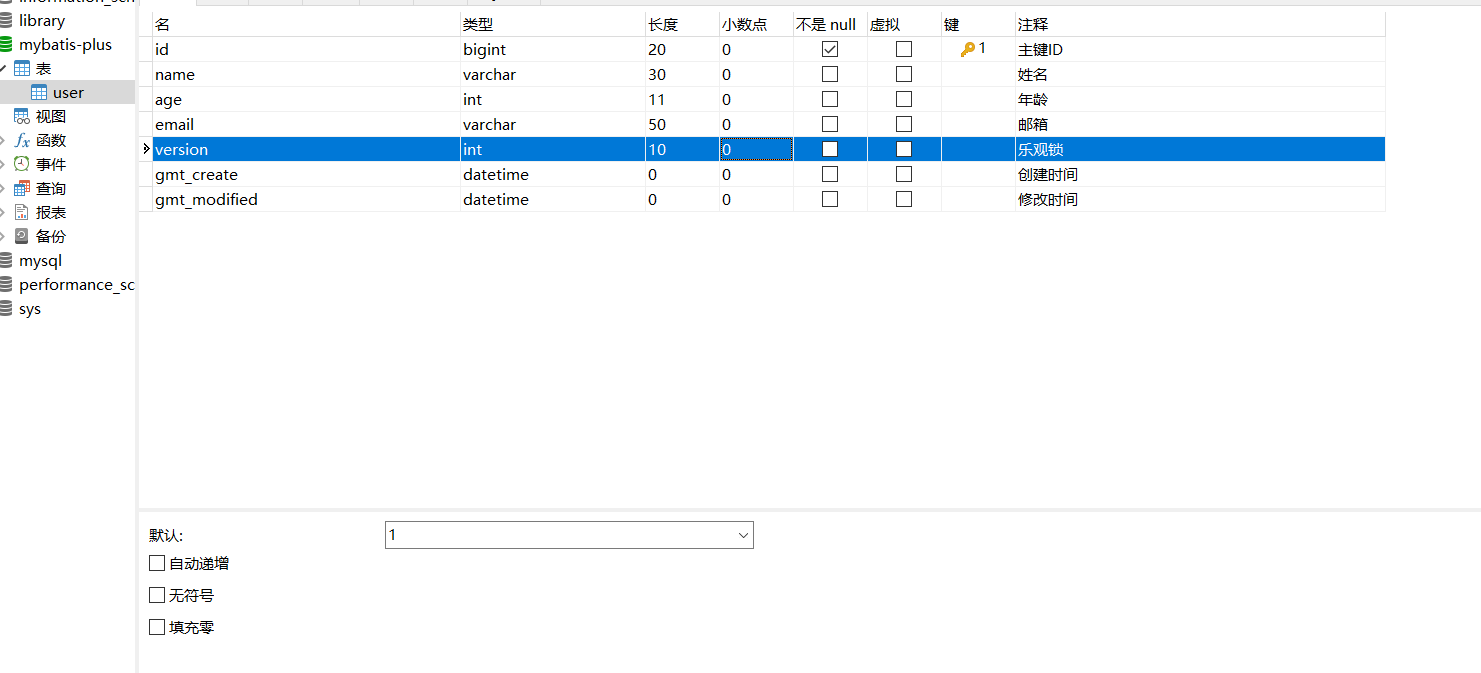
1.给数据库添加version字段
2.实体类添加对应的字段
	@Version
    private Integer version;
3.注册组件
package com.mybatisplus.config;

import com.baomidou.mybatisplus.extension.plugins.MybatisPlusInterceptor;
import com.baomidou.mybatisplus.extension.plugins.inner.OptimisticLockerInnerInterceptor;
import org.mybatis.spring.annotation.MapperScan;
import org.springframework.context.annotation.Bean;
import org.springframework.context.annotation.Configuration;
import org.springframework.transaction.annotation.EnableTransactionManagement;

@MapperScan("com.mybatisplus.mapper")
@EnableTransactionManagement
@Configuration //配置类
public class MyBatisPlusConfig {
    //注册乐观锁插件
    @Bean
    public MybatisPlusInterceptor mybatisPlusInterceptor() {
        MybatisPlusInterceptor interceptor = new MybatisPlusInterceptor();
        interceptor.addInnerInterceptor(new OptimisticLockerInnerInterceptor());
        return interceptor;
    }
}
4.测试代码
//测试乐观锁,成功的测试
    @Test
    void OptimisticLocker(){
        User user = new User();
        //1.查询用户信息
        user = userMapper.selectById(1390988672247562241L);
        //2.修改用户信息
        user.setName("AA");
        user.setAge(66);
        //3.执行更新操作
        userMapper.updateById(user);
    }


 //测试乐观锁,失败的测试
    @Test
    void OptimisticLocker1(){
        //线程1
        User user = new User();
        user = userMapper.selectById(1390988672247562241L);
        user.setName("BB");
        user.setAge(55);
        //模拟线程2执行了插队操作
        User user2 = new User();
        user2 = userMapper.selectById(1390988672247562241L);
        user2.setName("CC");
        user2.setAge(77);
        userMapper.updateById(user2);
		//自旋锁多次尝试提交
        userMapper.updateById(user); //如果没有乐观锁就会覆盖插队线程的值!
    }
5.测试结果
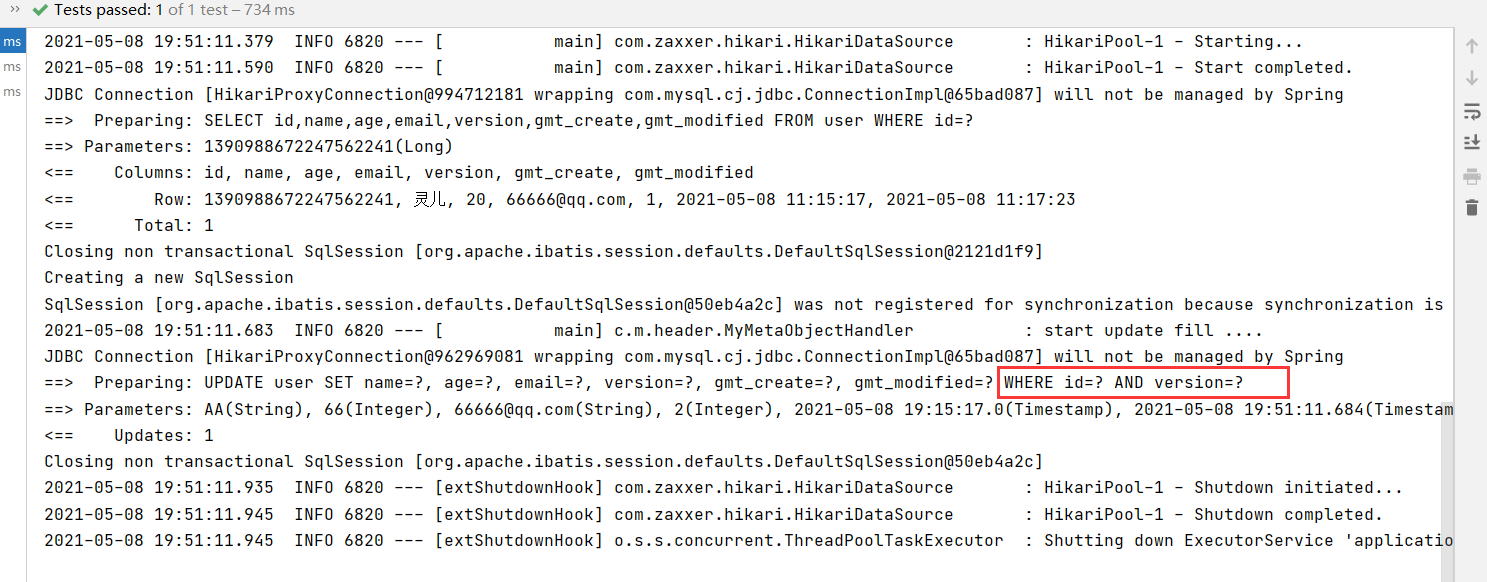
失败的
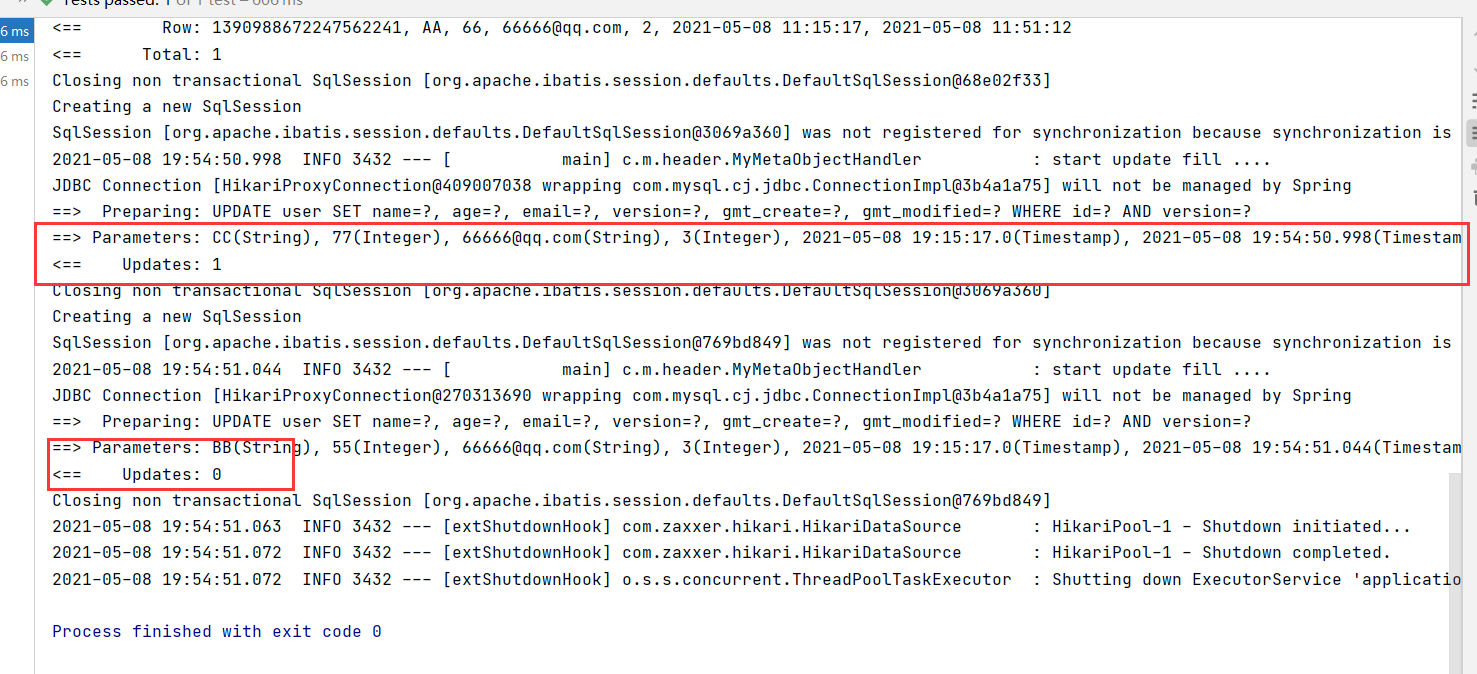

6.查询操作
    @Test
    void selectById(){
        //按照ID查询
        userMapper.selectById(1L);
    }
    @Test
    void selectByBach(){
        //批量查询
        List<User> users =  userMapper.selectBatchIds(Arrays.asList(1,2,3,4,5));
        users.forEach(System.out::println);
    }
    @Test
    void selectByMap(){
        //按照条件查询之一map方式
        HashMap<String,Object> map = new HashMap<>();
        //自定义查询的条件
        map.put("age",8);
        userMapper.selectByMap(map);
    }
}
7.分页查询
分页在网站使用随处可见。
1.原始的Limit
2.pageHelpler第三方插件
3.mybatis-plus内置的分页插件
使用方式
1.配置拦截器组件
   /**
     * 新的分页插件,一缓和二缓遵循mybatis的规则,需要设置 MybatisConfiguration#useDeprecatedExecutor = false 避免缓存出现问题(该属性会在旧插件移除后一同移除)
     */
    @Bean
    public MybatisPlusInterceptor paginationInterceptor() {
        MybatisPlusInterceptor interceptor = new MybatisPlusInterceptor();
        interceptor.addInnerInterceptor(new PaginationInnerInterceptor(DbType.H2));
        return interceptor;
    }

    @Bean
    public ConfigurationCustomizer configurationCustomizer() {
        return configuration -> configuration.setUseDeprecatedExecutor(false);
    }
2.测试代码,直接使用page对象
   @Test
    void paga(){
        //参数一: 当前页
        //参数二: 页面大小
        Page<User> page = new Page<>(2,3);
        userMapper.selectPage(page,null);
        page.getRecords().forEach(System.out::println);
        System.out.println(page.getTotal());
    }
8.基本的删除操作
测试代码
    @Test
    void deleteById(){
        //通过id删除
        userMapper.deleteById(1390973268867477506L);
    }
    @Test
    void deleteBachId(){
        //通过id批量删除
        userMapper.deleteBatchIds(Arrays.asList(1390983893551251458L,1390988672247562241L));
    }
    @Test
    void deleteMap(){
        //通过条件删除
        HashMap<String,Object> map =new HashMap<>();
        map.put("age",8);
        userMapper.deleteByMap(map);
    }
9.逻辑删除,工作中非常的重要
物理删除:从数据库中直接删除
逻辑删除:在数据库中没有被移除,而是通过一个变量来让他失效! delete=0 => delete =1
应用场景:管理员可以查看删除的记录,防止数据的丢失,类似回收站
步骤:
1.在数据表中添加一个deleted字段

2.实体类中对应
	@TableLogic //逻辑删除
    private Integer deleted;
3.配置yml
#逻辑插件
mybatis-plus:
  global-config:
    db-config:
      logic-delete-field: flag  # 全局逻辑删除的实体字段名(since 3.3.0,配置后可以忽略不配置步骤2)
      logic-delete-value: 1 # 逻辑已删除值(默认为 1)
      logic-not-delete-value: 0 # 逻辑未删除值(默认为 0)
4.测试代码
@Test
    void delectable(){
        //逻辑删除
        userMapper.deleteById(2L);
    }
5.测试结果
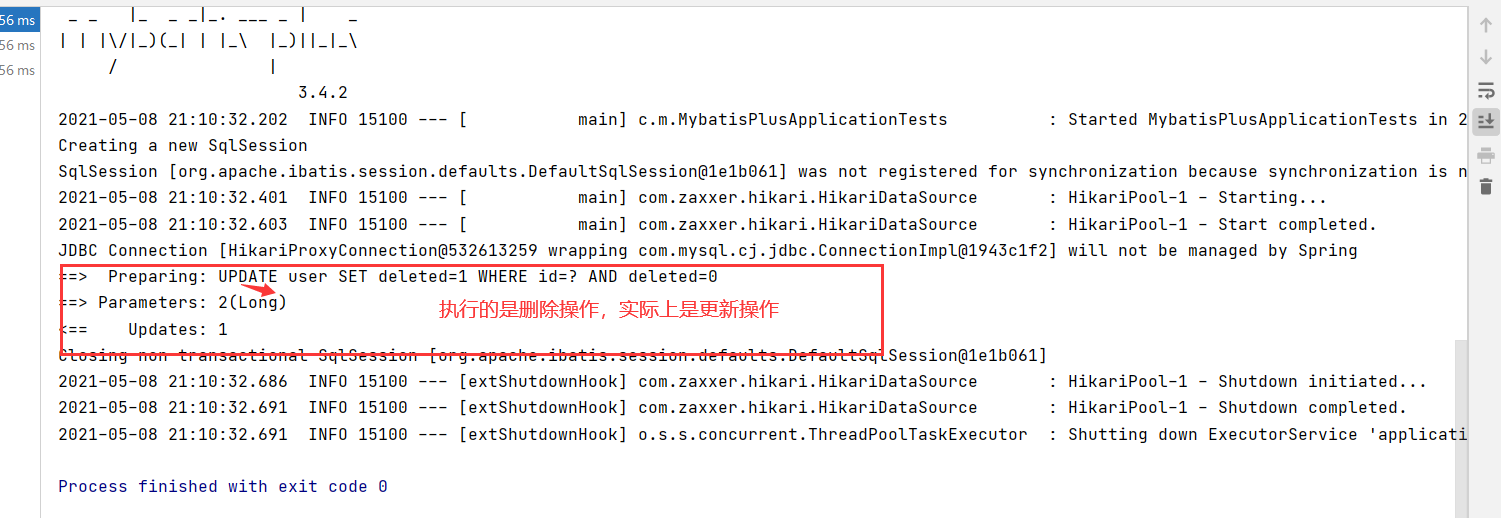
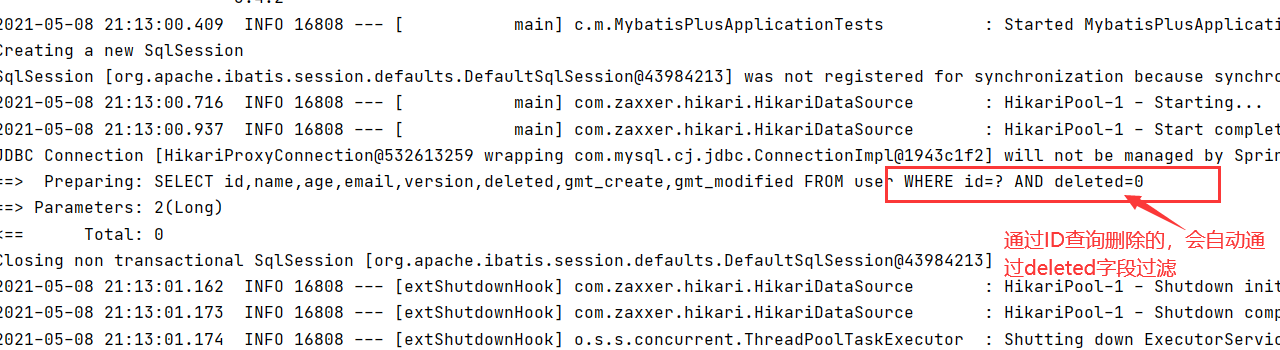
5.性能分析插件
在开发中,会遇到一些慢sql,解决方案:测试,druid监控…
作用:性能分析拦截器,用于输出每条SQL语句及其执行时间
MyBatisPlus也提供性能分析插件,如果超过这个时间就停止运行!
-
导入插件
    // SQL执行效率插件
    @Bean
    @Profile({"dev","test"})
    public PerformanceInterceptor performanceInterceptor(){
        PerformanceInterceptor performanceInterceptor = new PerformanceInterceptor();
        performanceInterceptor.setMaxTime(1000); //ms 设置sql执行的最大时间,如果超过了则不执行
        performanceInterceptor.setFormat(true); // 是否格式化
        return performanceInterceptor;
    }
注意:记住,要在SpringBoot中配置环境为dev或者test环境!
-
测试
 @Test
    void contextLoads() {
        List<User> userList = userMapper.selectList(null);
        for (User user : userList) {

            System.out.println(user);
        }
    }
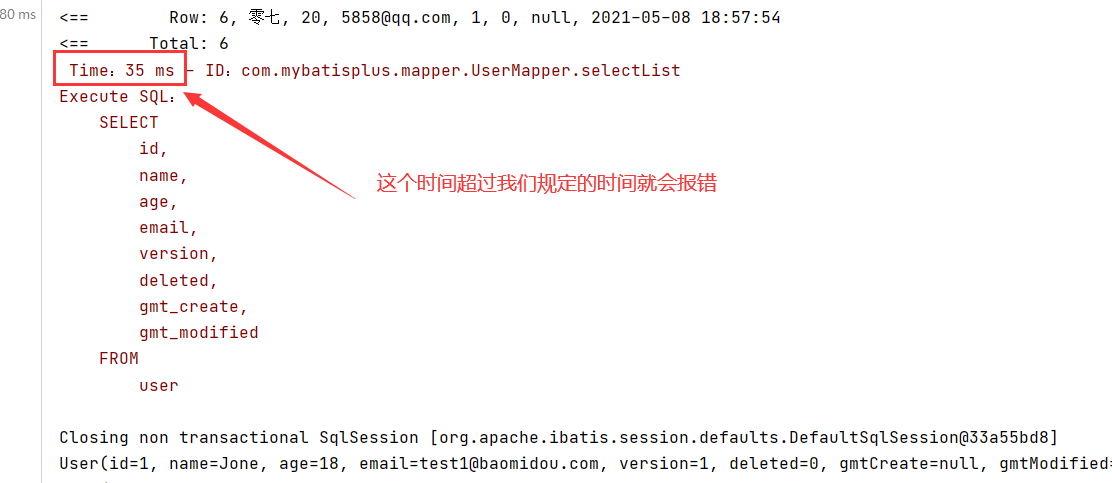
使用性能分析插件可以提高效率,新版本MP已经移除该插件了,可以使用druid
6.条件构造器
测试代码
 //Wrapper测试1
    @Test
    void test1(){
        //查询name不为空,并且邮箱不为空,年龄大于等于20岁
        //isNotNull不为空,ge大于等于
        QueryWrapper<User> wrapper = new QueryWrapper<>();
        wrapper.isNotNull("name").isNotNull("email").ge("age",20);
        List<User> users = userMapper.selectList(wrapper);
        users.forEach(System.out::println);
    }

    //Wrapper测试2
    @Test
    void test2(){
        //按名字查询
        //eq查询name等于Jack的用户
        QueryWrapper<User> wrapper = new QueryWrapper<>();
        wrapper.eq("name","Jack");
        System.out.println(userMapper.selectOne(wrapper));
    }

    //Wrapper测试3
    @Test
    void test3(){
        //查询年龄在22-30之间
        //between查询区间
        QueryWrapper<User> wrapper = new QueryWrapper<>();
        wrapper.between("age",22,30);
        Integer count = userMapper.selectCount(wrapper);//查询结果数
        System.out.println(count);
    }
    //Wrapper测试4
    @Test
    void test4(){
        //模糊查询
        //notLike不像,likeRight右,t%,likeLeft %t
        QueryWrapper<User> wrapper = new QueryWrapper<>();
        wrapper.notLike("name","o").likeRight("email","t");
        userMapper.selectMaps(wrapper).forEach(System.out::println);
    }

    //Wrapper测试5
    @Test
    void test5(){
        //子查询
        //inSql
        QueryWrapper<User> wrapper = new QueryWrapper<>();
        wrapper.inSql("age","select age from user where age<21");
        userMapper.selectList(wrapper).forEach(System.out::println);
    }

    //Wrapper测试6
    @Test
    void test6(){
        //通过id排序查询
        //orderByDesc降序,orderByAsc升序
        QueryWrapper<User> wrapper = new QueryWrapper<>();
        wrapper.orderByDesc("id");
        userMapper.selectList(wrapper).forEach(System.out::println);
    }
测试结果
测试1

测试2

测试3

测试4

测试5

测试6

7.代码生成器
使用步骤
-
添加依赖
<!--mybatis-plus代码生成器依赖-->
        <dependency>
            <groupId>com.baomidou</groupId>
            <artifactId>mybatis-plus-generator</artifactId>
            <version>3.4.1</version>
        </dependency>

        <!--MyBatis-Plus 模板引擎依赖 Velocity(默认)、Freemarker、Beetl,-->
        <dependency>
            <groupId>org.apache.velocity</groupId>
            <artifactId>velocity-engine-core</artifactId>
            <version>2.3</version>
        </dependency>
注意:如果您选择了非默认引擎,需要在 AutoGenerator 中 设置模板引擎。
-
编写配置类
import com.baomidou.mybatisplus.annotation.DbType; import com.baomidou.mybatisplus.annotation.FieldFill; import com.baomidou.mybatisplus.annotation.IdType; import com.baomidou.mybatisplus.generator.AutoGenerator; import com.baomidou.mybatisplus.generator.config.*; import com.baomidou.mybatisplus.generator.config.po.TableFill; import com.baomidou.mybatisplus.generator.config.rules.DateType; import com.baomidou.mybatisplus.generator.config.rules.NamingStrategy; import java.util.ArrayList; //代码自动生成器 public class Code { public static void main(String[] args) { // 代码生成器 AutoGenerator mpg = new AutoGenerator(); // 全局配置 GlobalConfig gc = new GlobalConfig(); String projectPath = System.getProperty("user.dir"); gc.setOutputDir(projectPath + "/src/main/java"); gc.setAuthor("清歌"); gc.setOpen(false); gc.setFileOverride(false);//是否覆盖 gc.setServiceName("%sService");//去Service的I前缀 gc.setIdType(IdType.ASSIGN_ID); gc.setDateType(DateType.ONLY_DATE); gc.setSwagger2(true); //实体属性 Swagger2 注解 mpg.setGlobalConfig(gc); // 数据源配置 DataSourceConfig dsc = new DataSourceConfig(); dsc.setUrl("jdbc:mysql://localhost:3306/mybatis-plus?userSSL=true&useUnicode=true&characterEncoding=UTF-8&serverTimezone=UTC"); dsc.setDriverName("com.mysql.cj.jdbc.Driver"); dsc.setUsername("root"); dsc.setPassword("123456"); dsc.setDbType(DbType.MYSQL); mpg.setDataSource(dsc); // 包配置 PackageConfig pc = new PackageConfig(); pc.setModuleName("ant"); pc.setParent("com.mybatisplus"); pc.setEntity("pojo"); pc.setMapper("mapper"); pc.setService("service"); pc.setController("controller"); mpg.setPackageInfo(pc); // 策略配置 StrategyConfig strategy = new StrategyConfig(); strategy.setInclude("book_info"); //要映射的表名 strategy.setNaming(NamingStrategy.underline_to_camel); strategy.setColumnNaming(NamingStrategy.underline_to_camel); strategy.setEntityLombokModel(true); //自动lombok strategy.setLogicDeleteFieldName("deleted"); //逻辑删除 //自动填充 TableFill createTime = new TableFill("create_time", FieldFill.INSERT); TableFill updateTime = new TableFill("update_time",FieldFill.INSERT_UPDATE); ArrayList<TableFill> fills = new ArrayList<>(); fills.add(createTime); fills.add(updateTime); strategy.setTableFillList(fills); //乐观锁 strategy.setVersionFieldName("version"); strategy.setRestControllerStyle(true);//开启controller的rest风格 strategy.setControllerMappingHyphenStyle(true);// localhost:8080://helle_id_2 下划线命名 mpg.setStrategy(strategy); mpg.execute(); } } -
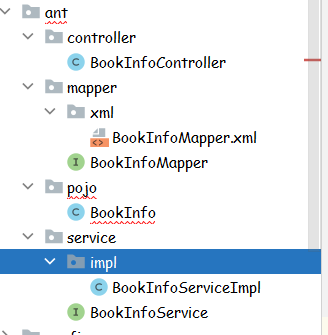
执行,查看效果
![]()

 浙公网安备 33010602011771号