
08——面向对象
面向对象
-
认识对象
- 认识对象
- “键值对” 的集合,属性和值的映射关系
- 大括号表示对象
- k v 之间冒号分隔,每一对用逗号分隔,最后一对可以不写逗号,这一点和数组一样
- k 命名不规范必须用引号包裹,这里单引号和双引号都可以,但json 中的对象k 必须使用双引号包裹
- 点语法 / 方括号 来访问
- delete 操作符:属性删除
- 对象的方法
- 某个属性的值是函数,就被称为对象的方法
- 对象遍历
- 使用 for in 循环可以遍历对象的每个键
- 后面es6 中, 还有其他的遍历方式
- 对象深浅克隆
-
{} == {} // false
-
对象浅克隆
- for in 一层
-
对象深克隆
-
deepClone
-
function deepClone(obj) { if (Array.isArray(obj)) { var result = []; for (var i = 0; i < obj.length; i++) { result.push(deepClone(obj[i])); } } else if (typeof obj == "object") { var result = {}; for (const key in obj) { result[key] = deepClone(obj[key]); } } else { var result = obj; } return result; } -
    const deepClone = (initObj, finalObj = {}) => {
        for (const key in initObj) {
          if (initObj[key] instanceof Array) {
            finalObj[key] = [];
            deepClone(initObj[key], finalObj[key]);
          } else if (initObj[key] instanceof Object) {
            finalObj[key] = {};
            deepClone(initObj[key], finalObj[key]);
          } else {
            finalObj[key] = initObj[key];
          }
        }
      };
-
-
- 认识对象
-
认识函数的上下文
-
什么是上下文
- “ 这是一个好习惯 ” // 这里的 “ 这 ” 就需要上下文
- 与文字中的 这 类似,函数中的 this 具体指代什么,必须通过调用函数时的前后文来判断
-
上下文规则1
-
对象打点调用它的方法函数,则函数的上下文是这个打点的对象
-
function fn() { console.log(this.a + this.b); } var obj = { a: 66, b: 33, fn: fn, }; obj.fn(); -
99
-
var obj1 = { a: 1, b: 2, fn: function () { console.log(this.a + this.b); }, }; var obj2 = { a: 3, b: 4, fn: obj1.fn, }; obj2.fn(); -
7
-
function outer() { var a = 11; var b = 22; return { a: 33, b: 44, fn: function () { console.log(this.a + this.b); }, }; } outer().fn(); -
77
-
function fun() { console.log(this.a + this.b); } var obj = { a: 1, b: 2, c: [ { a: 3, b: 4, c: fun, }, ], }; var a = 5; obj.c[0].c(); -
7
-
-
上下文规则2
-
圆括号直接调用函数,则函数的上下文是window 对象
-
var obj1 = { a: 1, b: 2, fn: function () { console.log(this.a + this.b); }, }; var a = 3; var b = 4; var fn = obj1.fn; fn(); -
7
-
function fun() { return this.a + this.b; } var a = 1; var b = 2; var obj = { a: 3, b: fun(), fun: fun, }; var result = obj.fun(); console.log(result); -
6
-
-
上下文规则3
-
数组(类数组对象)枚举出函数进行调用,上下文是这个数组(类数组对象)
-
argument 对象是最常见的类数组对象
-
var arr = [ "A", "B", "C", function () { console.log(this[0]); }, ]; arr[3](); -
'A'
-
function fun() { arguments[3](); } fun("A", "B", "C", function () { console.log(this[1]); }); -
'B'
-
-
上下文规则4
-
IIFE 中的函数,上下文是window 对象
-
var a = 1; var obj = { a: 2, fun: (function () { var a = this.a; return function () { console.log(a + this.a); }; })(), }; obj.fun(); -
3
-
-
上下文规则5
-
使用定时器、延时器调用函数,上下文是window 对象
-
var obj = { a: 1, b: 2, fun: function () { console.log(this.a + this.b); }, }; var a = 3; var b = 4; setTimeout(obj.fun, 2000); -
7
-
var obj = { a: 1, b: 2, fun: function () { console.log(this.a + this.b); }, }; var a = 3; var b = 4; setTimeout(function () { obj.fun(); }, 2000); -
3
-
-
上下文规则6
- 事件处理函数的上下文是绑定事件的DOM 元素
- 点击哪个盒子,哪个盒子在两秒后变红,要求使用同一个事件处理函数
-
call 和 apply
- 1:把sum 写到小明对象中
- 函数.call(上下文)
- 函数.apply(上下文)
- 区别
- 函数.call(this, var1 ,var2)
- 函数.call(this, [ var1 ,var2 ])
-
-
构造函数
- 用new 调用函数的四步走
- (新的调用函数的方式)
- 函数体内会自动创建一个空白对象
- 函数的上下文(this)会指向这个对象
- 执行函数体内的语句
- 函数会自动返回上下文对象,即使函数没有return 语句
- 构造函数
- 用new 调用的函数就叫构造函数,约定函数首字母大写
- 切记,构造函数中的this 不是函数本身
- 类和实例
- js 是基于对象的语言,和其他面向对象语言本质上不同,没有纯粹的类的概念,只有构造函数
- 用new 调用函数的四步走
-
原型和原型链
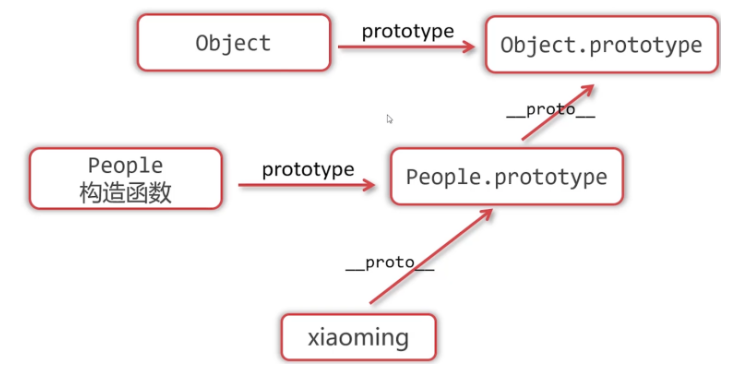
- prototype
- 函数拥有prototype 属性,值是对象,对象中拥有constructor 对象指回函数
- 构造函数的prototype 属性是它的实例的原型
- _proto_
- 实例的 _proto_ 对象指向构造函数的prototype 属性
- 原型链查找
- 实例可以打点访问它的原型的属性和方法
- 原型链也有“ 遮蔽效应 ”
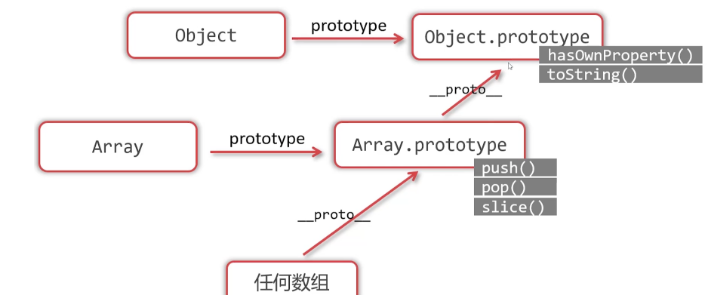
- hasOwnProperty()
- 是否 “ 自己拥有 ” 原型链上的属性不行,返回布尔
- in 运算符
- 是否可以访问,原型链上的属性也可以
- 在prototype 上添加方法
- 这样所有的实例都可以访问到
- 原型链的终点
![]()
- 关于数组的原型链
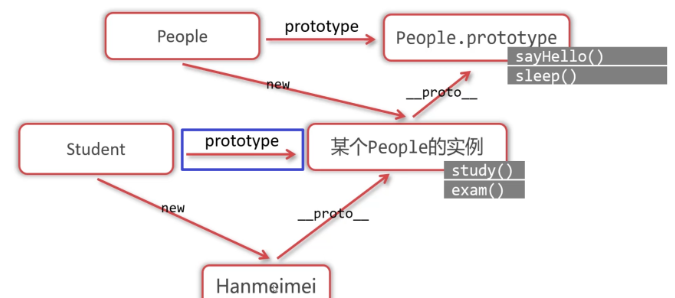
- 继承
- 通过原型链实现继承
![]()
- 子类的prototype 指向父类的一个实例,实现继承,子类需要添加方法,就相当于在父类的那个实例上添加
- 通过原型链实现继承
- prototype
-
上升到面向对象
-
面向对象本质----定义不同的类,让类的实例工作
-
上升到面向对象案例1----红绿灯
-
页面上做一个红绿灯,点击按照顺序切换颜色,思考:如果做很多个应该怎么做?
-
属性:当前的颜色,自己的dom 属性
-
方法:初始化、切换颜色、绑定事件、
-
<!DOCTYPE html>
<html lang="en">
  <head>
    <meta charset="UTF-8" />
    <title>Document</title>

    <style>
      #box img {
        width: 100px;
      }
    </style>
  </head>
  <body>
    <div id="box"></div>

    <script>
      function TrafficLight() {
        this.color = 1;
        this.init();
        this.bindEvent();
      }

      TrafficLight.prototype.init = function () {
        this.dom = document.createElement("img");
        this.dom.src = "./img/" + this.color + ".png";
        box.appendChild(this.dom);
      };
      TrafficLight.prototype.bindEvent = function () {
        var self = this;
        this.dom.onclick = function () {
          self.changeColor();
        };
      };
      TrafficLight.prototype.changeColor = function () {
        this.color++;
        if (this.color == 4) this.color = 1;
        this.dom.src = "./img/" + this.color + ".png";
      };

      var num = 100;
      while (num--) {
        var tl = new TrafficLight();
      }
    </script>
  </body>
</html>
-
-
上升到面向对象案例2----炫彩小球
-
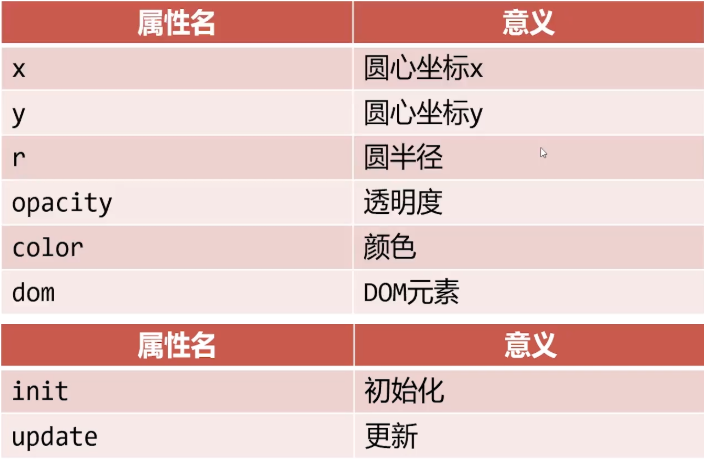
Ball 类
-
![]()
-
<!DOCTYPE html>
<html lang="en">
  <head>
    <meta charset="UTF-8" />
    <title>Document</title>

    <style>
      body {
        background: #34495e;
        overflow: hidden;
      }
      .ball {
        position: absolute;
        border-radius: 50%;
      }
    </style>
  </head>
  <body>
    <script>
      function Ball(x, y) {
        this.x = x;
        this.y = y;
        this.r = 20;
        this.color = colorArr[parseInt(Math.random() * colorArr.length)];

        do {
          this.dX = parseInt(Math.random() * 20) - 10;
          this.dY = parseInt(Math.random() * 20) - 10;
        } while (this.dX == 0 && this.dY == 0);

        this.opacity = 1;

        this.init();
        ballArr.push(this);
      }
      Ball.prototype.init = function () {
        this.dom = document.createElement("div");
        this.dom.classList.add("ball");
        this.dom.style.width = this.r * 2 + "px";
        this.dom.style.height = this.r * 2 + "px";
        this.dom.style.left = this.x - this.r + "px";
        this.dom.style.top = this.y - this.r + "px";
        this.dom.style.background = this.color;
        document.body.appendChild(this.dom);
      };
      Ball.prototype.update = function () {
        this.x += this.dX;
        this.y += this.dY;

        this.r += 0.2;

        this.opacity -= 0.01;

        this.dom.style.width = this.r * 2 + "px";
        this.dom.style.height = this.r * 2 + "px";
        this.dom.style.left = this.x - this.r + "px";
        this.dom.style.top = this.y - this.r + "px";
        this.dom.style.opacity = this.opacity;

        if (this.opacity < 0) {
          for (var i = 0; i < ballArr.length; i++) {
            if (ballArr[i] == this) {
              ballArr.splice(i, 1);
            }
          }
          document.body.removeChild(this.dom);
        }
      };

      var ballArr = [];

      var colorArr = [
        "#16a085",
        "#e74c3c",
        "#ecf0f1",
        "#d35400",
        "#f39c12",
        "#9b59b6",
        "#7f8c8d",
        "#2980b9",
      ];

      setInterval(() => {
        for (var i = 0; i < ballArr.length; i++) {
          ballArr[i].update();
        }
      }, 20);

      document.onmousemove = function (e) {
        var x = e.clientX;
        var y = e.clientY;

        new Ball(x, y);
      };

      var a = new String("aaa");
      console.log(a);
    </script>
  </body>
</html>
-
-
-
js 内置对象
-
包装类
- Number()、String()、Boolean() 就是包装类
- 包装类的目的就是为了让基本类型值可以从他们的构造函数的prototype 上获得方法
- 问题:使用包装类new 出来的变量是基本类型值吗?它们和普通的数字、字符串、布尔、有什么区别
- 包装类虽然new 出来的是对象,但是和普通值一样参与计算,使用PrimitiveValue 值,但是PrimitiveValue 不可以打点访问,是内部值
- 普通值的_proto_ 一样等于包装类的prototype
- 包装类只针对基本类型数值
-
Math 对象
-
幂和开放:Math.pow() Math.sqrt()
-
向上和向下取整:Math.ceil() Math.floor()
-
四舍五入:Math.round() ( Math.round(a * 100) / 100 )
-
最大最小值: Math.max(x1 ,x2 ,x3) Math.min(x1 ,x2 ,x3)
- Math.max.apply(null, arr)
-
随机数:parseInt(Math.random() * (b - a +1) ) + a
-
Date 对象
-
new Date() // object new Date(2022,11,1) // 2022-12-1 月份从零开始算 new Date('2022-12-01') // 同上, 日期月份必须两位 // 上面两种区别 : 第一种写法不算时区,第二种会自动加上时区( 八小时 ) -
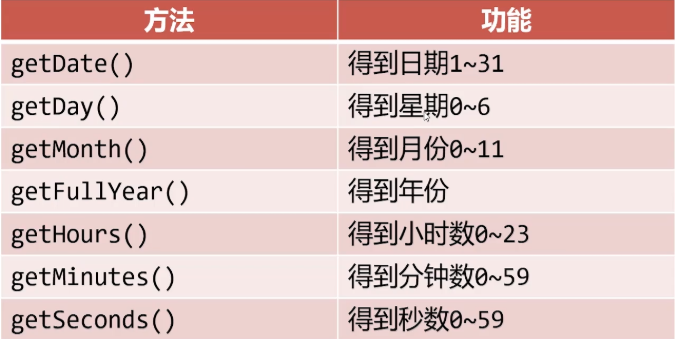
方法:
-
![]()
-
星期天是 0
-
-
时间戳
-
1970-01-01 零点距离某时刻的毫秒数
-
var d = new Date();
var timestamp1 = d.getTime();			// 精确到毫秒
var timestamp2 = Date.parse(d);			// 精确到秒,也是毫秒数,最后三位是000

var dd = new Date(timestamp)
-
-
小案例 : 倒计时小程序
-
在页面上显示距离2024年1月1日还有多少天/多少时/多少分/多少秒
-
	  var nd = new Date();
      var td = new Date(2024, 0, 1);

      var diff = td - nd;

      var day = parseInt(diff / (1000 * 60 * 60 * 24));
      var hours = parseInt((diff % (1000 * 60 * 60 * 24)) / (1000 * 60 * 60));
      var minutes = parseInt((diff % (1000 * 60 * 60)) / (1000 * 60));
      var seconds = parseInt((diff % (1000 * 60)) / 1000);
-
-
-

 浙公网安备 33010602011771号