

vue初级学习--使用 vue-resource 请求数据
一、导语
我发现好像我最近几次写文,都是在7号,很恰巧啊~~~~~~~~~~~~~~~~~~~~~~~~~~~~~~~~~~~~~~~~~~~~~~~~~~~~~~~~~~~~~~~~~~~~~~~~~~~~~~~~~
二、正文
最近用vue做一个订单管理混合开发APP,但是遇到个问题,使用了vueResource的post请求,后端做了跨域解决方案,可是前端还是请求不出去,最后才发现,其实还是有问题,其实踩到这个坑,根本原因,是没把form data和request payload的区别搞懂,所以建议大家还是找找资料,搞搞清楚
1、浅谈 form data和request payload的区别
- form date
get请求,是将请求参数以&方法,拼接在url后面,如:http://www.baidu.com?name=23&password=8888;
真正可以明显看出区分的是在post请求上,
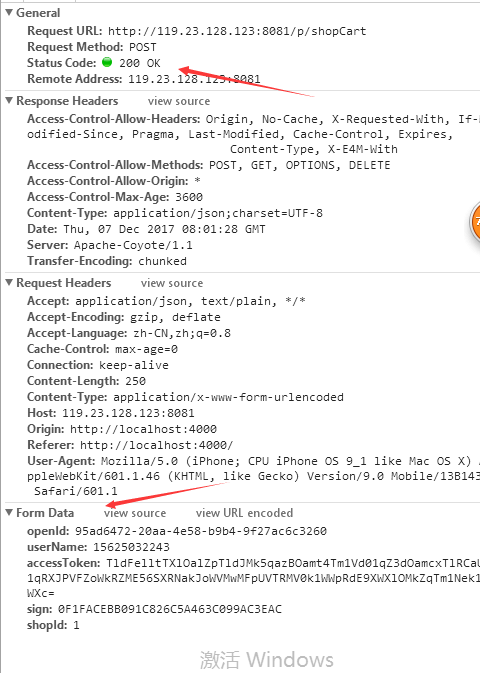
post请求时,头文件 中Content-Type 是默认值 application/x-www-form-urlencoded,参数是放在 form date中的,如下情况
- request payload
post请求时,头文件 中Content-Type 是默认值 application/json;charset=UTF-8,参数是放在 request payload 中的。
顺便说下 Content-Type 的参数,大家可以参考:http://tool.oschina.net/commons
2、解决vue-resource post请求跨域问题
vue提供了一个简单的解决方法,就是 Vue.http.options.emulateJSON = true; 其实等同于在headers中添加 'Content-Type': 'application/x-www-form-urlencoded'
不过,更稳妥的方法是如此写:
// 在路由的请求中如此设置
Vue.http.options.emulateJSON = true
Vue.http.options.xhr = { withCredentials: true }
Vue.http.options.crossOrigin = true
Vue.http.options.emulateHTTP = true
Vue.http.options.root = URL.Purl // URL.Purl指的是服务器路径
为何要如此写呢?感谢 我在寻找这问题时,看到的文章:https://segmentfault.com/a/1190000007087934
效果如下:
所以大家可以愉快的这么运行vue-resource了
getShopCartList() {
        this.$http.post(URL.ShopCartList, {
          openId: this.openId,
          userName: this.userName,
          accessToken: this.accessToken,
          sign: this.sign,
          shopId: this.shopId
        }).then(
          function (response) {
            this.$store.dispatch('update_loading', false)
            let status = response.body.status;
            if (status == 1) {
              let result = response.body.result;
              if (result !== null) {
                this.cartGoodLis = [];
                result.shopCarts.forEach((shopCartsItem) => {
                  if (shopCartsItem.cartItems.length == 1) {
                    this.cartGoodLis.push(shopCartsItem.cartItems[0])
                  } else {
                    shopCartsItem.cartItems.forEach((shopCartsItems) => {
                      this.cartGoodLis.push(shopCartsItems)
                    })
                  }
                });
              } else {
                this.cartGoodLis = [];
              }
            } else {
              // Router.verificationToUser(status, response.body.msg);
            }
          }
        )
      }
三、 结尾
订单管理APP已经通过测试部的测试了,开心开心~~~~~~~~~~~~~~

 浙公网安备 33010602011771号