
java springboot mybatisplus处理mysql JSON类型字段
说明
我们数据库字段类型是json格式的,那么如何转换成实体类呢
本篇教程就是基于mybatisplus解决对象与数据库json互相转换
数据库字段
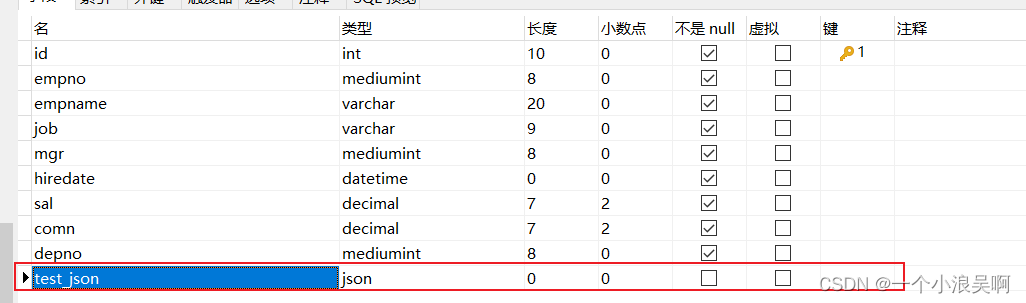
test_json字段类型为json
实体类字段
请注意 @TableField(typeHandler = JacksonTypeHandler.class) 注解
此包是mybatisplus下的,当然也可以自己实现处理类哦
/**
 * @author wuzhenyong
 * ClassName:EmpEntity.java
 * date:2022-05-25 10:31
 * Description:
 */
@TableName("sharding_emp")
@Data
public class EmpEntity {

    @TableId(type = IdType.AUTO)
    private long id;
    private String empno;
    private String empname;
    private String job;
    private String mgr;
    private LocalDateTime hiredate;
    private BigDecimal sal;
    private BigDecimal comn;
    private String depno;
    @TableField(exist = false)
    private long bb;
    @TableField(typeHandler = JacksonTypeHandler.class)
    private Map<String,Object> testJson;
}
测试添加
我们可以看到testJson插入的是一个map
@GetMapping("/testInsertJsonHandler")
public void testInsertJsonHandler() {
    EmpEntity entity = new EmpEntity();
    entity.setEmpno("36666");
    entity.setEmpname("36666");
    entity.setJob("36666");
    entity.setMgr("36666");
    entity.setHiredate(LocalDateTime.now());
    entity.setSal(new BigDecimal("0"));
    entity.setComn(new BigDecimal("0"));
    entity.setDepno("36666");
    Map<String, Object> map = new HashMap<>();
    map.put("name", "测试json添加");
    map.put("list", Lists.newArrayList("1", "2", "3"));
    entity.setTestJson(map);
    empMapper.insert(entity);

}
数据库效果

以上就实现了哦

 浙公网安备 33010602011771号