
web路径专题【学习记录】
一、提出问题
每次访问web资源,都要写完整的路径,很麻烦。如何解决访问资源的问题?
二、解决办法
1.使用相对路径
页面所有的相对路径,在默认情况下,都会参考当前浏览器地址栏的路径 http://ip:port/工程路径/ + 资源来进行跳转。
例如: okServlet => http://localhost:8080/webpath(工程路径)/okServlet
2.相对路径带来的问题
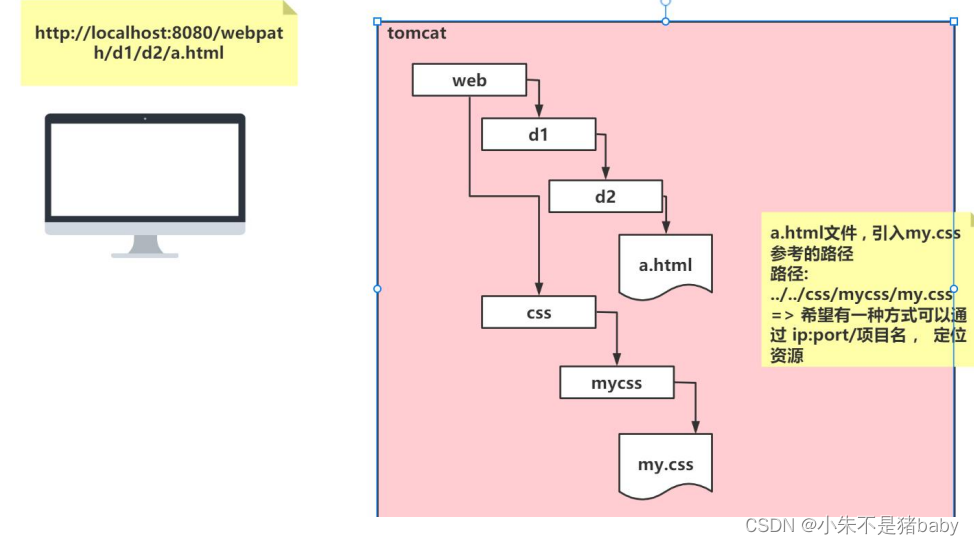
相对路径会让整个项目相互调用的关系变得复杂
3. 使用base标签:
注意:工程路径后的 / 不能少!!!
1.base标签是由浏览器解析
2.浏览器会把第一个 / 解析成 http://localhost:8080/
3.当前页面访问的所有资源,都会以http://localhost:8080/webpath/为参照
href="/webpath/" => href="http://localhost:8080/webpath/"
<a href="a.html"></a> => href="http://localhost:8080/webpath/a.html"
代码示例:
<head>
    <!--<base href="http://localhost:8080/webpath/"/>-->
    <!--简化写法-->
    <base href="/webpath/"/>
</head>
<body>
    <a href="a.html"></a><br/>
    <a href="d1/d2/b.html">跳转到/d1/d2/b.html</a><br/>
  	<a href="servlet03">转发到/d1/d2/b.html</a>
</body>
Web工程路径优化: 使用jsp添加标签,动态获取到的工程路径:
<%@ page contentType="text/html;charset=UTF-8" language="java" isELIgnored="false" %>
<%=request.getContextPath()%>
三、服务端转发定位资源
- 服务器端解析第一个/ =>
/项目名(工程路径)/(因为请求转发 发生在服务器端) - /d1/d2/b.html =>
http://ip:port/项目名(工程路径)/d1/d2/b.html - 在服务器端进行转发,没有/ 就按照默认的方式定位: http://ip:port/项目名(工程路径)/
public class Servlet03 extends HttpServlet {
	@Override
	protected void doPost(HttpServletRequest request, HttpServletResponse response) throws ServletException, IOException {
	    System.out.println("Servlet03进行转发...");
	    request.getRequestDispatcher("/d1/d2/b.html").forward(request,response);
	}
}
四、练习
- 创建login.html
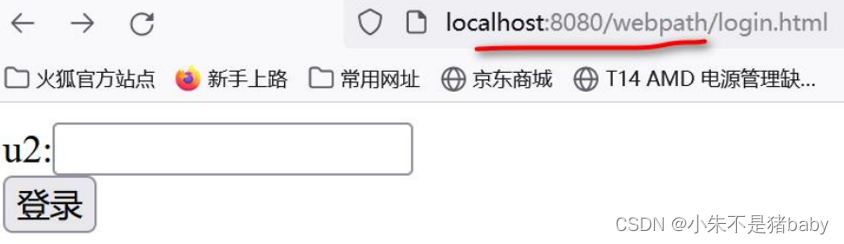
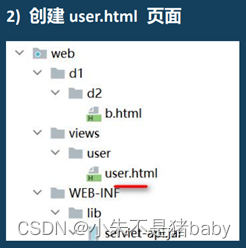
3)请写出 login.html 在不通过Servlet转发情况下,如何通过表单提交,找到 user.html
 1. 绝对路径(完整的url) http://localhost:8080/webpath/views/user/user.html
 2. 相对路径(参考当前浏览器地址): action="views/user/user.html"
 3. 浏览器解析第一个 / => http://localhost:8080     action="/webpath/views/user/user.html"
 4. 使用服务器渲染技术,可以动态得到 /工程路径
<form action="views/user/user.html" method="post">
  u:<input type="text" name="uname"/><br/>
  <input type="submit" value="登录"/>
</form>
4)请写出 login.html 在通过Servlet转发情况下(自己定义Servlet),如何通过表单提交,找到 user.html
1.完整路径 action="http://localhost:8080/webpath/userServlet"
2.相对路径(参考当前浏览器地址): action="userServlet"
3.浏览器解析第一个 / => http://localhost:8080		action="/webpath/userServlet"
login.html
<form action="/webpath/userServlet" method="post">
    u2:<input type="text" name="uname"/><br/>
    <input type="submit" value="登录"/>
</form>
- 定义 UserServlet
/**
 * 使用请求转发(发生在服务器端)
 * 第一个 / 被服务器解析 => /webpath(工程路径)/
 * 可以不写 / ,会默认按照上面的方式解析,但建议写上 /
 */
@Override
protected void doPost(HttpServletRequest request, HttpServletResponse response) throws ServletException, IOException {
    System.out.println("UserServlet进行请求转发...");
    request.getRequestDispatcher("/views/user/user.html").forward(request,response);
    //request.getRequestDispatcher("views/user/user.html").forward(request,response);
}
5)请写出 在user.html,点击 返回登录,可以重新回到到login.html
1. 使用<base href="/webpath/">标签给一个固定的相对路径
      href="login.html" => href="http://localhost:8080/webpath/login.html"
2. 结合请求转发: href="loginServlet"
3. 相对路径(比较麻烦,还要考虑 直接定位 到这个资源还是 请求转发 到这个资源)
<h1>用户页面</h1>
<!-- 回到login.html -->
<a href="login.html">点击返回登录1</a><br/>
<a href="loginServlet">点击返回登录2</a><br/>
<!--<a href="../../loginServlet">点击返回登录3</a><br/>-->
五、总结
本文简单总结了web路径的用法,推荐使用 /工程路径/具体资源路径 进行访问,稳定且不易出错。

 浙公网安备 33010602011771号