

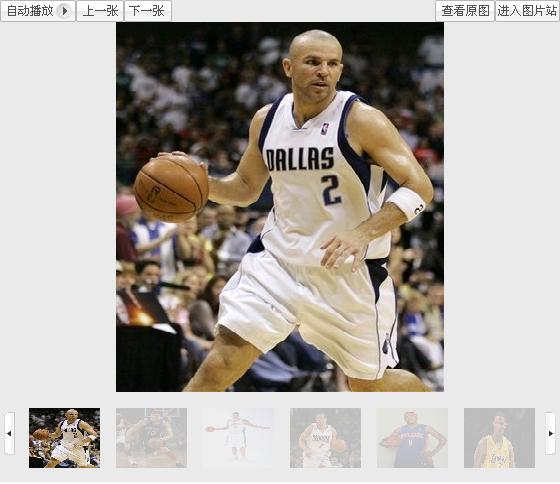
这个我做成的是一个ASP.NET控件
用时传串图片地址数组string[N]传进Imgs属性就可以用了
下面是控件前台代码

 Code
Code1
<% @ Control Language="C#" AutoEventWireup="true" CodeBehind="ImgUserControl.ascx.cs" Inherits="ZM_web.UserControl.ImgUserControl" %>
2
<style type="text/css">3
 img.ximg
4

 {}{
{}{5
border-top: 6px solid #eaeaea;6
border-bottom: 14px solid #eaeaea; 7
border-left: 10px solid #eaeaea; 8
border-right: 6px solid #eaeaea;9
filter:alpha(opacity=20); width: 71px; height: 60px;float: left10
 }
}11
 </style>
12
<style>13
<!--14
15
.mouseBeOffMe {}{16
border-top: 10px solid #eaeaea; 17
border-bottom: 10px solid #eaeaea; 18
border-left: 6px solid #eaeaea; 19
border-right: 10px solid #eaeaea; 20
filter:alpha(opacity=20); width: 71px; height: 60px;float: left21
 }
}22
23
.mouseBeOnMe {}{24
border-top: 6px solid #eaeaea;25
border-bottom: 14px solid #eaeaea; 26
border-left: 10px solid #eaeaea; 27
border-right: 6px solid #eaeaea;28
filter:alpha(opacity=20); width: 71px; height: 60px;float: left29
}30
31
.mouseBeDown {}{32
border-top: 13px solid #eaeaea;33
border-bottom: 7px solid #eaeaea; 34
border-left: 10px solid #eaeaea; 35
border-right: 6px solid #eaeaea;36
filter:alpha(opacity=20); width: 71px; height: 60px;float: left37
}38
39
.mouseBeUp {}{40
border-top: 10px solid #eaeaea;41
border-bottom: 10px solid #eaeaea; 42
border-left: 10px solid #eaeaea; 43
border-right: 6px solid #eaeaea;44
filter:alpha(opacity=20); width: 71px; height: 60px;float: left45
}46
47
//-->48
</style>49
<script type="text/javascript"> 50
var imgdiv=document.getElementsByName('imgdiv');51
<!-- 52
function setImg(img, width, height) 53
{ 54
img.width = img.offsetWidth>width ? width : img.offsetWidth; 55
img.height = img.offsetHeight>height ? height : img.offsetHeight; img.width 56
} 57
//--> 58
<!--59
function makevisible(cur,which){60
if (which==0) 61
{62
cur.filters.alpha.opacity=100;63
cur.className='mouseBeOnMe';64
}65
else66
{67
if(cur.title!=document.getElementById("zimg").title)68
{69
cur.filters.alpha.opacity=20;70
cur.className='mouseBeOffMe';71
}72
}73
}74
75
//-->76
77
function PreviousPage()78
{79
var a =parseInt( document.getElementById("hidden1").value); 80
if(a>1)81
{82
imgdiv[a-2].style.display="block";83
imgdiv[a+4].style.display="none";84
document.getElementById("hidden1").value=a-1;85
}86
}87
88
function NextPage()89
{90
var a =parseInt( document.getElementById("hidden1").value); 91
if((a+6)<imgdiv.length)92
{93
imgdiv[a-1].style.display="none";94
imgdiv[a+5].style.display="block";95
document.getElementById("hidden1").value=a+1;96
}97
}98
99
function xiaoimgok(cur)100
{101
var x=parseInt(document.getElementById("zimg").title);102
document.getElementById("zimg").src=cur.src;103
document.getElementById("zimg").title=cur.title;104
makevisible(imgdiv[x-1],1);105
makevisible(imgdiv[parseInt(document.getElementById("zimg").title-1)],0);106
}107
function Previous()108
{109
var x=parseInt(document.getElementById("zimg").title);110
if(x>1)111
{112
document.getElementById("zimg").src=imgdiv[ x-2].src;113
document.getElementById("zimg").title=imgdiv[ x-2].title;114
makevisible(imgdiv[parseInt(document.getElementById("zimg").title)],1);115
makevisible(imgdiv[x-2],0);116
}117
}118
function next()119
{120
if(parseInt(document.getElementById("zimg").title)<imgdiv.length)121
{122
document.getElementById("zimg").src=imgdiv[ parseInt(document.getElementById("zimg").title)].src;123
document.getElementById("zimg").title=imgdiv[ parseInt(document.getElementById("zimg").title)].title;124
makevisible(imgdiv[parseInt(document.getElementById("zimg").title)-2],1);125
makevisible(imgdiv[parseInt(document.getElementById("zimg").title)-1],0);126
}127
}128
</script>129
130
<div style=" width: 560px; background-color:#eaeaea; margin-bottom: 0px;">131
<img name="ImageButton3" style=" float:left; "132
src="../shop/img/9423081[1].gif" />133
<img name="ImageButton4" onclick="Previous()" style=" float:left"134
src="../shop/img/9423087[1].gif" />135
<img name="ImageButton1" onclick="next()" style=" float:left"136
src="../shop/img/9423077[1].gif" />137
<img ID="ImageButton7" style=" float: right"138
src="../shop/img/9423517[1].gif" />139
<img name="ImageButton2" style=" float: right" 140
src="../shop/img/9423079[1].gif" />141
</div>142
<div style="height: 380px; width: 560px; text-align:center; background-color:#eaeaea">143
<img alt="" title="1" id ="zimg" src='<%=Imgs[0] %>' onload="setImg(this,550,370);" />144
</div>145
<input type="hidden" id="hidden1" value="1"/>146
<div id="xiadiv" name="xxx" style=" width: 560px; background-color:#eaeaea">147
<img name="ImageButton6" style=" float:left; margin-bottom: 0px; " onclick="PreviousPage()"148
src="../shop/img/9423218[1].gif" />149
<img name="ImageButton5" style=" float: right" src="../shop/img/9423216[1].gif" onclick="NextPage()"/>150
<%=xiaoimg() %>151
</div>152
153
<script type="text/javascript">154
window.onload=function()155
{156
makevisible(document.getElementsByName('imgdiv')[parseInt(document.getElementById("zimg").title)-1],0);157
}158
</script>
后台代码
Code1
public partial class ImgUserControl : System.Web.UI.UserControl2
{3
public string [] Imgs4
{5
get { return ViewState["imgs"] as string []; }6
set { ViewState["imgs"] = value; }7
}8
protected void Page_Load(object sender, EventArgs e)9
{10
11
}12
13
protected string xiaoimg()14
{15
string str="";16
for (int i = 0; i < Imgs.Length; i++)17
{18
str += "<img name='imgdiv' alt='' title='" + (i + 1) + "' src='" + Imgs[i] + "' class='ximg' onMouseOver='makevisible(this,0)' onMouseOut='makevisible(this,1)' onclick='xiaoimgok(this)' style='";19
if (i > 5)20
{21
str += "display:none;";22
}23
else24
{25
str += "display:block;";26
}27
str += "cursor:pointer;' class=mouseBeOffMe onmousedown =this.className='mouseBeDown' onmouseup= this.className='mouseBeUp' />";28
}29
return str;30
}31
32
}
添加到页面后台使用代码
Code1
protected void Page_Load(object sender, EventArgs e)2
{3
List<string > list=new List<string> ();4
list.Add("img/18441797.jpg");5
list.Add("img/18441799.jpg");6
list.Add("img/18441801.jpg");7
list.Add("img/18441803.jpg");8
list.Add("img/18441805.jpg");9
list.Add("img/18441807.jpg");10
list.Add("img/18441811.jpg");11
list.Add("img/18441813.jpg");12
this.ImgUserControl1.Imgs = list.ToArray();13
}
这是我所做项目中的一个小控件所以源码我就没发了。
没把JS和CSS单位独放在一个文件下看起有点多。。。

 浙公网安备 33010602011771号