

dify的API调用
根据官方文档,调用dify工作流,尤其是上传文件的工作流,要先去上传文件:
curl -X POST 'http://localhost/v1/files/upload' \
--header 'Authorization: Bearer {api_key}' \
--form 'file=@localfile;type=image/[png|jpeg|jpg|webp|gif]' \
--form 'user=abc-123'
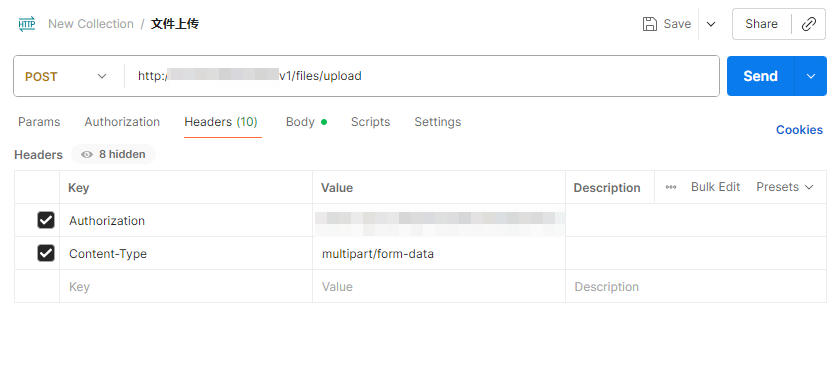
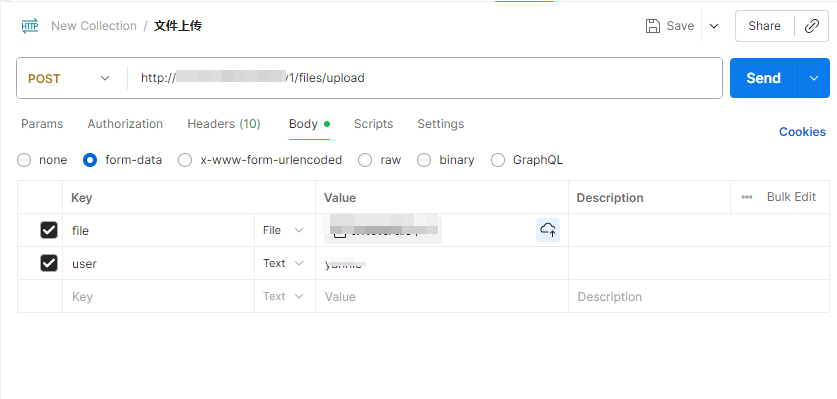
这里使用postman上传本地文件如果报错,解决方案:解决postman上传文件,打不开文件的问题_postman form-data上传的图片打不开-CSDN博客
还有发送请求的格式什么的都正确,但请求失败,建议查看前一天fq时是不是没有关闭代理就关机了,此时打开代理,基本就可以了。
上传成功文件后,获得的response里有文件id,复制下来。
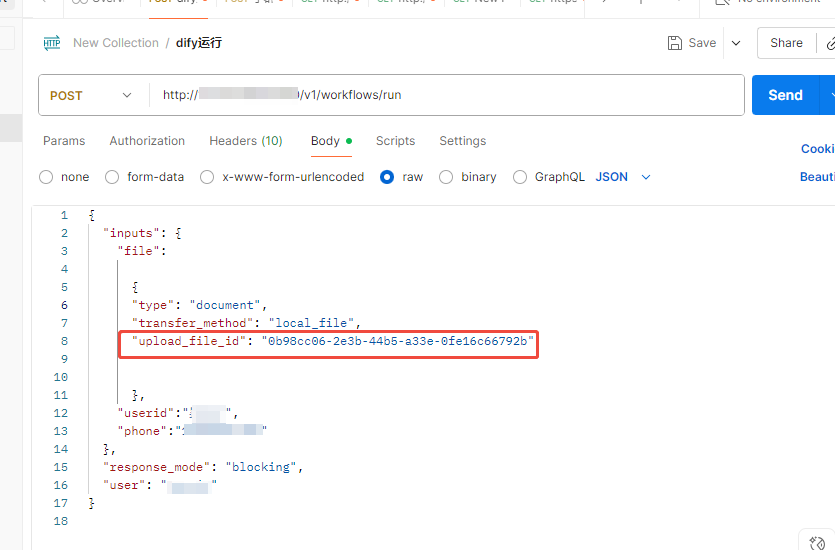
调用工作流运行API,这里和官方文档中并不完全一致,但我按照官方文档反倒不成功。。。
官方:
curl -X POST 'http://localhost/v1/workflows/run' \
--header 'Authorization: Bearer {api_key}' \
--header 'Content-Type: application/json' \
--data-raw '
{
"inputs": {
"{variable_name}":
[
{
"transfer_method": "local_file",
"upload_file_id": "{upload_file_id}",
"type": "{document_type}"
}
]
}
"response_mode": "streaming",
"user": "abc-123"
}'
因为我个人的工作流还需要在开始节点输入姓名和手机号,所以我又加了

 浙公网安备 33010602011771号