Perfetto:抓取log与分析
编译工具,然后使用工具抓取Trace并及进行分析。
1 编译工具
下载Perfetto源码:
git clone https://android.googlesource.com/platform/system/perfetto.git
cd perfetto
生成配置文件:
tools/gn gen out/linux
编译traced等工具:
ninja -C out/linux
2 设置抓取数据
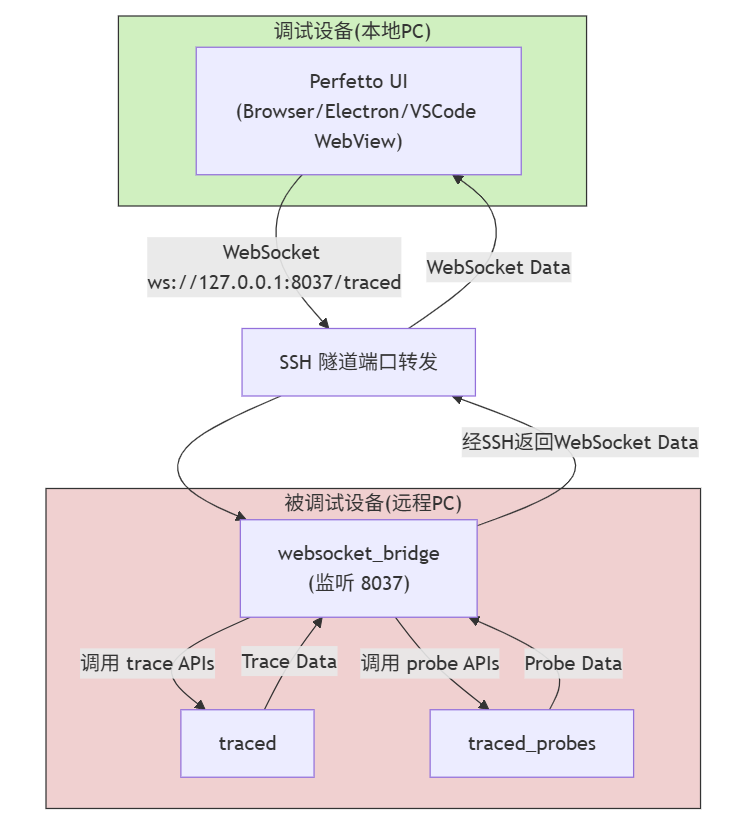
2.1 启动traced和traced_probe
启动traced:
traced &
如下:
[979.989] service.cc:249 Started traced, listening on /tmp/perfetto-producer /tmp/perfetto-consumer
启动traced_probes:
traced_probes &
如下:
[987.162]           probes.cc:103 Starting ./traced_probes service
[987.163] ing_service_impl.cc:395 Producer 1 connected, uid=1000
[987.164]  probes_producer.cc:394 Connected to the service
...
2.2 启动websocket_bridge
启动websocket_bridge,指定端口8037:
websocket_bridge --port 8037
如下:
./websocket_bridge --port 8037
[004.882]  websocket_bridge.cc:90 [WSBridge] adb server socket is:127.0.0.1:5037.
[004.882]       http_server.cc:67 [HTTP] Starting HTTP server on 127.0.0.1:8037
[004.882]       http_server.cc:78 [HTTP] Starting HTTP server on [::1]:8037
[004.882] websocket_bridge.cc:101 [WSBridge] Listening on 127.0.0.1:8037
[095.739]      http_server.cc:120 [HTTP] New connection
[095.740]      http_server.cc:271 [HTTP] GET /traced [body=0B, origin="http://localhost:10000"]
[095.740] websocket_bridge.cc:119 [WSBridge] New connection from "http://localhost:10000"
[095.740] websocket_bridge.cc:130 [WSBridge] Connected to /tmp/perfetto-consumer
[095.740]      http_server.cc:358 [HTTP] Handshaking WebSocket for /traced
[095.740]      http_server.cc:360 > Upgrade: websocket
[095.740]      http_server.cc:360 > Connection: Upgrade
[095.740]      http_server.cc:360 > Sec-WebSocket-Accept: mhAzf3QnrRHbW9FI4dirqtDw3o0=
[095.757] ing_service_impl.cc:489 Consumer 0x6195fe7a1180 connected from UID 1000
[178.973]      http_server.cc:120 [HTTP] New connection
[178.973]      http_server.cc:271 [HTTP] GET /traced [body=0B, origin="http://localhost:10000"]
[178.973] websocket_bridge.cc:119 [WSBridge] New connection from "http://localhost:10000"
[178.973] websocket_bridge.cc:130 [WSBridge] Connected to /tmp/perfetto-consumer
[178.974]      http_server.cc:358 [HTTP] Handshaking WebSocket for /traced
[178.974]      http_server.cc:360 > Upgrade: websocket
[178.974]      http_server.cc:360 > Connection: Upgrade
[178.974]      http_server.cc:360 > Sec-WebSocket-Accept: WETKBNkabPJrB+Ajdv8sIYyKqSQ=
[178.987] ing_service_impl.cc:489 Consumer 0x6195fe7a3a90 connected from UID 1000
[178.987] ing_service_impl.cc:599 Enabling tracing for consumer 0x6195fe7a23a0, UUID: 103ffaee-5a0a-5bed-9eb0-a892896bc7a5
[178.988] ng_service_impl.cc:3275 Setting up data source linux.ftrace with target buffer 1
[178.988] ng_service_impl.cc:3309 Creating SMB of 2048 KB for producer "perfetto.traced_probes"
[178.988] ng_service_impl.cc:3275 Setting up data source linux.process_stats with target buffer 2
[178.988] ng_service_impl.cc:3275 Setting up data source linux.sys_stats with target buffer 1
2.3 Perfetto UI链接
Perfetto UI和被测设备在同一PC为例,启动Perfetto UI:
ui/build -s --serve-host 0.0.0.0 -w
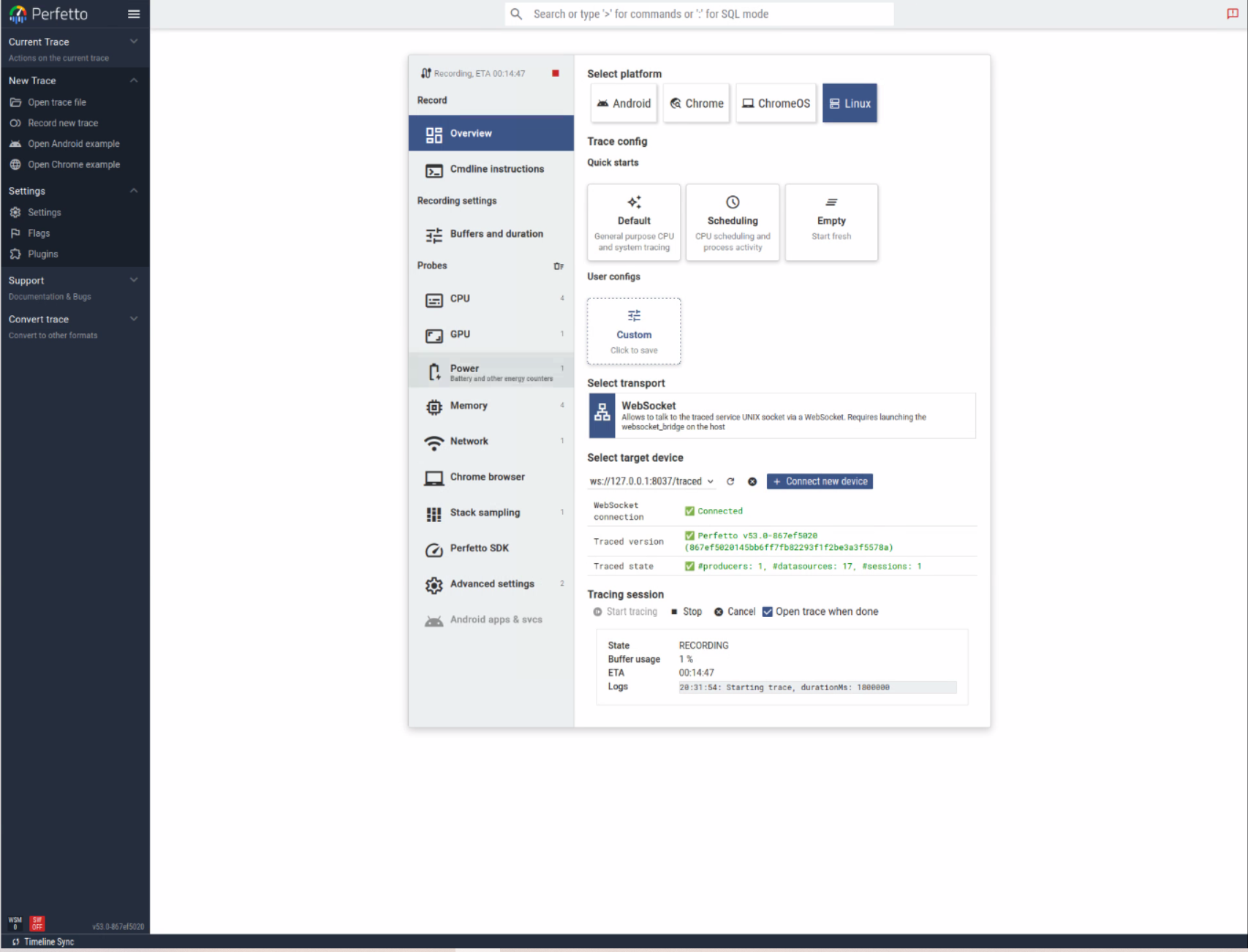
检测到可用websocket后,如下:
- 选择抓取哪个平台:Android、Chrome、Linux等。
- 选取抓取配置:Default、Scheduling、自定义等。
- 选择传输通道:WebSocket等。
- 抓取会话:Start tracing、Stop等。
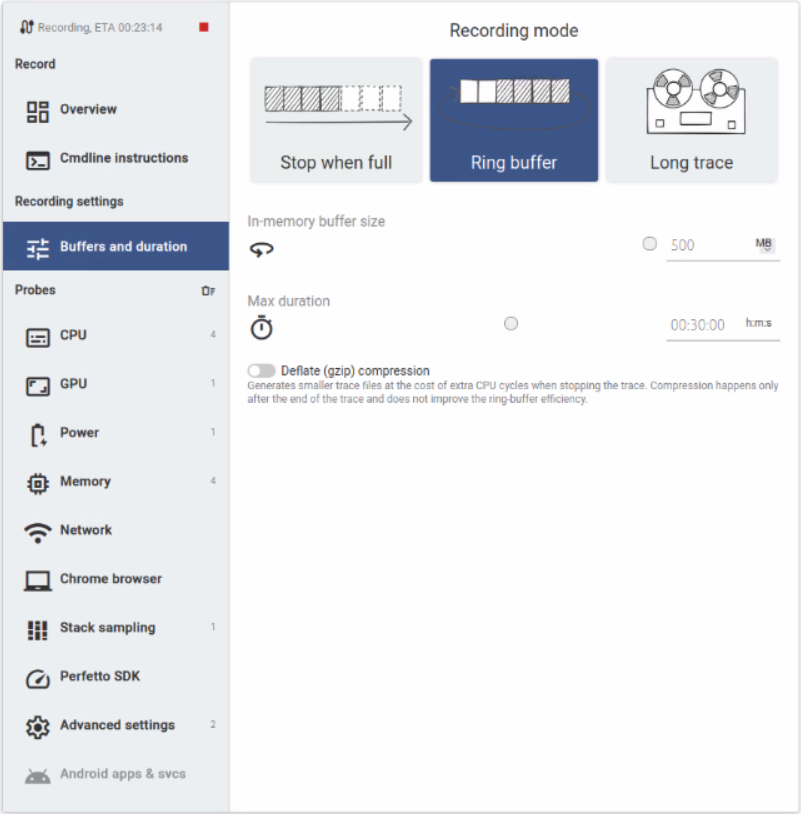
缓存模式和时长配置:Buffers and dataflow - Perfetto Tracing Docs。
抓取哪些Trace和Probe:

3 分析Trace数据
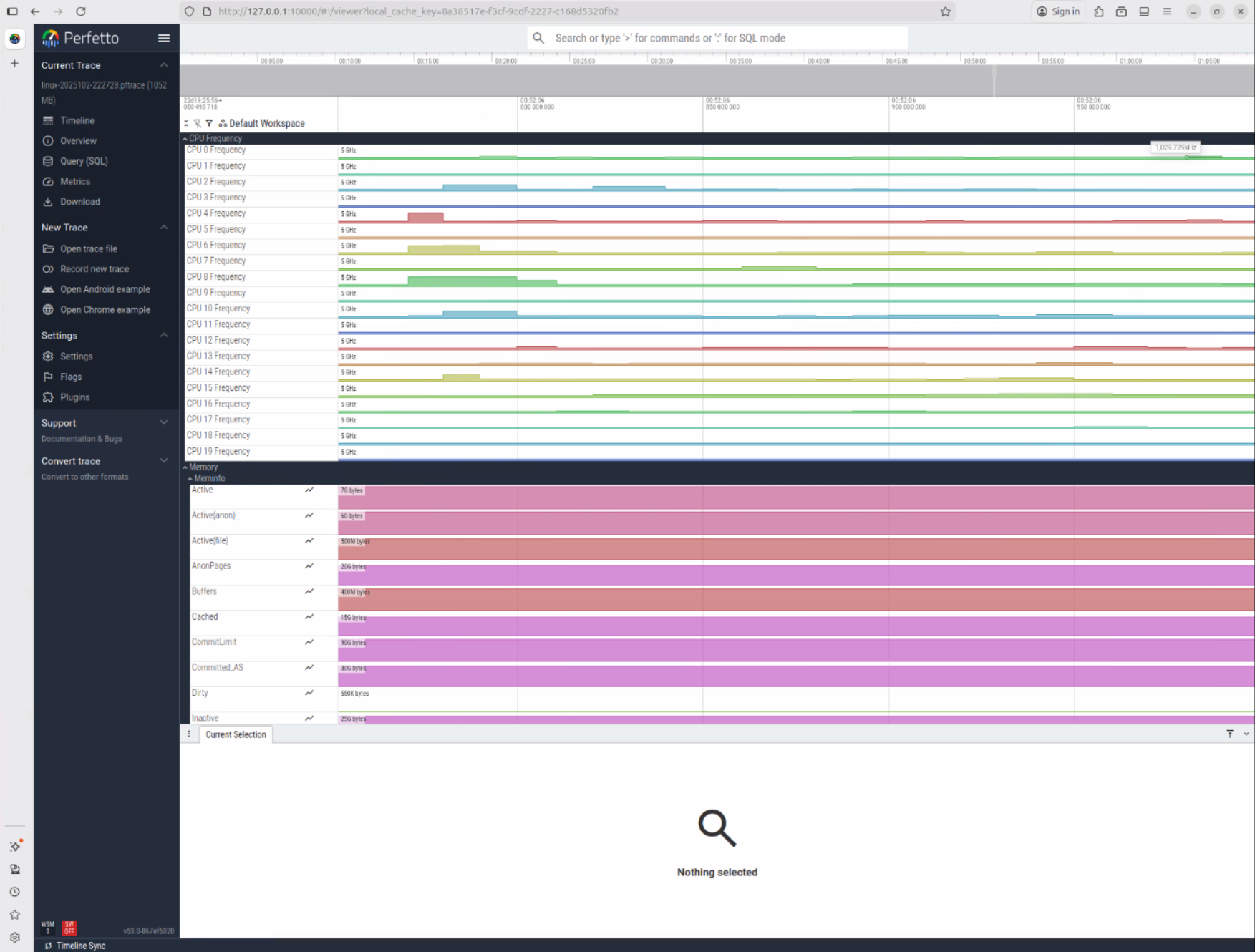
Perfetto UI - Perfetto Tracing Docs介绍了Perfetto UI的主界面使用方法,如果有大文件需要打开参考Visualising large traces - Perfetto Tracing Docs。。
联系方式:arnoldlu@qq.com


 浙公网安备 33010602011771号