OpenWRT(21):sysupgrade中签名和验签流程
sysupgrade支持在编译的时候生成签名和metadata,在设备进行upgrade进行验签和metadata检查。
1 签名和metadata生成流程
签名和metadata流程如下:
| 文件 | 类型 | 核心作用 |
|---|---|---|
key-build |
私钥 | 签名固件和软件包。 |
key-build.pub |
公钥 | 验证签名合法性。 |
key-build.ucert |
证书 | 扩展信任链,支持复杂证书体系。 |
key-build.sig |
签名文件 | 验证特定文件的完整性和来源。 |
key-build.ucert.revoke |
证书撤销列表 | 声明失效证书,防止非法访问。 |
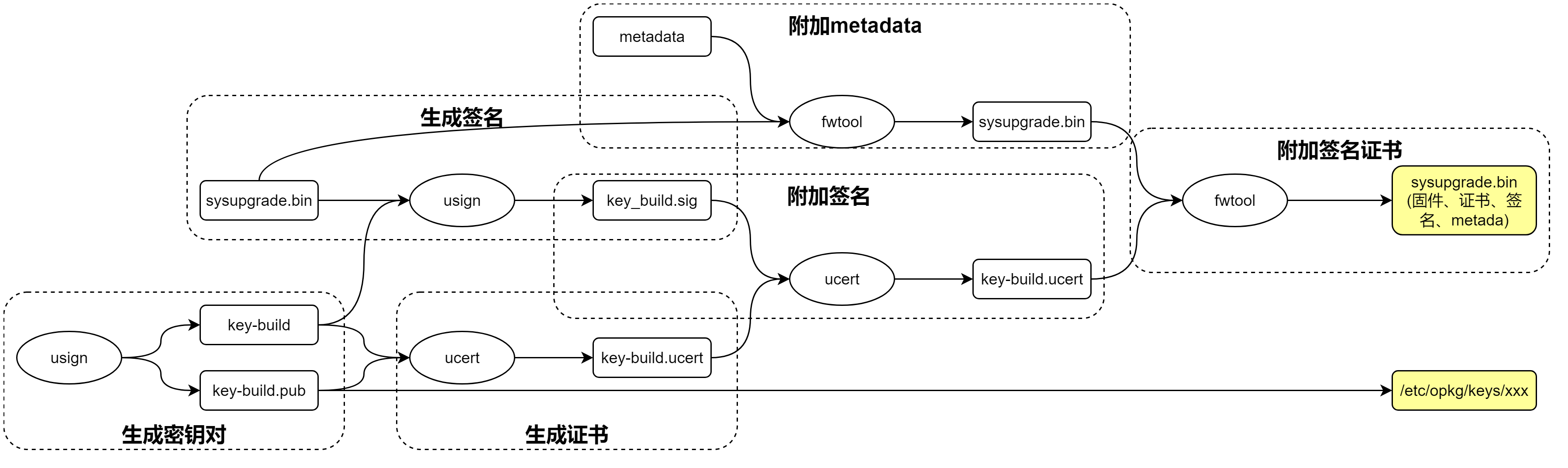
usign基于Ed25519非对称算法和SHA512,用于生成密钥对、签名、验签等:
Usage: staging_dir/host/bin/usign <command> <options>
Commands:
  -V:                   verify (needs at least -m and -p|-P)
  -S:                   sign (needs at least -m and -s)
  -F:                   print key fingerprint of public/secret key or signature
  -G:                   generate a new keypair (needs at least -p and -s)
Options:
  -c <comment>:         add comment to keys
  -m <file>:            message file
  -p <file>:            public key file (verify/fingerprint only)
  -P <path>:            public key directory (verify only)
  -q:                   quiet (do not print verification result, use return code only)
  -s <file>:            secret key file (sign/fingerprint only)
  -x <file>:            signature file (defaults to <message file>.sig)
ucert用于生成证书、附加签名、验签等:
Usage: staging_dir/host/bin/ucert <command> <options>
Commands:
  -A:                   append signature (needs -c and -x)
  -D:                   dump (needs -c)
  -I:                   issue cert and revoker (needs -c and -p and -s)
  -R:                   process revoker certificate (needs -c and -P)
  -V:                   verify (needs -c and -p|-P, may have -m)
Options:
  -c <file>:            certificate file
  -m <file>:            message file (verify only)
  -p <file>:            public key file
  -P <path>:            public key directory (verify only)
  -q:                   quiet (do not print verification result, use return code only)
  -s <file>:            secret key file (issue only)
  -x <file>:            signature file (append only)
fwtool将签名和metadata打包到固件中,或者从固件解包:
Usage: staging_dir/host/bin/fwtool <options> <firmware>

Options:
  -S <file>:            Append signature file to firmware image
  -I <file>:            Append metadata file to firmware image
  -s <file>:            Extract signature file from firmware image
  -i <file>:            Extract metadata file from firmware image
  -t:                   Remove extracted chunks from firmare image (using -s, -i)
  -T:                   Output firmware image without extracted chunks to stdout (using -s, -i)
  -q:                   Quiet (suppress error messages)
package/base-files/Makefile中生成私钥、公钥、证书:
ifdef CONFIG_SIGNED_PACKAGES
  define Build/Configure
        [ -s $(BUILD_KEY) -a -s $(BUILD_KEY).pub ] || \
                $(STAGING_DIR_HOST)/bin/usign -G -s $(BUILD_KEY) -p $(BUILD_KEY).pub -c "Local build key"--生成一对私钥和公钥,注释为Local build key。

        [ -s $(BUILD_KEY).ucert ] || \
                $(STAGING_DIR_HOST)/bin/ucert -I -c $(BUILD_KEY).ucert -p $(BUILD_KEY).pub -s $(BUILD_KEY)--根据私钥和公钥生成证书。

  endef
...
endif
package/base-files/Makefile中安装公钥到rootfs:
  define Package/base-files/install-key
        mkdir -p $(1)/etc/opkg/keys
        $(CP) $(BUILD_KEY).pub $(1)/etc/opkg/keys/`$(STAGING_DIR_HOST)/bin/usign -F -p $(BUILD_KEY).pub`--拷贝的pubkey名称为key-public.key的fingerprint。所以rootfs中的pubkey要和sysupgrade升级包中一致。

  endef
include/image-commands.mk中对镜像进行签名:
compat_version=$(if $(DEVICE_COMPAT_VERSION),$(DEVICE_COMPAT_VERSION),1.0)
json_quote=$(subst ','\'',$(subst ",\",$(1)))
#")')

legacy_supported_message=$(SUPPORTED_DEVICES) - Image version mismatch: image $(compat_version), \
        device 1.0. Please wipe config during upgrade (force required) or reinstall. \
        $(if $(DEVICE_COMPAT_MESSAGE),Reason: $(DEVICE_COMPAT_MESSAGE),Please check documentation ...)

metadata_devices=$(if $(1),$(subst "$(space)","$(comma)",$(strip $(foreach v,$(1),"$(call json_quote,$(v))"))))
metadata_json = \
        '{ $(if $(IMAGE_METADATA),$(IMAGE_METADATA)$(comma)) \
                "metadata_version": "1.1", \
                "compat_version": "$(call json_quote,$(compat_version))", \
                $(if $(DEVICE_COMPAT_MESSAGE),"compat_message": "$(call json_quote,$(DEVICE_COMPAT_MESSAGE))"$(comma)) \
                $(if $(filter-out 1.0,$(compat_version)),"new_supported_devices": \
                        [$(call metadata_devices,$(SUPPORTED_DEVICES))]$(comma) \
                        "supported_devices": ["$(call json_quote,$(legacy_supported_message))"]$(comma)) \
                $(if $(filter 1.0,$(compat_version)),"supported_devices":[$(call metadata_devices,$(SUPPORTED_DEVICES))]$(comma)) \--取SUPPORTED_DEVICES定义的设备名称。
                "version": { \
                        "dist": "$(call json_quote,$(VERSION_DIST))", \--指的是OpenWrt。
                        "version": "$(call json_quote,$(VERSION_NUMBER))", \--OpenWrt的版本号。
                        "revision": "$(call json_quote,$(REVISION))", \
                        "target": "$(call json_quote,$(TARGETID))", \
                        "board": "$(call json_quote,$(if $(BOARD_NAME),$(BOARD_NAME),$(DEVICE_NAME)))" \--如果定义BOARD_NAME,则取值;否则取DEVICE_NAME。
                } \
        }'

define Build/append-metadata
        $(if $(SUPPORTED_DEVICES),-echo $(call metadata_json) | fwtool -I - $@)
        [ ! -s "$(BUILD_KEY)" -o ! -s "$(BUILD_KEY).ucert" -o ! -s "$@" ] || { \
                cp "$(BUILD_KEY).ucert" "$@.ucert" ;\
                usign -S -m "$@" -s "$(BUILD_KEY)" -x "$@.sig" ;\--对-m指定的输入文件,使用-s私钥进行签名,写入-x指定签名中。
                ucert -A -c "$@.ucert" -x "$@.sig" ;\--将签名附加到证书中。
                fwtool -S "$@.ucert" "$@" ;\--将带签名的证书附加到镜像中。
        }
endef
然后将append-metada放在sysupgrade生成命令之后,对其进行签名添加metadata。
2 验签和metadata检查流程
验签和metada检查流程如下:
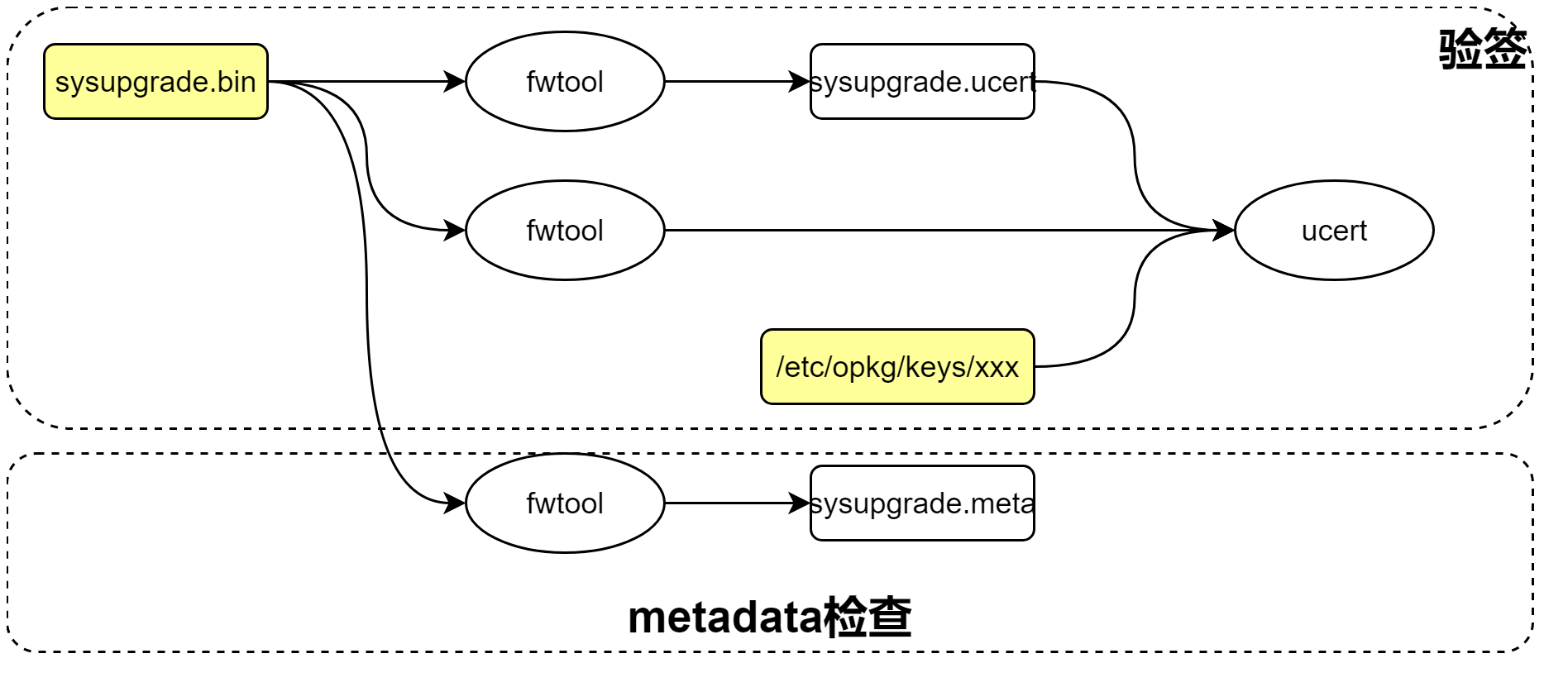 sysupgrade进行升级包验签:
- 升级过程中如果REQUIRE_IMAGE_SIGNATURE为1,则必须检查签名。REQUIRE_IMAGE_METADATA为1,则必须检查metadata。失败则停止。除非使用sysupgrade -F强制更新。
json_load  "$(/usr/libexec/validate_firmware_image "$IMAGE")"
  fw_check_signature(/lib/upgrade/fwtool.sh)
    -x /usr/bin/ucert--检查ucert工具是否存在。如果不存在或不可执行,则检查REQUIRE_IMAGE_SIGNATURE是否为1,为1表示需要签名,返回1,表示错误;否则返回0,表示成功。
    fwtool -q -s /tmp/sysupgrade.ucert $IMAGE--从升级包中提取签名文件到/tmp/sysupgrade.ucert。
    fwtool -q -T -s /dev/null $IMAGE | ucert -V -m - -c "/tmp/sysupgrade.ucert" -P /etc/opkg/keys--fwtool从升级包中提取固件文件,并使用公钥和签名进行验签。并将公钥的内容放入到/etc/opkg.keys目录下。
  fw_check_image(/lib/upgrade/fwtool.sh)
    /usr/share/libubox/jshn.sh
    fwtool -q -i /tmp/sysupgrade.meta $IMAGE--从升级包中提取metadata文件。
    json_get_keys dev_keys--获取当前设备名称和支持设备名称比较,以及进行版本兼容检查。
fwtool_check_signature提取证书签名,然后进行验签。
fwtool_check_signature() {
        [ $# -gt 1 ] && return 1

        [ ! -x /usr/bin/ucert ] && {
                if [ "$REQUIRE_IMAGE_SIGNATURE" = 1 ]; then
                        return 1
                else
                        return 0
                fi
        }

        if ! fwtool -q -s /tmp/sysupgrade.ucert "$1"; then
                v "Image signature not present"
                [ "$REQUIRE_IMAGE_SIGNATURE" = 1 -a "$FORCE" != 1 ] && {
                        v "Use sysupgrade -F to override this check when downgrading or flashing to vendor firmware"
                }
                [ "$REQUIRE_IMAGE_SIGNATURE" = 1 ] && return 1
                return 0
        fi

        fwtool -q -T -s /dev/null "$1" | \
                ucert -V -m - -c "/tmp/sysupgrade.ucert" -P /etc/opkg/keys

        return $?
}
fwtool_check_image提取metata,然后检查版本号和设备兼容性。
fwtool_check_image() {
    [ $# -gt 1 ] && return 1

    . /usr/share/libubox/jshn.sh

    if ! fwtool -q -i /tmp/sysupgrade.meta "$1"; then
        v "Image metadata not present"
        [ "$REQUIRE_IMAGE_METADATA" = 1 -a "$FORCE" != 1 ] && {
            v "Use sysupgrade -F to override this check when downgrading or flashing to vendor firmware"
        }
        [ "$REQUIRE_IMAGE_METADATA" = 1 ] && return 1
        return 0
    fi

    json_load "$(cat /tmp/sysupgrade.meta)" || {--解析metadata到json。
        v "Invalid image metadata"
        return 1
    }

    device="$(cat /tmp/sysinfo/board_name)"--从board_name获取当前设备名称。
    devicecompat="$(uci -q get system.@system[0].compat_version)"--获取设备兼容版本号,否则默认1.0。
    [ -n "$devicecompat" ] || devicecompat="1.0"

    json_get_var imagecompat compat_version--从metada获取compart_version。
    json_get_var compatmessage compat_message
    [ -n "$imagecompat" ] || imagecompat="1.0"

    # select correct supported list based on compat_version
    # (using this ensures that compatibility check works for devices
    #  not knowing about compat-version)
    local supported=supported_devices--获取metada中supported_devices列表。
    [ "$imagecompat" != "1.0" ] && supported=new_supported_devices
    json_select $supported || return 1

    json_get_keys dev_keys
    for k in $dev_keys; do--遍历supported_devices列表。
        json_get_var dev "$k"
        if [ "$dev" = "$device" ]; then--判断当前设备device是否在supported_devices中。
            # major compat version -> no sysupgrade
            if [ "${devicecompat%.*}" != "${imagecompat%.*}" ]; then--比较从设备获取的版本号devicecompat和metadata中版本号imagecompat的点号之前的部分是否一致。不一致则返回错误。
                v "The device is supported, but this image is incompatible for sysupgrade based on the image version ($devicecompat->$imagecompat)."
                [ -n "$compatmessage" ] && v "$compatmessage"
                return 1
            fi

            # minor compat version -> sysupgrade with -n required
            if [ "${devicecompat#.*}" != "${imagecompat#.*}" ] && [ "$SAVE_CONFIG" = "1" ]; then--版本号点号后部分兼容性检查。
                v "The device is supported, but the config is incompatible to the new image ($devicecompat->$imagecompat). Please upgrade without keeping config (sysupgrade -n)."
                [ -n "$compatmessage" ] && v "$compatmessage"
                return 1
            fi

            return 0--设备名称匹配,并且版本号匹配则表示metadata支持。
        fi
    done

    v "Device $device not supported by this image"
    vn "Supported devices:"
    for k in $dev_keys; do
        json_get_var dev "$k"
        _vn " $dev"
    done
    _v

    return 1
}
联系方式:arnoldlu@qq.com


 浙公网安备 33010602011771号