

第二次作业
• 作业①:
– 要求:在中国气象网(http://www.weather.com.cn)给定城市集的7日天气预报,并保存在数据库。
– 输出信息:
我选择的是爬取福州的天气
核心代码`网页爬虫模块
负责从中国气象网抓取天气数据
"""
import requests
from bs4 import BeautifulSoup
import re
import time
from datetime import datetime
from config import Config
class WeatherCrawler:
"""
天气数据爬虫类
从中国气象网抓取福州7日天气预报
"""
def __init__(self, retry_times=3, timeout=10):
    """
    初始化爬虫

    Args:
        retry_times: 重试次数
        timeout: 请求超时时间(秒)
    """
    self.session = requests.Session()
    self.session.headers.update(Config.HEADERS)
    self.retry_times = retry_times
    self.timeout = timeout
    print("✓ 爬虫初始化完成")

def extract_temperature_values(self, temp_str):
    """
    从温度字符串中提取数值

    Args:
        temp_str: 温度字符串,如 "25/18℃" 或 "25℃/18℃"

    Returns:
        tuple: (最高温度, 最低温度) 或 (None, None)
    """
    if not temp_str:
        return None, None

    try:
        # 使用正则表达式提取所有数字
        numbers = re.findall(r'(-?\d+)', temp_str)

        if len(numbers) >= 2:
            # 通常第一个是最高温,第二个是最低温
            high_temp = float(numbers[0])
            low_temp = float(numbers[1])
            return high_temp, low_temp
        elif len(numbers) == 1:
            # 如果只有一个数字,假设为最高温
            return float(numbers[0]), None
        else:
            return None, None

    except (ValueError, TypeError) as e:
        print(f"⚠️  温度解析失败 '{temp_str}': {e}")
        return None, None

def parse_weather_html(self, html_content):
    """
    解析HTML内容,提取天气数据

    Args:
        html_content: HTML网页内容

    Returns:
        list: 天气数据列表
    """
    if not html_content:
        print("✗ HTML内容为空")
        return []

    weather_data_list = []

    try:
        soup = BeautifulSoup(html_content, 'html.parser')

        # 方法1:尝试查找7天天气预报的容器(标准结构)
        weather_container = soup.find('ul', class_='t clearfix')

        if not weather_container:
            # 方法2:尝试其他可能的容器
            weather_container = soup.find('div', id='7d')
            if weather_container:
                weather_container = weather_container.find('ul')

        if not weather_container:
            print("✗ 未找到天气数据容器,网站结构可能已变化")
            # 可以在这里添加调试信息
            # print("页面标题:", soup.title.text if soup.title else "无标题")
            return []

        # 查找所有的天气条目
        weather_items = weather_container.find_all('li')

        if not weather_items:
            print("✗ 未找到天气数据条目")
            return []

        print(f"✓ 找到 {len(weather_items)} 个天气条目")

        # 解析每个天气条目
        for index, item in enumerate(weather_items[:7]):  # 只取前7天
            try:
                weather_data = {
                    'city': '福州',
                    'date': '',
                    'week': '',
                    'weather': '',
                    'temperature': '',
                    'wind': '',
                    'high_temp': None,
                    'low_temp': None
                }

                # 1. 提取日期和星期
                date_tag = item.find('h1')
                if date_tag:
                    date_text = date_tag.get_text(strip=True)
                    # 处理格式如 "20日(今天)"
                    if '(' in date_text and ')' in date_text:
                        date_part = date_text.split('(')[0].strip()
                        week_part = date_text.split('(')[1].split(')')[0].strip()
                        weather_data['date'] = date_part
                        weather_data['week'] = week_part
                    else:
                        weather_data['date'] = date_text

                # 2. 提取天气状况
                wea_tag = item.find('p', class_='wea')
                if wea_tag:
                    weather_data['weather'] = wea_tag.get_text(strip=True)

                # 3. 提取温度
                temp_tag = item.find('p', class_='tem')
                if temp_tag:
                    # 获取温度文本,清理空白字符
                    temp_text = temp_tag.get_text(strip=True, separator=' ')
                    weather_data['temperature'] = temp_text

                    # 提取温度数值
                    high_temp, low_temp = self.extract_temperature_values(temp_text)
                    weather_data['high_temp'] = high_temp
                    weather_data['low_temp'] = low_temp

                # 4. 提取风力风向
                wind_tag = item.find('p', class_='win')
                if wind_tag:
                    # 移除图标标签
                    for icon in wind_tag.find_all('i'):
                        icon.decompose()
                    wind_text = wind_tag.get_text(strip=True, separator=' ')
                    weather_data['wind'] = wind_text

                # 确保有有效数据才添加到列表
                if weather_data['date']:
                    weather_data_list.append(weather_data)
                    print(
                        f"  ✓ 解析第{index + 1}天: {weather_data['date']} {weather_data['weather']} {weather_data['temperature']}")

            except Exception as e:
                print(f"  ✗ 解析第{index + 1}个条目时出错: {e}")
                continue

        return weather_data_list

    except Exception as e:
        print(f"✗ 解析HTML时发生错误: {e}")
        return []

def fetch_weather_with_retry(self):
    """
    获取天气数据,支持重试机制

    Returns:
        list: 天气数据列表
    """
    url = f"{Config.BASE_URL}{Config.CITY_CODE}.shtml"
    print(f"🌐 目标URL: {url}")

    for attempt in range(1, self.retry_times + 1):
        try:
            print(f"  第{attempt}次尝试...")

            response = self.session.get(
                url,
                timeout=self.timeout,
                allow_redirects=True
            )

            # 检查响应状态
            if response.status_code == 200:
                response.encoding = 'utf-8'
                print(f"✓ 请求成功 (状态码: {response.status_code})")

                # 解析数据
                weather_data = self.parse_weather_html(response.text)

                if weather_data:
                    print(f"✓ 成功解析 {len(weather_data)} 天天气数据")
                    return weather_data
                else:
                    print("⚠️  解析到0条有效数据")
                    # 可以保存网页用于调试
                    if attempt == self.retry_times:
                        self._save_html_for_debug(response.text)
                    continue

            else:
                print(f"✗ 请求失败 (状态码: {response.status_code})")
                if attempt < self.retry_times:
                    time.sleep(2)  # 等待后重试

        except requests.exceptions.Timeout:
            print(f"✗ 请求超时 (尝试 {attempt}/{self.retry_times})")
            if attempt < self.retry_times:
                time.sleep(3)

        except requests.exceptions.ConnectionError:
            print(f"✗ 连接错误 (尝试 {attempt}/{self.retry_times})")
            if attempt < self.retry_times:
                time.sleep(5)

        except Exception as e:
            print(f"✗ 请求异常: {e} (尝试 {attempt}/{self.retry_times})")
            if attempt < self.retry_times:
                time.sleep(2)

    print(f"✗ 经过 {self.retry_times} 次尝试后仍失败")
    return []

def _save_html_for_debug(self, html_content):
    """保存HTML用于调试"""
    try:
        debug_file = f"{Config.DATA_DIR}/debug_{datetime.now().strftime('%Y%m%d_%H%M%S')}.html"
        with open(debug_file, 'w', encoding='utf-8') as f:
            f.write(html_content)
        print(f"⚠️  已保存网页到 {debug_file} 用于调试")
    except Exception as e:
        print(f"⚠️  保存调试文件失败: {e}")

def fetch_weather_data(self):
    """
    获取天气数据的主方法

    Returns:
        list: 天气数据列表
    """
    print("\n" + "=" * 60)
    print("开始抓取天气数据...")
    print("=" * 60)

    start_time = time.time()
    weather_data = self.fetch_weather_with_retry()
    elapsed_time = time.time() - start_time

    if weather_data:
        print(f"\n✅ 数据抓取成功!")
        print(f"   耗时: {elapsed_time:.2f}秒")
        print(f"   获取天数: {len(weather_data)}天")
    else:
        print(f"\n❌ 数据抓取失败!")
        print(f"   耗时: {elapsed_time:.2f}秒")

    return weather_data`
结果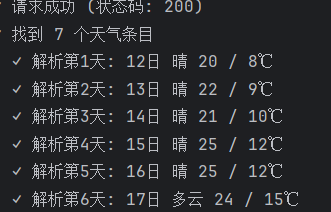
当前配置信息:
数据库: root@192.168.131.129:3306/weather_data
目标城市: 福州 (代码: 101230101)
数据目录: ./data
============================================================
步骤1: 检查数据库...
✓ 数据库 weather_data 已就绪
✓ 数据库连接成功
============================================================
步骤2: 初始化爬虫...
✓ 爬虫初始化完成
============================================================
步骤3: 抓取天气数据...
============================================================
开始抓取天气数据...
🌐 目标URL: http://www.weather.com.cn/weather/101230101.shtml
第1次尝试...
✓ 请求成功 (状态码: 200)
✓ 找到 7 个天气条目
✓ 解析第1天: 12日 晴 20 / 8℃
✓ 解析第2天: 13日 晴 22 / 9℃
✓ 解析第3天: 14日 晴 21 / 10℃
✓ 解析第4天: 15日 晴 25 / 12℃
✓ 解析第5天: 16日 晴 25 / 12℃
✓ 解析第6天: 17日 多云 24 / 15℃
✓ 解析第7天: 18日 多云转晴 23 / 14℃
✓ 成功解析 7 天天气数据
✅ 数据抓取成功!
耗时: 0.68秒
获取天数: 7天
═════════════════════════════════════════════════════════════════════════════════════
📅 福州7日天气预报
═════════════════════════════════════════════════════════════════════════════════════
日期 星期 天气 温度 风力风向 最高温 最低温
12日 今天 晴 20 / 8℃ 20.0°C 8.0°C
13日 明天 晴 22 / 9℃ 22.0°C 9.0°C
14日 后天 晴 21 / 10℃ 21.0°C 10.0°C
15日 周四 晴 25 / 12℃ 25.0°C 12.0°C
16日 周五 晴 25 / 12℃ 25.0°C 12.0°C
17日 周六 多云 24 / 15℃ 24.0°C 15.0°C
18日 周日 多云转晴 23 / 14℃ 23.0°C 14.0°C
═════════════════════════════════════════════════════════════════════════════════════
============================================================
步骤4: 保存到数据库...
✓ 成功保存 7/7 条天气数据
✅ 数据保存成功
• 作业②
– 要求:用requests和BeautifulSoup库方法定向爬取股票相关信息,并存储在数据库中。
– 候选网站:东方财富网:https://www.eastmoney.com/
新浪股票:http://finance.sina.com.cn/stock/
– 技巧:在谷歌浏览器中进入F12调试模式进行抓包,查找股票列表加载使用的url,并分析api返回的值,并根据所要求的参数可适当更改api的请求参数。根据URL可观察请求的参数f1、f2可获取不同的数值,根据情况可删减请求的参数。
参考链接:https://zhuanlan.zhihu.com/p/50099084
我选取的是东方财富网
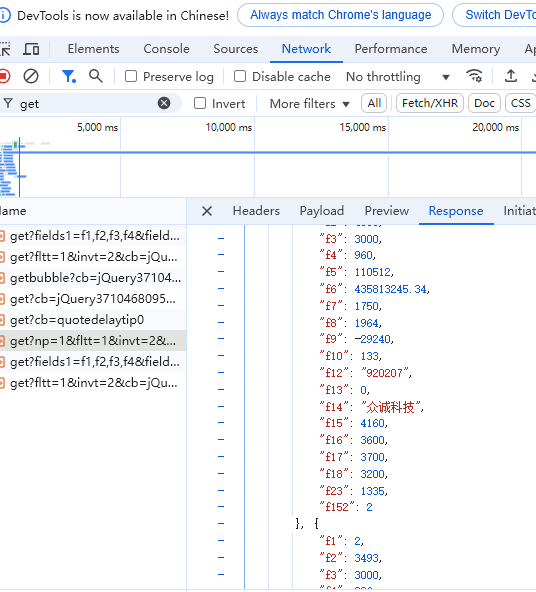
抓包流程:进入网站,打开F12,在下面的选项中找到network,然后刷新网页。接着选中js文件,搜索get,会在名字含有get的url中找到我们需要的url
核心代码>`import requests
import json
import sqlite3
from datetime import datetime
数据库配置
DB_NAME = 'stock_data.db'
def create_database():
"""创建数据库和股票信息表"""
conn = sqlite3.connect(DB_NAME)
cursor = conn.cursor()
# 创建股票信息表
cursor.execute('''
CREATE TABLE IF NOT EXISTS stocks (
    id INTEGER PRIMARY KEY AUTOINCREMENT,
    stock_code TEXT NOT NULL,
    market_code INTEGER,
    stock_name TEXT,
    close_price REAL,
    change_percent REAL,
    change_amount REAL,
    turnover_rate REAL,
    turnover_volume REAL,
    turnover_amount REAL,
    amplitude REAL,
    high_price REAL,
    low_price REAL,
    open_price REAL,
    pre_close REAL,
    pe_ratio REAL,
    pb_ratio REAL,
    market_value REAL,
    circulation_value REAL,
    update_time TIMESTAMP DEFAULT CURRENT_TIMESTAMP,
    UNIQUE(stock_code, update_time)
)
''')

conn.commit()
conn.close()
print(f"数据库 '{DB_NAME}' 创建成功!")
def parse_stock_data(json_str):
"""解析API返回的JSON数据"""
# 移除JSONP包装
if json_str.startswith('jQuery'):
start = json_str.find('(') + 1
end = json_str.rfind(')')
json_str = json_str[start:end]
data = json.loads(json_str)

# 字段对照表(根据API文档)
field_mapping = {
    'f12': 'stock_code',  # 股票代码
    'f13': 'market_code',  # 市场类型
    'f14': 'stock_name',  # 股票名称
    'f2': 'close_price',  # 最新价/收盘价
    'f3': 'change_percent',  # 涨跌幅%
    'f4': 'change_amount',  # 涨跌额
    'f8': 'turnover_rate',  # 换手率%
    'f5': 'turnover_volume',  # 成交量(手)
    'f6': 'turnover_amount',  # 成交金额(元)
    'f7': 'amplitude',  # 振幅%
    'f15': 'high_price',  # 最高价
    'f16': 'low_price',  # 最低价
    'f17': 'open_price',  # 开盘价
    'f18': 'pre_close',  # 前收盘价
    'f9': 'pe_ratio',  # 市盈率
    'f23': 'pb_ratio',  # 市净率
    'f20': 'market_value',  # 总市值(从其他字段获取)
    'f21': 'circulation_value'  # 流通市值(从其他字段获取)
}

stocks = []
if 'data' in data and 'diff' in data['data']:
    for item in data['data']['diff']:
        stock_info = {}
        for key, value in item.items():
            if key in field_mapping:
                # 处理可能的空值
                stock_info[field_mapping[key]] = value if value != '-' and value != '' else None
        stocks.append(stock_info)

return stocks
def fetch_stock_data():
"""从东方财富API获取股票数据"""
# 你提供的API链接(已简化参数)
url = "https://push2.eastmoney.com/api/qt/clist/get"
params = {
    'np': 1,
    'fltt': 2,
    'invt': 2,
    'fs': 'm:0+t:6,m:0+t:80,m:1+t:2,m:1+t:23',
    'fields': 'f12,f13,f14,f2,f3,f4,f8,f5,f6,f7,f15,f16,f17,f18,f9,f23',
    'fid': 'f3',
    'pn': 1,  # 页码
    'pz': 100,  # 每页数量(可调整,最大500)
    'po': 1,
    'dect': 1,
    '_': int(datetime.now().timestamp() * 1000)  # 时间戳防止缓存
}

try:
    headers = {
        'User-Agent': 'Mozilla/5.0 (Windows NT 10.0; Win64; x64) AppleWebKit/537.36',
        'Referer': 'https://www.eastmoney.com/'
    }

    response = requests.get(url, params=params, headers=headers, timeout=10)
    response.raise_for_status()

    return parse_stock_data(response.text)

except requests.RequestException as e:
    print(f"请求失败: {e}")
    return []
def save_to_database(stocks):
"""将股票数据保存到数据库"""
if not stocks:
print("没有数据可保存")
return
conn = sqlite3.connect(DB_NAME)
cursor = conn.cursor()

saved_count = 0
for stock in stocks:
    try:
        cursor.execute('''
        INSERT INTO stocks (
            stock_code, market_code, stock_name, close_price, change_percent,
            change_amount, turnover_rate, turnover_volume, turnover_amount,
            amplitude, high_price, low_price, open_price, pre_close,
            pe_ratio, pb_ratio, update_time
        ) VALUES (?, ?, ?, ?, ?, ?, ?, ?, ?, ?, ?, ?, ?, ?, ?, ?, ?)
        ''', (
            stock.get('stock_code'),
            stock.get('market_code'),
            stock.get('stock_name'),
            stock.get('close_price'),
            stock.get('change_percent'),
            stock.get('change_amount'),
            stock.get('turnover_rate'),
            stock.get('turnover_volume'),
            stock.get('turnover_amount'),
            stock.get('amplitude'),
            stock.get('high_price'),
            stock.get('low_price'),
            stock.get('open_price'),
            stock.get('pre_close'),
            stock.get('pe_ratio'),
            stock.get('pb_ratio'),
            datetime.now()
        ))
        saved_count += 1
    except sqlite3.IntegrityError:
        # 忽略重复数据
        continue
    except Exception as e:
        print(f"保存股票 {stock.get('stock_code')} 时出错: {e}")

conn.commit()
conn.close()
print(f"成功保存 {saved_count} 条股票数据")
def query_stock_data(limit=10):
"""查询数据库中的股票数据"""
conn = sqlite3.connect(DB_NAME)
conn.row_factory = sqlite3.Row
cursor = conn.cursor()
cursor.execute('''
SELECT stock_code, stock_name, close_price, change_percent,
       turnover_amount, update_time
FROM stocks
ORDER BY update_time DESC
LIMIT ?
''', (limit,))

results = cursor.fetchall()
conn.close()

return results
def main():
"""主函数"""
print("=" * 50)
print("东方财富股票数据爬虫")
print("=" * 50)
# 1. 创建数据库
create_database()

# 2. 获取股票数据
print("\n正在获取股票数据...")
stocks = fetch_stock_data()
print(f"成功获取 {len(stocks)} 只股票数据")

# 3. 保存到数据库
print("\n正在保存到数据库...")
save_to_database(stocks)

# 4. 查询并显示最新数据
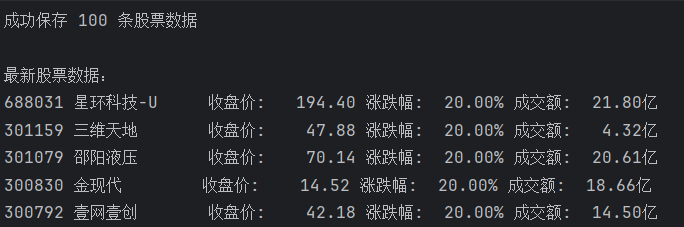
print("\n最新股票数据:")
recent_data = query_stock_data(5)

for row in recent_data:
    print(f"{row['stock_code']} {row['stock_name']:10} "
          f"收盘价: {row['close_price']:>8.2f} "
          f"涨跌幅: {row['change_percent']:>6.2f}% "
          f"成交额: {row['turnover_amount'] / 100000000:>6.2f}亿")
if name == "main":
main()`
运行结果
• 作业③:
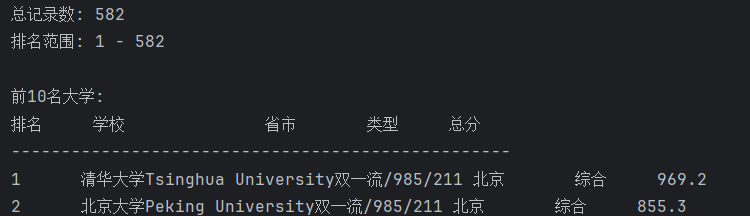
– 要求:爬取中国大学2021主榜(https://www.shanghairanking.cn/rankings/bcur/2021)所有院校信息,并存储在数据库中,同时将浏览器F12调试分析的过程录制Gif加入至博客中。
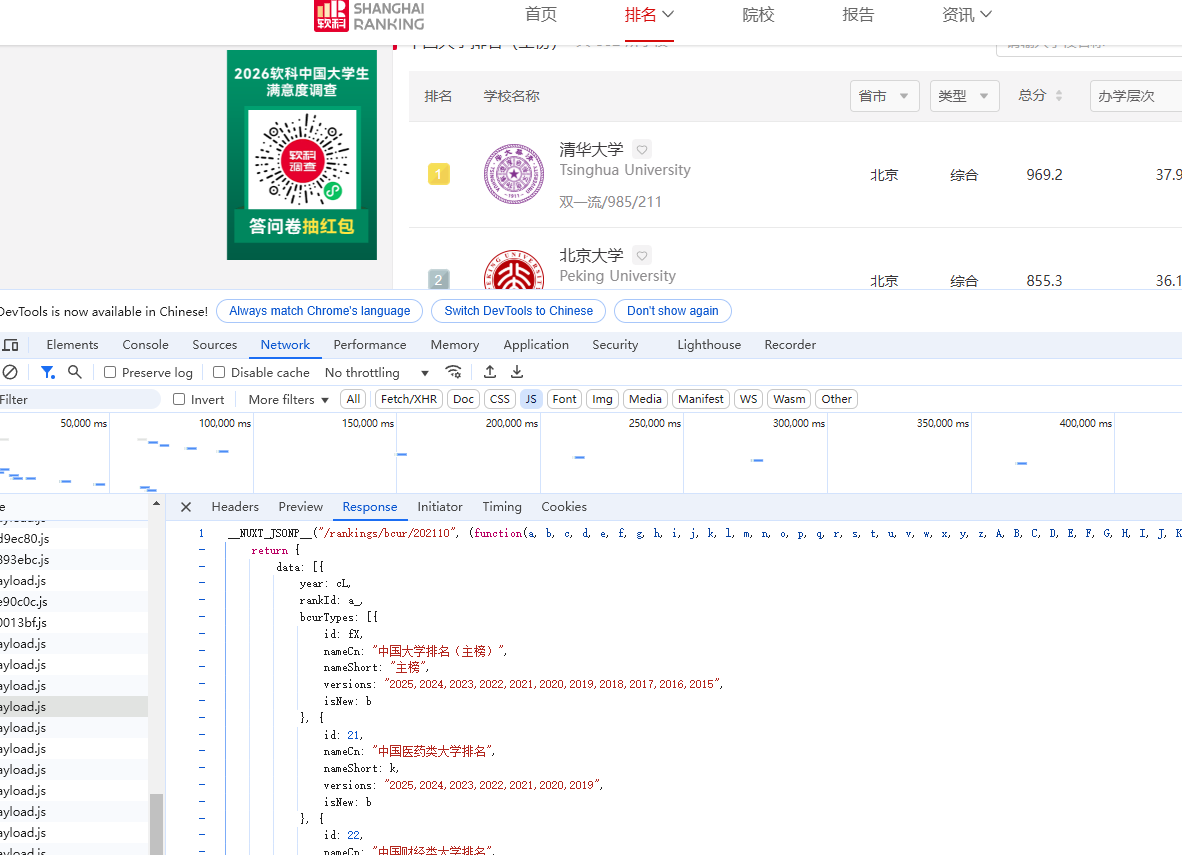
– 技巧:分析该网站的发包情况,分析获取数据的api
获取api
核心代码`def fetch_all_from_html():
"""从HTML页面解析所有大学数据"""
url = 'https://www.shanghairanking.cn/rankings/bcur/2021'
headers = {
    'User-Agent': 'Mozilla/5.0 (Windows NT 10.0; Win64; x64) AppleWebKit/537.36 (KHTML, like Gecko) Chrome/120.0.0.0 Safari/537.36',
    'Accept': 'text/html,application/xhtml+xml,application/xml;q=0.9,image/webp,*/*;q=0.8',
}

print("正在获取网页内容...")
response = requests.get(url, headers=headers, timeout=30)
response.encoding = 'utf-8'

if response.status_code != 200:
    print(f"请求失败,状态码: {response.status_code}")
    return []

soup = BeautifulSoup(response.text, 'html.parser')
all_universities = []

# 方法1: 查找包含所有数据的script标签
print("正在解析数据...")

# 查找包含排名数据的script标签
script_tags = soup.find_all('script')

for script in script_tags:
    if script.string and 'rankingData' in script.string:
        # 尝试从JavaScript中提取JSON数据
        content = script.string

        # 查找包含学校数据的部分
        # 使用正则表达式匹配可能的JSON结构
        pattern = r'(\[\s*\{.*?\}\s*\])'
        matches = re.findall(pattern, content, re.DOTALL)`
运行结果

 浙公网安备 33010602011771号