会员
周边
新闻
博问
闪存
赞助商
YouClaw
所有博客
当前博客
我的博客
我的园子
账号设置
会员中心
简洁模式
...
退出登录
注册
登录
小星的背包
博客园
首页
新随笔
联系
管理
[置顶]
kubectl命令
摘要: 查看所有 pod 列表, -n 后跟 namespace, 查看指定的命名空间 kubectl get pod kubectl get pod -n kube 查看 RC 和 service 列表, -o wide 查看详细信息 kubectl get rc,svc kubectl get pod,
阅读全文
posted @ 2020-03-23 00:06 Eric小星
阅读(771)
评论(0)
推荐(0)
2025年12月11日
VMware 进阶实战:使用 Windows 虚机搭建本地透明网关与流量代理服务
摘要: 实现宿主机(物理机)通过虚拟机的VPN网络访问公司内网网站。 代理模式(Proxy Mode) 是最简单且干扰最小的方式 如果你需要所有流量都走虚拟机,则可以使用 网关模式(Gateway Mode)。 以下是详细的操作步骤: 核心思路 虚拟机 (VM):连接互联网,开启VPN,并允许局域网(LAN
阅读全文
posted @ 2025-12-11 18:51 Eric小星
阅读(429)
评论(0)
推荐(0)
2022年11月21日
nodejs版本管理工具nvm
摘要: linux版本 安装 curl -o- https://gitee.com/Annlix/nvm-sh_nvm/raw/master/install.sh|bash 查看nodejs版本 nvm ls-remote 安装指定版本 nvm install v16.18.1 查看已装版本 nvm lis
阅读全文
posted @ 2022-11-21 03:22 Eric小星
阅读(78)
评论(0)
推荐(0)
2022年11月4日
linux硬盘lvm管理格式化和扩展、挂载
摘要: 一:相关概念 1:物理卷:通常一个分区或者一个硬盘就可以建立一个物理卷,物理卷的最小单位是PE,一般默认是4MB。 2:卷组:将多个物理卷组合到一起,成为一个卷组。 3:虚拟卷:其实就是在卷组的基础上再次划分,最小单位是LE,与PE一样,并且一一对应。逻辑卷跟物理卷没有本质区别,只是站在不同的层次来
阅读全文
posted @ 2022-11-04 00:34 Eric小星
阅读(1023)
评论(0)
推荐(0)
2022年5月10日
linux安装nodejs
摘要: #下载最新稳定版 wget -O node-linux-x64.tar.xz https://cdn.npmmirror.com/binaries/node/v16.15.0/node-v16.15.0-linux-x64.tar.xz #解压 tar -xvf node-linux-x64.tar
阅读全文
posted @ 2022-05-10 23:19 Eric小星
阅读(57)
评论(0)
推荐(0)
2022年1月8日
Mysql MVCC原理和幻读解决
摘要: Mysql MVCC原理和幻读解决 reference:https://blog.csdn.net/weixin_43477531/article/details/121963884 reference:https://www.cnblogs.com/xuwc/p/13873293.html 1、M
阅读全文
posted @ 2022-01-08 18:01 Eric小星
阅读(907)
评论(0)
推荐(0)
2021年9月17日
Es常用Elasticsearch SQL查询语句
摘要: Es常用Elasticsearch SQL查询语句 # 创建索引 PUT /patent/ { "mappings": { "properties": { "title": { "type": "text", "fields": { "keyword": { "type": "keyword", "
阅读全文
posted @ 2021-09-17 16:58 Eric小星
阅读(2637)
评论(0)
推荐(0)
2021年9月6日
vi编辑器常用命令(核心版)
摘要: vi编辑器常用命令(核心版) 模式转换: 正常模式=>命令模式,按键 : 正常模式=>可视模式,按键 v 正常模式=>编辑模式,按键 i # 插入模式(insert) # 或者r,replace模式 光标移动 移动光标(方向键、或者h j k l 左下右上四个字母键(命令模式下))。 翻页(Page
阅读全文
posted @ 2021-09-06 14:06 Eric小星
阅读(1014)
评论(0)
推荐(0)
2021年7月19日
pandas分页读取亿级大数据csv文件
摘要: ` reader = pd.read_csv('/home/eric/data.csv', iterator=True) loop = True chunkSize = 10000000 chunks = [] while loop: try: chunk = reader.get_chunk(ch
阅读全文
posted @ 2021-07-19 15:37 Eric小星
阅读(548)
评论(0)
推荐(0)
2021年7月14日
git命令速查
摘要: 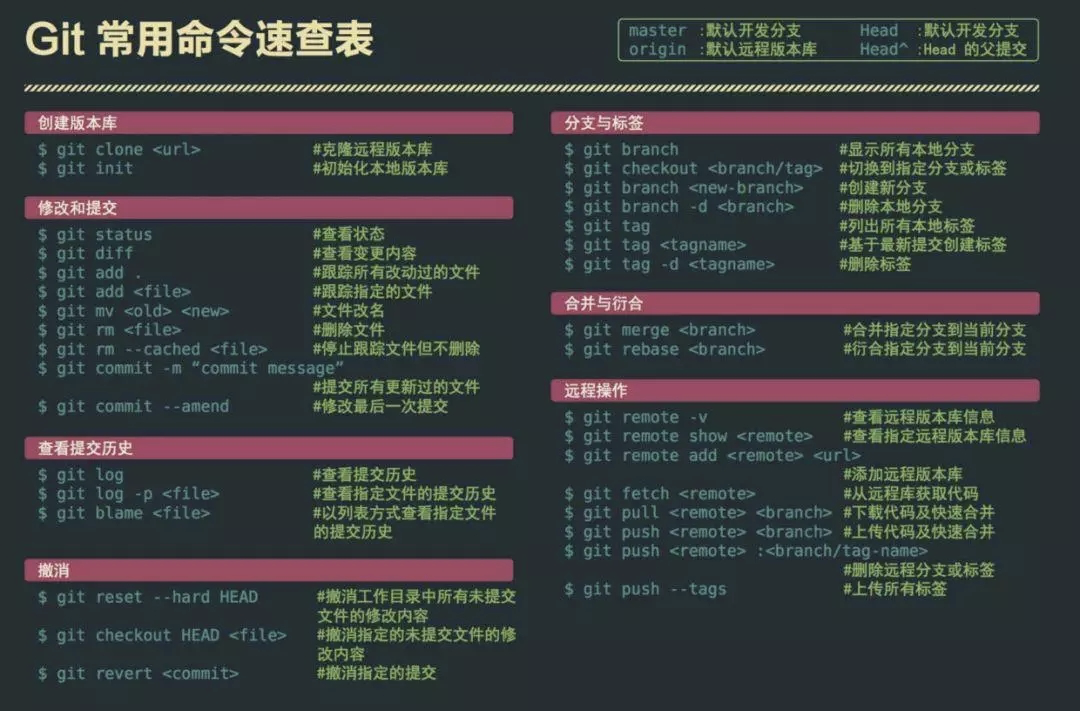
阅读全文
posted @ 2021-07-14 20:34 Eric小星
阅读(30)
评论(0)
推荐(0)
2021年6月27日
conda常用命令操作
摘要: 1、查看信息:conda info 2、查看环境:conda info -e 或者conda env list 3、查看源: 4、新建环境:conda create -n ic-kg python==3.7 5、删除环境:conda remove --name ic-kg --all 6、激活环境:
阅读全文
posted @ 2021-06-27 12:01 Eric小星
阅读(2988)
评论(0)
推荐(1)
下一页

 浙公网安备 33010602011771号