android:CoordinatorLayout+AppBarLayout实现停靠吸顶二
一,代码:
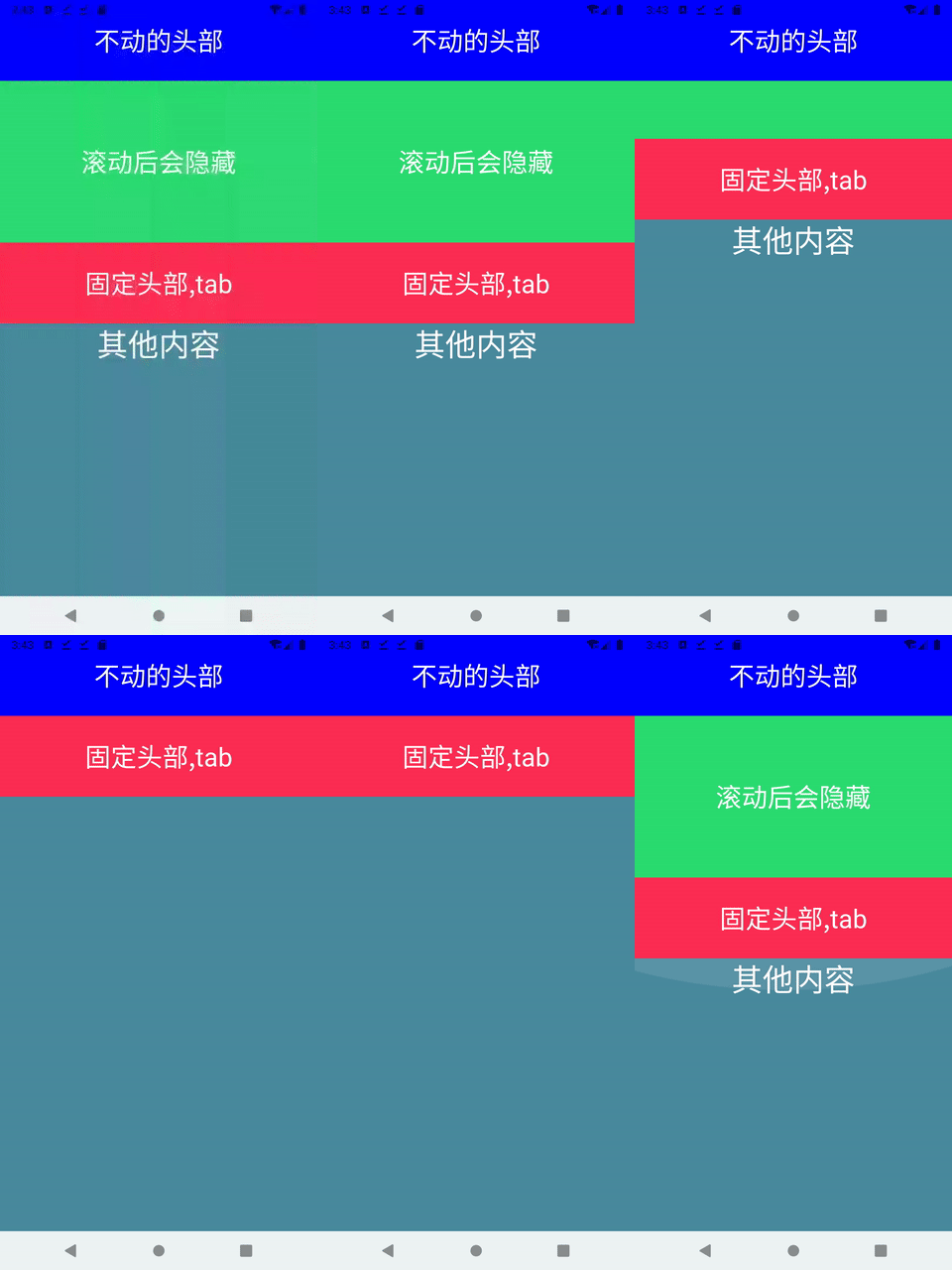
说明:在外层的最上面,增加了固定不移动的header
xml:
<?xml version="1.0" encoding="utf-8"?>
<androidx.coordinatorlayout.widget.CoordinatorLayout xmlns:android="http://schemas.android.com/apk/res/android"
    xmlns:app="http://schemas.android.com/apk/res-auto"
    xmlns:tools="http://schemas.android.com/tools"
    android:layout_width="match_parent"
    android:layout_height="match_parent">

    <LinearLayout
        android:layout_width="match_parent"
        android:layout_height="match_parent"
        android:orientation="vertical">

        <TextView
            android:layout_width="match_parent"
            android:layout_height="100dp"
            android:textColor="@color/white"
            android:background="#0000ff"
            android:gravity="center"
            android:textSize="32sp"
            android:text="不动的头部"
            />
        <androidx.coordinatorlayout.widget.CoordinatorLayout
            android:layout_width="match_parent"
            android:layout_height="match_parent">

    <com.google.android.material.appbar.AppBarLayout
        app:elevation="0dp"
        android:background="#00000000"
        android:layout_width="match_parent"
        android:layout_height="wrap_content"
        android:orientation="vertical">

        <TextView
            android:layout_width="match_parent"
            android:layout_height="200dp"
            android:textColor="@color/white"
            android:background="#2BDC70"
            android:gravity="center"
            android:textSize="32sp"
            android:text="滚动后会隐藏"
            app:layout_scrollFlags="scroll|snap"/>
        <TextView
            android:layout_width="match_parent"
            android:layout_height="100dp"
            android:textColor="@color/white"
            android:background="#FD2E54"
            android:gravity="center"
            android:textSize="32sp"
            android:text="固定头部,tab"
            />
    </com.google.android.material.appbar.AppBarLayout>

    <androidx.core.widget.NestedScrollView
        android:layout_width="match_parent"
        android:layout_height="match_parent"
        app:layout_behavior="@string/appbar_scrolling_view_behavior">
        <LinearLayout
            android:layout_width="match_parent"
            android:layout_height="match_parent"
            android:orientation="vertical">
            <TextView
                android:layout_width="match_parent"
                android:text="其他内容"
                android:gravity="center_horizontal"
                android:textColor="@color/white"
                android:textSize="38sp"
                android:layout_height="800dp"
                android:background="#4A8A9E"/>
        </LinearLayout>
    </androidx.core.widget.NestedScrollView>

        </androidx.coordinatorlayout.widget.CoordinatorLayout>
    </LinearLayout>
</androidx.coordinatorlayout.widget.CoordinatorLayout>
二,测试效果:

 浙公网安备 33010602011771号