flutter:(增加滑动动画)用GlobalKey作为锚点跳转到指定widget
一,代码:
import 'package:flutter/gestures.dart';
import 'package:flutter/material.dart';

class MyviewDemo extends StatefulWidget {
  @override
  State<MyviewDemo> createState() => _MyviewDemoState();
}

class _MyviewDemoState extends State<MyviewDemo> with TickerProviderStateMixin {
  int currentIndex = 0;
  final ScrollController _tabController = ScrollController();
  final ScrollController _contentController = ScrollController();

  GlobalKey _targetKeyOrange = GlobalKey();
  GlobalKey _targetKeyRed = GlobalKey();
  GlobalKey _targetKeyYellow = GlobalKey();

  GlobalKey _scrollKey = GlobalKey();
  @override
  Widget build(BuildContext context) {
    return Scaffold(
        appBar: AppBar(title: Text("历史记录")),
        body: Column(
            children: [
        //显示菜单的container,显示标签
        Container(
        margin: EdgeInsets.only(top: 10),
      height: 80,
      child: SingleChildScrollView(
          controller: _tabController,
          scrollDirection: Axis.horizontal,
          child:Row(
            children: <Widget>[
              SizedBox(width: 20),
              tabText("推荐", 0),
              SizedBox(width: 50),
              tabText("武汉", 1),
              SizedBox(width: 50),
              tabText("导购", 2),
            ],
          )
      ),
    ),
    //显示内容的container,显示主要内容
    Container(
      height: 500,
      child: SingleChildScrollView(
          key:_scrollKey,
          controller: _contentController,
          scrollDirection: Axis.vertical,
          child:Column(
            children: <Widget>[
              Container(
                key: _targetKeyOrange,
                height: 300,
                width: double.infinity,
                decoration: BoxDecoration(
                  color: Colors.orange, // 设置背景色
                ),
                child: Text('橙色区'),
              ),
              Container(
                key: _targetKeyRed,
                height: 400,
                width: double.infinity,
                decoration: BoxDecoration(
                  color: Colors.red, // 设置背景色
                ),
                child: Text('红色区'),
              ),
              Container(
                key: _targetKeyYellow,
                height: 200,
                width: double.infinity,
                decoration: BoxDecoration(
                  color: Colors.yellow, // 设置背景色
                ),
                child: Text('黄色区'),
              ),
              Container(
                height: 600,
                width: double.infinity,
                decoration: BoxDecoration(
                  color: Colors.pink, // 设置背景色
                ),
                child: Text('粉色区'),
              ),
            ],
          )
      ),
    ),
  ],
        ),
    );
  }


  /// 导航栏文本样式定义
  RichText tabText(String text1, int index) {
    return RichText(
      text:TextSpan(
          text: text1,
          style: TextStyle(color: currentIndex == index ? Colors.black : Colors.grey,
              fontSize: currentIndex == index ? 40 : 30),
          recognizer: TapGestureRecognizer()
            ..onTap = () {
              setState(() {
                currentIndex = index; // 修改状态并触发 UI 更新
              });
              if (index == 0) {
                Offset offsetOrange = _getPositions(_targetKeyOrange);
                print(offsetOrange);
                _contentController.animateTo(
                  offsetOrange.dy+_contentController.offset,
                  duration: Duration(milliseconds: 500),
                  curve: Curves.decelerate);
              } else if (index == 1) {
                Offset offsetRed = _getPositions(_targetKeyRed);
                print(offsetRed);
                _contentController.animateTo(
                    offsetRed.dy+_contentController.offset,
                    //300,
                    duration: Duration(milliseconds: 500),
                    curve: Curves.decelerate);

              } else if (index == 2) {
                 //跳到黄色区
                Offset offsetYellow = _getPositions(_targetKeyYellow);
                print(offsetYellow);
                _contentController.animateTo(
                    offsetYellow.dy+_contentController.offset,
                    duration: Duration(milliseconds: 500),
                    curve: Curves.decelerate);
              }
            }),
    );
  }

  Offset _getPositions(GlobalKey key) {
    RenderBox? renderBoxRed = key.currentContext?.findRenderObject() as RenderBox;
    return renderBoxRed!.localToGlobal(Offset.zero, ancestor: _scrollKey.currentContext!.findRenderObject());
  }
}
滑动时现在缺少和上面的标签联动,
思路时得到每个内容块的高度后,在滑动时触发选中上面的标签
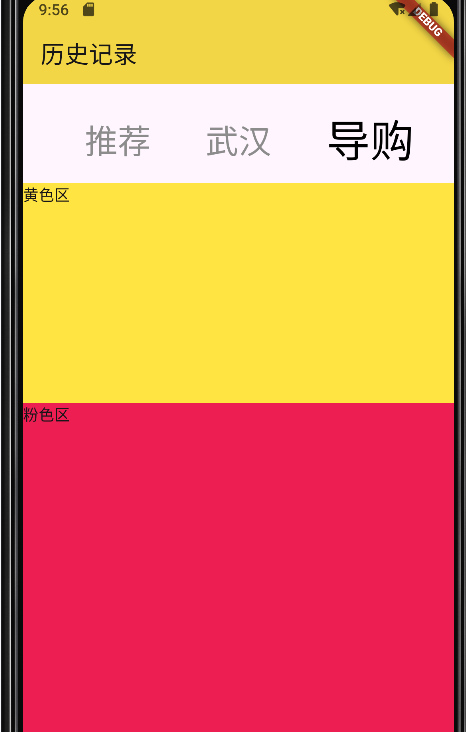
二,测试效果:

 浙公网安备 33010602011771号