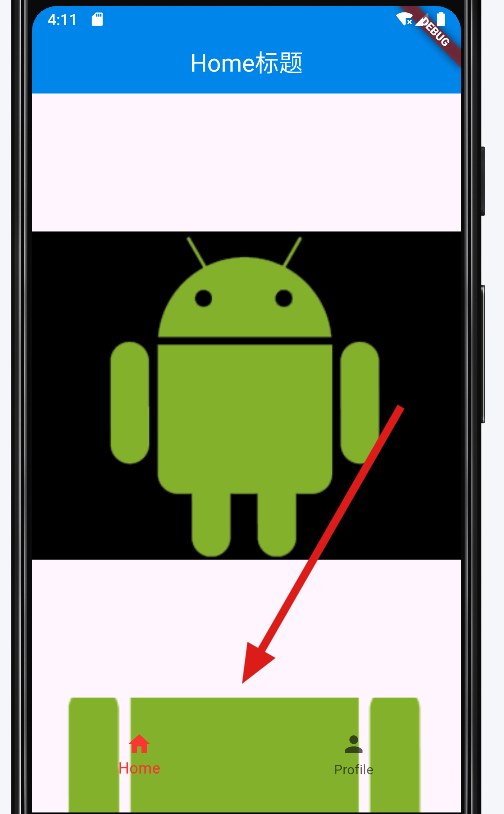
flutter: BottomNavigationBar配置高度和背景图片
一,代码:
import 'package:flutter/material.dart';
import '../tabpages/MyHomePage.dart';
import '../tabpages/ProfilePage.dart';
import '../tabpages/WebviewPage.dart';

class MyTabBar extends StatefulWidget {
  const MyTabBar({super.key});

  @override
  State<MyTabBar> createState() => _MyTabBarState();
}

class _MyTabBarState extends State<MyTabBar> with SingleTickerProviderStateMixin {
  final List<Widget> pages = const [MyHomePage(), WebviewPage()];
  /// PageView 控制器 , 用于控制 PageView
  late PageController _pageController;
  int _currentIndex = 0;

  @override
  void initState() {
    super.initState();
    //_tabController = TabController(length: pages.length, vsync: this);
    _pageController = PageController(
      /// 初始索引值
      initialPage: 0,

    );
  }

  @override
  void dispose() {
    super.dispose();

    /// 销毁 PageView 控制器
    _pageController.dispose();
  }

  @override
  Widget build(BuildContext context) {
    return Scaffold(
      /// 滑动组件 , 界面的核心元素
        body: PageView(
          /// 控制跳转翻页的控制器
          controller: _pageController,
          /// 页面滑动
          /// 这里设置 PageView 页面滑动也能
          onPageChanged: (index) {
            setState(() {
              // 更新当前的索引值
              _currentIndex = index;
            });
          },
          children: pages,
        ),
      bottomNavigationBar:Container(
        height: 105,       //指定高度
          decoration: const BoxDecoration(    //此处指定背景
            image: DecorationImage(
                image: AssetImage('images/b.png'),
                fit: BoxFit.fitWidth),
          ),
      child:SizedBox(height: 105, child:BottomNavigationBar(
        currentIndex: _currentIndex,
        selectedItemColor: Colors.red,
        backgroundColor: Colors.transparent,  //透明
        elevation: 0.0,   //去掉阴影
        onTap: (index) {
          setState(() {
            _pageController.animateToPage(
              index,
              duration: Duration(milliseconds: 300),
              curve: Curves.easeInOut,
            );
            _currentIndex = index;
          });
        },
        items: const [
          BottomNavigationBarItem(
            icon: Icon(Icons.home),
            label: 'Home',
          ),
          BottomNavigationBarItem(
            icon: Icon(Icons.person),
            label: 'Profile',
          ),
        ],
      ),
      ),
      ),
    );
  }
}
二,测试效果:

 浙公网安备 33010602011771号