flutter:用SingleChildScrollView使页面可以滑动
一,SingleChildScrollView
SingleChildScrollView是Flutter中的一个基础滚动组件,它可以让单个组件滚动。
这个组件非常适合用于只有一个直接子组件的滚动场景,比如长文本、图片或者一个自定义组件。
这个组件非常适合用于只有一个直接子组件的滚动场景,比如长文本、图片或者一个自定义组件。
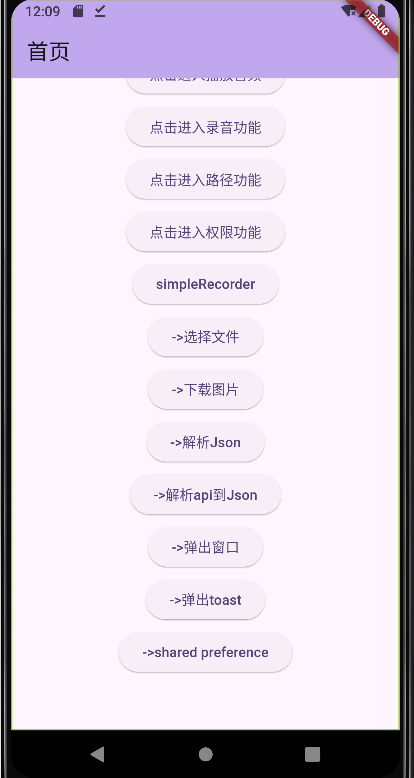
很多情况下页面内容并没有那么多,但有可能超出屏幕范围,
这时又不需要用gridview,listview,那么SingleChildScrollView就很方便
二,代码:
class MyHomePage extends StatefulWidget {

  @override
  State<MyHomePage> createState() => _MyHomePageState();
}

class _MyHomePageState extends State<MyHomePage> {

  @override
  Widget build(BuildContext context) {
    return Scaffold(
      appBar: AppBar(
        backgroundColor: Theme.of(context).colorScheme.inversePrimary,
        title: Text("首页"),
      ),

      body: SingleChildScrollView(
         child: Center(
             child: Column(
            children: <Widget>[
              SizedBox(height: 85),
              ElevatedButton(
                child: Text("点击进入播放音频"),
                onPressed: () {
                  Navigator.of(context).pushNamed('/audio',arguments:{'title': "音频播放",'id': 7});
                },
              ),
              SizedBox(height: 5),
              ElevatedButton(
                child: Text("点击进入录音功能"),
                onPressed: () {
                  Navigator.of(context).pushNamed('/record',arguments:{'title': "录音功能",'id': 7});
                },
              ),
              SizedBox(height: 5),
              ElevatedButton(
                child: Text("点击进入路径功能"),
                onPressed: () {
                  Navigator.of(context).pushNamed('/path',arguments:{'title': "得到路径功能",'id': 7});
                },
              ),
              SizedBox(height: 5),
              ElevatedButton(
                child: Text("点击进入权限功能"),
                onPressed: () {
                  Navigator.of(context).pushNamed('/permission',arguments:{'title': "得到权限功能",'id': 7});
                },
              ),
              SizedBox(height: 5),
              ElevatedButton(
                child: Text("simpleRecorder"),
                onPressed: () {
                  Navigator.of(context).pushNamed('/simplerecorder',arguments:{'title': "得到权限功能",'id': 7});
                },
              ),
              SizedBox(height: 5),
              ElevatedButton(
                child: Text("->选择文件"),
                onPressed: () {
                  Navigator.of(context).pushNamed('/picker',arguments:{'title': "选择文件功能",'id': 7});
                },
              ),
              SizedBox(height: 5),
              ElevatedButton(
                child: Text("->下载图片"),
                onPressed: () {
                  Navigator.of(context).pushNamed('/download',arguments:{'title': "下载图片",'id': 7});
                },
              ),
              SizedBox(height: 5),
              ElevatedButton(
                child: Text("->解析Json"),
                onPressed: () {
                  Navigator.of(context).pushNamed('/json',arguments:{'title': "解析json",'id': 7});
                },
              ),
              SizedBox(height: 5),
              ElevatedButton(
                child: Text("->解析api到Json"),
                onPressed: () {
                  Navigator.of(context).pushNamed('/apijson',arguments:{'title': "解析api到Json",'id': 7});
                },
              ),
              SizedBox(height: 5),
              ElevatedButton(
                child: Text("->弹出窗口"),
                onPressed: () {
                  Navigator.of(context).pushNamed('/dialog',arguments:{'title': "弹出窗口",'id': 7});
                },
              ),
              SizedBox(height: 5),
              ElevatedButton(
                child: Text("->弹出toast"),
                onPressed: () {
                  Navigator.of(context).pushNamed('/toast',arguments:{'title': "弹出toast",'id': 7});
                },
              ),
              SizedBox(height: 5),
              ElevatedButton(
                child: Text("->shared preference"),
                onPressed: () {
                  Navigator.of(context).pushNamed('/preference',arguments:{'title': "保存数据",'id': 7});
                },
              ),

              SizedBox(height: 55),

            ],
          ),
      ),
      ),
    );
  }
}
三,测试效果:

 浙公网安备 33010602011771号