flutter:弹出窗口
一,代码:
1,通用方法
import 'package:flutter/material.dart';

class DialogHelper {
  // 显示通用弹窗
  static Future<void> showCustomDialog({
    required BuildContext context,
    String? title,
    String? content,
    List<Widget>? actions,
    Widget? customContent,
    Color? backgroundColor,
    TextStyle? titleStyle,
    TextStyle? contentStyle,
  }) async {
    return showDialog(
      context: context,
      builder: (context) {
        return AlertDialog(
          backgroundColor: backgroundColor,
          title: title != null
              ? Text(
            title!,
            style: titleStyle ?? Theme.of(context).textTheme.headlineMedium,
          )
              : null,
          content: customContent ??
              (content != null
                  ? Text(
                content!,
                style: contentStyle ?? Theme.of(context).textTheme.bodyMedium,
              )
                  : null),
          actions: actions,
        );
      },
    );
  }

  // 显示确认弹框
  static Future<bool?> showConfirmDialog({
    required BuildContext context,
    String? title,
    String? content,
    String confirmText = '确认',
    String cancelText = '取消',
  }) async {
    return showDialog<bool>(
      context: context,
      builder: (context) {
        return AlertDialog(
          title: title != null ? Text(title) : null,
          content: content != null ? Text(content) : null,
          actions: [
            TextButton(
              onPressed: () => Navigator.of(context).pop(false),
              child: Text(cancelText),
            ),
            TextButton(
              onPressed: () => Navigator.of(context).pop(true),
              child: Text(confirmText),
            ),
          ],
        );
      },
    );
  }

  // 显示输入弹框
  static Future<String?> showInputDialog({
    required BuildContext context,
    String? title,
    String? hintText,
    String confirmText = '确认',
    String cancelText = '取消',
  }) async {
    final TextEditingController controller = TextEditingController();
    return showDialog<String>(
      context: context,
      builder: (context) {
        return AlertDialog(
          title: title != null ? Text(title) : null,
          content: TextField(
            controller: controller,
            decoration: InputDecoration(hintText: hintText),
          ),
          actions: [
            TextButton(
              onPressed: () => Navigator.of(context).pop(),
              child: Text(cancelText),
            ),
            TextButton(
              onPressed: () => Navigator.of(context).pop(controller.text),
              child: Text(confirmText),
            ),
          ],
        );
      },
    );
  }

  // 显示选择弹框
  static Future<void> showSelectionDialog({
    required BuildContext context,
    String? title,
    required List<String> options,
  }) async {
    return showDialog(
      context: context,
      builder: (context) {
        return SimpleDialog(
          title: title != null ? Text(title) : null,
          children: options.map((option) {
            return SimpleDialogOption(
              onPressed: () {
                Navigator.of(context).pop(option);
              },
              child: Text(option),
            );
          }).toList(),
        );
      },
    );
  }


  // 显示toast提示消息
  static Future<void> showToast({
    required BuildContext context,
    String? message,
  }) async {
    return showDialog(
      context: context,
      barrierDismissible: false, // 点击外部不可关闭
      builder: (context) {
        return AlertDialog(
          content: Column(
            mainAxisSize: MainAxisSize.min,
            children: [
              //CircularProgressIndicator(),
              SizedBox(height: 16),
              Text(message ?? '加载中...'),
            ],
          ),
        );
      },
    );
  }


  // 显示加载弹框
  static Future<void> showLoadingDialog({
    required BuildContext context,
    String? message,
  }) async {
    return showDialog(
      context: context,
      barrierDismissible: false, // 点击外部不可关闭
      builder: (context) {
        return AlertDialog(
          content: Column(
            mainAxisSize: MainAxisSize.min,
            children: [
              CircularProgressIndicator(),
              SizedBox(height: 16),
              Text(message ?? '加载中...'),
            ],
          ),
        );
      },
    );
  }

  // 显示底部弹框
  static Future<void> showBottomSheetDialog({
    required BuildContext context,
    required Widget child,
  }) async {
    return showModalBottomSheet(
      context: context,
      builder: (context) {
        return child;
      },
    );
  }
}
2,在页面上调用
import 'package:flutter/material.dart';
import 'package:demo3/common/DialogHelper.dart';

class DialogPage extends StatefulWidget {
  final Map arguments;

  // 为title设置一个默认参数,这样的跳转该界面时可以不传值。
  DialogPage({super.key, required this.arguments});
  @override
  State<DialogPage> createState() => _DialogPageState();
}

class _DialogPageState extends State<DialogPage> {

  @override
  Widget build(BuildContext context) {
    return Scaffold(
      appBar: AppBar(
        backgroundColor: Theme.of(context).colorScheme.primaryContainer,
        title: Text(widget.arguments["title"]),
      ),

        body: Center(
          child: Column(
            mainAxisAlignment: MainAxisAlignment.center,
            children: [
              ElevatedButton(
                onPressed: () {
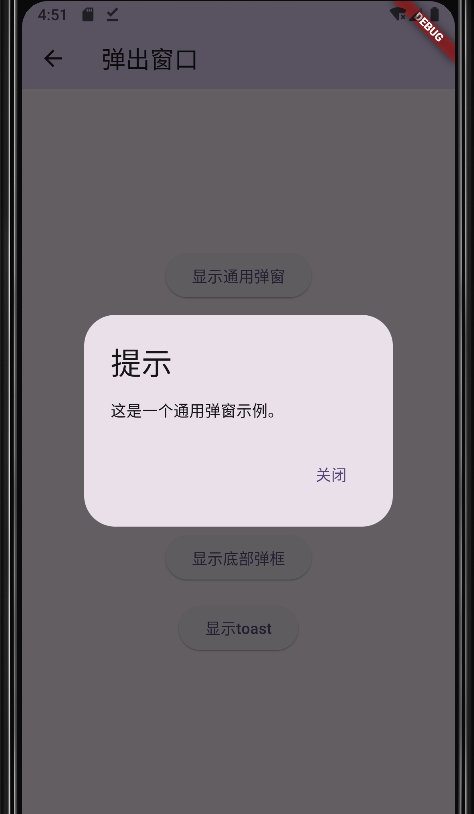
                  DialogHelper.showCustomDialog(
                    context: context,
                    title: '提示',
                    content: '这是一个通用弹窗示例。',
                    actions: [
                      TextButton(
                        onPressed: () {
                          Navigator.of(context).pop();
                        },
                        child: Text('关闭'),
                      ),
                    ],
                  );
                },
                child: Text('显示通用弹窗'),
              ),
              SizedBox(height: 16),
              ElevatedButton(
                onPressed: () async {
                  bool? result = await DialogHelper.showConfirmDialog(
                    context: context,
                    title: '确认删除',
                    content: '确定要删除此项吗?',
                  );
                  if (result == true) {
                    print('用户确认删除');
                  } else {
                    print('用户取消删除');
                  }
                },
                child: Text('显示确认弹框'),
              ),
              SizedBox(height: 16),
              ElevatedButton(
                onPressed: () async {
                  String? result = await DialogHelper.showInputDialog(
                    context: context,
                    title: '输入内容',
                    hintText: '请输入文本',
                  );
                  if (result != null) {
                    print('用户输入: $result');
                  }
                },
                child: Text('显示输入弹框'),
              ),
              SizedBox(height: 16),
              ElevatedButton(
                onPressed: () {
                  DialogHelper.showLoadingDialog(
                    context: context,
                    message: '请稍候...',
                  );
                  // 模拟异步操作
                  Future.delayed(Duration(seconds: 2), () {
                    Navigator.of(context).pop(); // 关闭弹窗
                  });
                },
                child: Text('显示加载弹框'),
              ),
              SizedBox(height: 16),
              ElevatedButton(
                onPressed: () {
                  DialogHelper.showBottomSheetDialog(
                    context: context,
                    child: Container(
                      padding: EdgeInsets.all(16),
                      child: Column(
                        mainAxisSize: MainAxisSize.min,
                        children: [
                          Text('这是一个底部弹框'),
                          SizedBox(height: 16),
                          ElevatedButton(
                            onPressed: () {
                              Navigator.of(context).pop();
                            },
                            child: Text('关闭'),
                          ),
                        ],
                      ),
                    ),
                  );
                },
                child: Text('显示底部弹框'),
              ),
              SizedBox(height: 16),
              ElevatedButton(
                onPressed: () {
                  DialogHelper.showToast(
                    context: context,
                    message: '遇到错误:当前商品不存在',
                  );
                  // 模拟异步操作
                  Future.delayed(Duration(seconds: 2), () {
                    Navigator.of(context).pop(); // 关闭弹窗
                  });
                },
                child: Text('显示toast'),
              ),
            ],
          ),
        ),


    );
  }
}
二,测试效果:

 浙公网安备 33010602011771号