flutter:用BottomNavigationBar做底部导航
一,代码:
import 'package:flutter/material.dart';

class HomePage extends StatefulWidget {
  @override
  State<HomePage> createState() => _HomePageState();
}

class _HomePageState extends State<HomePage> {
  int pageIndex = 0;

  List<Widget> pageList = const [
    Text("首页"),
    Text("新增"),
    Text("用户"),
  ];

  //悬浮按钮的点击事件
  void floatBtnFunc() {
    debugPrint("点击了悬浮按钮");
    //HapticFeedback.vibrate();
  }

  @override
  Widget build(BuildContext context) {
    return Scaffold(
      appBar: AppBar(
        //省略样式代码
      ), //顶部栏
      body: Center(
        child: ListView(
          padding: const EdgeInsets.only(top: 15),
          children: [
            Row(
              children: [pageList[pageIndex]],
            )
          ],
        ),
      ),

      bottomNavigationBar: BottomNavigationBar(
        items: const <BottomNavigationBarItem>[
          BottomNavigationBarItem(
            icon: Icon(Icons.home), //图标
            label: "首页",  //标签
            tooltip: "首页",  //长按提示信息
            backgroundColor: Colors.blueAccent,  //背景颜色
            activeIcon: Icon(Icons.home_filled),  //选中图标
          ),
          BottomNavigationBarItem(icon: Icon(Icons.add), label: "新增"),
          BottomNavigationBarItem(icon: Icon(Icons.verified_user), label: "用户"),
        ], //底部导航栏
        currentIndex: pageIndex, //当前页面索引
        onTap: (index) {
          setState(() {
            pageIndex = index;
          });
        }, //点击事件
        type: BottomNavigationBarType.fixed, //导航栏的类型
        iconSize: 25,  //图标大小
        elevation: 20, //阴影
        selectedFontSize: 12, //选中字体大小
        unselectedFontSize: 12, //未选中字体大小
        selectedItemColor: Colors.blue, //选中颜色
        unselectedItemColor: Colors.black, //未选中颜色
        showUnselectedLabels: true, //是否显示未选中的标签
        selectedLabelStyle: const TextStyle(color: Colors.blue), //选中文本样式
        unselectedLabelStyle: const TextStyle(color: Colors.black), //未选中文本样式
        backgroundColor: const Color.fromARGB(255, 99, 255, 247),
        showSelectedLabels: true, //分别控制是否显示选中和未选中的标签文本,默认都是显示的
      ),
    );
  }
}
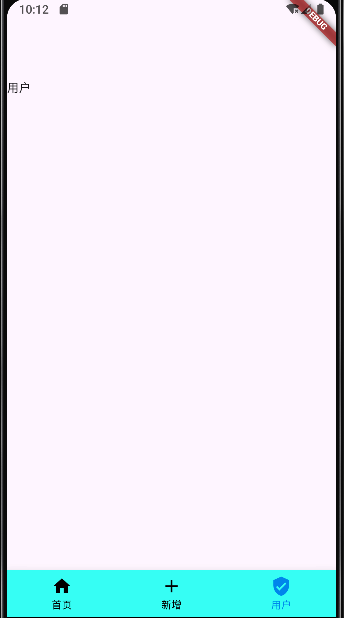
二,效果:

 浙公网安备 33010602011771号