第4章 文件和目录(1)_文件属性及文件类型
1. 文件属性及文件类型
(1)文件属性:stat结构体
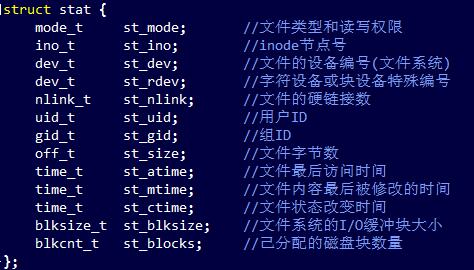
(2)文件类型:Linux中的7种文件和宏
|
文件类型 |
宏 |
备注 |
|
①普通文件(regular file) |
S_ISREG() |
如:touch filename |
|
②目录文件(directory file) |
S_ISDIR() |
如:mkdir directoryname |
|
③块特殊文件(block special file) |
S_ISBLK() |
如:ls –l /dev/sr0 (光驱) |
|
④字符特殊文件(character special file) |
S_ISCHR() |
如:ls -l /dev/event2 (键盘) |
|
⑤FIFO(named piped) |
S_ISFIFO() |
如:mkfifo filename.pipe |
|
⑥套接字(socket) |
S_ISSOCK() |
如:ls -l /dev/log |
|
⑦符号链接(symbolic link) |
S_ISLNK() |
如:ln -s srcfile filename.lnk |
(3)stat、fstatt lstat函数
|
头文件 |
#include<sys/types.h> //位于/usr/include目录下 #include<sys/stat.h> //文件状态信息,如大小,创建时间,UID等。 |
|
函数 |
int stat(const char* pathname, struct stat buf); int fstat(int fd, struct stat* buf); int lstat(const char* pathname, struct stat* buf); |
|
返回值 |
若成功则为0,若出错则为-1 |
|
功能 |
返回一个与pathname或fd指定的文件属性信息,存储在结构体buf中 |
|
参数 |
(1)pathname:文件路径名 (2)buf:struct stat结构体 |
|
备注 |
(1)lstat函数类似于stat,但是当命名的文件是一个符号连接时,lstat返回该符号连接的有关信息,而不是由该符号连接引用的文件的信息。
|
【编程实验】判断文件类型
//file_type.c

#include <unistd.h>
#include <sys/types.h>
#include <sys/stat.h>
#include <stdio.h>
#include <stdlib.h>
#include <string.h>

int main(int argc, char* argv[])
{
    if(argc < 2){
        fprintf(stderr, "usage: %s files\n", argv[0]);
        exit(1);
    }

    struct stat buff;
    int i = 0;
    for(i=1; i<argc; i++){
        memset(&buff, 0, sizeof(buff));
        if(lstat(argv[i], &buff) < 0){ //使用lstat查看文件属性
            perror("lstat error");
            continue;
        }

        printf("%-20s", argv[i]); //左对齐输出文件名

        //判断文件类型
        if(S_ISREG(buff.st_mode))
        {
            printf("normal file");
        }else if (S_ISDIR(buff.st_mode)){
            printf("directory");
        }else if (S_ISBLK(buff.st_mode)){
            printf("block device");
        }else if (S_ISCHR(buff.st_mode)){
            printf("character device");
        }else if (S_ISSOCK(buff.st_mode)){
            printf("sock device");
        }else if (S_ISFIFO(buff.st_mode)){
            printf("name piped");
        }else if (S_ISLNK(buff.st_mode)){
            printf("link file");
        }else{
            printf("unknow type");
        }

        printf("\n");
    }

    return 0;
}


 浙公网安备 33010602011771号