
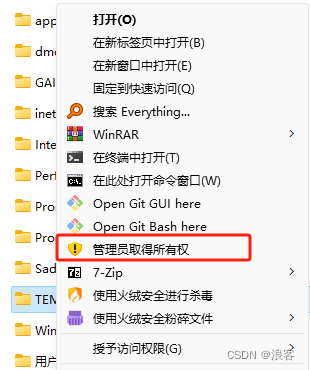
Windows右键添加“管理员取得所有权”菜单
下面内容保存为“管理员取得所有权.reg”文件后双击导入注册表。
 1 Windows Registry Editor Version 5.00
 2
 3 ;右键添加管理员
 4
 5 [HKEY_CLASSES_ROOT\*\shell\runas]
 6 @="管理员取得所有权"
 7 "NoWorkingDirectory"=""
 8 "Icon"="%SystemRoot%\\System32\\shell32.dll,244"
 9
10 [HKEY_CLASSES_ROOT\*\shell\runas\Command]
11 @="cmd.exe /c takeown /f \"%1\" && icacls \"%1\" /grant administrators:F"
12 "IsolatedCommand"="cmd.exe /c takeown /f \"%1\" && icacls \"%1\" /grant administrators:F"
13
14
15 [HKEY_CLASSES_ROOT\Directory\shell\runas]
16 @="管理员取得所有权"
17 "Icon"="%SystemRoot%\\System32\\shell32.dll,244"
18
19 [HKEY_CLASSES_ROOT\Directory\shell\runas\Command]
20 @="cmd.exe /c takeown /f \"%1\\*\" /r /d y && icacls \"%1\\*\" /grant administrators:F /t"
21 "IsolatedCommand"="cmd.exe /c takeown /f \"%1\\*\" /r /d y && icacls \"%1\\*\" /grant administrators:F /t"
22
23
24 [HKEY_CLASSES_ROOT\Drive\shell\runas]
25 @="管理员取得所有权"
26 "Icon"="%SystemRoot%\\System32\\shell32.dll,244"
27
28 [HKEY_CLASSES_ROOT\Drive\shell\runas\Command]
29 @="cmd.exe /c takeown /f \"%1\\*\" /r /d y && icacls \"%1\\*\" /grant administrators:F /t"
30 "IsolatedCommand"="cmd.exe /c takeown /f \"%1\\*\" /r /d y && icacls \"%1\\*\" /grant administrators:F /t"
31
32
33 [HKEY_CURRENT_USER\SOFTWARE\Classes\*\shell\runas]
34 @="管理员取得所有权"
35 "Icon"="%SystemRoot%\\System32\\shell32.dll,244"
36
37 [HKEY_CURRENT_USER\SOFTWARE\Classes\*\shell\runas\Command]
38 @="cmd.exe /c takeown /f \"%1\" && icacls \"%1\" /grant administrators:F"
39 "IsolatedCommand"="cmd.exe /c takeown /f \"%1\" && icacls \"%1\" /grant administrators:F"
40
41
42 [HKEY_CURRENT_USER\SOFTWARE\Classes\Directory\shell\runas]
43 @="管理员取得所有权"
44 "Icon"="%SystemRoot%\\System32\\shell32.dll,244"
45
46 [HKEY_CURRENT_USER\SOFTWARE\Classes\Directory\shell\runas\Command]
47 @="cmd.exe /c takeown /f \"%1\\*\" /r /d y && icacls \"%1\\*\" /grant administrators:F /t"
48 "IsolatedCommand"="cmd.exe /c takeown /f \"%1\\*\" /r /d y && icacls \"%1\\*\" /grant administrators:F /t"
49
50
51 [HKEY_CURRENT_USER\SOFTWARE\Classes\Drive\shell\runas]
52 @="管理员取得所有权"
53 "Icon"="%SystemRoot%\\System32\\shell32.dll,244"
54
55 [HKEY_CURRENT_USER\SOFTWARE\Classes\Drive\shell\runas\Command]
56 @="cmd.exe /c takeown /f \"%1\\*\" /r /d y && icacls \"%1\\*\" /grant administrators:F /t"
57 "IsolatedCommand"="cmd.exe /c takeown /f \"%1\\*\" /r /d y && icacls \"%1\\*\" /grant administrators:F /t"
58
59
60 [HKEY_LOCAL_MACHINE\SOFTWARE\Classes\exefile\shell\TakeAuthority]
61 @="管理员取得所有权"
62 "Icon"="%SystemRoot%\\System32\\shell32.dll,244"
63
64 [HKEY_LOCAL_MACHINE\SOFTWARE\Classes\exefile\shell\TakeAuthority\Command]
65 @="cmd.exe /c takeown /f \"%1\" && icacls \"%1\" /grant administrators:F"


 浙公网安备 33010602011771号